Checkmate is an open source monitoring tool used to track the operational status and performance of servers and websites. It regularly checks whether a server/website is accessible and performs optimally, providing real-time alerts and reports on the monitored services' availability, downtime, and response time.
Checkmate also has an agent, called [Capture](https://github.com/bluewave-labs/capture), to retrieve data from remote servers. While Capture is not required to run Checkmate, it provides additional insigths about your servers' CPU, RAM, disk and temperature status.
See [Checkmate](https://checkmate-demo.bluewavelabs.ca/) in action. The username is uptimedemo@demo.com and the password is Demouser1! (just a note that we update the demo server from time to time, so if it doesn't work for you, please ping us on Discussions channel).
Usage instructions can be found [here](https://bluewavelabs.gitbook.io/checkmate). It's still WIP and some of the information there might be outdated. Rest assured, we are doing our best! :)
See installation instructions in [Checkmate documentation portal](https://bluewavelabs.gitbook.io/checkmate/quickstart). Alternatively, you can also use [Coolify](https://coolify.io/) for a one click Docker deployment. If you would like to monitor your server infrastructure, you'll need [Capture agent](https://github.com/bluewave-labs/capture). Capture repository also contains the installation instructions.
If you have any questions, suggestions or comments, please use our [Discord channel](https://discord.gg/NAb6H3UTjK). We've also launched our [Discussions](https://github.com/bluewave-labs/bluewave-uptime/discussions) page! Feel free to ask questions or share your ideas—we'd love to hear from you!
- If you would like to support us, please consider giving it a ⭐ and click on "watch".
- Have a question or suggestion for the roadmap/featureset? Check our [Discord channel](https://discord.gg/NAb6H3UTjK) or [Discussions](https://github.com/bluewave-labs/checkmate/discussions) forum.
- Need a ping when there's a new release? Use [Newreleases](https://newreleases.io/), a free service to track releases.
- Watch a Checkmate [installation and usage video](https://www.youtube.com/watch?v=GfFOc0xHIwY)
We pride ourselves on building strong connections with contributors at every level. Despite being a young project, Checkmate has already earned 3300 stars and attracted 40+ contributors from around the globe. So, don’t hold back — jump in, contribute and learn with us!
1. Check [Contributor's guideline](https://github.com/bluewave-labs/bluewave-uptime/blob/master/CONTRIBUTING.md). First timers are encouraged to check `good-first-issue` tag.
2. Optionally, read [project structure](https://bluewavelabs.gitbook.io/checkmate/developers-guide/general-project-structure) and [high level overview](https://bluewavelabs.gitbook.io/checkmate/developers-guide/high-level-overview).
3. Have a look at our Figma designs [here](https://www.figma.com/design/RPSfaw66HjzSwzntKcgDUV/Uptime-Genie?node-id=0-1&t=WqOFv9jqNTFGItpL-1) if you are going to use one of our designs. We encourage you to copy to your own Figma page, then work on it as it is read-only.
4. Open an issue if you believe you've encountered a bug.
5. Check for good-first-issue's if you are a newcomer.
6. Make a pull request to add new features/make quality-of-life improvements/fix bugs.
[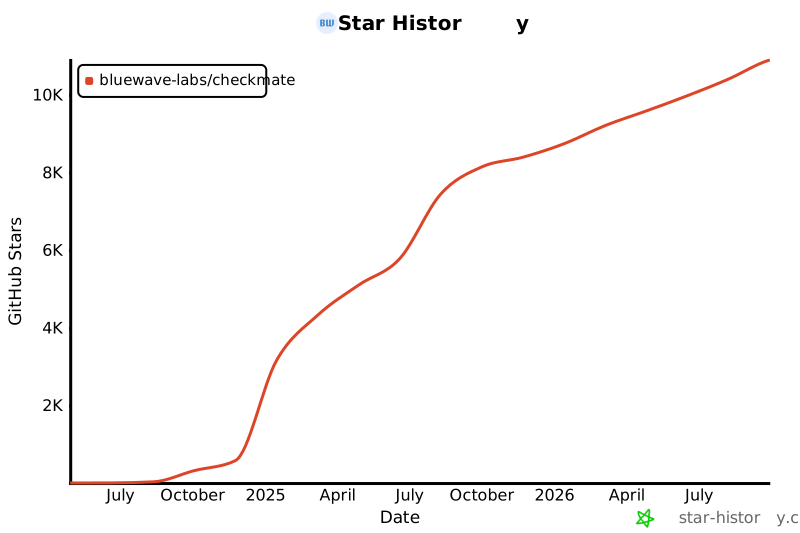](https://star-history.com/#bluewave-labs/bluewave-uptime&Date)
- [Guidefox](https://github.com/bluewave-labs/guidefox), an application that helps new users learn how to use your product via hints, tours, popups and banners.


