Compare commits
169
Commits
| Author | SHA1 | Date | |
|---|---|---|---|
 Alexander Holliday Alexander Holliday
|
73b74ffd80 | ||
|
Alex Holliday
|
2b393f9ebe | ||
|
Alexander Holliday
|
562a17707d | ||
|
Alex Holliday
|
7d800b0f38 | ||
|
Alex Holliday
|
a19479b578 | ||
|
Alexander Holliday
|
9b4a810e21 | ||
|
Alex Holliday
|
1388d61b07 | ||
|
Alexander Holliday
|
8dbe42288b | ||
|
Alexander Holliday
|
45e31e7212 | ||
 Br0wnHammer Br0wnHammer
|
7872b18108 | ||
|
Alexander Holliday
|
15ac5fa84d | ||
|
Alex Holliday
|
3c85b36b1b | ||
|
Alex Holliday
|
ee0bc5e500 | ||
|
Alex Holliday
|
4729863826 | ||
|
Alex Holliday
|
174fb048f7 | ||
|
Alex Holliday
|
63fd3f6afd | ||
|
Alex Holliday
|
c3944f2fe7 | ||
|
Alexander Holliday
|
ddd937d42f | ||
|
Alex Holliday
|
5e225f9173 | ||
|
Alex Holliday
|
d2d110fcd5 | ||
|
Alexander Holliday
|
724f30070d | ||
|
Alex Holliday
|
b8a44f09fc | ||
|
Alex Holliday
|
f85f1aa1d1 | ||
|
Alex Holliday
|
707b8f903b | ||
|
Alex Holliday
|
9e4fd6d708 | ||
|
Br0wnHammer
|
8572065ef7 | ||
|
Br0wnHammer
|
01c3870b22 | ||
|
Alexander Holliday
|
420c103f41 | ||
|
Alex Holliday
|
b4970d321d | ||
|
Alex Holliday
|
f5a4a03898 | ||
|
Alex Holliday
|
dfae6c8abd | ||
|
Alex Holliday
|
2b6734bb78 | ||
|
Alex Holliday
|
b9fd29b906 | ||
|
Alex Holliday
|
caf8f22fec | ||
|
Alex Holliday
|
599c599588 | ||
|
Alex Holliday
|
cfed235d1f | ||
|
Alex Holliday
|
c9eacff71f | ||
|
Alex Holliday
|
b2526a5be9 | ||
|
Alex Holliday
|
cffe3f57fa | ||
|
Alex Holliday
|
8b2506cc3d | ||
|
Alex Holliday
|
60356a95fe | ||
|
Alexander Holliday
|
1195567da8 | ||
|
Br0wnHammer
|
7617929700 | ||
|
Br0wnHammer
|
7df3ee6ecd | ||
|
Alexander Holliday
|
dc788dbf85 | ||
|
Alex Holliday
|
89c4f4005e | ||
|
Alex Holliday
|
53ed3b3465 | ||
|
Alex Holliday
|
e37fbf2a5c | ||
|
Alex Holliday
|
4df08bfa79 | ||
|
Alex Holliday
|
f74231cf33 | ||
|
Alex Holliday
|
e1558d35b0 | ||
|
Alex Holliday
|
51672890df | ||
|
Alex Holliday
|
fc357fe3ae | ||
|
Alex Holliday
|
1a0e6d9404 | ||
|
Alexander Holliday
|
b9e8a6dbc8 | ||
|
Alex Holliday
|
c704f67e57 | ||
|
Alexander Holliday
|
4629a947a4 | ||
|
Alex Holliday
|
da92b9d067 | ||
|
Alex Holliday
|
458442f364 | ||
|
Alex Holliday
|
400b295dae | ||
|
Alex Holliday
|
6ddee6e85b | ||
|
Alex Holliday
|
2db88ac192 | ||
|
Alex Holliday
|
0342870bbd | ||
|
Alex Holliday
|
4280a6c2c3 | ||
|
Alex Holliday
|
0a3232419a | ||
|
Alex Holliday
|
4dc3a756a8 | ||
|
Alex Holliday
|
cd91e83817 | ||
|
Alex Holliday
|
f476710c29 | ||
|
Alex Holliday
|
0d255c8962 | ||
|
Alex Holliday
|
bf25a65d8e | ||
|
Alex Holliday
|
f1e16b65ee | ||
|
Alex Holliday
|
201ad987ce | ||
|
Alex Holliday
|
c12ce2fbcf | ||
|
Alexander Holliday
|
6e77738ecf | ||
 gorkem-bwl gorkem-bwl
|
cbd1153189 | ||
|
gorkem-bwl
|
88042e7c50 | ||
|
gorkem-bwl
|
ba44985763 | ||
|
gorkem-bwl
|
b164fa63bf | ||
|
Alexander Holliday
|
7630491ad4 | ||
|
Alex Holliday
|
09be4cdf9a | ||
|
Br0wnHammer
|
8360c05448 | ||
|
Br0wnHammer
|
3cce1aa842 | ||
 joaquimpeixoto joaquimpeixoto
|
8a83bc99e9 | ||
|
Br0wnHammer
|
37dfc67e33 | ||
|
Alexander Holliday
|
4a939ad2c4 | ||
|
Alex Holliday
|
56ee8ef5ea | ||
|
Alexander Holliday
|
8dd13c4b75 | ||
|
Alex Holliday
|
6b5c3bba47 | ||
|
Alexander Holliday
|
02998ed06e | ||
|
Alex Holliday
|
397541a789 | ||
|
Alex Holliday
|
949beff4f9 | ||
|
Alex Holliday
|
806c7764b1 | ||
|
Alex Holliday
|
d18a53eec2 | ||
|
Alex Holliday
|
f4b14e7df9 | ||
|
Alex Holliday
|
e834402672 | ||
|
Alex Holliday
|
290adf024c | ||
|
Alex Holliday
|
2c89086b68 | ||
|
Alex Holliday
|
20167d537b | ||
|
Alex Holliday
|
bf43632482 | ||
|
Alex Holliday
|
2d432e0a3d | ||
|
Br0wnHammer
|
967e415b0a | ||
|
Alexander Holliday
|
2764468e90 | ||
|
Alex Holliday
|
10d0835eb3 | ||
|
Br0wnHammer
|
1702fd1c5a | ||
|
Br0wnHammer
|
c98ec7d047 | ||
|
Br0wnHammer
|
9ffe0caed9 | ||
|
Alexander Holliday
|
ef8a8016df | ||
|
Alex Holliday
|
3a1a9bde4d | ||
|
Alexander Holliday
|
0e24bb7c94 | ||
|
Alex Holliday
|
a415c75eb4 | ||
|
Alexander Holliday
|
d1f46aba9e | ||
|
Alexander Holliday
|
bb60d22dea | ||
 harsh-aghara harsh-aghara
|
0ff642cb24 | ||
|
harsh-aghara
|
a044d7b2c7 | ||
|
harsh-aghara
|
9cee2eebd0 | ||
|
Alexander Holliday
|
bec5ef09cb | ||
|
Alex Holliday
|
3abacb046b | ||
|
Alex Holliday
|
fbfb861447 | ||
|
Alex Holliday
|
0470eab782 | ||
|
Alex Holliday
|
abf66eed95 | ||
|
Alex Holliday
|
4f571a258c | ||
|
Alex Holliday
|
85196852f4 | ||
|
Alex Holliday
|
46c80985ec | ||
|
Alex Holliday
|
8c7b691fda | ||
|
Alexander Holliday
|
d5dac6b557 | ||
|
Alexander Holliday
|
f0129f257a | ||
|
Alex Holliday
|
4b9f1ba43b | ||
|
Alex Holliday
|
1322033d41 | ||
|
Alex Holliday
|
7c201d087c | ||
|
Alex Holliday
|
27e34f3b95 | ||
|
Alex Holliday
|
130d825d66 | ||
|
Alex Holliday
|
c6d82223f9 | ||
|
Alex Holliday
|
3bcdd3c445 | ||
|
Alex Holliday
|
3f290bc963 | ||
|
Alex Holliday
|
7d7926fab9 | ||
|
Alex Holliday
|
a09a885786 | ||
|
Alex Holliday
|
76953f9a5c | ||
|
Alex Holliday
|
67bba1479c | ||
|
Alex Holliday
|
b981427d8d | ||
|
Alex Holliday
|
f37ae8fddb | ||
|
Alex Holliday
|
dc80b3cafc | ||
|
Alex Holliday
|
896d1b784b | ||
|
Alex Holliday
|
02640c3155 | ||
|
Alex Holliday
|
5a187cd1c9 | ||
|
Alex Holliday
|
e6a0f89c68 | ||
|
Alex Holliday
|
e96de364c0 | ||
|
Alex Holliday
|
8aa55885e5 | ||
|
Alex Holliday
|
1f7344f2e6 | ||
|
Alex Holliday
|
fe74d4b465 | ||
|
Alexander Holliday
|
9c62dc9c52 | ||
|
Alex Holliday
|
2a2f101d4b | ||
|
Alex Holliday
|
76ce362eea | ||
|
Alex Holliday
|
029f732a86 | ||
|
Alex Holliday
|
a7abbd60bd | ||
|
Alex Holliday
|
9b84b98391 | ||
|
Alex Holliday
|
6c2e3b4fe1 | ||
|
Alex Holliday
|
57acbd3497 | ||
|
Alex Holliday
|
48735c7dc8 | ||
|
Alex Holliday
|
451c752170 | ||
|
Alex Holliday
|
b1871b31a5 | ||
|
Alex Holliday
|
a740a9e005 | ||
|
Alex Holliday
|
43ff7ca4bd | ||
|
Alexander Holliday
|
01a53298c2 | ||
|
Alex Holliday
|
3de392c3c9 | ||
|
Alexander Holliday
|
d1b5830c3d | ||
|
Alex Holliday
|
704f25b987 | ||
|
Alex Holliday
|
f46c2edd1b | ||
|
Alexander Holliday
|
9d7523c406 | ||
|
gorkem-bwl
|
bc7b3a5ffb |
No files matched your search
@@ -151,6 +151,7 @@ LOG_LEVEL="debug"
|
||||
- `ORIGIN`: Origin for CORS purposes
|
||||
- `TOKEN_TTL`: Token time to live (in vercel/ms format)
|
||||
- `LOG_LEVEL`: Debug level (debug, info, warn, error)
|
||||
- `QUEUE_TYPE`: Job queue implementation (`superSimpleQueue` or `lessSimpleQueue`, optional, default: `superSimpleQueue`)
|
||||
|
||||
Start the backend server:
|
||||
|
||||
|
||||
-172
@@ -1,172 +0,0 @@
|
||||
<p align=center> <a href="https://trendshift.io/repositories/12443" target="_blank"><img src="https://trendshift.io/api/badge/repositories/12443" alt="bluewave-labs%2Fcheckmate | Trendshift" style="width: 250px; height: 55px;" width="250" height="55"/></a></p>
|
||||
|
||||

|
||||

|
||||

|
||||

|
||||

|
||||

|
||||

|
||||
[](https://www.bestpractices.dev/projects/9901)
|
||||
[](https://deepwiki.com/bluewave-labs/checkmate)
|
||||
|
||||
<h1 align="center"><a href="https://bluewavelabs.ca" target="_blank">Checkmate</a></h1>
|
||||
|
||||
<p align="center"><strong>Una aplicación de código abierto para monitoreo de infraestructura y tiempo de actividad</strong></p>
|
||||
|
||||
<img width="1660" alt="image" src="https://github.com/user-attachments/assets/b748f36d-a271-4965-ad0a-18bf153bbee7" />
|
||||
|
||||
Este repositorio contiene tanto el frontend como el backend de Checkmate, una herramienta de monitoreo de código abierto y autoalojada para rastrear hardware de servidores, tiempo de actividad, tiempos de respuesta e incidentes en tiempo real con visualizaciones atractivas. Checkmate revisa regularmente si un servidor o sitio web es accesible y funciona de manera óptima, proporcionando alertas e informes en tiempo real sobre la disponibilidad, el tiempo de inactividad y el tiempo de respuesta de los servicios monitoreados.
|
||||
|
||||
Checkmate también tiene un agente llamado [Capture](https://github.com/bluewave-labs/capture), para recuperar datos de servidores remotos. Aunque Capture no es obligatorio para ejecutar Checkmate, proporciona información adicional sobre el estado de la CPU, RAM, disco y temperatura de tus servidores.
|
||||
|
||||
Checkmate ha sido probado con más de 1000 monitores activos sin problemas ni cuellos de botella de rendimiento.
|
||||
|
||||
**Si deseas patrocinar una función, [visita este enlace](https://checkmate.so/sponsored-features).**
|
||||
|
||||
## 📚 Tabla de contenidos
|
||||
|
||||
- [📦 Demo](#demo)
|
||||
- [🔗 Guía del usuario](#guía-del-usuario)
|
||||
- [🛠️ Instalación](#instalación)
|
||||
- [🏁 Traducciones](#traducciones)
|
||||
- [🚀 Rendimiento](#rendimiento)
|
||||
- [💚 Preguntas e ideas](#preguntas-e-ideas)
|
||||
- [🧩 Características](#características)
|
||||
- [🏗️ Capturas de pantalla](#capturas-de-pantalla)
|
||||
- [🏗️ Tecnologías](#tecnologías)
|
||||
- [🔗 Enlaces útiles](#enlaces-útiles)
|
||||
- [🤝 Contribuciones](#contribuciones)
|
||||
- [💰 Patrocinadores](#patrocinadores)
|
||||
|
||||
...
|
||||
|
||||
**[Texto truncado para mantener la longitud del mensaje manejable]**
|
||||
|
||||
## Demo
|
||||
|
||||
Puedes ver la última versión de [Checkmate](https://checkmate-demo.bluewavelabs.ca/) en acción. El usuario es uptimedemo@demo.com y la contraseña es Demouser1! (ten en cuenta que actualizamos el servidor de demostración de vez en cuando, así que si no funciona para ti, por favor contáctanos en el canal de Discusiones).
|
||||
|
||||
## Guía del usuario
|
||||
|
||||
Las instrucciones de uso se pueden encontrar [aquí](https://checkmate.so/docs). Todavía está en desarrollo y parte de la información puede estar desactualizada ya que continuamente añadimos funciones cada semana. ¡Ten por seguro que estamos haciendo lo mejor posible! :)
|
||||
|
||||
## Instalación
|
||||
|
||||
Consulta las instrucciones de instalación en el [portal de documentación de Checkmate](https://checkmate.so/docs/getting-started/installation).
|
||||
|
||||
Alternativamente, también puedes usar [Coolify](https://coolify.io/), [Elestio](https://elest.io/open-source/checkmate), [K8s](./charts/helm/checkmate/INSTALLATION.md) o [Pikapods](https://www.pikapods.com/) para desplegar rápidamente una instancia de Checkmate. Si deseas monitorear tu infraestructura de servidores, necesitarás el agente [Capture](https://github.com/bluewave-labs/capture). El repositorio de Capture también contiene las instrucciones de instalación.
|
||||
|
||||
## Traducciones
|
||||
|
||||
Si deseas usar Checkmate en tu idioma, por favor [ve a esta página](https://poeditor.com/join/project/lRUoGZFCsJ) y regístrate para el idioma al que te gustaría traducir Checkmate.
|
||||
|
||||
## Rendimiento
|
||||
|
||||
Gracias a extensas optimizaciones, Checkmate opera con un uso de memoria excepcionalmente bajo, requiriendo recursos mínimos de memoria y CPU. Aquí está el uso de memoria de una instancia de Node.js ejecutándose en un servidor que monitorea 323 servidores cada minuto:
|
||||
|
||||

|
||||
|
||||
También puedes ver el consumo de memoria de MongoDB y Redis en el mismo servidor (398Mb y 15Mb) para la misma cantidad de servidores:
|
||||
|
||||

|
||||
|
||||
## Preguntas e Ideas
|
||||
|
||||
Si tienes alguna pregunta, sugerencia o comentario, tienes varias opciones:
|
||||
|
||||
- [Canal de Discord](https://discord.gg/NAb6H3UTjK)
|
||||
- [Discusiones en GitHub](https://github.com/bluewave-labs/checkmate/discussions)
|
||||
- [Grupo en Reddit](https://www.reddit.com/r/CheckmateMonitoring/)
|
||||
|
||||
¡No dudes en hacer preguntas o compartir tus ideas, nos encantaría saber de ti!
|
||||
|
||||
## Características
|
||||
|
||||
- Completamente de código abierto, desplegable en tus propios servidores o dispositivos personales (por ejemplo, Raspberry Pi 4 o 5)
|
||||
- Monitoreo de sitios web
|
||||
- Monitoreo de velocidad de carga
|
||||
- Monitoreo de infraestructura (memoria, uso de disco, rendimiento de CPU, etc) - requiere el agente [Capture](https://github.com/bluewave-labs/capture)
|
||||
- Monitoreo de Docker
|
||||
- Monitoreo con ping
|
||||
- Monitoreo de certificados SSL
|
||||
- Monitoreo de puertos
|
||||
- Incidentes en una sola vista
|
||||
- Páginas de estado
|
||||
- Notificaciones por correo, Webhooks, Discord, Telegram, Slack
|
||||
- Mantenimiento programado
|
||||
- Monitoreo de consultas JSON
|
||||
- Soporte para múltiples idiomas
|
||||
|
||||
**Hoja de ruta a corto plazo:** ([Milestone 2.2](https://github.com/bluewave-labs/Checkmate/milestone/8))
|
||||
|
||||
- Mejores notificaciones
|
||||
- Monitoreo de red
|
||||
- ...y algunas funciones más
|
||||
|
||||
## Capturas de pantalla
|
||||
|
||||
<p>
|
||||
<img width="1628" alt="image" src="https://github.com/user-attachments/assets/2eff6464-0738-4a32-9312-26e1e8e86275" />
|
||||
</p>
|
||||
<p>
|
||||
<img width="1656" alt="image" src="https://github.com/user-attachments/assets/616c3563-c2a7-4ee4-af6c-7e6068955d1a" />
|
||||
</p>
|
||||
<p>
|
||||
<img width="1652" alt="image" src="https://github.com/user-attachments/assets/7912d7cf-0d0e-4f26-aa5c-2ad7170b5c99" />
|
||||
</p>
|
||||
<p>
|
||||
<img width="1652" alt="image" src="https://github.com/user-attachments/assets/08c2c6ac-3a2f-44d1-a229-d1746a3f9d16" />
|
||||
</p>
|
||||
|
||||
## Tecnologías
|
||||
|
||||
- [ReactJs](https://react.dev/)
|
||||
- [MUI (framework de React)](https://mui.com/)
|
||||
- [Node.js](https://nodejs.org/en)
|
||||
- [MongoDB](https://mongodb.com)
|
||||
- [Recharts](https://recharts.org)
|
||||
- ¡Y muchos otros componentes de código abierto!
|
||||
|
||||
## Enlaces útiles
|
||||
|
||||
- Si deseas apoyarnos, por favor considera darle una ⭐ y haz clic en "watch".
|
||||
- ¿Tienes una pregunta o sugerencia para la hoja de ruta? Revisa nuestro [canal de Discord](https://discord.gg/NAb6H3UTjK) o el foro de [Discusiones](https://github.com/bluewave-labs/checkmate/discussions).
|
||||
- ¿Quieres saber cuándo hay una nueva versión? Usa [Newreleases](https://newreleases.io/), un servicio gratuito para seguir lanzamientos.
|
||||
- Mira un video de instalación y uso de Checkmate [aquí](https://www.youtube.com/watch?v=GfFOc0xHIwY)
|
||||
|
||||
## Contribuciones
|
||||
|
||||
Somos [Alex](http://github.com/ajhollid) (líder de equipo), [Vishnu](http://github.com/vishnusn77), [Mohadeseh](http://github.com/mohicody), [Gorkem](http://github.com/gorkem-bwl/), [Owaise](http://github.com/Owaiseimdad), [Aryaman](https://github.com/Br0wnHammer) y [Mert](https://github.com/mertssmnoglu), ayudando a personas y empresas a monitorear su infraestructura y servidores.
|
||||
|
||||
Nos enorgullecemos de construir conexiones fuertes con contribuyentes de todos los niveles. A pesar de ser un proyecto joven, Checkmate ya ha ganado más de 7000 estrellas y ha atraído a más de 90 contribuyentes de todo el mundo.
|
||||
|
||||
Nuestro repositorio ha sido marcado con estrella por empleados de **Google, Microsoft, Intel, Cisco, Tencent, Electronic Arts, ByteDance, JP Morgan Chase, Deloitte, Accenture, Foxconn, Broadcom, China Telecom, Barclays, Capgemini, Wipro, Cloudflare, Dassault Systèmes y NEC**, ¡así que no te detengas — participa, contribuye y aprende con nosotros!
|
||||
|
||||
Cómo contribuir:
|
||||
|
||||
0. Dale una estrella al repositorio :)
|
||||
1. Revisa la [guía para contribuidores](https://github.com/bluewave-labs/Checkmate/blob/develop/CONTRIBUTING.md). Se anima a los nuevos a revisar las etiquetas `good-first-issue`.
|
||||
2. Consulta la [estructura del proyecto](https://deepwiki.com/bluewave-labs/Checkmate#system-architecture) y la [visión general](https://deepwiki.com/bluewave-labs/Checkmate#overview).
|
||||
3. Lee una estructura detallada de [Checkmate](https://deepwiki.com/bluewave-labs/Checkmate) si deseas profundizar en la arquitectura.
|
||||
4. Abre un issue si crees que has encontrado un error.
|
||||
5. Revisa los issues con la etiqueta `good-first-issue` si eres nuevo.
|
||||
6. Haz un pull request para añadir nuevas funciones, mejoras o correcciones.
|
||||
|
||||
<a href="https://github.com/bluewave-labs/checkmate/graphs/contributors">
|
||||
<img src="https://contrib.rocks/image?repo=bluewave-labs/checkmate" />
|
||||
</a>
|
||||
|
||||
[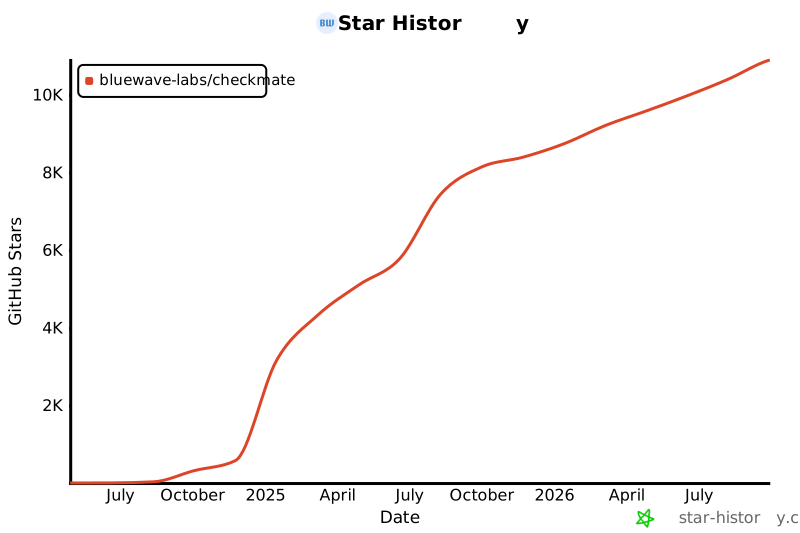](https://star-history.com/#bluewave-labs/bluewave-uptime&Date)
|
||||
|
||||
## Patrocinadores
|
||||
|
||||
Gracias a [Gitbook](https://gitbook.io/) por darnos una cuenta gratuita para su plataforma de documentación, y a [Poeditor](https://poeditor.com/) por proporcionarnos una cuenta gratuita para servicios de traducción. Si deseas patrocinar Checkmate, por favor envía un correo a hello@bluewavelabs.ca
|
||||
|
||||
Si deseas patrocinar una función, [visita esta página](https://checkmate.so/sponsored-features).
|
||||
|
||||
También puedes revisar otros proyectos de BlueWave orientados a desarrolladores y contribuidores:
|
||||
|
||||
- [VerifyWise](https://github.com/bluewave-labs/verifywise), la primera plataforma de gobernanza de IA de código abierto.
|
||||
- [DataRoom](https://github.com/bluewave-labs/bluewave-dataroom), una aplicación de intercambio de archivos seguro, también conocida como dataroom.
|
||||
- [Guidefox](https://github.com/bluewave-labs/guidefox), una app que ayuda a nuevos usuarios a aprender a usar tu producto mediante pistas, tours, popups y banners.
|
||||
@@ -1,5 +1,25 @@
|
||||
<p align=center> <a href="https://trendshift.io/repositories/12443" target="_blank"><img src="https://trendshift.io/api/badge/repositories/12443" alt="bluewave-labs%2Fcheckmate | Trendshift" style="width: 250px; height: 55px;" width="250" height="55"/></a></p>
|
||||
|
||||
|
||||
<p align="center">
|
||||
🇺🇸 <a href="README.md">English</a> |
|
||||
🇸🇦 <a href="docs/translations/README.ar.md">العربية</a> |
|
||||
🇪🇸 <a href="docs/translations/README.ca.md">Català</a> |
|
||||
🇨🇿 <a href="docs/translations/README.cs.md">Čeština</a> |
|
||||
🇩🇪 <a href="docs/translations/README.de.md">Deutsch</a> |
|
||||
🇪🇸 <a href="docs/translations/README.es.md">Español</a> |
|
||||
🇫🇮 <a href="docs/translations/README.fi.md">Suomi</a> |
|
||||
🇫🇷 <a href="docs/translations/README.fr.md">Français</a> |
|
||||
🇯🇵 <a href="docs/translations/README.ja.md">日本語</a> |
|
||||
🇧🇷 <a href="docs/translations/README.pt-BR.md">Português (Brasil)</a> |
|
||||
🇷🇺 <a href="docs/translations/README.ru.md">Русский</a> |
|
||||
🇹🇭 <a href="docs/translations/README.th.md">ไทย</a> |
|
||||
🇹🇷 <a href="docs/translations/README.tr.md">Türkçe</a> |
|
||||
🇺🇦 <a href="docs/translations/README.uk.md">Українська</a> |
|
||||
🇻🇳 <a href="docs/translations/README.vi.md">Tiếng Việt</a> |
|
||||
🇨🇳 <a href="docs/translations/README.zh-CN.md">简体中文</a> |
|
||||
🇹🇼 <a href="docs/translations/README.zh-TW.md">繁體中文</a>
|
||||
</p>
|
||||
|
||||

|
||||

|
||||

|
||||
@@ -40,12 +60,14 @@ Checkmate has been stress-tested with 1000+ active monitors without any particul
|
||||
- [🤝 Contributing](#contributing)
|
||||
|
||||
|
||||
<a id="demo"></a>
|
||||
## Demo
|
||||
|
||||
You can see the latest build of [Checkmate](https://demo.checkmate.so/) in action.
|
||||
|
||||
The username is demouser@demo.com and the password is Demouser1! (just a note that we update the demo server from time to time, so if it doesn't work for you, please ping us on the Discussions channel).
|
||||
|
||||
<a id="users-guide"></a>
|
||||
## User's guide
|
||||
|
||||
Usage instructions can be found [here](https://checkmate.so/docs).
|
||||
@@ -54,6 +76,7 @@ Usage instructions can be found [here](https://checkmate.so/docs).
|
||||
- [Docker](https://www.docker.com/) installed
|
||||
- [Git](https://git-scm.com/) installed
|
||||
|
||||
<a id="installation"></a>
|
||||
## Installation
|
||||
|
||||
See installation instructions in [Checkmate documentation portal](https://checkmate.so/docs).
|
||||
@@ -66,6 +89,7 @@ If you need to monitor internal HTTPS endpoints with certificates from private C
|
||||
|
||||
For more documentation, see the [docs directory](./docs/).
|
||||
|
||||
<a id="performance"></a>
|
||||
## Performance
|
||||
|
||||
Thanks to extensive optimizations, Checkmate operates with an exceptionally small memory footprint, requiring minimal memory and CPU resources. Here’s the memory usage of a Node.js instance running on a server that monitors 323 servers every minute:
|
||||
@@ -76,6 +100,7 @@ You can see the memory footprint of MongoDB and Redis on the same server (398Mb
|
||||
|
||||

|
||||
|
||||
<a id="questions--ideas"></a>
|
||||
## Questions & Ideas
|
||||
|
||||
If you have any questions, suggestions or comments, you have several options:
|
||||
@@ -85,6 +110,7 @@ If you have any questions, suggestions or comments, you have several options:
|
||||
|
||||
Feel free to ask questions or share your ideas - we'd love to hear from you!
|
||||
|
||||
<a id="features"></a>
|
||||
## Features
|
||||
|
||||
- Completely open source, deployable on your servers or home devices (e.g Raspberry Pi 4 or 5)
|
||||
@@ -109,6 +135,7 @@ Feel free to ask questions or share your ideas - we'd love to hear from you!
|
||||
5. Upon a state change: an incident is either created or resolved, depending on the monitor's current status
|
||||
6. Notifications are triggered based on configuration
|
||||
|
||||
<a id="screenshots"></a>
|
||||
## Screenshots
|
||||
|
||||
<p>
|
||||
@@ -126,6 +153,7 @@ Feel free to ask questions or share your ideas - we'd love to hear from you!
|
||||
|
||||
|
||||
|
||||
<a id="tech-stack"></a>
|
||||
## Tech stack
|
||||
|
||||
- [ReactJs](https://react.dev/)
|
||||
@@ -135,6 +163,7 @@ Feel free to ask questions or share your ideas - we'd love to hear from you!
|
||||
- [Recharts](https://recharts.org)
|
||||
- Lots of other open source components!
|
||||
|
||||
<a id="a-few-links"></a>
|
||||
## A few links
|
||||
|
||||
- If you would like to support us, please consider giving it a ⭐ and click on "watch".
|
||||
@@ -142,6 +171,7 @@ Feel free to ask questions or share your ideas - we'd love to hear from you!
|
||||
- Need a ping when there's a new release? Use [Newreleases](https://newreleases.io/), a free service to track releases.
|
||||
- Watch a Checkmate [installation and usage video](https://www.youtube.com/watch?v=GfFOc0xHIwY)
|
||||
|
||||
<a id="contributing"></a>
|
||||
## Contributing
|
||||
|
||||
We are [Alex](http://github.com/ajhollid) (team lead), [Gorkem](http://github.com/gorkem-bwl/), [Aryaman](https://github.com/Br0wnHammer), [Mert](https://github.com/mertssmnoglu) and [Karen](https://github.com/karenvicent) helping individuals and businesses monitor their infra and servers.
|
||||
|
||||
Generated
+236
-4
@@ -1,12 +1,12 @@
|
||||
{
|
||||
"name": "client",
|
||||
"version": "3.7.1",
|
||||
"version": "3.8.1",
|
||||
"lockfileVersion": 3,
|
||||
"requires": true,
|
||||
"packages": {
|
||||
"": {
|
||||
"name": "client",
|
||||
"version": "3.7.1",
|
||||
"version": "3.8.1",
|
||||
"dependencies": {
|
||||
"@emotion/react": "^11.13.3",
|
||||
"@emotion/styled": "^11.13.0",
|
||||
@@ -57,6 +57,7 @@
|
||||
"eslint-plugin-react-hooks": "^5.0.0",
|
||||
"eslint-plugin-react-refresh": "^0.4.6",
|
||||
"lint-staged": "^16.2.7",
|
||||
"mongoose": "9.6.2",
|
||||
"prettier": "^3.3.3",
|
||||
"typescript": "5.9.3",
|
||||
"vite": "^6.4.2"
|
||||
@@ -84,6 +85,7 @@
|
||||
"node_modules/@babel/core": {
|
||||
"version": "7.29.0",
|
||||
"license": "MIT",
|
||||
"peer": true,
|
||||
"dependencies": {
|
||||
"@babel/code-frame": "^7.29.0",
|
||||
"@babel/generator": "^7.29.0",
|
||||
@@ -354,6 +356,7 @@
|
||||
"node_modules/@emotion/react": {
|
||||
"version": "11.14.0",
|
||||
"license": "MIT",
|
||||
"peer": true,
|
||||
"dependencies": {
|
||||
"@babel/runtime": "^7.18.3",
|
||||
"@emotion/babel-plugin": "^11.13.5",
|
||||
@@ -391,6 +394,7 @@
|
||||
"node_modules/@emotion/styled": {
|
||||
"version": "11.14.1",
|
||||
"license": "MIT",
|
||||
"peer": true,
|
||||
"dependencies": {
|
||||
"@babel/runtime": "^7.18.3",
|
||||
"@emotion/babel-plugin": "^11.13.5",
|
||||
@@ -1107,6 +1111,16 @@
|
||||
"supercluster": "^8.0.1"
|
||||
}
|
||||
},
|
||||
"node_modules/@mongodb-js/saslprep": {
|
||||
"version": "1.4.11",
|
||||
"resolved": "https://registry.npmjs.org/@mongodb-js/saslprep/-/saslprep-1.4.11.tgz",
|
||||
"integrity": "sha512-o9rAHc0IpIjuPSxRutWpE1F62x7n+4mVS4rCNHkzhIUMQcc18bb6xEq5wd2NdN0WjepIyXIppRshYI2kQDOZVA==",
|
||||
"dev": true,
|
||||
"license": "MIT",
|
||||
"dependencies": {
|
||||
"sparse-bitfield": "^3.0.3"
|
||||
}
|
||||
},
|
||||
"node_modules/@mui/core-downloads-tracker": {
|
||||
"version": "7.3.7",
|
||||
"license": "MIT",
|
||||
@@ -1160,6 +1174,7 @@
|
||||
"node_modules/@mui/material": {
|
||||
"version": "7.3.7",
|
||||
"license": "MIT",
|
||||
"peer": true,
|
||||
"dependencies": {
|
||||
"@babel/runtime": "^7.28.4",
|
||||
"@mui/core-downloads-tracker": "^7.3.7",
|
||||
@@ -1264,6 +1279,7 @@
|
||||
"node_modules/@mui/system": {
|
||||
"version": "7.3.7",
|
||||
"license": "MIT",
|
||||
"peer": true,
|
||||
"dependencies": {
|
||||
"@babel/runtime": "^7.28.4",
|
||||
"@mui/private-theming": "^7.3.7",
|
||||
@@ -2304,6 +2320,7 @@
|
||||
"version": "24.5.2",
|
||||
"devOptional": true,
|
||||
"license": "MIT",
|
||||
"peer": true,
|
||||
"dependencies": {
|
||||
"undici-types": "~7.12.0"
|
||||
}
|
||||
@@ -2319,6 +2336,7 @@
|
||||
"node_modules/@types/react": {
|
||||
"version": "18.3.27",
|
||||
"license": "MIT",
|
||||
"peer": true,
|
||||
"dependencies": {
|
||||
"@types/prop-types": "*",
|
||||
"csstype": "^3.2.2"
|
||||
@@ -2352,6 +2370,23 @@
|
||||
"version": "0.0.6",
|
||||
"license": "MIT"
|
||||
},
|
||||
"node_modules/@types/webidl-conversions": {
|
||||
"version": "7.0.3",
|
||||
"resolved": "https://registry.npmjs.org/@types/webidl-conversions/-/webidl-conversions-7.0.3.tgz",
|
||||
"integrity": "sha512-CiJJvcRtIgzadHCYXw7dqEnMNRjhGZlYK05Mj9OyktqV8uVT8fD2BFOB7S1uwBE3Kj2Z+4UyPmFw/Ixgw/LAlA==",
|
||||
"dev": true,
|
||||
"license": "MIT"
|
||||
},
|
||||
"node_modules/@types/whatwg-url": {
|
||||
"version": "13.0.0",
|
||||
"resolved": "https://registry.npmjs.org/@types/whatwg-url/-/whatwg-url-13.0.0.tgz",
|
||||
"integrity": "sha512-N8WXpbE6Wgri7KUSvrmQcqrMllKZ9uxkYWMt+mCSGwNc0Hsw9VQTW7ApqI4XNrx6/SaM2QQJCzMPDEXE058s+Q==",
|
||||
"dev": true,
|
||||
"license": "MIT",
|
||||
"dependencies": {
|
||||
"@types/webidl-conversions": "*"
|
||||
}
|
||||
},
|
||||
"node_modules/@typescript-eslint/eslint-plugin": {
|
||||
"version": "7.18.0",
|
||||
"resolved": "https://registry.npmjs.org/@typescript-eslint/eslint-plugin/-/eslint-plugin-7.18.0.tgz",
|
||||
@@ -2392,6 +2427,7 @@
|
||||
"integrity": "sha512-4Z+L8I2OqhZV8qA132M4wNL30ypZGYOQVBfMgxDH/K5UX0PNqTu1c6za9ST5r9+tavvHiTWmBnKzpCJ/GlVFtg==",
|
||||
"dev": true,
|
||||
"license": "BSD-2-Clause",
|
||||
"peer": true,
|
||||
"dependencies": {
|
||||
"@typescript-eslint/scope-manager": "7.18.0",
|
||||
"@typescript-eslint/types": "7.18.0",
|
||||
@@ -2672,6 +2708,7 @@
|
||||
"version": "8.15.0",
|
||||
"dev": true,
|
||||
"license": "MIT",
|
||||
"peer": true,
|
||||
"bin": {
|
||||
"acorn": "bin/acorn"
|
||||
},
|
||||
@@ -3006,6 +3043,7 @@
|
||||
}
|
||||
],
|
||||
"license": "MIT",
|
||||
"peer": true,
|
||||
"dependencies": {
|
||||
"baseline-browser-mapping": "^2.9.0",
|
||||
"caniuse-lite": "^1.0.30001759",
|
||||
@@ -3020,6 +3058,16 @@
|
||||
"node": "^6 || ^7 || ^8 || ^9 || ^10 || ^11 || ^12 || >=13.7"
|
||||
}
|
||||
},
|
||||
"node_modules/bson": {
|
||||
"version": "7.2.0",
|
||||
"resolved": "https://registry.npmjs.org/bson/-/bson-7.2.0.tgz",
|
||||
"integrity": "sha512-YCEo7KjMlbNlyHhz7zAZNDpIpQbd+wOEHJYezv0nMYTn4x31eIUM2yomNNubclAt63dObUzKHWsBLJ9QcZNSnQ==",
|
||||
"dev": true,
|
||||
"license": "Apache-2.0",
|
||||
"engines": {
|
||||
"node": ">=20.19.0"
|
||||
}
|
||||
},
|
||||
"node_modules/bytewise": {
|
||||
"version": "1.1.0",
|
||||
"resolved": "https://registry.npmjs.org/bytewise/-/bytewise-1.1.0.tgz",
|
||||
@@ -3437,7 +3485,8 @@
|
||||
},
|
||||
"node_modules/dayjs": {
|
||||
"version": "1.11.13",
|
||||
"license": "MIT"
|
||||
"license": "MIT",
|
||||
"peer": true
|
||||
},
|
||||
"node_modules/debug": {
|
||||
"version": "4.4.3",
|
||||
@@ -3832,6 +3881,7 @@
|
||||
"version": "8.57.1",
|
||||
"dev": true,
|
||||
"license": "MIT",
|
||||
"peer": true,
|
||||
"dependencies": {
|
||||
"@eslint-community/eslint-utils": "^4.2.0",
|
||||
"@eslint-community/regexpp": "^4.6.1",
|
||||
@@ -4627,6 +4677,7 @@
|
||||
}
|
||||
],
|
||||
"license": "MIT",
|
||||
"peer": true,
|
||||
"dependencies": {
|
||||
"@babel/runtime": "^7.27.6"
|
||||
},
|
||||
@@ -5222,6 +5273,16 @@
|
||||
"node": ">=4.0"
|
||||
}
|
||||
},
|
||||
"node_modules/kareem": {
|
||||
"version": "3.3.0",
|
||||
"resolved": "https://registry.npmjs.org/kareem/-/kareem-3.3.0.tgz",
|
||||
"integrity": "sha512-kpSuLD3/7RenBnjnJdOHXCKC8dTd1JzeOiJhN0necWWci6cC+qX+VuwPnMVgb+a4+KNJSfgqahpnfWaeDXCimw==",
|
||||
"dev": true,
|
||||
"license": "Apache-2.0",
|
||||
"engines": {
|
||||
"node": ">=18.0.0"
|
||||
}
|
||||
},
|
||||
"node_modules/kdbush": {
|
||||
"version": "4.0.2",
|
||||
"resolved": "https://registry.npmjs.org/kdbush/-/kdbush-4.0.2.tgz",
|
||||
@@ -5412,6 +5473,7 @@
|
||||
"resolved": "https://registry.npmjs.org/maplibre-gl/-/maplibre-gl-5.19.0.tgz",
|
||||
"integrity": "sha512-REhYUN8gNP3HlcIZS6QU2uy8iovl31cXsrNDkCcqWSQbCkcpdYLczqDz5PVIwNH42UQNyvukjes/RoHPDrOUmQ==",
|
||||
"license": "BSD-3-Clause",
|
||||
"peer": true,
|
||||
"dependencies": {
|
||||
"@mapbox/geojson-rewind": "^0.5.2",
|
||||
"@mapbox/jsonlint-lines-primitives": "^2.0.2",
|
||||
@@ -5451,6 +5513,13 @@
|
||||
"node": ">= 0.4"
|
||||
}
|
||||
},
|
||||
"node_modules/memory-pager": {
|
||||
"version": "1.5.0",
|
||||
"resolved": "https://registry.npmjs.org/memory-pager/-/memory-pager-1.5.0.tgz",
|
||||
"integrity": "sha512-ZS4Bp4r/Zoeq6+NLJpP+0Zzm0pR8whtGPf1XExKLJBAczGMnSi3It14OiNCStjQjM6NU1okjQGSxgEZN8eBYKg==",
|
||||
"dev": true,
|
||||
"license": "MIT"
|
||||
},
|
||||
"node_modules/merge2": {
|
||||
"version": "1.4.1",
|
||||
"resolved": "https://registry.npmjs.org/merge2/-/merge2-1.4.1.tgz",
|
||||
@@ -5540,6 +5609,109 @@
|
||||
"url": "https://github.com/sponsors/ljharb"
|
||||
}
|
||||
},
|
||||
"node_modules/mongodb": {
|
||||
"version": "7.2.0",
|
||||
"resolved": "https://registry.npmjs.org/mongodb/-/mongodb-7.2.0.tgz",
|
||||
"integrity": "sha512-F/2+BMZtLVhY30ioZp0dAmZ+IRZMBqI+nrv6t5+9/1AIwCa8sMRC3jBf81lpxMhnZgqq8CoUD503Z1oZWq1/sw==",
|
||||
"dev": true,
|
||||
"license": "Apache-2.0",
|
||||
"dependencies": {
|
||||
"@mongodb-js/saslprep": "^1.3.0",
|
||||
"bson": "^7.2.0",
|
||||
"mongodb-connection-string-url": "^7.0.0"
|
||||
},
|
||||
"engines": {
|
||||
"node": ">=20.19.0"
|
||||
},
|
||||
"peerDependencies": {
|
||||
"@aws-sdk/credential-providers": "^3.806.0",
|
||||
"@mongodb-js/zstd": "^7.0.0",
|
||||
"gcp-metadata": "^7.0.1",
|
||||
"kerberos": "^7.0.0",
|
||||
"mongodb-client-encryption": ">=7.0.0 <7.1.0",
|
||||
"snappy": "^7.3.2",
|
||||
"socks": "^2.8.6"
|
||||
},
|
||||
"peerDependenciesMeta": {
|
||||
"@aws-sdk/credential-providers": {
|
||||
"optional": true
|
||||
},
|
||||
"@mongodb-js/zstd": {
|
||||
"optional": true
|
||||
},
|
||||
"gcp-metadata": {
|
||||
"optional": true
|
||||
},
|
||||
"kerberos": {
|
||||
"optional": true
|
||||
},
|
||||
"mongodb-client-encryption": {
|
||||
"optional": true
|
||||
},
|
||||
"snappy": {
|
||||
"optional": true
|
||||
},
|
||||
"socks": {
|
||||
"optional": true
|
||||
}
|
||||
}
|
||||
},
|
||||
"node_modules/mongodb-connection-string-url": {
|
||||
"version": "7.0.1",
|
||||
"resolved": "https://registry.npmjs.org/mongodb-connection-string-url/-/mongodb-connection-string-url-7.0.1.tgz",
|
||||
"integrity": "sha512-h0AZ9A7IDVwwHyMxmdMXKy+9oNlF0zFoahHiX3vQ8e3KFcSP3VmsmfvtRSuLPxmyv2vjIDxqty8smTgie/SNRQ==",
|
||||
"dev": true,
|
||||
"license": "Apache-2.0",
|
||||
"dependencies": {
|
||||
"@types/whatwg-url": "^13.0.0",
|
||||
"whatwg-url": "^14.1.0"
|
||||
},
|
||||
"engines": {
|
||||
"node": ">=20.19.0"
|
||||
}
|
||||
},
|
||||
"node_modules/mongoose": {
|
||||
"version": "9.6.2",
|
||||
"resolved": "https://registry.npmjs.org/mongoose/-/mongoose-9.6.2.tgz",
|
||||
"integrity": "sha512-7m8HntjkoRnwEmuPC0kdlwcZXJOQf4twumFj+PNzg/anqqZE2Er7hQslqyzy07mP3JcFjoTSgH5765PyqOXsxw==",
|
||||
"dev": true,
|
||||
"license": "MIT",
|
||||
"dependencies": {
|
||||
"kareem": "3.3.0",
|
||||
"mongodb": "~7.2",
|
||||
"mpath": "0.9.0",
|
||||
"mquery": "6.0.0",
|
||||
"ms": "2.1.3",
|
||||
"sift": "17.1.3"
|
||||
},
|
||||
"engines": {
|
||||
"node": ">=20.19.0"
|
||||
},
|
||||
"funding": {
|
||||
"type": "opencollective",
|
||||
"url": "https://opencollective.com/mongoose"
|
||||
}
|
||||
},
|
||||
"node_modules/mpath": {
|
||||
"version": "0.9.0",
|
||||
"resolved": "https://registry.npmjs.org/mpath/-/mpath-0.9.0.tgz",
|
||||
"integrity": "sha512-ikJRQTk8hw5DEoFVxHG1Gn9T/xcjtdnOKIU1JTmGjZZlg9LST2mBLmcX3/ICIbgJydT2GOc15RnNy5mHmzfSew==",
|
||||
"dev": true,
|
||||
"license": "MIT",
|
||||
"engines": {
|
||||
"node": ">=4.0.0"
|
||||
}
|
||||
},
|
||||
"node_modules/mquery": {
|
||||
"version": "6.0.0",
|
||||
"resolved": "https://registry.npmjs.org/mquery/-/mquery-6.0.0.tgz",
|
||||
"integrity": "sha512-b2KQNsmgtkscfeDgkYMcWGn9vZI9YoXh802VDEwE6qc50zxBFQ0Oo8ROkawbPAsXCY1/Z1yp0MagqsZStPWJjw==",
|
||||
"dev": true,
|
||||
"license": "MIT",
|
||||
"engines": {
|
||||
"node": ">=20.19.0"
|
||||
}
|
||||
},
|
||||
"node_modules/ms": {
|
||||
"version": "2.1.3",
|
||||
"license": "MIT"
|
||||
@@ -6078,6 +6250,7 @@
|
||||
"node_modules/react-dom": {
|
||||
"version": "18.3.1",
|
||||
"license": "MIT",
|
||||
"peer": true,
|
||||
"dependencies": {
|
||||
"loose-envify": "^1.1.0",
|
||||
"scheduler": "^0.23.2"
|
||||
@@ -6089,6 +6262,7 @@
|
||||
"node_modules/react-hook-form": {
|
||||
"version": "7.71.1",
|
||||
"license": "MIT",
|
||||
"peer": true,
|
||||
"engines": {
|
||||
"node": ">=18.0.0"
|
||||
},
|
||||
@@ -6288,7 +6462,8 @@
|
||||
},
|
||||
"node_modules/redux": {
|
||||
"version": "5.0.1",
|
||||
"license": "MIT"
|
||||
"license": "MIT",
|
||||
"peer": true
|
||||
},
|
||||
"node_modules/redux-persist": {
|
||||
"version": "6.0.0",
|
||||
@@ -6438,6 +6613,7 @@
|
||||
"resolved": "https://registry.npmjs.org/rollup/-/rollup-4.59.0.tgz",
|
||||
"integrity": "sha512-2oMpl67a3zCH9H79LeMcbDhXW/UmWG/y2zuqnF2jQq5uq9TbM9TVyXvA4+t+ne2IIkBdrLpAaRQAvo7YI/Yyeg==",
|
||||
"license": "MIT",
|
||||
"peer": true,
|
||||
"dependencies": {
|
||||
"@types/estree": "1.0.8"
|
||||
},
|
||||
@@ -6713,6 +6889,13 @@
|
||||
"url": "https://github.com/sponsors/ljharb"
|
||||
}
|
||||
},
|
||||
"node_modules/sift": {
|
||||
"version": "17.1.3",
|
||||
"resolved": "https://registry.npmjs.org/sift/-/sift-17.1.3.tgz",
|
||||
"integrity": "sha512-Rtlj66/b0ICeFzYTuNvX/EF1igRbbnGSvEyT79McoZa/DeGhMyC5pWKOEsZKnpkqtSeovd5FL/bjHWC3CIIvCQ==",
|
||||
"dev": true,
|
||||
"license": "MIT"
|
||||
},
|
||||
"node_modules/signal-exit": {
|
||||
"version": "4.1.0",
|
||||
"resolved": "https://registry.npmjs.org/signal-exit/-/signal-exit-4.1.0.tgz",
|
||||
@@ -6823,6 +7006,16 @@
|
||||
"node": ">=0.10.0"
|
||||
}
|
||||
},
|
||||
"node_modules/sparse-bitfield": {
|
||||
"version": "3.0.3",
|
||||
"resolved": "https://registry.npmjs.org/sparse-bitfield/-/sparse-bitfield-3.0.3.tgz",
|
||||
"integrity": "sha512-kvzhi7vqKTfkh0PZU+2D2PIllw2ymqJKujUcyPMd9Y75Nv4nPbGJZXNhxsgdQab2BmlDct1YnfQCguEvHr7VsQ==",
|
||||
"dev": true,
|
||||
"license": "MIT",
|
||||
"dependencies": {
|
||||
"memory-pager": "^1.0.2"
|
||||
}
|
||||
},
|
||||
"node_modules/split-string": {
|
||||
"version": "3.1.0",
|
||||
"resolved": "https://registry.npmjs.org/split-string/-/split-string-3.1.0.tgz",
|
||||
@@ -7136,6 +7329,19 @@
|
||||
"node": ">=8.0"
|
||||
}
|
||||
},
|
||||
"node_modules/tr46": {
|
||||
"version": "5.1.1",
|
||||
"resolved": "https://registry.npmjs.org/tr46/-/tr46-5.1.1.tgz",
|
||||
"integrity": "sha512-hdF5ZgjTqgAntKkklYw0R03MG2x/bSzTtkxmIRw/sTNV8YXsCJ1tfLAX23lhxhHJlEf3CRCOCGGWw3vI3GaSPw==",
|
||||
"dev": true,
|
||||
"license": "MIT",
|
||||
"dependencies": {
|
||||
"punycode": "^2.3.1"
|
||||
},
|
||||
"engines": {
|
||||
"node": ">=18"
|
||||
}
|
||||
},
|
||||
"node_modules/ts-api-utils": {
|
||||
"version": "1.4.3",
|
||||
"resolved": "https://registry.npmjs.org/ts-api-utils/-/ts-api-utils-1.4.3.tgz",
|
||||
@@ -7249,6 +7455,7 @@
|
||||
"version": "5.9.3",
|
||||
"devOptional": true,
|
||||
"license": "Apache-2.0",
|
||||
"peer": true,
|
||||
"bin": {
|
||||
"tsc": "bin/tsc",
|
||||
"tsserver": "bin/tsserver"
|
||||
@@ -7384,6 +7591,7 @@
|
||||
"resolved": "https://registry.npmjs.org/vite/-/vite-6.4.2.tgz",
|
||||
"integrity": "sha512-2N/55r4JDJ4gdrCvGgINMy+HH3iRpNIz8K6SFwVsA+JbQScLiC+clmAxBgwiSPgcG9U15QmvqCGWzMbqda5zGQ==",
|
||||
"license": "MIT",
|
||||
"peer": true,
|
||||
"dependencies": {
|
||||
"esbuild": "^0.25.0",
|
||||
"fdir": "^6.4.4",
|
||||
@@ -7472,6 +7680,30 @@
|
||||
"node": ">=0.10.0"
|
||||
}
|
||||
},
|
||||
"node_modules/webidl-conversions": {
|
||||
"version": "7.0.0",
|
||||
"resolved": "https://registry.npmjs.org/webidl-conversions/-/webidl-conversions-7.0.0.tgz",
|
||||
"integrity": "sha512-VwddBukDzu71offAQR975unBIGqfKZpM+8ZX6ySk8nYhVoo5CYaZyzt3YBvYtRtO+aoGlqxPg/B87NGVZ/fu6g==",
|
||||
"dev": true,
|
||||
"license": "BSD-2-Clause",
|
||||
"engines": {
|
||||
"node": ">=12"
|
||||
}
|
||||
},
|
||||
"node_modules/whatwg-url": {
|
||||
"version": "14.2.0",
|
||||
"resolved": "https://registry.npmjs.org/whatwg-url/-/whatwg-url-14.2.0.tgz",
|
||||
"integrity": "sha512-De72GdQZzNTUBBChsXueQUnPKDkg/5A5zp7pFDuQAj5UFoENpiACU0wlCvzpAGnTkj++ihpKwKyYewn/XNUbKw==",
|
||||
"dev": true,
|
||||
"license": "MIT",
|
||||
"dependencies": {
|
||||
"tr46": "^5.1.0",
|
||||
"webidl-conversions": "^7.0.0"
|
||||
},
|
||||
"engines": {
|
||||
"node": ">=18"
|
||||
}
|
||||
},
|
||||
"node_modules/which": {
|
||||
"version": "2.0.2",
|
||||
"dev": true,
|
||||
|
||||
+2
-1
@@ -1,7 +1,7 @@
|
||||
{
|
||||
"name": "client",
|
||||
"private": true,
|
||||
"version": "3.7.1",
|
||||
"version": "3.8.1",
|
||||
"type": "module",
|
||||
"scripts": {
|
||||
"dev": "vite",
|
||||
@@ -66,6 +66,7 @@
|
||||
"eslint-plugin-react-hooks": "^5.0.0",
|
||||
"eslint-plugin-react-refresh": "^0.4.6",
|
||||
"lint-staged": "^16.2.7",
|
||||
"mongoose": "9.6.2",
|
||||
"prettier": "^3.3.3",
|
||||
"typescript": "5.9.3",
|
||||
"vite": "^6.4.2"
|
||||
|
||||
@@ -35,7 +35,7 @@ const calculateResponseTimeStats = (checks: CheckSnapshot[]): ResponseTimeStats
|
||||
}
|
||||
|
||||
const responseTimes = validChecks.map((check) => check.originalResponseTime);
|
||||
const max = Math.max(...responseTimes);
|
||||
const max = Math.round(Math.max(...responseTimes));
|
||||
const avg = Math.round(
|
||||
responseTimes.reduce((sum, time) => sum + time, 0) / responseTimes.length
|
||||
);
|
||||
@@ -73,14 +73,20 @@ export const HistogramResponseTime = ({
|
||||
<Stack
|
||||
justifyContent="center"
|
||||
alignItems={statsPosition === "left" ? "flex-end" : "flex-start"}
|
||||
minWidth={70}
|
||||
width={110}
|
||||
pr={statsPosition === "left" ? theme.spacing(8) : 0}
|
||||
pl={statsPosition === "right" ? theme.spacing(8) : 0}
|
||||
>
|
||||
<Typography variant="body2">
|
||||
<Typography
|
||||
variant="body2"
|
||||
noWrap
|
||||
>
|
||||
{t("common.charts.histogram.avg", { value: stats.avg })}
|
||||
</Typography>
|
||||
<Typography variant="body2">
|
||||
<Typography
|
||||
variant="body2"
|
||||
noWrap
|
||||
>
|
||||
{t("common.charts.histogram.max", { value: stats.max })}
|
||||
</Typography>
|
||||
</Stack>
|
||||
|
||||
@@ -1,30 +1,36 @@
|
||||
import { BaseChart } from "@/Components/design-elements";
|
||||
import Stack from "@mui/material/Stack";
|
||||
import Box from "@mui/material/Box";
|
||||
import Box, { type BoxProps } from "@mui/material/Box";
|
||||
import Typography from "@mui/material/Typography";
|
||||
|
||||
import { useTheme } from "@mui/material/styles";
|
||||
import { useMemo, useState, useEffect } from "react";
|
||||
import { forwardRef, useMemo, useState, useEffect } from "react";
|
||||
import { getInfraGaugeColor } from "@/Utils/MonitorUtils";
|
||||
|
||||
const MINIMUM_VALUE = 0;
|
||||
const MAXIMUM_VALUE = 100;
|
||||
|
||||
export const Gauge = ({
|
||||
isLoading = false,
|
||||
progress = 0,
|
||||
radius = 70,
|
||||
strokeWidth = 15,
|
||||
precision = 1,
|
||||
unit = "%",
|
||||
}: {
|
||||
interface GaugeProps extends Omit<BoxProps, "color"> {
|
||||
isLoading?: boolean;
|
||||
progress?: number;
|
||||
radius?: number;
|
||||
strokeWidth?: number;
|
||||
precision?: number;
|
||||
unit?: string;
|
||||
}) => {
|
||||
}
|
||||
|
||||
export const Gauge = forwardRef<HTMLDivElement, GaugeProps>(function Gauge(
|
||||
{
|
||||
isLoading = false,
|
||||
progress = 0,
|
||||
radius = 70,
|
||||
strokeWidth = 15,
|
||||
precision = 1,
|
||||
unit = "%",
|
||||
...rest
|
||||
},
|
||||
ref
|
||||
) {
|
||||
const theme = useTheme();
|
||||
const progressWithinRange = Math.max(MINIMUM_VALUE, Math.min(progress, MAXIMUM_VALUE));
|
||||
|
||||
@@ -51,17 +57,19 @@ export const Gauge = ({
|
||||
const fillColor = getInfraGaugeColor(progressWithinRange, theme);
|
||||
|
||||
if (isLoading) {
|
||||
return;
|
||||
return null;
|
||||
}
|
||||
|
||||
return (
|
||||
<Box
|
||||
ref={ref}
|
||||
display={"inline-block"}
|
||||
position={"relative"}
|
||||
width={radius}
|
||||
height={radius}
|
||||
bgcolor={theme.palette.background.paper}
|
||||
borderRadius={"50%"}
|
||||
{...rest}
|
||||
>
|
||||
<svg
|
||||
viewBox={`0 0 ${totalSize} ${totalSize}`}
|
||||
@@ -105,7 +113,7 @@ export const Gauge = ({
|
||||
</Typography>
|
||||
</Box>
|
||||
);
|
||||
};
|
||||
});
|
||||
|
||||
export const DetailGauge = ({
|
||||
title,
|
||||
|
||||
@@ -93,3 +93,20 @@ export const ValueLabel = ({ value, text }: { value: ValueType; text: string })
|
||||
</BaseBox>
|
||||
);
|
||||
};
|
||||
|
||||
export const ColoredLabel = ({ text, color }: { text: string; color: string }) => {
|
||||
const theme = useTheme();
|
||||
|
||||
return (
|
||||
<BaseBox
|
||||
sx={{
|
||||
width: "fit-content",
|
||||
padding: theme.spacing(1, 3),
|
||||
color: color,
|
||||
borderColor: color,
|
||||
}}
|
||||
>
|
||||
<Typography>{text}</Typography>
|
||||
</BaseBox>
|
||||
);
|
||||
};
|
||||
@@ -0,0 +1,42 @@
|
||||
import Stack from "@mui/material/Stack";
|
||||
import Box from "@mui/material/Box";
|
||||
import { useTheme, alpha } from "@mui/material/styles";
|
||||
import { LAYOUT } from "@/Utils/Theme/constants";
|
||||
|
||||
interface StepProgressProps {
|
||||
steps: number;
|
||||
current: number;
|
||||
}
|
||||
|
||||
export const StepProgress = ({ steps, current }: StepProgressProps) => {
|
||||
const theme = useTheme();
|
||||
const activeBg = `linear-gradient(135deg, ${theme.palette.primary.light} 0%, ${theme.palette.primary.main} 100%)`;
|
||||
const completedBg = `linear-gradient(135deg, ${alpha(theme.palette.primary.light, 0.5)} 0%, ${alpha(theme.palette.primary.main, 0.5)} 100%)`;
|
||||
|
||||
const getSegmentBackground = (index: number) => {
|
||||
if (index < current) return completedBg;
|
||||
if (index === current) return activeBg;
|
||||
return theme.palette.divider;
|
||||
};
|
||||
|
||||
return (
|
||||
<Stack
|
||||
direction="row"
|
||||
gap={theme.spacing(LAYOUT.XS)}
|
||||
width="100%"
|
||||
>
|
||||
{Array.from({ length: steps }).map((_, index) => (
|
||||
<Box
|
||||
key={index}
|
||||
flex={1}
|
||||
height={theme.spacing(LAYOUT.XXS)}
|
||||
borderRadius={theme.shape.borderRadius}
|
||||
sx={{
|
||||
background: getSegmentBackground(index),
|
||||
transition: "background 0.2s ease",
|
||||
}}
|
||||
/>
|
||||
))}
|
||||
</Stack>
|
||||
);
|
||||
};
|
||||
@@ -142,7 +142,7 @@ export function DataTable<
|
||||
>
|
||||
<Typography
|
||||
component="div"
|
||||
color={theme.palette.text.secondary}
|
||||
color={theme.palette.text.primary}
|
||||
>
|
||||
{header.mobileLabel ?? header.content}
|
||||
</Typography>
|
||||
|
||||
@@ -6,7 +6,11 @@ import type { TooltipProps } from "@mui/material/Tooltip";
|
||||
|
||||
type StyledTooltipProps = TooltipProps;
|
||||
|
||||
export const Tooltip = ({ placement = "top", ...props }: StyledTooltipProps) => {
|
||||
export const Tooltip = ({
|
||||
placement = "top",
|
||||
slotProps,
|
||||
...props
|
||||
}: StyledTooltipProps) => {
|
||||
const theme = useTheme();
|
||||
|
||||
return (
|
||||
@@ -27,6 +31,7 @@ export const Tooltip = ({ placement = "top", ...props }: StyledTooltipProps) =>
|
||||
boxShadow: theme.shadows[6],
|
||||
},
|
||||
},
|
||||
...slotProps,
|
||||
}}
|
||||
>
|
||||
{props.children}
|
||||
|
||||
@@ -27,3 +27,4 @@ export * from "./OfflineBanner";
|
||||
export * from "./Avatar";
|
||||
export * from "./StatusCodeLabel";
|
||||
export * from "./StrategyBadge";
|
||||
export * from "./StepProgress";
|
||||
@@ -14,17 +14,19 @@ type AutoCompleteInputProps = Omit<
|
||||
renderInput?: AutocompleteProps<any, boolean, boolean, boolean>["renderInput"];
|
||||
fieldLabel?: string;
|
||||
required?: boolean;
|
||||
renderOptionContent?: (option: any) => React.ReactNode;
|
||||
};
|
||||
|
||||
export const AutoCompleteInput = ({
|
||||
fieldLabel,
|
||||
required,
|
||||
renderInput,
|
||||
renderOptionContent,
|
||||
...props
|
||||
}: AutoCompleteInputProps) => {
|
||||
const theme = useTheme();
|
||||
const multiple = props.multiple;
|
||||
|
||||
const { renderOption: customRenderOption, ...autocompleteProps } = props;
|
||||
const defaultRenderInput = (params: any) => (
|
||||
<TextField
|
||||
{...params}
|
||||
@@ -34,7 +36,7 @@ export const AutoCompleteInput = ({
|
||||
|
||||
const autocomplete = (
|
||||
<Autocomplete
|
||||
{...props}
|
||||
{...autocompleteProps}
|
||||
disableCloseOnSelect={!!multiple}
|
||||
popupIcon={
|
||||
<ChevronDown
|
||||
@@ -46,24 +48,28 @@ export const AutoCompleteInput = ({
|
||||
renderInput={renderInput || defaultRenderInput}
|
||||
getOptionKey={(option) => option.id}
|
||||
renderTags={() => null}
|
||||
renderOption={(props, option, { selected }) => {
|
||||
const { key, ...optionProps } = props;
|
||||
return (
|
||||
<ListItem
|
||||
key={key}
|
||||
{...optionProps}
|
||||
>
|
||||
<Stack
|
||||
direction={"row"}
|
||||
alignItems={"center"}
|
||||
gap={theme.spacing(2)}
|
||||
renderOption={
|
||||
customRenderOption ||
|
||||
((props, option, { selected }) => {
|
||||
const { key, ...optionProps } = props;
|
||||
return (
|
||||
<ListItem
|
||||
key={key}
|
||||
{...optionProps}
|
||||
>
|
||||
{multiple && <Checkbox checked={selected} />}
|
||||
{option.name}
|
||||
</Stack>
|
||||
</ListItem>
|
||||
);
|
||||
}}
|
||||
<Stack
|
||||
direction={"row"}
|
||||
alignItems={"center"}
|
||||
gap={theme.spacing(2)}
|
||||
width="100%"
|
||||
>
|
||||
{multiple && <Checkbox checked={selected} />}
|
||||
{renderOptionContent ? renderOptionContent(option) : option.name}
|
||||
</Stack>
|
||||
</ListItem>
|
||||
);
|
||||
})
|
||||
}
|
||||
sx={{
|
||||
"&.MuiAutocomplete-root .MuiAutocomplete-input": {
|
||||
padding: `0 ${theme.spacing(5)}`,
|
||||
|
||||
@@ -1,7 +1,7 @@
|
||||
import { forwardRef } from "react";
|
||||
import Checkbox from "@mui/material/Checkbox";
|
||||
import type { CheckboxProps } from "@mui/material/Checkbox";
|
||||
import { Square, SquareCheck } from "lucide-react";
|
||||
import { Square, SquareCheck, SquareMinus } from "lucide-react";
|
||||
import { useTheme } from "@mui/material/styles";
|
||||
|
||||
type CheckboxInputProps = CheckboxProps & {
|
||||
@@ -34,9 +34,15 @@ export const CheckboxInput = forwardRef<HTMLInputElement, CheckboxInputProps>(
|
||||
strokeWidth={1.5}
|
||||
/>
|
||||
}
|
||||
indeterminateIcon={
|
||||
<SquareMinus
|
||||
size={16}
|
||||
strokeWidth={1.5}
|
||||
/>
|
||||
}
|
||||
sx={{
|
||||
color: theme.palette.text.secondary,
|
||||
"&.Mui-checked": {
|
||||
"&.Mui-checked, &.MuiCheckbox-indeterminate": {
|
||||
color: theme.palette.primary.main,
|
||||
},
|
||||
"&:hover": { backgroundColor: "transparent" },
|
||||
|
||||
@@ -1,138 +0,0 @@
|
||||
import React, { useState, useEffect } from "react";
|
||||
import { useTranslation } from "react-i18next";
|
||||
import { useTheme } from "@mui/material/styles";
|
||||
import { Dialog, Select, RadioWithDescription } from "@/Components/inputs";
|
||||
import { SPACING, LAYOUT } from "@/Utils/Theme/constants";
|
||||
import Stack from "@mui/material/Stack";
|
||||
import RadioGroup from "@mui/material/RadioGroup";
|
||||
import MenuItem from "@mui/material/MenuItem";
|
||||
import Typography from "@mui/material/Typography";
|
||||
import Alert from "@mui/material/Alert";
|
||||
import { useGet, usePatch } from "@/Hooks/UseApi";
|
||||
import type { Notification } from "@/Types/Notification";
|
||||
|
||||
interface BulkEditNotificationsModalProps {
|
||||
open: boolean;
|
||||
onClose: () => void;
|
||||
selectedMonitors: string[];
|
||||
onComplete: (success: boolean) => void;
|
||||
}
|
||||
|
||||
export const BulkEditNotificationsModal: React.FC<BulkEditNotificationsModalProps> = ({
|
||||
open,
|
||||
onClose,
|
||||
selectedMonitors,
|
||||
onComplete,
|
||||
}) => {
|
||||
const { t } = useTranslation();
|
||||
const theme = useTheme();
|
||||
|
||||
const [action, setAction] = useState<"add" | "remove" | "set">("add");
|
||||
const [notificationIds, setNotificationIds] = useState<string[]>([]);
|
||||
|
||||
// Fetch available notifications
|
||||
const { data: notifications } = useGet<Notification[]>(
|
||||
"/notifications/team",
|
||||
undefined,
|
||||
{
|
||||
keepPreviousData: true,
|
||||
}
|
||||
);
|
||||
|
||||
const { patch, loading: isPatching, error } = usePatch();
|
||||
|
||||
// Reset state when modal opens
|
||||
useEffect(() => {
|
||||
if (open) {
|
||||
setAction("add");
|
||||
setNotificationIds([]);
|
||||
}
|
||||
}, [open]);
|
||||
|
||||
const handleConfirm = async () => {
|
||||
const res = await patch("/monitors/notifications", {
|
||||
monitorIds: selectedMonitors,
|
||||
notificationIds,
|
||||
action,
|
||||
});
|
||||
|
||||
onComplete(!!res);
|
||||
};
|
||||
|
||||
// Prevent submitting empty arrays unless the action is 'set'
|
||||
const isMissingSelection = action !== "set" && notificationIds.length === 0;
|
||||
|
||||
return (
|
||||
<Dialog
|
||||
open={open}
|
||||
title={t("pages.common.monitors.bulkEdit.title")}
|
||||
onCancel={onClose}
|
||||
onConfirm={isMissingSelection ? undefined : handleConfirm}
|
||||
loading={isPatching}
|
||||
maxWidth="sm"
|
||||
fullWidth
|
||||
>
|
||||
<Stack
|
||||
spacing={theme.spacing(LAYOUT.XS)}
|
||||
mt={theme.spacing(SPACING.LG)}
|
||||
>
|
||||
{error && <Alert severity="error">{error}</Alert>}
|
||||
<Typography variant="body1">
|
||||
{t("pages.common.monitors.bulkEdit.selectedText", {
|
||||
count: selectedMonitors.length,
|
||||
})}
|
||||
</Typography>
|
||||
|
||||
<RadioGroup
|
||||
value={action}
|
||||
onChange={(e) => {
|
||||
const val = e.target.value;
|
||||
if (val === "add" || val === "remove" || val === "set") {
|
||||
setAction(val);
|
||||
}
|
||||
}}
|
||||
>
|
||||
<RadioWithDescription
|
||||
value="add"
|
||||
label={t("pages.common.monitors.bulkEdit.actionAdd")}
|
||||
description={t("pages.common.monitors.bulkEdit.actionAddDesc")}
|
||||
/>
|
||||
<RadioWithDescription
|
||||
value="remove"
|
||||
label={t("pages.common.monitors.bulkEdit.actionRemove")}
|
||||
description={t("pages.common.monitors.bulkEdit.actionRemoveDesc")}
|
||||
/>
|
||||
<RadioWithDescription
|
||||
value="set"
|
||||
label={t("pages.common.monitors.bulkEdit.actionSet")}
|
||||
description={t("pages.common.monitors.bulkEdit.actionSetDesc")}
|
||||
/>
|
||||
</RadioGroup>
|
||||
|
||||
<Select
|
||||
multiple
|
||||
value={notificationIds}
|
||||
onChange={(e) => {
|
||||
const val = e.target.value;
|
||||
if (typeof val === "string") {
|
||||
setNotificationIds(val.split(","));
|
||||
} else if (Array.isArray(val)) {
|
||||
setNotificationIds(val.filter((v) => typeof v === "string"));
|
||||
}
|
||||
}}
|
||||
fieldLabel={t("pages.common.monitors.bulkEdit.selectLabel")}
|
||||
placeholder={t("pages.common.monitors.bulkEdit.selectPlaceholder")}
|
||||
>
|
||||
{notifications?.map((n) => (
|
||||
<MenuItem
|
||||
key={n.id}
|
||||
value={n.id}
|
||||
>
|
||||
{n.notificationName} ({n.type.toUpperCase()})
|
||||
</MenuItem>
|
||||
))}
|
||||
</Select>
|
||||
</Stack>
|
||||
</Dialog>
|
||||
);
|
||||
};
|
||||
@@ -1,9 +1,11 @@
|
||||
import Stack from "@mui/material/Stack";
|
||||
import { Select, Button } from "@/Components/inputs";
|
||||
import { Select, Autocomplete, Button, TextField } from "@/Components/inputs";
|
||||
import { ColoredLabel } from "@/Components/design-elements";
|
||||
import MenuItem from "@mui/material/MenuItem";
|
||||
import useMediaQuery from "@mui/material/useMediaQuery";
|
||||
|
||||
import type { MonitorType } from "@/Types/Monitor";
|
||||
import type { Tag } from "@/Types/Tag";
|
||||
import { Typography, useTheme } from "@mui/material";
|
||||
import { useTranslation } from "react-i18next";
|
||||
|
||||
@@ -28,22 +30,34 @@ export const ControlsFilter = ({
|
||||
setSelectedStatus,
|
||||
selectedState,
|
||||
setSelectedState,
|
||||
tagOptions,
|
||||
selectedTags,
|
||||
setSelectedTags,
|
||||
onClearFilters,
|
||||
}: {
|
||||
showTypes?: boolean;
|
||||
selectedTypes?: MonitorType[];
|
||||
setSelectedTypes?: React.Dispatch<React.SetStateAction<MonitorType[]>>;
|
||||
selectedStatus: string;
|
||||
setSelectedStatus: React.Dispatch<React.SetStateAction<string>>;
|
||||
selectedState: string;
|
||||
setSelectedState: React.Dispatch<React.SetStateAction<string>>;
|
||||
selectedStatus?: string;
|
||||
setSelectedStatus?: React.Dispatch<React.SetStateAction<string>>;
|
||||
selectedState?: string;
|
||||
setSelectedState?: React.Dispatch<React.SetStateAction<string>>;
|
||||
tagOptions?: Tag[];
|
||||
selectedTags?: string[];
|
||||
setSelectedTags?: React.Dispatch<React.SetStateAction<string[]>>;
|
||||
onClearFilters: () => void;
|
||||
}) => {
|
||||
const theme = useTheme();
|
||||
const { t } = useTranslation();
|
||||
const isSmall = useMediaQuery(theme.breakpoints.down("md"));
|
||||
const isFilterActive =
|
||||
(selectedTypes?.length ?? 0) > 0 || selectedStatus !== "" || selectedState !== "";
|
||||
(selectedTypes?.length ?? 0) > 0 ||
|
||||
Boolean(selectedStatus) ||
|
||||
Boolean(selectedState) ||
|
||||
(selectedTags?.length ?? 0) > 0;
|
||||
const selectedTagObjects = (tagOptions ?? []).filter((tag) =>
|
||||
(selectedTags ?? []).includes(tag.id)
|
||||
);
|
||||
return (
|
||||
<Stack
|
||||
direction={isSmall ? "column" : "row"}
|
||||
@@ -66,34 +80,68 @@ export const ControlsFilter = ({
|
||||
))}
|
||||
</Select>
|
||||
)}
|
||||
<Select
|
||||
placeholder="Status"
|
||||
value={selectedStatus}
|
||||
onChange={(e) => setSelectedStatus(e.target.value)}
|
||||
>
|
||||
{statuses.map((status) => (
|
||||
<MenuItem
|
||||
key={status}
|
||||
value={status}
|
||||
>
|
||||
<Typography textTransform={"capitalize"}>{status}</Typography>
|
||||
</MenuItem>
|
||||
))}
|
||||
</Select>
|
||||
<Select
|
||||
placeholder="State"
|
||||
value={selectedState}
|
||||
onChange={(e) => setSelectedState(e.target.value)}
|
||||
>
|
||||
{states.map((state) => (
|
||||
<MenuItem
|
||||
key={state}
|
||||
value={state}
|
||||
>
|
||||
<Typography textTransform={"capitalize"}>{state}</Typography>
|
||||
</MenuItem>
|
||||
))}
|
||||
</Select>
|
||||
{setSelectedStatus && (
|
||||
<Select
|
||||
placeholder="Status"
|
||||
value={selectedStatus ?? ""}
|
||||
onChange={(e) => setSelectedStatus(e.target.value)}
|
||||
>
|
||||
{statuses.map((status) => (
|
||||
<MenuItem
|
||||
key={status}
|
||||
value={status}
|
||||
>
|
||||
<Typography textTransform={"capitalize"}>{status}</Typography>
|
||||
</MenuItem>
|
||||
))}
|
||||
</Select>
|
||||
)}
|
||||
{setSelectedState && (
|
||||
<Select
|
||||
placeholder="State"
|
||||
value={selectedState ?? ""}
|
||||
onChange={(e) => setSelectedState(e.target.value)}
|
||||
>
|
||||
{states.map((state) => (
|
||||
<MenuItem
|
||||
key={state}
|
||||
value={state}
|
||||
>
|
||||
<Typography textTransform={"capitalize"}>{state}</Typography>
|
||||
</MenuItem>
|
||||
))}
|
||||
</Select>
|
||||
)}
|
||||
{tagOptions && setSelectedTags && (
|
||||
<Autocomplete
|
||||
multiple
|
||||
options={tagOptions}
|
||||
value={selectedTagObjects}
|
||||
getOptionLabel={(option) => option.name}
|
||||
onChange={(_: unknown, newValue: Tag[]) => {
|
||||
setSelectedTags(newValue.map((tag) => tag.id));
|
||||
}}
|
||||
isOptionEqualToValue={(option, value) => option.id === value.id}
|
||||
renderOptionContent={(option) => (
|
||||
<ColoredLabel
|
||||
text={option.name}
|
||||
color={option.color}
|
||||
/>
|
||||
)}
|
||||
renderInput={(params) => (
|
||||
<TextField
|
||||
{...params}
|
||||
placeholder={t("common.table.headers.tags")}
|
||||
/>
|
||||
)}
|
||||
slotProps={{
|
||||
popper: {
|
||||
sx: { width: "fit-content !important", minWidth: 280 },
|
||||
},
|
||||
}}
|
||||
sx={{ minWidth: 180 }}
|
||||
/>
|
||||
)}
|
||||
{isFilterActive && (
|
||||
<Button
|
||||
variant="contained"
|
||||
|
||||
@@ -15,4 +15,3 @@ export * from "./charts/HistogramPageSpeedDetailsTooltip";
|
||||
export * from "./charts/HistogramInfrastructure";
|
||||
export * from "./HeaderMonitorsSummary";
|
||||
export * from "./BulkActionsBar";
|
||||
export * from "./BulkEditNotificationsModal";
|
||||
@@ -17,6 +17,7 @@ import {
|
||||
User,
|
||||
Lock,
|
||||
Users,
|
||||
Tag,
|
||||
} from "lucide-react";
|
||||
|
||||
export const getMenu = (t: Function) => {
|
||||
@@ -41,6 +42,11 @@ export const getMenu = (t: Function) => {
|
||||
path: "notifications",
|
||||
icon: <Icon icon={Bell} />,
|
||||
},
|
||||
{
|
||||
name: t("components.sidebar.menu.tags"),
|
||||
path: "tags",
|
||||
icon: <Icon icon={Tag} />,
|
||||
},
|
||||
{
|
||||
name: t("components.sidebar.menu.checks"),
|
||||
path: "checks",
|
||||
|
||||
@@ -20,6 +20,8 @@ export const useToast = () => {
|
||||
showToast(msg, { ...opts, type: "error" });
|
||||
const toastInfo = (msg: string, opts?: ToastOptions) =>
|
||||
showToast(msg, { ...opts, type: "info" });
|
||||
const toastWarning = (msg: string, opts?: ToastOptions) =>
|
||||
showToast(msg, { ...opts, type: "warning" });
|
||||
|
||||
return { showToast, toastSuccess, toastError, toastInfo };
|
||||
return { showToast, toastSuccess, toastError, toastInfo, toastWarning };
|
||||
};
|
||||
@@ -9,7 +9,10 @@ import type { Monitor } from "@/Types/Monitor";
|
||||
interface ApiResponse {
|
||||
success: boolean;
|
||||
msg: string;
|
||||
data: Monitor[];
|
||||
data: {
|
||||
monitors: Monitor[];
|
||||
failedCount: number;
|
||||
};
|
||||
}
|
||||
|
||||
interface UseBulkMonitorActionsReturn {
|
||||
@@ -25,7 +28,7 @@ export const useBulkMonitorActions = (
|
||||
page?: number
|
||||
): UseBulkMonitorActionsReturn => {
|
||||
const [selectedRows, setSelectedRows] = useState<string[]>([]);
|
||||
const { toastSuccess, toastError, toastInfo } = useToast();
|
||||
const { toastSuccess, toastError, toastInfo, toastWarning } = useToast();
|
||||
const { t } = useTranslation();
|
||||
|
||||
// Clear selection when page changes
|
||||
@@ -40,13 +43,21 @@ export const useBulkMonitorActions = (
|
||||
pause,
|
||||
});
|
||||
|
||||
const affectedCount = res.data?.data?.length ?? 0;
|
||||
const affectedCount = res.data?.data?.monitors?.length ?? 0;
|
||||
const failedCount = res.data?.data?.failedCount ?? 0;
|
||||
|
||||
if (affectedCount === 0) {
|
||||
const key = pause
|
||||
? "pages.common.monitors.bulkPause.alreadyPaused"
|
||||
: "pages.common.monitors.bulkPause.alreadyRunning";
|
||||
toastInfo(t(key, { count: selectedRows.length }));
|
||||
} else if (failedCount > 0) {
|
||||
toastWarning(
|
||||
t("pages.common.monitors.bulkPause.partialFailure", {
|
||||
successCount: affectedCount,
|
||||
failedCount,
|
||||
})
|
||||
);
|
||||
} else {
|
||||
const key = pause
|
||||
? "pages.common.monitors.bulkPause.paused"
|
||||
|
||||
+125
-110
@@ -13,128 +13,143 @@ const getBaseDefaults = (data?: Monitor | null) => ({
|
||||
description: data?.description || "",
|
||||
interval: data?.interval || 60000,
|
||||
notifications: data?.notifications || [],
|
||||
tags: data?.tags || [],
|
||||
statusWindowSize: data?.statusWindowSize || 5,
|
||||
statusWindowThreshold: data?.statusWindowThreshold || 60,
|
||||
});
|
||||
|
||||
// Geo-check defaults — only http and ping support geo checks.
|
||||
const getGeoCheckDefaults = (data?: Monitor | null) => ({
|
||||
geoCheckEnabled: data?.geoCheckEnabled ?? false,
|
||||
geoCheckLocations: data?.geoCheckLocations || [],
|
||||
geoCheckInterval: data?.geoCheckInterval || 300000,
|
||||
});
|
||||
|
||||
export const getMonitorDefaults = (
|
||||
type: MonitorType,
|
||||
data: Monitor | null = null
|
||||
): MonitorFormData => {
|
||||
const base = getBaseDefaults(data);
|
||||
|
||||
let defaults: MonitorFormData;
|
||||
|
||||
switch (type) {
|
||||
case "http":
|
||||
defaults = {
|
||||
...base,
|
||||
...getGeoCheckDefaults(data),
|
||||
type: "http",
|
||||
url: data?.url || "",
|
||||
ignoreTlsErrors: data?.ignoreTlsErrors || false,
|
||||
useAdvancedMatching: data?.useAdvancedMatching || false,
|
||||
matchMethod: data?.matchMethod || "",
|
||||
expectedValue: data?.expectedValue || "",
|
||||
jsonPath: data?.jsonPath || "",
|
||||
};
|
||||
break;
|
||||
case "ping":
|
||||
defaults = {
|
||||
...base,
|
||||
...getGeoCheckDefaults(data),
|
||||
type: "ping",
|
||||
url: data?.url || "",
|
||||
};
|
||||
break;
|
||||
case "port":
|
||||
defaults = {
|
||||
...base,
|
||||
type: "port",
|
||||
url: data?.url || "",
|
||||
port: data?.port || 80,
|
||||
};
|
||||
break;
|
||||
case "docker":
|
||||
defaults = {
|
||||
...base,
|
||||
type: "docker",
|
||||
url: data?.url || "",
|
||||
};
|
||||
break;
|
||||
case "game":
|
||||
defaults = {
|
||||
...base,
|
||||
type: "game",
|
||||
url: data?.url || "",
|
||||
port: data?.port || 27015,
|
||||
gameId: data?.gameId || "",
|
||||
};
|
||||
break;
|
||||
case "grpc":
|
||||
defaults = {
|
||||
...base,
|
||||
type: "grpc",
|
||||
url: data?.url || "",
|
||||
port: data?.port || 50051,
|
||||
grpcServiceName: data?.grpcServiceName || "",
|
||||
ignoreTlsErrors: data?.ignoreTlsErrors || false,
|
||||
};
|
||||
break;
|
||||
case "pagespeed":
|
||||
defaults = {
|
||||
...base,
|
||||
type: "pagespeed",
|
||||
url: data?.url || "",
|
||||
strategy: data?.strategy ?? DefaultPageSpeedStrategy,
|
||||
};
|
||||
break;
|
||||
case "hardware":
|
||||
defaults = {
|
||||
...base,
|
||||
type: "hardware",
|
||||
url: data?.url || "",
|
||||
secret: data?.secret || "",
|
||||
cpuAlertThreshold: data?.cpuAlertThreshold ?? 100,
|
||||
memoryAlertThreshold: data?.memoryAlertThreshold ?? 100,
|
||||
diskAlertThreshold: data?.diskAlertThreshold ?? 100,
|
||||
tempAlertThreshold: data?.tempAlertThreshold ?? 100,
|
||||
selectedDisks: data?.selectedDisks || [],
|
||||
};
|
||||
break;
|
||||
case "websocket":
|
||||
defaults = {
|
||||
...base,
|
||||
type: "websocket",
|
||||
url: data?.url || "",
|
||||
ignoreTlsErrors: data?.ignoreTlsErrors || false,
|
||||
};
|
||||
break;
|
||||
case "dns":
|
||||
defaults = {
|
||||
...base,
|
||||
type: "dns",
|
||||
url: data?.url || "",
|
||||
dnsServer: data?.dnsServer || "",
|
||||
dnsRecordType: data?.dnsRecordType || "A",
|
||||
};
|
||||
break;
|
||||
default:
|
||||
defaults = {
|
||||
...base,
|
||||
...getGeoCheckDefaults(data),
|
||||
type: "http",
|
||||
url: "",
|
||||
ignoreTlsErrors: false,
|
||||
useAdvancedMatching: false,
|
||||
matchMethod: "",
|
||||
expectedValue: "",
|
||||
jsonPath: "",
|
||||
};
|
||||
}
|
||||
|
||||
return defaults;
|
||||
};
|
||||
|
||||
export const useMonitorForm = ({
|
||||
data = null,
|
||||
defaultType = "http",
|
||||
}: UseMonitorFormOptions = {}) => {
|
||||
return useMemo(() => {
|
||||
const type = data?.type || defaultType;
|
||||
const base = getBaseDefaults(data);
|
||||
|
||||
let defaults: MonitorFormData;
|
||||
|
||||
switch (type) {
|
||||
case "http":
|
||||
defaults = {
|
||||
...base,
|
||||
type: "http",
|
||||
url: data?.url || "",
|
||||
ignoreTlsErrors: data?.ignoreTlsErrors || false,
|
||||
useAdvancedMatching: data?.useAdvancedMatching || false,
|
||||
matchMethod: data?.matchMethod || "",
|
||||
expectedValue: data?.expectedValue || "",
|
||||
jsonPath: data?.jsonPath || "",
|
||||
};
|
||||
break;
|
||||
case "ping":
|
||||
defaults = {
|
||||
...base,
|
||||
type: "ping",
|
||||
url: data?.url || "",
|
||||
};
|
||||
break;
|
||||
case "port":
|
||||
defaults = {
|
||||
...base,
|
||||
type: "port",
|
||||
url: data?.url || "",
|
||||
port: data?.port || 80,
|
||||
};
|
||||
break;
|
||||
case "docker":
|
||||
defaults = {
|
||||
...base,
|
||||
type: "docker",
|
||||
url: data?.url || "",
|
||||
};
|
||||
break;
|
||||
case "game":
|
||||
defaults = {
|
||||
...base,
|
||||
type: "game",
|
||||
url: data?.url || "",
|
||||
port: data?.port || 27015,
|
||||
gameId: data?.gameId || "",
|
||||
};
|
||||
break;
|
||||
case "grpc":
|
||||
defaults = {
|
||||
...base,
|
||||
type: "grpc",
|
||||
url: data?.url || "",
|
||||
port: data?.port || 50051,
|
||||
grpcServiceName: data?.grpcServiceName || "",
|
||||
ignoreTlsErrors: data?.ignoreTlsErrors || false,
|
||||
};
|
||||
break;
|
||||
case "pagespeed":
|
||||
defaults = {
|
||||
...base,
|
||||
type: "pagespeed",
|
||||
url: data?.url || "",
|
||||
strategy: data?.strategy ?? DefaultPageSpeedStrategy,
|
||||
};
|
||||
break;
|
||||
case "hardware":
|
||||
defaults = {
|
||||
...base,
|
||||
type: "hardware",
|
||||
url: data?.url || "",
|
||||
secret: data?.secret || "",
|
||||
cpuAlertThreshold: data?.cpuAlertThreshold ?? 100,
|
||||
memoryAlertThreshold: data?.memoryAlertThreshold ?? 100,
|
||||
diskAlertThreshold: data?.diskAlertThreshold ?? 100,
|
||||
tempAlertThreshold: data?.tempAlertThreshold ?? 100,
|
||||
selectedDisks: data?.selectedDisks || [],
|
||||
};
|
||||
break;
|
||||
case "websocket":
|
||||
defaults = {
|
||||
...base,
|
||||
type: "websocket",
|
||||
url: data?.url || "",
|
||||
ignoreTlsErrors: data?.ignoreTlsErrors || false,
|
||||
};
|
||||
break;
|
||||
case "dns":
|
||||
defaults = {
|
||||
...base,
|
||||
type: "dns",
|
||||
url: data?.url || "",
|
||||
dnsServer: data?.dnsServer || "",
|
||||
dnsRecordType: data?.dnsRecordType || "A",
|
||||
};
|
||||
break;
|
||||
default:
|
||||
defaults = {
|
||||
...base,
|
||||
type: "http",
|
||||
url: "",
|
||||
ignoreTlsErrors: false,
|
||||
useAdvancedMatching: false,
|
||||
matchMethod: "",
|
||||
expectedValue: "",
|
||||
jsonPath: "",
|
||||
};
|
||||
}
|
||||
|
||||
return { schema: monitorSchema, defaults };
|
||||
return { schema: monitorSchema, defaults: getMonitorDefaults(type, data) };
|
||||
}, [data, defaultType]);
|
||||
};
|
||||
@@ -78,6 +78,14 @@ function buildDefaults(data: Notification | null): NotificationFormData {
|
||||
accessToken: data.accessToken || "",
|
||||
};
|
||||
}
|
||||
if (data?.type === "ntfy") {
|
||||
return {
|
||||
type: "ntfy",
|
||||
notificationName: data.notificationName || "",
|
||||
address: data.address || "",
|
||||
topic: data.topic || "",
|
||||
};
|
||||
}
|
||||
// Default: email (covers both data === null and data.type === "email")
|
||||
return {
|
||||
type: "email",
|
||||
|
||||
@@ -0,0 +1,18 @@
|
||||
import { useMemo } from "react";
|
||||
import { tagSchema, type TagFormData } from "@/Validation/tag";
|
||||
import type { Tag } from "@/Types/Tag";
|
||||
|
||||
interface UseTagsFormOptions {
|
||||
data?: Tag | null;
|
||||
}
|
||||
|
||||
export const useTagsForm = ({ data }: UseTagsFormOptions) => {
|
||||
return useMemo(() => {
|
||||
const defaults: TagFormData = {
|
||||
name: data?.name ?? "",
|
||||
color: data?.color ?? "#13715B",
|
||||
};
|
||||
|
||||
return { schema: tagSchema, defaults };
|
||||
}, [data]);
|
||||
};
|
||||
File diff suppressed because it is too large.
Load diff
@@ -1,7 +1,14 @@
|
||||
import Box from "@mui/material/Box";
|
||||
import Stack from "@mui/material/Stack";
|
||||
import Typography from "@mui/material/Typography";
|
||||
import { Table, Pagination, StatusLabel, Gauge } from "@/Components/design-elements";
|
||||
import {
|
||||
Table,
|
||||
Pagination,
|
||||
StatusLabel,
|
||||
Gauge,
|
||||
ColoredLabel,
|
||||
} from "@/Components/design-elements";
|
||||
import { SPACING } from "@/Utils/Theme/constants";
|
||||
import type { Header } from "@/Components/design-elements/Table";
|
||||
import { ActionsMenu, type ActionMenuItem } from "@/Components/actions-menu";
|
||||
import { ArrowUp, ArrowDown } from "lucide-react";
|
||||
@@ -13,10 +20,12 @@ import { useNavigate } from "react-router-dom";
|
||||
import { usePost } from "@/Hooks/UseApi";
|
||||
|
||||
import type { Monitor } from "@/Types/Monitor";
|
||||
import type { Tag } from "@/Types/Tag";
|
||||
import { Checkbox } from "@/Components/inputs";
|
||||
|
||||
interface InfraMonitorsTableProps {
|
||||
monitors: Monitor[];
|
||||
tags: Tag[];
|
||||
refetch: () => void;
|
||||
setSelectedMonitor: (monitor: Monitor | null) => void;
|
||||
sortField: string;
|
||||
@@ -34,6 +43,7 @@ interface InfraMonitorsTableProps {
|
||||
|
||||
export const InfraMonitorsTable = ({
|
||||
monitors,
|
||||
tags,
|
||||
refetch,
|
||||
setSelectedMonitor,
|
||||
sortField,
|
||||
@@ -267,6 +277,32 @@ export const InfraMonitorsTable = ({
|
||||
return <Gauge progress={diskUsage} />;
|
||||
},
|
||||
},
|
||||
{
|
||||
id: "tags",
|
||||
content: t("common.table.headers.tags"),
|
||||
render: (row) => {
|
||||
if (row.tags.length === 0) return "-";
|
||||
return (
|
||||
<Stack
|
||||
justifyContent={"center"}
|
||||
direction={isSmall ? "column" : "row"}
|
||||
gap={theme.spacing(SPACING.LG)}
|
||||
>
|
||||
{row.tags.map((tagId) => {
|
||||
const fullTag = tags.find((t) => t.id === tagId);
|
||||
if (!fullTag) return null;
|
||||
return (
|
||||
<ColoredLabel
|
||||
key={fullTag.id}
|
||||
text={fullTag.name}
|
||||
color={fullTag.color}
|
||||
/>
|
||||
);
|
||||
})}
|
||||
</Stack>
|
||||
);
|
||||
},
|
||||
},
|
||||
|
||||
{
|
||||
id: "actions",
|
||||
|
||||
@@ -1,6 +1,7 @@
|
||||
import Stack from "@mui/material/Stack";
|
||||
import Typography from "@mui/material/Typography";
|
||||
import useMediaQuery from "@mui/material/useMediaQuery";
|
||||
import { MonitorBasePageWithStates } from "@/Components/design-elements";
|
||||
import { MonitorBasePageWithStates, ColoredLabel } from "@/Components/design-elements";
|
||||
import { HeaderCreate } from "@/Components/common";
|
||||
import {
|
||||
ControlsFilter,
|
||||
@@ -13,7 +14,9 @@ import { Play, Pause } from "lucide-react";
|
||||
import { useGet, useDelete } from "@/Hooks/UseApi";
|
||||
import { useIsAdmin } from "@/Hooks/useIsAdmin";
|
||||
import type { Monitor, MonitorsWithChecksResponse } from "@/Types/Monitor";
|
||||
import type { Tag } from "@/Types/Tag";
|
||||
import { useTheme } from "@mui/material";
|
||||
import { SPACING } from "@/Utils/Theme/constants";
|
||||
import { useState, useCallback, useMemo } from "react";
|
||||
import { useTranslation } from "react-i18next";
|
||||
import { useSelector, useDispatch } from "react-redux";
|
||||
@@ -38,12 +41,15 @@ const InfrastructureMonitors = () => {
|
||||
// Local state
|
||||
const [selectedStatus, setSelectedStatus] = useState<string>("");
|
||||
const [selectedState, setSelectedState] = useState<string>("");
|
||||
const [selectedTags, setSelectedTags] = useState<string[]>([]);
|
||||
const [search, setSearch] = useState<string>("");
|
||||
const [page, setPage] = useState<number>(0);
|
||||
const [sortField, setSortField] = useState<string>("");
|
||||
const [sortOrder, setSortOrder] = useState<"asc" | "desc">("asc");
|
||||
const [selectedMonitor, setSelectedMonitor] = useState<Monitor | null>(null);
|
||||
|
||||
const { data: tags } = useGet<Tag[]>("/tags/team");
|
||||
|
||||
const isDialogOpen = Boolean(selectedMonitor);
|
||||
|
||||
const debouncedSearch = useDebounce<string>(search, 300);
|
||||
@@ -51,6 +57,7 @@ const InfrastructureMonitors = () => {
|
||||
const handleClearFilters = useCallback(() => {
|
||||
setSelectedStatus("");
|
||||
setSelectedState("");
|
||||
setSelectedTags([]);
|
||||
setSearch("");
|
||||
}, []);
|
||||
|
||||
@@ -81,6 +88,7 @@ const InfrastructureMonitors = () => {
|
||||
const monitorsWithChecksUrl = useMemo(() => {
|
||||
const params = new URLSearchParams();
|
||||
params.append("type", "hardware");
|
||||
selectedTags.forEach((tagId) => params.append("tags", tagId));
|
||||
params.append("limit", "1");
|
||||
if (page !== undefined) params.append("page", String(page));
|
||||
if (rowsPerPage) params.append("rowsPerPage", String(rowsPerPage));
|
||||
@@ -88,7 +96,7 @@ const InfrastructureMonitors = () => {
|
||||
if (field) params.append("field", field);
|
||||
if (sortOrder) params.append("order", sortOrder);
|
||||
return `/monitors/team/with-checks?${params.toString()}`;
|
||||
}, [page, rowsPerPage, filter, field, sortOrder]);
|
||||
}, [page, rowsPerPage, filter, field, sortOrder, selectedTags]);
|
||||
|
||||
const {
|
||||
data: monitorsWithChecksData,
|
||||
@@ -114,7 +122,9 @@ const InfrastructureMonitors = () => {
|
||||
} = useBulkMonitorActions(refetch, page);
|
||||
|
||||
// Check if any filters are active
|
||||
const hasActiveFilters = Boolean(selectedStatus || selectedState || search);
|
||||
const hasActiveFilters = Boolean(
|
||||
selectedStatus || selectedState || selectedTags.length > 0 || search
|
||||
);
|
||||
|
||||
// Show empty state only when there are truly no monitors (not just filtered out)
|
||||
const effectiveTotalCount =
|
||||
@@ -165,6 +175,9 @@ const InfrastructureMonitors = () => {
|
||||
setSelectedStatus={setSelectedStatus}
|
||||
selectedState={selectedState}
|
||||
setSelectedState={setSelectedState}
|
||||
tagOptions={tags ?? []}
|
||||
selectedTags={selectedTags}
|
||||
setSelectedTags={setSelectedTags}
|
||||
onClearFilters={handleClearFilters}
|
||||
/>
|
||||
<TextField
|
||||
@@ -176,6 +189,30 @@ const InfrastructureMonitors = () => {
|
||||
/>
|
||||
</Stack>
|
||||
|
||||
{selectedTags.length > 0 && (
|
||||
<Stack
|
||||
direction={isSmall ? "column" : "row"}
|
||||
alignItems={isSmall ? "flex-start" : "center"}
|
||||
flexWrap="wrap"
|
||||
gap={theme.spacing(SPACING.XL)}
|
||||
>
|
||||
<Typography color={theme.palette.text.secondary}>
|
||||
{t("pages.uptime.filters.activeTags")}
|
||||
</Typography>
|
||||
{selectedTags.map((tagId) => {
|
||||
const tag = tags?.find((t) => t.id === tagId);
|
||||
if (!tag) return null;
|
||||
return (
|
||||
<ColoredLabel
|
||||
key={tag.id}
|
||||
text={tag.name}
|
||||
color={tag.color}
|
||||
/>
|
||||
);
|
||||
})}
|
||||
</Stack>
|
||||
)}
|
||||
|
||||
{!isLoading && (
|
||||
<BulkActionsBar
|
||||
selectedCount={selectedRows.length}
|
||||
@@ -200,6 +237,7 @@ const InfrastructureMonitors = () => {
|
||||
|
||||
<InfraMonitorsTable
|
||||
monitors={monitorsWithChecksData?.monitors || []}
|
||||
tags={tags ?? []}
|
||||
refetch={refetch}
|
||||
setSelectedMonitor={setSelectedMonitor}
|
||||
sortField={sortField}
|
||||
|
||||
@@ -1,12 +1,15 @@
|
||||
import Stack from "@mui/material/Stack";
|
||||
import Typography from "@mui/material/Typography";
|
||||
import { Stats } from "@/Pages/Logs/components/Stats";
|
||||
import { MongoStats } from "@/Pages/Logs/components/MongoStats";
|
||||
import { MongoCollectionStats } from "./components/MongoCollectionStats";
|
||||
import { StatGauges } from "@/Pages/Logs/components/StatGauges";
|
||||
|
||||
import { useTheme } from "@mui/material";
|
||||
import { useTranslation } from "react-i18next";
|
||||
import { useGet } from "@/Hooks/UseApi";
|
||||
import type { Diagnostics } from "@/Types/Diagnostics";
|
||||
import { LAYOUT, SPACING } from "@/Utils/Theme/constants";
|
||||
|
||||
export const TabDiagnostics = () => {
|
||||
const theme = useTheme();
|
||||
@@ -19,12 +22,12 @@ export const TabDiagnostics = () => {
|
||||
} = useGet<Diagnostics>("/diagnostic/system", {}, { refreshInterval: 5000 });
|
||||
|
||||
return (
|
||||
<Stack gap={theme.spacing(12)}>
|
||||
<Stack gap={theme.spacing(4)}>
|
||||
<Stack gap={theme.spacing(1)}>
|
||||
<Stack gap={theme.spacing(LAYOUT.XL)}>
|
||||
<Stack gap={theme.spacing(LAYOUT.XS)}>
|
||||
<Stack gap={theme.spacing(SPACING.SM)}>
|
||||
<Typography
|
||||
variant="eyebrow"
|
||||
color="text.secondary"
|
||||
color={theme.palette.text.secondary}
|
||||
>
|
||||
{t("pages.logs.diagnostics.sections.runtimeStats.title")}
|
||||
</Typography>
|
||||
@@ -34,11 +37,11 @@ export const TabDiagnostics = () => {
|
||||
</Stack>
|
||||
<Stats diagnostics={diagnostics} />
|
||||
</Stack>
|
||||
<Stack gap={theme.spacing(4)}>
|
||||
<Stack gap={theme.spacing(1)}>
|
||||
<Stack gap={theme.spacing(LAYOUT.XS)}>
|
||||
<Stack gap={theme.spacing(SPACING.SM)}>
|
||||
<Typography
|
||||
variant="eyebrow"
|
||||
color="text.secondary"
|
||||
color={theme.palette.text.secondary}
|
||||
>
|
||||
{t("pages.logs.diagnostics.sections.memoryCpu.title")}
|
||||
</Typography>
|
||||
@@ -48,6 +51,30 @@ export const TabDiagnostics = () => {
|
||||
</Stack>
|
||||
<StatGauges diagnostics={diagnostics} />
|
||||
</Stack>
|
||||
<Stack gap={theme.spacing(LAYOUT.XS)}>
|
||||
<Typography
|
||||
variant="eyebrow"
|
||||
color={theme.palette.text.secondary}
|
||||
>
|
||||
{t("pages.logs.diagnostics.sections.mongoDBStats.title")}
|
||||
</Typography>
|
||||
<Typography color={theme.palette.text.secondary}>
|
||||
{t("pages.logs.diagnostics.sections.mongoDBStats.description")}
|
||||
</Typography>
|
||||
<MongoStats diagnostics={diagnostics} />
|
||||
</Stack>
|
||||
<Stack gap={theme.spacing(LAYOUT.XS)}>
|
||||
<Typography
|
||||
variant="eyebrow"
|
||||
color={theme.palette.text.secondary}
|
||||
>
|
||||
{t("pages.logs.diagnostics.sections.mongoDBCollectionStats.title")}
|
||||
</Typography>
|
||||
<Typography color={theme.palette.text.secondary}>
|
||||
{t("pages.logs.diagnostics.sections.mongoDBCollectionStats.description")}
|
||||
</Typography>
|
||||
<MongoCollectionStats diagnostics={diagnostics} />
|
||||
</Stack>
|
||||
</Stack>
|
||||
);
|
||||
};
|
||||
@@ -2,8 +2,9 @@ import Stack from "@mui/material/Stack";
|
||||
import Typography from "@mui/material/Typography";
|
||||
import Box from "@mui/material/Box";
|
||||
import { TableJobs, TableFailedJobs } from "./components/TableJobs";
|
||||
|
||||
import { TableWorkers } from "./components/TableWorkers";
|
||||
import { useTheme } from "@mui/material";
|
||||
import { useState } from "react";
|
||||
import { useTranslation, Trans } from "react-i18next";
|
||||
import { useGet, usePost } from "@/Hooks/UseApi";
|
||||
import type { QueueData } from "@/Types/Queue";
|
||||
@@ -15,16 +16,27 @@ import { SPACING } from "@/Utils/Theme/constants";
|
||||
export const TabQueue = () => {
|
||||
const theme = useTheme();
|
||||
const { t } = useTranslation();
|
||||
const [page, setPage] = useState(0);
|
||||
const [rowsPerPage, setRowsPerPage] = useState(10);
|
||||
const {
|
||||
data: queueData,
|
||||
isLoading,
|
||||
// error,
|
||||
refetch,
|
||||
} = useGet<QueueData>("/queue/all-metrics", {}, { refreshInterval: 1000 });
|
||||
} = useGet<QueueData>(
|
||||
`/queue/all-metrics?page=${page}&rowsPerPage=${rowsPerPage}`,
|
||||
{},
|
||||
{ refreshInterval: 1000, keepPreviousData: true }
|
||||
);
|
||||
|
||||
const { post, loading: isFlushing } = usePost();
|
||||
|
||||
const jobs = queueData?.jobs ?? [];
|
||||
const jobsCount = queueData?.count ?? 0;
|
||||
const workers = (queueData?.metrics?.workers ?? []).map((worker, idx) => ({
|
||||
...worker,
|
||||
id: idx,
|
||||
}));
|
||||
const metrics = queueData?.metrics ?? null;
|
||||
const hasNeverRun = !isLoading && metrics !== null && (metrics.totalRuns ?? 0) === 0;
|
||||
const noQueueData = !isLoading && metrics === null && jobs.length === 0;
|
||||
@@ -46,6 +58,34 @@ export const TabQueue = () => {
|
||||
return (
|
||||
<Stack gap={theme.spacing(16)}>
|
||||
<Metrics metrics={metrics} />
|
||||
<Stack gap={theme.spacing(3)}>
|
||||
<Stack gap={theme.spacing(1)}>
|
||||
<Typography
|
||||
variant="eyebrow"
|
||||
color={theme.palette.text.secondary}
|
||||
>
|
||||
{t("pages.logs.workers")}
|
||||
</Typography>
|
||||
<Typography color={theme.palette.text.secondary}>
|
||||
<Trans
|
||||
i18nKey="pages.logs.workersExplainers"
|
||||
components={{
|
||||
highlight: (
|
||||
<Box
|
||||
component="span"
|
||||
bgcolor={theme.palette.rowStatus.running}
|
||||
color={theme.palette.text.primary}
|
||||
px={SPACING.SM}
|
||||
py={SPACING.XXS}
|
||||
borderRadius={theme.shape.borderRadius}
|
||||
/>
|
||||
),
|
||||
}}
|
||||
/>
|
||||
</Typography>
|
||||
</Stack>
|
||||
<TableWorkers queueWorkers={workers} />
|
||||
</Stack>
|
||||
<Stack gap={theme.spacing(3)}>
|
||||
<Stack gap={theme.spacing(1)}>
|
||||
<Typography
|
||||
@@ -72,7 +112,17 @@ export const TabQueue = () => {
|
||||
/>
|
||||
</Typography>
|
||||
</Stack>
|
||||
<TableJobs jobs={jobs} />
|
||||
<TableJobs
|
||||
jobs={jobs}
|
||||
count={jobsCount}
|
||||
page={page}
|
||||
rowsPerPage={rowsPerPage}
|
||||
onPageChange={(_, newPage) => setPage(newPage)}
|
||||
onRowsPerPageChange={(event) => {
|
||||
setRowsPerPage(parseInt(event.target.value, 10));
|
||||
setPage(0);
|
||||
}}
|
||||
/>
|
||||
</Stack>
|
||||
<Stack gap={theme.spacing(3)}>
|
||||
<Stack gap={theme.spacing(1)}>
|
||||
|
||||
@@ -0,0 +1,104 @@
|
||||
import Box from "@mui/material/Box";
|
||||
import { StatBox, Gauge, Tooltip } from "@/Components/design-elements";
|
||||
import Stack from "@mui/material/Stack";
|
||||
import Typography from "@mui/material/Typography";
|
||||
|
||||
import { useTranslation } from "react-i18next";
|
||||
import prettyBytes from "pretty-bytes";
|
||||
import { useTheme } from "@mui/material";
|
||||
import type { Diagnostics } from "@/Types/Diagnostics";
|
||||
import { LAYOUT } from "@/Utils/Theme/constants";
|
||||
|
||||
interface MongoStatsProps {
|
||||
diagnostics: Diagnostics | null;
|
||||
}
|
||||
|
||||
export const MongoCollectionStats = ({ diagnostics }: MongoStatsProps) => {
|
||||
const theme = useTheme();
|
||||
const { t } = useTranslation();
|
||||
|
||||
const mongoStats = diagnostics?.mongoStats;
|
||||
if (!mongoStats) {
|
||||
return null;
|
||||
}
|
||||
|
||||
return (
|
||||
<Box
|
||||
display={"grid"}
|
||||
gap={theme.spacing(LAYOUT.MD)}
|
||||
sx={{
|
||||
gridTemplateColumns: { xs: "1fr", md: "repeat(5, 1fr)" },
|
||||
"& > *": { width: "100% !important" },
|
||||
}}
|
||||
>
|
||||
{mongoStats.collections.map((colStat) => (
|
||||
<StatBox
|
||||
key={colStat.name}
|
||||
title={colStat.name}
|
||||
subtitle={""}
|
||||
>
|
||||
<Stack
|
||||
direction={"row"}
|
||||
alignItems={"center"}
|
||||
justifyContent={"space-between"}
|
||||
>
|
||||
<Stack>
|
||||
{/* <Typography variant="body2">{`Documents: ${colStat.documentCount}`}</Typography> */}
|
||||
<Typography variant="body2">
|
||||
{t("pages.logs.diagnostics.mongoDBCollectionStats.documents", {
|
||||
count: colStat.documentCount,
|
||||
})}
|
||||
</Typography>
|
||||
{colStat.bucketCount !== undefined && (
|
||||
<Typography variant="body2">
|
||||
{t("pages.logs.diagnostics.mongoDBCollectionStats.bucketCount", {
|
||||
count: colStat.bucketCount,
|
||||
})}
|
||||
</Typography>
|
||||
)}
|
||||
<Typography variant="body2">
|
||||
{t("pages.logs.diagnostics.mongoDBCollectionStats.storageSize", {
|
||||
size: prettyBytes(colStat.storageSize),
|
||||
})}
|
||||
</Typography>
|
||||
<Typography variant="body2">
|
||||
{t("pages.logs.diagnostics.mongoDBCollectionStats.indexSize", {
|
||||
size: prettyBytes(colStat.totalIndexSize),
|
||||
})}
|
||||
</Typography>
|
||||
<Typography variant="body2">
|
||||
{t("pages.logs.diagnostics.mongoDBCollectionStats.totalSize", {
|
||||
size: prettyBytes(colStat.totalSize),
|
||||
})}
|
||||
</Typography>
|
||||
</Stack>
|
||||
<Stack alignItems={"center"}>
|
||||
<Tooltip
|
||||
title={t("pages.logs.diagnostics.mongoDBCollectionStats.dbUsageTooltip", {
|
||||
percentage: ((colStat.totalSize / mongoStats.totalSize) * 100).toFixed(
|
||||
2
|
||||
),
|
||||
})}
|
||||
placement="top"
|
||||
slotProps={{
|
||||
popper: {
|
||||
modifiers: [
|
||||
{
|
||||
name: "offset",
|
||||
options: {
|
||||
offset: [0, -10],
|
||||
},
|
||||
},
|
||||
],
|
||||
},
|
||||
}}
|
||||
>
|
||||
<Gauge progress={(colStat.totalSize / mongoStats.totalSize) * 100} />
|
||||
</Tooltip>
|
||||
</Stack>
|
||||
</Stack>
|
||||
</StatBox>
|
||||
))}
|
||||
</Box>
|
||||
);
|
||||
};
|
||||
@@ -0,0 +1,54 @@
|
||||
import Box from "@mui/material/Box";
|
||||
import { StatBox } from "@/Components/design-elements";
|
||||
|
||||
import { useTranslation } from "react-i18next";
|
||||
import prettyBytes from "pretty-bytes";
|
||||
import { useTheme } from "@mui/material";
|
||||
import type { Diagnostics } from "@/Types/Diagnostics";
|
||||
import { LAYOUT } from "@/Utils/Theme/constants";
|
||||
|
||||
interface MongoStatsProps {
|
||||
diagnostics: Diagnostics | null;
|
||||
}
|
||||
|
||||
export const MongoStats = ({ diagnostics }: MongoStatsProps) => {
|
||||
const theme = useTheme();
|
||||
const { t } = useTranslation();
|
||||
|
||||
const mongoStats = diagnostics?.mongoStats;
|
||||
if (!mongoStats) {
|
||||
return null;
|
||||
}
|
||||
|
||||
return (
|
||||
<Box
|
||||
display={"grid"}
|
||||
gap={theme.spacing(LAYOUT.MD)}
|
||||
sx={{
|
||||
gridTemplateColumns: { xs: "1fr", md: "repeat(5, 1fr)" },
|
||||
"& > *": { width: "100% !important" },
|
||||
}}
|
||||
>
|
||||
<StatBox
|
||||
title={t("pages.logs.diagnostics.mongoDBStats.readyState")}
|
||||
subtitle={mongoStats.readyState.toString()}
|
||||
/>
|
||||
<StatBox
|
||||
title={t("pages.logs.diagnostics.mongoDBStats.host")}
|
||||
subtitle={mongoStats.host}
|
||||
/>
|
||||
<StatBox
|
||||
title={t("pages.logs.diagnostics.mongoDBStats.port")}
|
||||
subtitle={mongoStats.port.toString()}
|
||||
/>
|
||||
<StatBox
|
||||
title={t("pages.logs.diagnostics.mongoDBStats.dbName")}
|
||||
subtitle={mongoStats.dbName}
|
||||
/>
|
||||
<StatBox
|
||||
title={t("pages.logs.diagnostics.mongoDBStats.storageSize")}
|
||||
subtitle={prettyBytes(mongoStats.totalSize)}
|
||||
/>
|
||||
</Box>
|
||||
);
|
||||
};
|
||||
@@ -1,4 +1,4 @@
|
||||
import { Table } from "@/Components/design-elements";
|
||||
import { Table, Pagination } from "@/Components/design-elements";
|
||||
import { Typography, useTheme } from "@mui/material";
|
||||
import prettyMilliseconds from "pretty-ms";
|
||||
import { formatTimestamp } from "@/Utils/TimeUtils";
|
||||
@@ -6,14 +6,27 @@ import { formatTimestamp } from "@/Utils/TimeUtils";
|
||||
import { useTranslation } from "react-i18next";
|
||||
import type { QueueJobFailure, QueueJobSummary, QueueMetrics } from "@/Types/Queue";
|
||||
import type { Header } from "@/Components/design-elements";
|
||||
import type { TablePaginationProps } from "@mui/material/TablePagination";
|
||||
|
||||
type QueueJobWithId = QueueJobSummary & { id: string | number };
|
||||
|
||||
interface TableJobsProps {
|
||||
jobs: QueueJobSummary[];
|
||||
count: number;
|
||||
page: number;
|
||||
rowsPerPage: number;
|
||||
onPageChange: TablePaginationProps["onPageChange"];
|
||||
onRowsPerPageChange: TablePaginationProps["onRowsPerPageChange"];
|
||||
}
|
||||
|
||||
export const TableJobs = ({ jobs }: TableJobsProps) => {
|
||||
export const TableJobs = ({
|
||||
jobs,
|
||||
count,
|
||||
page,
|
||||
rowsPerPage,
|
||||
onPageChange,
|
||||
onRowsPerPageChange,
|
||||
}: TableJobsProps) => {
|
||||
const { t } = useTranslation();
|
||||
const theme = useTheme();
|
||||
|
||||
@@ -127,21 +140,53 @@ export const TableJobs = ({ jobs }: TableJobsProps) => {
|
||||
);
|
||||
},
|
||||
},
|
||||
{
|
||||
id: "lockedBy",
|
||||
content: t("pages.logs.table.headers.lockedBy"),
|
||||
render: (row) => {
|
||||
const lockedBy = row.lockedBy;
|
||||
if (!lockedBy) {
|
||||
return <Typography sx={cellSx}>-</Typography>;
|
||||
}
|
||||
|
||||
const workerId = lockedBy.split(":")[2];
|
||||
const shortWorkerId = workerId.slice(workerId.length - 8);
|
||||
return (
|
||||
<Typography
|
||||
title={workerId}
|
||||
sx={cellSx}
|
||||
>
|
||||
{`...${shortWorkerId}`}
|
||||
</Typography>
|
||||
);
|
||||
},
|
||||
},
|
||||
];
|
||||
|
||||
return (
|
||||
<Table
|
||||
headers={headers}
|
||||
data={jobsWithId}
|
||||
getRowSx={(row) => ({
|
||||
...(row.lockedAt && {
|
||||
"& td": { backgroundColor: theme.palette.rowStatus.running },
|
||||
}),
|
||||
...(row.monitorActive === false && {
|
||||
"& td": { backgroundColor: theme.palette.rowStatus.paused },
|
||||
}),
|
||||
})}
|
||||
/>
|
||||
<>
|
||||
<Table
|
||||
headers={headers}
|
||||
data={jobsWithId}
|
||||
getRowSx={(row) => ({
|
||||
...(row.lockedAt && {
|
||||
"& td": { backgroundColor: theme.palette.rowStatus.running },
|
||||
}),
|
||||
...(row.monitorActive === false && {
|
||||
"& td": { backgroundColor: theme.palette.rowStatus.paused },
|
||||
}),
|
||||
})}
|
||||
/>
|
||||
<Pagination
|
||||
component="div"
|
||||
count={count}
|
||||
page={page}
|
||||
rowsPerPage={rowsPerPage}
|
||||
onPageChange={onPageChange}
|
||||
onRowsPerPageChange={onRowsPerPageChange}
|
||||
itemsOnPage={jobs.length}
|
||||
/>
|
||||
</>
|
||||
);
|
||||
};
|
||||
|
||||
|
||||
@@ -0,0 +1,94 @@
|
||||
import { Table } from "@/Components/design-elements";
|
||||
import { Typography, useTheme } from "@mui/material";
|
||||
import { formatTimestamp } from "@/Utils/TimeUtils";
|
||||
|
||||
import { useTranslation } from "react-i18next";
|
||||
import type { QueueWorker } from "@/Types/Queue";
|
||||
import type { Header } from "@/Components/design-elements";
|
||||
|
||||
type QueueWorkerWithId = QueueWorker & { id: number };
|
||||
|
||||
interface TableWorkersProps {
|
||||
queueWorkers: QueueWorkerWithId[];
|
||||
}
|
||||
|
||||
export const TableWorkers = ({ queueWorkers }: TableWorkersProps) => {
|
||||
const { t } = useTranslation();
|
||||
const theme = useTheme();
|
||||
|
||||
const cellSx = {
|
||||
whiteSpace: "nowrap" as const,
|
||||
overflow: "hidden",
|
||||
textOverflow: "ellipsis",
|
||||
maxWidth: 220,
|
||||
};
|
||||
|
||||
const headers: Header<QueueWorkerWithId>[] = [
|
||||
{
|
||||
id: "host",
|
||||
content: t("pages.logs.table.headers.host"),
|
||||
render: (row) => {
|
||||
const host = row.workerId.split(":")[0];
|
||||
return (
|
||||
<Typography
|
||||
fontFamily={theme.typography.fontFamilyMonospace}
|
||||
sx={cellSx}
|
||||
>
|
||||
{host}
|
||||
</Typography>
|
||||
);
|
||||
},
|
||||
},
|
||||
{
|
||||
id: "processId",
|
||||
content: t("pages.logs.table.headers.processId"),
|
||||
render: (row) => {
|
||||
const processId = row.workerId.split(":")[1];
|
||||
return (
|
||||
<Typography
|
||||
fontFamily={theme.typography.fontFamilyMonospace}
|
||||
sx={cellSx}
|
||||
>
|
||||
{processId}
|
||||
</Typography>
|
||||
);
|
||||
},
|
||||
},
|
||||
{
|
||||
id: "id",
|
||||
content: t("pages.logs.table.headers.workerId"),
|
||||
render: (row) => {
|
||||
const workerId = row.workerId.split(":")[2];
|
||||
const shortWorkerId = workerId.slice(workerId.length - 8);
|
||||
return (
|
||||
<Typography
|
||||
fontFamily={theme.typography.fontFamilyMonospace}
|
||||
title={workerId}
|
||||
sx={cellSx}
|
||||
>
|
||||
{`...${shortWorkerId}`}
|
||||
</Typography>
|
||||
);
|
||||
},
|
||||
},
|
||||
{
|
||||
id: "mode",
|
||||
content: t("pages.logs.table.headers.workerMode"),
|
||||
render: (row) => <Typography sx={cellSx}>{row.mode}</Typography>,
|
||||
},
|
||||
{
|
||||
id: "lastSeen",
|
||||
content: t("pages.logs.table.headers.lastSeenAt"),
|
||||
render: (row) => (
|
||||
<Typography sx={cellSx}>{formatTimestamp(row.lastSeenAt)}</Typography>
|
||||
),
|
||||
},
|
||||
];
|
||||
|
||||
return (
|
||||
<Table
|
||||
headers={headers}
|
||||
data={queueWorkers}
|
||||
/>
|
||||
);
|
||||
};
|
||||
@@ -150,7 +150,8 @@ const NotificationsCreatePage = () => {
|
||||
{watchedType !== "matrix" &&
|
||||
watchedType !== "telegram" &&
|
||||
watchedType !== "pushover" &&
|
||||
watchedType !== "twilio" && (
|
||||
watchedType !== "twilio" &&
|
||||
watchedType !== "ntfy" && (
|
||||
<ConfigBox
|
||||
title={addressConfig.title}
|
||||
subtitle={addressConfig.description}
|
||||
@@ -174,6 +175,48 @@ const NotificationsCreatePage = () => {
|
||||
}
|
||||
/>
|
||||
)}
|
||||
{watchedType === "ntfy" && (
|
||||
<ConfigBox
|
||||
title={t("pages.notifications.form.ntfy.title")}
|
||||
subtitle={t("pages.notifications.form.ntfy.description")}
|
||||
rightContent={
|
||||
<Stack spacing={theme.spacing(8)}>
|
||||
<Controller
|
||||
name="address"
|
||||
control={control}
|
||||
defaultValue={"address" in defaults ? defaults.address : ""}
|
||||
render={({ field, fieldState }) => (
|
||||
<TextField
|
||||
{...field}
|
||||
type="text"
|
||||
fieldLabel={t("pages.notifications.form.ntfy.optionServerUrl")}
|
||||
placeholder={t("pages.notifications.form.ntfy.placeholderServerUrl")}
|
||||
fullWidth
|
||||
error={!!fieldState.error}
|
||||
helperText={fieldState.error?.message ?? ""}
|
||||
/>
|
||||
)}
|
||||
/>
|
||||
<Controller
|
||||
name="topic"
|
||||
control={control}
|
||||
defaultValue={"topic" in defaults ? defaults.topic : ""}
|
||||
render={({ field, fieldState }) => (
|
||||
<TextField
|
||||
{...field}
|
||||
type="text"
|
||||
fieldLabel={t("pages.notifications.form.ntfy.optionTopic")}
|
||||
placeholder={t("pages.notifications.form.ntfy.placeholderTopic")}
|
||||
fullWidth
|
||||
error={!!fieldState.error}
|
||||
helperText={fieldState.error?.message ?? ""}
|
||||
/>
|
||||
)}
|
||||
/>
|
||||
</Stack>
|
||||
}
|
||||
/>
|
||||
)}
|
||||
{watchedType === "telegram" && (
|
||||
<ConfigBox
|
||||
title={t("pages.notifications.form.telegram.title")}
|
||||
|
||||
@@ -6,8 +6,9 @@ import {
|
||||
Pagination,
|
||||
StatusLabel,
|
||||
StrategyBadge,
|
||||
ColoredLabel,
|
||||
} from "@/Components/design-elements";
|
||||
import { LAYOUT } from "@/Utils/Theme/constants";
|
||||
import { LAYOUT, SPACING } from "@/Utils/Theme/constants";
|
||||
import { HistogramPageSpeed } from "@/Components/monitors";
|
||||
import { ArrowDown, ArrowUp } from "lucide-react";
|
||||
import type { Header } from "@/Components/design-elements/Table";
|
||||
@@ -20,10 +21,12 @@ import { useNavigate } from "react-router-dom";
|
||||
import { usePatch } from "@/Hooks/UseApi";
|
||||
|
||||
import type { Monitor, MonitorWithChecks } from "@/Types/Monitor";
|
||||
import type { Tag } from "@/Types/Tag";
|
||||
import type { ActionMenuItem } from "@/Components/actions-menu";
|
||||
|
||||
export const PageSpeedMonitorsTable = ({
|
||||
monitors,
|
||||
tags,
|
||||
refetch,
|
||||
setSelectedMonitor,
|
||||
sortField,
|
||||
@@ -37,6 +40,7 @@ export const PageSpeedMonitorsTable = ({
|
||||
setRowsPerPage,
|
||||
}: {
|
||||
monitors: MonitorWithChecks[];
|
||||
tags: Tag[];
|
||||
refetch: Function;
|
||||
setSelectedMonitor: Function;
|
||||
sortField: string;
|
||||
@@ -233,6 +237,32 @@ export const PageSpeedMonitorsTable = ({
|
||||
);
|
||||
},
|
||||
},
|
||||
{
|
||||
id: "tags",
|
||||
content: t("common.table.headers.tags"),
|
||||
render: (row) => {
|
||||
if (row.tags.length === 0) return "-";
|
||||
return (
|
||||
<Stack
|
||||
justifyContent={"center"}
|
||||
direction={isSmall ? "column" : "row"}
|
||||
gap={theme.spacing(SPACING.LG)}
|
||||
>
|
||||
{row.tags.map((tagId) => {
|
||||
const fullTag = tags.find((tag) => tag.id === tagId);
|
||||
if (!fullTag) return null;
|
||||
return (
|
||||
<ColoredLabel
|
||||
key={fullTag.id}
|
||||
text={fullTag.name}
|
||||
color={fullTag.color}
|
||||
/>
|
||||
);
|
||||
})}
|
||||
</Stack>
|
||||
);
|
||||
},
|
||||
},
|
||||
|
||||
{
|
||||
id: "actions",
|
||||
|
||||
@@ -1,22 +1,32 @@
|
||||
import {
|
||||
MonitorBasePageWithStates,
|
||||
PageSpeedKeyPriorityFallback,
|
||||
ColoredLabel,
|
||||
} from "@/Components/design-elements";
|
||||
import { Dialog } from "@/Components/inputs";
|
||||
import { Dialog, TextField } from "@/Components/inputs";
|
||||
import { HeaderCreate } from "@/Components/common";
|
||||
import { PageSpeedMonitorsTable } from "@/Pages/PageSpeed/Monitors/Components/PageSpeedMonitorsTable";
|
||||
import type { Monitor } from "@/Types/Monitor";
|
||||
import type { Tag } from "@/Types/Tag";
|
||||
import Stack from "@mui/material/Stack";
|
||||
import Typography from "@mui/material/Typography";
|
||||
import useMediaQuery from "@mui/material/useMediaQuery";
|
||||
import { useTheme } from "@mui/material";
|
||||
import { SPACING } from "@/Utils/Theme/constants";
|
||||
|
||||
import { useTranslation } from "react-i18next";
|
||||
import { useMemo, useState } from "react";
|
||||
import { useCallback, useMemo, useState } from "react";
|
||||
import { useIsAdmin } from "@/Hooks/useIsAdmin";
|
||||
import { useGet, useDelete } from "@/Hooks/UseApi";
|
||||
import useDebounce from "@/Hooks/useDebounce";
|
||||
import type { MonitorsWithChecksResponse } from "@/Types/Monitor";
|
||||
import type { AppSettingsResponse } from "@/Types/Settings";
|
||||
import { HeaderMonitorsSummary } from "@/Components/monitors";
|
||||
import { ControlsFilter, HeaderMonitorsSummary } from "@/Components/monitors";
|
||||
|
||||
const PageSpeedMonitorsPage = () => {
|
||||
const { t } = useTranslation();
|
||||
const theme = useTheme();
|
||||
const isSmall = useMediaQuery(theme.breakpoints.down("md"));
|
||||
const isAdmin = useIsAdmin();
|
||||
const { deleteFn, loading: isDeleting } = useDelete();
|
||||
|
||||
@@ -33,17 +43,50 @@ const PageSpeedMonitorsPage = () => {
|
||||
const [sortOrder, setSortOrder] = useState<"asc" | "desc">("asc");
|
||||
const [page, setPage] = useState(0);
|
||||
const [rowsPerPage, setRowsPerPage] = useState(10);
|
||||
const [selectedTags, setSelectedTags] = useState<string[]>([]);
|
||||
const [selectedStatus, setSelectedStatus] = useState<string>("");
|
||||
const [selectedState, setSelectedState] = useState<string>("");
|
||||
const [search, setSearch] = useState<string>("");
|
||||
|
||||
const debouncedSearch = useDebounce<string>(search, 300);
|
||||
|
||||
// Status: pass "up"/"down" directly to the API
|
||||
// State: "active" -> true, "paused" -> false
|
||||
const toFilterStatus = useMemo(() => {
|
||||
if (selectedStatus === "up") return "up";
|
||||
if (selectedStatus === "down") return "down";
|
||||
return undefined;
|
||||
}, [selectedStatus]);
|
||||
|
||||
const toFilterActive = useMemo(() => {
|
||||
if (selectedState === "active") return "true";
|
||||
if (selectedState === "paused") return "false";
|
||||
return undefined;
|
||||
}, [selectedState]);
|
||||
|
||||
// Priority: status > isActive > search > sort
|
||||
const filterLookup = new Map<string | undefined, string>([
|
||||
[toFilterStatus, "status"],
|
||||
[toFilterActive, "isActive"],
|
||||
]);
|
||||
const activeFilter = [...filterLookup].find(([key]) => key !== undefined);
|
||||
const field = activeFilter?.[1] || (debouncedSearch ? "name" : sortField || undefined);
|
||||
const filter = activeFilter?.[0] || debouncedSearch;
|
||||
|
||||
const { data: tags } = useGet<Tag[]>("/tags/team");
|
||||
|
||||
const monitorsWithChecksUrl = useMemo(() => {
|
||||
const params = new URLSearchParams();
|
||||
params.append("type", "pagespeed");
|
||||
selectedTags.forEach((tagId) => params.append("tags", tagId));
|
||||
params.append("limit", "25");
|
||||
if (page !== undefined) params.append("page", String(page));
|
||||
if (rowsPerPage) params.append("rowsPerPage", String(rowsPerPage));
|
||||
if (sortField) params.append("field", sortField);
|
||||
if (filter) params.append("filter", filter);
|
||||
if (field) params.append("field", field);
|
||||
if (sortOrder) params.append("order", sortOrder);
|
||||
return `/monitors/team/with-checks?${params.toString()}`;
|
||||
}, [page, rowsPerPage, sortField, sortOrder]);
|
||||
}, [page, rowsPerPage, sortOrder, selectedTags, filter, field]);
|
||||
|
||||
const {
|
||||
data: monitorsData,
|
||||
@@ -75,12 +118,28 @@ const PageSpeedMonitorsPage = () => {
|
||||
setSelectedMonitor(null);
|
||||
};
|
||||
|
||||
const handleClearFilters = useCallback(() => {
|
||||
setSelectedStatus("");
|
||||
setSelectedState("");
|
||||
setSelectedTags([]);
|
||||
setSearch("");
|
||||
}, []);
|
||||
|
||||
const hasActiveFilters = Boolean(
|
||||
selectedStatus || selectedState || selectedTags.length > 0 || search
|
||||
);
|
||||
|
||||
const effectiveTotalCount =
|
||||
hasActiveFilters && (summary?.totalMonitors ?? 0) === 0
|
||||
? 1
|
||||
: (summary?.totalMonitors ?? 0);
|
||||
|
||||
return (
|
||||
<MonitorBasePageWithStates
|
||||
headerKey="pageSpeed"
|
||||
loading={isLoading}
|
||||
error={monitorsError || settingsError}
|
||||
totalCount={summary?.totalMonitors ?? 0}
|
||||
totalCount={effectiveTotalCount}
|
||||
page="pageSpeed"
|
||||
actionLink="/pagespeed/create"
|
||||
priorityFallback={showApiKeyWarning ? <PageSpeedKeyPriorityFallback /> : undefined}
|
||||
@@ -91,8 +150,59 @@ const PageSpeedMonitorsPage = () => {
|
||||
isAdmin={isAdmin}
|
||||
/>
|
||||
<HeaderMonitorsSummary summary={summary} />
|
||||
|
||||
<Stack
|
||||
direction={isSmall ? "column" : "row"}
|
||||
justifyContent={isSmall ? "flex-start" : "space-between"}
|
||||
gap={theme.spacing(4)}
|
||||
>
|
||||
<ControlsFilter
|
||||
showTypes={false}
|
||||
selectedStatus={selectedStatus}
|
||||
setSelectedStatus={setSelectedStatus}
|
||||
selectedState={selectedState}
|
||||
setSelectedState={setSelectedState}
|
||||
tagOptions={tags ?? []}
|
||||
selectedTags={selectedTags}
|
||||
setSelectedTags={setSelectedTags}
|
||||
onClearFilters={handleClearFilters}
|
||||
/>
|
||||
<TextField
|
||||
placeholder={t("pages.uptime.filters.search.placeholder")}
|
||||
value={search}
|
||||
onChange={(event) => {
|
||||
setSearch(event.target.value);
|
||||
}}
|
||||
/>
|
||||
</Stack>
|
||||
|
||||
{selectedTags.length > 0 && (
|
||||
<Stack
|
||||
direction={isSmall ? "column" : "row"}
|
||||
alignItems={isSmall ? "flex-start" : "center"}
|
||||
flexWrap="wrap"
|
||||
gap={theme.spacing(SPACING.XL)}
|
||||
>
|
||||
<Typography color={theme.palette.text.secondary}>
|
||||
{t("pages.uptime.filters.activeTags")}
|
||||
</Typography>
|
||||
{selectedTags.map((tagId) => {
|
||||
const tag = tags?.find((t) => t.id === tagId);
|
||||
if (!tag) return null;
|
||||
return (
|
||||
<ColoredLabel
|
||||
key={tag.id}
|
||||
text={tag.name}
|
||||
color={tag.color}
|
||||
/>
|
||||
);
|
||||
})}
|
||||
</Stack>
|
||||
)}
|
||||
|
||||
<PageSpeedMonitorsTable
|
||||
monitors={monitors || []}
|
||||
tags={tags ?? []}
|
||||
refetch={refetch}
|
||||
setSelectedMonitor={setSelectedMonitor}
|
||||
sortField={sortField}
|
||||
|
||||
@@ -1,4 +1,4 @@
|
||||
import { BasePage, ConfigBox } from "@/Components/design-elements";
|
||||
import { BasePage, ConfigBox, StepProgress } from "@/Components/design-elements";
|
||||
import Stack from "@mui/material/Stack";
|
||||
import { logger } from "@/Utils/logger";
|
||||
import { SPACING, LAYOUT } from "@/Utils/Theme/constants";
|
||||
@@ -26,6 +26,7 @@ import { useForm, Controller } from "react-hook-form";
|
||||
import { zodResolver } from "@hookform/resolvers/zod";
|
||||
import { useStatusPageForm } from "@/Hooks/useStatusPageForm";
|
||||
import type { StatusPageFormData } from "@/Validation/statusPage";
|
||||
import { statusPageStepCount, statusPageStepFieldsFor } from "@/Validation/statusPage";
|
||||
import { useGet, usePost, usePut, useDelete } from "@/Hooks/UseApi";
|
||||
import type { Monitor } from "@/Types/Monitor";
|
||||
import type { MonitorDisplayType, StatusPageResponse } from "@/Types/StatusPage";
|
||||
@@ -86,13 +87,27 @@ const CreateStatusPage = () => {
|
||||
defaultValues: defaults,
|
||||
});
|
||||
|
||||
const { control, reset, handleSubmit } = form;
|
||||
const { control, reset, handleSubmit, trigger } = form;
|
||||
|
||||
// Reset form when defaults change (from fetched data)
|
||||
useEffect(() => {
|
||||
reset(defaults);
|
||||
}, [defaults, reset]);
|
||||
|
||||
// Multi-step wizard, create only. The configure (edit) flow keeps the flat
|
||||
// form, where showStep() is always true.
|
||||
const [currentStep, setCurrentStep] = useState(0);
|
||||
const showStep = (step: number) => !isCreate || currentStep === step;
|
||||
const totalSteps = statusPageStepCount();
|
||||
|
||||
const handleNext = async () => {
|
||||
const isValid = await trigger(statusPageStepFieldsFor(currentStep));
|
||||
if (isValid) {
|
||||
setCurrentStep((step) => step + 1);
|
||||
}
|
||||
};
|
||||
const handleBack = () => setCurrentStep((step) => step - 1);
|
||||
|
||||
const watchedMonitorIds: string[] = form.watch("monitors") ?? [];
|
||||
const computedTypes: MonitorDisplayType[] = useMemo(() => {
|
||||
const selectedMonitors = (watchedMonitorIds ?? [])
|
||||
@@ -200,315 +215,334 @@ const CreateStatusPage = () => {
|
||||
onSubmit={handleSubmit(onSubmit, onError)}
|
||||
>
|
||||
{!isCreate && <HeaderConfigStatusControls onDelete={handleDeleteClick} />}
|
||||
<ConfigBox
|
||||
title={t("pages.statusPages.form.access.title")}
|
||||
subtitle={t("pages.statusPages.form.access.description")}
|
||||
rightContent={
|
||||
<Stack
|
||||
direction="row"
|
||||
alignItems="center"
|
||||
spacing={theme.spacing(SPACING.MD)}
|
||||
>
|
||||
<Controller
|
||||
name="isPublished"
|
||||
control={control}
|
||||
render={({ field }) => (
|
||||
<SwitchComponent
|
||||
checked={field.value ?? false}
|
||||
onChange={(e) => field.onChange(e.target.checked)}
|
||||
/>
|
||||
)}
|
||||
/>
|
||||
<Typography>
|
||||
{t("pages.statusPages.form.access.option.published.name")}
|
||||
</Typography>
|
||||
</Stack>
|
||||
}
|
||||
/>
|
||||
<ConfigBox
|
||||
title={t("pages.statusPages.form.basicInfo.title")}
|
||||
subtitle={t("pages.statusPages.form.basicInfo.description")}
|
||||
rightContent={
|
||||
<Stack spacing={theme.spacing(LAYOUT.MD)}>
|
||||
<Controller
|
||||
name="companyName"
|
||||
control={control}
|
||||
render={({ field, fieldState }) => (
|
||||
<TextField
|
||||
{...field}
|
||||
fieldLabel={t("pages.statusPages.form.basicInfo.option.name.label")}
|
||||
placeholder={t(
|
||||
"pages.statusPages.form.basicInfo.option.name.placeholder"
|
||||
)}
|
||||
error={!!fieldState.error}
|
||||
helperText={fieldState.error?.message}
|
||||
/>
|
||||
)}
|
||||
/>
|
||||
<Controller
|
||||
name="url"
|
||||
control={control}
|
||||
render={({ field, fieldState }) => (
|
||||
<TextField
|
||||
{...field}
|
||||
fieldLabel={t("pages.statusPages.form.basicInfo.option.url.label")}
|
||||
placeholder={t(
|
||||
"pages.statusPages.form.basicInfo.option.url.placeholder"
|
||||
)}
|
||||
error={!!fieldState.error}
|
||||
helperText={fieldState.error?.message}
|
||||
/>
|
||||
)}
|
||||
/>
|
||||
</Stack>
|
||||
}
|
||||
/>
|
||||
<ConfigBox
|
||||
title={t("pages.statusPages.form.monitors.title")}
|
||||
subtitle={t("pages.statusPages.form.monitors.description")}
|
||||
rightContent={
|
||||
<Controller
|
||||
name="monitors"
|
||||
control={control}
|
||||
render={({ field, fieldState }) => {
|
||||
const selectedMonitors = field.value
|
||||
.map((id: string) => monitors.find((m) => m.id === id))
|
||||
.filter((m): m is Monitor => m !== undefined);
|
||||
|
||||
const handleDragEnd = (result: DropResult) => {
|
||||
if (!result.destination) return;
|
||||
const reordered = Array.from(field.value);
|
||||
const [removed] = reordered.splice(result.source.index, 1);
|
||||
reordered.splice(result.destination.index, 0, removed);
|
||||
field.onChange(reordered);
|
||||
};
|
||||
|
||||
return (
|
||||
<Stack spacing={theme.spacing(LAYOUT.MD)}>
|
||||
<Autocomplete
|
||||
multiple
|
||||
options={monitors}
|
||||
getOptionLabel={(option: Monitor) => option.name}
|
||||
value={selectedMonitors}
|
||||
onChange={(_, newValue) => {
|
||||
field.onChange(newValue.map((m: Monitor) => m.id));
|
||||
}}
|
||||
fieldLabel={t(
|
||||
"pages.statusPages.form.monitors.option.monitors.label"
|
||||
)}
|
||||
renderInput={(params) => (
|
||||
<TextField
|
||||
{...params}
|
||||
placeholder={
|
||||
selectedMonitors.length === 0
|
||||
? t(
|
||||
"pages.statusPages.form.monitors.option.monitors.placeholder"
|
||||
)
|
||||
: ""
|
||||
}
|
||||
error={!!fieldState.error}
|
||||
helperText={fieldState.error?.message}
|
||||
/>
|
||||
)}
|
||||
/>
|
||||
{selectedMonitors.length > 0 && (
|
||||
<DragDropContext onDragEnd={handleDragEnd}>
|
||||
<Droppable droppableId="monitors-list">
|
||||
{(provided) => (
|
||||
<Stack
|
||||
{...provided.droppableProps}
|
||||
ref={provided.innerRef}
|
||||
>
|
||||
{selectedMonitors.map((monitor, index) => (
|
||||
<Draggable
|
||||
key={monitor.id}
|
||||
draggableId={monitor.id}
|
||||
index={index}
|
||||
>
|
||||
{(provided) => (
|
||||
<Stack
|
||||
ref={provided.innerRef}
|
||||
{...provided.draggableProps}
|
||||
{...provided.dragHandleProps}
|
||||
direction="row"
|
||||
alignItems="center"
|
||||
spacing={theme.spacing(LAYOUT.XS)}
|
||||
padding={theme.spacing(LAYOUT.XS)}
|
||||
marginTop={theme.spacing(SPACING.LG)}
|
||||
borderRadius={1}
|
||||
sx={{
|
||||
border: `1px solid ${theme.palette.divider}`,
|
||||
cursor: "grab",
|
||||
"&:active": { cursor: "grabbing" },
|
||||
}}
|
||||
>
|
||||
<GripVertical size={20} />
|
||||
<Typography
|
||||
flexGrow={1}
|
||||
>{`${monitor.name} (${getMonitorTypeLabel(monitor.type, t)})`}</Typography>
|
||||
<IconButton
|
||||
size="small"
|
||||
onClick={() => {
|
||||
field.onChange(
|
||||
field.value.filter(
|
||||
(id: string) => id !== monitor.id
|
||||
)
|
||||
);
|
||||
}}
|
||||
aria-label="Remove monitor"
|
||||
>
|
||||
<Trash2 size={16} />
|
||||
</IconButton>
|
||||
</Stack>
|
||||
)}
|
||||
</Draggable>
|
||||
))}
|
||||
{provided.placeholder}
|
||||
</Stack>
|
||||
)}
|
||||
</Droppable>
|
||||
</DragDropContext>
|
||||
)}
|
||||
</Stack>
|
||||
);
|
||||
}}
|
||||
/>
|
||||
}
|
||||
/>
|
||||
<ConfigBox
|
||||
title={t("pages.statusPages.form.timezone.title")}
|
||||
subtitle={t("pages.statusPages.form.timezone.description")}
|
||||
rightContent={
|
||||
<Controller
|
||||
name="timezone"
|
||||
control={control}
|
||||
render={({ field }) => (
|
||||
<Autocomplete
|
||||
options={timezones}
|
||||
getOptionLabel={(option: TimezoneOption) => option.name}
|
||||
value={
|
||||
timezones.find((tz: TimezoneOption) => tz._id === field.value) ?? null
|
||||
}
|
||||
onChange={(_, newValue: TimezoneOption | null) => {
|
||||
field.onChange(newValue?._id ?? "");
|
||||
}}
|
||||
fieldLabel={t("pages.statusPages.form.timezone.option.timezone.label")}
|
||||
renderInput={(params) => (
|
||||
<TextField
|
||||
{...params}
|
||||
placeholder={t(
|
||||
"pages.statusPages.form.timezone.option.timezone.placeholder"
|
||||
)}
|
||||
{isCreate && (
|
||||
<StepProgress
|
||||
steps={totalSteps}
|
||||
current={currentStep}
|
||||
/>
|
||||
)}
|
||||
{showStep(0) && (
|
||||
<ConfigBox
|
||||
title={t("pages.statusPages.form.access.title")}
|
||||
subtitle={t("pages.statusPages.form.access.description")}
|
||||
rightContent={
|
||||
<Stack
|
||||
direction="row"
|
||||
alignItems="center"
|
||||
spacing={theme.spacing(SPACING.MD)}
|
||||
>
|
||||
<Controller
|
||||
name="isPublished"
|
||||
control={control}
|
||||
render={({ field }) => (
|
||||
<SwitchComponent
|
||||
checked={field.value ?? false}
|
||||
onChange={(e) => field.onChange(e.target.checked)}
|
||||
/>
|
||||
)}
|
||||
/>
|
||||
)}
|
||||
/>
|
||||
}
|
||||
/>
|
||||
<ConfigBox
|
||||
title={t("pages.statusPages.form.appearance.title")}
|
||||
subtitle={t("pages.statusPages.form.appearance.description")}
|
||||
rightContent={
|
||||
<Stack spacing={theme.spacing(LAYOUT.MD)}>
|
||||
<Stack alignItems={"center"}>
|
||||
<Typography>
|
||||
{t("pages.statusPages.form.access.option.published.name")}
|
||||
</Typography>
|
||||
</Stack>
|
||||
}
|
||||
/>
|
||||
)}
|
||||
{showStep(0) && (
|
||||
<ConfigBox
|
||||
title={t("pages.statusPages.form.basicInfo.title")}
|
||||
subtitle={t("pages.statusPages.form.basicInfo.description")}
|
||||
rightContent={
|
||||
<Stack spacing={theme.spacing(LAYOUT.MD)}>
|
||||
<Controller
|
||||
name="logo"
|
||||
name="companyName"
|
||||
control={control}
|
||||
render={({ field }) => (
|
||||
<ImageUpload
|
||||
src={field.value?.data}
|
||||
onChange={(file) => {
|
||||
if (file) {
|
||||
field.onChange({
|
||||
data: file.src,
|
||||
contentType: file.file.type,
|
||||
});
|
||||
} else {
|
||||
field.onChange(null);
|
||||
}
|
||||
}}
|
||||
render={({ field, fieldState }) => (
|
||||
<TextField
|
||||
{...field}
|
||||
fieldLabel={t("pages.statusPages.form.basicInfo.option.name.label")}
|
||||
placeholder={t(
|
||||
"pages.statusPages.form.basicInfo.option.name.placeholder"
|
||||
)}
|
||||
error={!!fieldState.error}
|
||||
helperText={fieldState.error?.message}
|
||||
/>
|
||||
)}
|
||||
/>
|
||||
<Controller
|
||||
name="url"
|
||||
control={control}
|
||||
render={({ field, fieldState }) => (
|
||||
<TextField
|
||||
{...field}
|
||||
fieldLabel={t("pages.statusPages.form.basicInfo.option.url.label")}
|
||||
placeholder={t(
|
||||
"pages.statusPages.form.basicInfo.option.url.placeholder"
|
||||
)}
|
||||
error={!!fieldState.error}
|
||||
helperText={fieldState.error?.message}
|
||||
/>
|
||||
)}
|
||||
/>
|
||||
</Stack>
|
||||
}
|
||||
/>
|
||||
)}
|
||||
{showStep(0) && (
|
||||
<ConfigBox
|
||||
title={t("pages.statusPages.form.monitors.title")}
|
||||
subtitle={t("pages.statusPages.form.monitors.description")}
|
||||
rightContent={
|
||||
<Controller
|
||||
name="color"
|
||||
name="monitors"
|
||||
control={control}
|
||||
render={({ field }) => (
|
||||
<ColorInput
|
||||
format="hex"
|
||||
value={field.value}
|
||||
onChange={field.onChange}
|
||||
fieldLabel={t("pages.statusPages.form.appearance.option.color.label")}
|
||||
/>
|
||||
)}
|
||||
/>
|
||||
</Stack>
|
||||
}
|
||||
/>
|
||||
<ConfigBox
|
||||
title={t("pages.statusPages.form.theme.title")}
|
||||
subtitle={t("pages.statusPages.form.theme.description")}
|
||||
rightContent={
|
||||
<Controller
|
||||
name="theme"
|
||||
control={control}
|
||||
render={({ field: themeField }) => (
|
||||
<Controller
|
||||
name="themeMode"
|
||||
control={control}
|
||||
render={({ field: modeField }) => (
|
||||
<ThemePicker
|
||||
theme={themeField.value ?? "refined"}
|
||||
themeMode={modeField.value ?? "auto"}
|
||||
onThemeChange={themeField.onChange}
|
||||
onThemeModeChange={modeField.onChange}
|
||||
/>
|
||||
)}
|
||||
/>
|
||||
)}
|
||||
/>
|
||||
}
|
||||
/>
|
||||
<ConfigBox
|
||||
title={t("pages.statusPages.form.features.title")}
|
||||
subtitle={t("pages.statusPages.form.features.description")}
|
||||
rightContent={
|
||||
<Stack spacing={theme.spacing(LAYOUT.MD)}>
|
||||
<Controller
|
||||
name="showCharts"
|
||||
control={control}
|
||||
render={({ field }) => (
|
||||
<FormControlLabel
|
||||
control={
|
||||
<Checkbox
|
||||
checked={field.value}
|
||||
onChange={field.onChange}
|
||||
render={({ field, fieldState }) => {
|
||||
const selectedMonitors = field.value
|
||||
.map((id: string) => monitors.find((m) => m.id === id))
|
||||
.filter((m): m is Monitor => m !== undefined);
|
||||
|
||||
const handleDragEnd = (result: DropResult) => {
|
||||
if (!result.destination) return;
|
||||
const reordered = Array.from(field.value);
|
||||
const [removed] = reordered.splice(result.source.index, 1);
|
||||
reordered.splice(result.destination.index, 0, removed);
|
||||
field.onChange(reordered);
|
||||
};
|
||||
|
||||
return (
|
||||
<Stack spacing={theme.spacing(LAYOUT.MD)}>
|
||||
<Autocomplete
|
||||
multiple
|
||||
options={monitors}
|
||||
getOptionLabel={(option: Monitor) => option.name}
|
||||
value={selectedMonitors}
|
||||
onChange={(_, newValue) => {
|
||||
field.onChange(newValue.map((m: Monitor) => m.id));
|
||||
}}
|
||||
fieldLabel={t(
|
||||
"pages.statusPages.form.monitors.option.monitors.label"
|
||||
)}
|
||||
renderInput={(params) => (
|
||||
<TextField
|
||||
{...params}
|
||||
placeholder={
|
||||
selectedMonitors.length === 0
|
||||
? t(
|
||||
"pages.statusPages.form.monitors.option.monitors.placeholder"
|
||||
)
|
||||
: ""
|
||||
}
|
||||
error={!!fieldState.error}
|
||||
helperText={fieldState.error?.message}
|
||||
/>
|
||||
)}
|
||||
/>
|
||||
}
|
||||
label={t("pages.statusPages.form.features.option.showCharts.label")}
|
||||
/>
|
||||
)}
|
||||
{selectedMonitors.length > 0 && (
|
||||
<DragDropContext onDragEnd={handleDragEnd}>
|
||||
<Droppable droppableId="monitors-list">
|
||||
{(provided) => (
|
||||
<Stack
|
||||
{...provided.droppableProps}
|
||||
ref={provided.innerRef}
|
||||
>
|
||||
{selectedMonitors.map((monitor, index) => (
|
||||
<Draggable
|
||||
key={monitor.id}
|
||||
draggableId={monitor.id}
|
||||
index={index}
|
||||
>
|
||||
{(provided) => (
|
||||
<Stack
|
||||
ref={provided.innerRef}
|
||||
{...provided.draggableProps}
|
||||
{...provided.dragHandleProps}
|
||||
direction="row"
|
||||
alignItems="center"
|
||||
spacing={theme.spacing(LAYOUT.XS)}
|
||||
padding={theme.spacing(LAYOUT.XS)}
|
||||
marginTop={theme.spacing(SPACING.LG)}
|
||||
borderRadius={1}
|
||||
sx={{
|
||||
border: `1px solid ${theme.palette.divider}`,
|
||||
cursor: "grab",
|
||||
"&:active": { cursor: "grabbing" },
|
||||
}}
|
||||
>
|
||||
<GripVertical size={20} />
|
||||
<Typography
|
||||
flexGrow={1}
|
||||
>{`${monitor.name} (${getMonitorTypeLabel(monitor.type, t)})`}</Typography>
|
||||
<IconButton
|
||||
size="small"
|
||||
onClick={() => {
|
||||
field.onChange(
|
||||
field.value.filter(
|
||||
(id: string) => id !== monitor.id
|
||||
)
|
||||
);
|
||||
}}
|
||||
aria-label="Remove monitor"
|
||||
>
|
||||
<Trash2 size={16} />
|
||||
</IconButton>
|
||||
</Stack>
|
||||
)}
|
||||
</Draggable>
|
||||
))}
|
||||
{provided.placeholder}
|
||||
</Stack>
|
||||
)}
|
||||
</Droppable>
|
||||
</DragDropContext>
|
||||
)}
|
||||
</Stack>
|
||||
);
|
||||
}}
|
||||
/>
|
||||
}
|
||||
/>
|
||||
)}
|
||||
{showStep(0) && (
|
||||
<ConfigBox
|
||||
title={t("pages.statusPages.form.timezone.title")}
|
||||
subtitle={t("pages.statusPages.form.timezone.description")}
|
||||
rightContent={
|
||||
<Controller
|
||||
name="showInfrastructure"
|
||||
name="timezone"
|
||||
control={control}
|
||||
render={({ field }) => (
|
||||
<FormControlLabel
|
||||
control={
|
||||
<Checkbox
|
||||
checked={field.value}
|
||||
onChange={field.onChange}
|
||||
/>
|
||||
<Autocomplete
|
||||
options={timezones}
|
||||
getOptionLabel={(option: TimezoneOption) => option.name}
|
||||
value={
|
||||
timezones.find((tz: TimezoneOption) => tz._id === field.value) ?? null
|
||||
}
|
||||
label={t(
|
||||
"pages.statusPages.form.features.option.showInfrastructure.label"
|
||||
onChange={(_, newValue: TimezoneOption | null) => {
|
||||
field.onChange(newValue?._id ?? "");
|
||||
}}
|
||||
fieldLabel={t("pages.statusPages.form.timezone.option.timezone.label")}
|
||||
renderInput={(params) => (
|
||||
<TextField
|
||||
{...params}
|
||||
placeholder={t(
|
||||
"pages.statusPages.form.timezone.option.timezone.placeholder"
|
||||
)}
|
||||
/>
|
||||
)}
|
||||
/>
|
||||
)}
|
||||
/>
|
||||
{/* <Controller
|
||||
}
|
||||
/>
|
||||
)}
|
||||
{showStep(1) && (
|
||||
<ConfigBox
|
||||
title={t("pages.statusPages.form.appearance.title")}
|
||||
subtitle={t("pages.statusPages.form.appearance.description")}
|
||||
rightContent={
|
||||
<Stack spacing={theme.spacing(LAYOUT.MD)}>
|
||||
<Stack alignItems={"center"}>
|
||||
<Controller
|
||||
name="logo"
|
||||
control={control}
|
||||
render={({ field }) => (
|
||||
<ImageUpload
|
||||
src={field.value?.data}
|
||||
onChange={(file) => {
|
||||
if (file) {
|
||||
field.onChange({
|
||||
data: file.src,
|
||||
contentType: file.file.type,
|
||||
});
|
||||
} else {
|
||||
field.onChange(null);
|
||||
}
|
||||
}}
|
||||
/>
|
||||
)}
|
||||
/>
|
||||
</Stack>
|
||||
<Controller
|
||||
name="color"
|
||||
control={control}
|
||||
render={({ field }) => (
|
||||
<ColorInput
|
||||
format="hex"
|
||||
value={field.value}
|
||||
onChange={field.onChange}
|
||||
fieldLabel={t("pages.statusPages.form.appearance.option.color.label")}
|
||||
/>
|
||||
)}
|
||||
/>
|
||||
</Stack>
|
||||
}
|
||||
/>
|
||||
)}
|
||||
{showStep(1) && (
|
||||
<ConfigBox
|
||||
title={t("pages.statusPages.form.theme.title")}
|
||||
subtitle={t("pages.statusPages.form.theme.description")}
|
||||
rightContent={
|
||||
<Controller
|
||||
name="theme"
|
||||
control={control}
|
||||
render={({ field: themeField }) => (
|
||||
<Controller
|
||||
name="themeMode"
|
||||
control={control}
|
||||
render={({ field: modeField }) => (
|
||||
<ThemePicker
|
||||
theme={themeField.value ?? "refined"}
|
||||
themeMode={modeField.value ?? "auto"}
|
||||
onThemeChange={themeField.onChange}
|
||||
onThemeModeChange={modeField.onChange}
|
||||
/>
|
||||
)}
|
||||
/>
|
||||
)}
|
||||
/>
|
||||
}
|
||||
/>
|
||||
)}
|
||||
{showStep(1) && (
|
||||
<ConfigBox
|
||||
title={t("pages.statusPages.form.features.title")}
|
||||
subtitle={t("pages.statusPages.form.features.description")}
|
||||
rightContent={
|
||||
<Stack spacing={theme.spacing(LAYOUT.MD)}>
|
||||
<Controller
|
||||
name="showCharts"
|
||||
control={control}
|
||||
render={({ field }) => (
|
||||
<FormControlLabel
|
||||
control={
|
||||
<Checkbox
|
||||
checked={field.value}
|
||||
onChange={field.onChange}
|
||||
/>
|
||||
}
|
||||
label={t("pages.statusPages.form.features.option.showCharts.label")}
|
||||
/>
|
||||
)}
|
||||
/>
|
||||
<Controller
|
||||
name="showInfrastructure"
|
||||
control={control}
|
||||
render={({ field }) => (
|
||||
<FormControlLabel
|
||||
control={
|
||||
<Checkbox
|
||||
checked={field.value}
|
||||
onChange={field.onChange}
|
||||
/>
|
||||
}
|
||||
label={t(
|
||||
"pages.statusPages.form.features.option.showInfrastructure.label"
|
||||
)}
|
||||
/>
|
||||
)}
|
||||
/>
|
||||
{/* <Controller
|
||||
name="showUptimePercentage"
|
||||
control={control}
|
||||
render={({ field }) => (
|
||||
@@ -542,21 +576,46 @@ const CreateStatusPage = () => {
|
||||
/>
|
||||
)}
|
||||
/> */}
|
||||
</Stack>
|
||||
}
|
||||
/>
|
||||
</Stack>
|
||||
}
|
||||
/>
|
||||
)}
|
||||
<Stack
|
||||
direction="row"
|
||||
justifyContent="flex-end"
|
||||
justifyContent={isCreate ? "space-between" : "flex-end"}
|
||||
>
|
||||
<Button
|
||||
loading={isSubmitting}
|
||||
type="submit"
|
||||
variant="contained"
|
||||
color="primary"
|
||||
>
|
||||
{t("common.buttons.save")}
|
||||
</Button>
|
||||
{isCreate && (
|
||||
<Button
|
||||
type="button"
|
||||
variant="outlined"
|
||||
color="secondary"
|
||||
disabled={currentStep === 0}
|
||||
onClick={handleBack}
|
||||
>
|
||||
{t("common.buttons.back")}
|
||||
</Button>
|
||||
)}
|
||||
{isCreate && currentStep < totalSteps - 1 ? (
|
||||
<Button
|
||||
key="wizard-next"
|
||||
type="button"
|
||||
variant="contained"
|
||||
color="primary"
|
||||
onClick={handleNext}
|
||||
>
|
||||
{t("common.buttons.next")}
|
||||
</Button>
|
||||
) : (
|
||||
<Button
|
||||
key="wizard-save"
|
||||
loading={isSubmitting}
|
||||
type="submit"
|
||||
variant="contained"
|
||||
color="primary"
|
||||
>
|
||||
{t("common.buttons.save")}
|
||||
</Button>
|
||||
)}
|
||||
</Stack>
|
||||
<Dialog
|
||||
open={isDeleteDialogOpen}
|
||||
|
||||
@@ -0,0 +1,109 @@
|
||||
import { ActionsMenu, type ActionMenuItem } from "@/Components/actions-menu";
|
||||
import Typography from "@mui/material/Typography";
|
||||
import Box from "@mui/material/Box";
|
||||
import type { Header } from "@/Components/design-elements/Table";
|
||||
import { Table, ColoredLabel } from "@/Components/design-elements";
|
||||
import { Pagination } from "@/Components/design-elements/Table";
|
||||
import { useClientPagination } from "@/Hooks/useClientPagination";
|
||||
|
||||
import type { Tag } from "@/Types/Tag";
|
||||
import { useNavigate } from "react-router";
|
||||
import { useTranslation } from "react-i18next";
|
||||
import { useTheme } from "@mui/material";
|
||||
|
||||
interface TagsTableProps {
|
||||
tags: Tag[];
|
||||
setSelectedTag: Function;
|
||||
}
|
||||
|
||||
export const TagsTable = ({ tags, setSelectedTag }: TagsTableProps) => {
|
||||
const navigate = useNavigate();
|
||||
const { t } = useTranslation();
|
||||
const theme = useTheme();
|
||||
const { pagedRows, paginationProps } = useClientPagination(tags);
|
||||
|
||||
const getActions = (tag: Tag): ActionMenuItem[] => {
|
||||
return [
|
||||
{
|
||||
id: 1,
|
||||
label: t("pages.common.monitors.actions.configure"),
|
||||
action: () => {
|
||||
navigate(`/tags/configure/${tag.id}`);
|
||||
},
|
||||
closeMenu: true,
|
||||
},
|
||||
|
||||
{
|
||||
id: 2,
|
||||
label: (
|
||||
<Typography color={theme.palette.error.main}>
|
||||
{t("pages.common.monitors.actions.delete")}
|
||||
</Typography>
|
||||
),
|
||||
action: async () => {
|
||||
setSelectedTag(tag);
|
||||
},
|
||||
closeMenu: true,
|
||||
},
|
||||
];
|
||||
};
|
||||
|
||||
const getHeaders = () => {
|
||||
const headers: Header<Tag>[] = [
|
||||
{
|
||||
id: "name",
|
||||
content: t("common.table.headers.name"),
|
||||
render: (row) => {
|
||||
return <Typography>{row?.name}</Typography>;
|
||||
},
|
||||
},
|
||||
|
||||
{
|
||||
id: "color",
|
||||
content: t("pages.tags.table.headers.color"),
|
||||
render: (row) => {
|
||||
return <Typography textTransform={"capitalize"}>{row?.color}</Typography>;
|
||||
},
|
||||
},
|
||||
{
|
||||
id: "chip",
|
||||
content: t("pages.tags.table.headers.appearance"),
|
||||
render: (row) => {
|
||||
return (
|
||||
<Box
|
||||
display="flex"
|
||||
justifyContent="center"
|
||||
>
|
||||
<ColoredLabel
|
||||
text={row.name}
|
||||
color={row.color}
|
||||
/>
|
||||
</Box>
|
||||
);
|
||||
},
|
||||
},
|
||||
|
||||
{
|
||||
id: "actions",
|
||||
content: t("common.table.headers.actions"),
|
||||
render: (row) => {
|
||||
return <ActionsMenu items={getActions(row)} />;
|
||||
},
|
||||
},
|
||||
];
|
||||
return headers;
|
||||
};
|
||||
|
||||
return (
|
||||
<>
|
||||
<Table
|
||||
headers={getHeaders()}
|
||||
data={pagedRows}
|
||||
onRowClick={(row) => {
|
||||
navigate(`/tags/configure/${row.id}`);
|
||||
}}
|
||||
/>
|
||||
{tags.length > 0 && <Pagination {...paginationProps} />}
|
||||
</>
|
||||
);
|
||||
};
|
||||
@@ -0,0 +1,118 @@
|
||||
import { BasePage, ConfigBox } from "@/Components/design-elements";
|
||||
import { TextField, Button, ColorInput } from "@/Components/inputs";
|
||||
import Stack from "@mui/material/Stack";
|
||||
import { useTheme } from "@mui/material/styles";
|
||||
|
||||
import { useEffect } from "react";
|
||||
import { useParams } from "react-router-dom";
|
||||
import { useNavigate } from "react-router-dom";
|
||||
import { Controller, useForm } from "react-hook-form";
|
||||
import { zodResolver } from "@hookform/resolvers/zod";
|
||||
import { mutate } from "swr";
|
||||
import { useGet, usePost, usePatch } from "@/Hooks/UseApi";
|
||||
import type { TagFormData } from "@/Validation/tag";
|
||||
import type { Tag } from "@/Types/Tag";
|
||||
import { useTranslation } from "react-i18next";
|
||||
import { useTagsForm } from "@/Hooks/useTagsForm";
|
||||
|
||||
const TagsCreatePage = () => {
|
||||
const { t } = useTranslation();
|
||||
const theme = useTheme();
|
||||
const navigate = useNavigate();
|
||||
const { tagId } = useParams<{ tagId: string }>();
|
||||
const isEditMode = Boolean(tagId);
|
||||
|
||||
const { data: existingTag } = useGet<Tag>(isEditMode ? `/tags/${tagId}` : null);
|
||||
|
||||
const { post, loading: isSubmitting } = usePost<TagFormData, Tag>();
|
||||
const { patch, loading: isPatching } = usePatch<TagFormData, Tag>();
|
||||
|
||||
const { schema, defaults } = useTagsForm({ data: existingTag });
|
||||
|
||||
const form = useForm<TagFormData>({
|
||||
resolver: zodResolver(schema),
|
||||
defaultValues: defaults,
|
||||
});
|
||||
|
||||
const { control, reset, handleSubmit } = form;
|
||||
|
||||
useEffect(() => {
|
||||
reset(defaults);
|
||||
}, [defaults, reset]);
|
||||
|
||||
const onSubmit = async (data: TagFormData) => {
|
||||
const result = isEditMode
|
||||
? await patch(`/tags/${tagId}`, data)
|
||||
: await post("/tags", data);
|
||||
if (result?.success) {
|
||||
await mutate((key) => typeof key === "string" && key.startsWith("/tags"));
|
||||
navigate("/tags");
|
||||
}
|
||||
};
|
||||
|
||||
return (
|
||||
<BasePage
|
||||
component="form"
|
||||
onSubmit={handleSubmit(onSubmit)}
|
||||
>
|
||||
<ConfigBox
|
||||
title={t("pages.tags.form.name.title")}
|
||||
subtitle={t("pages.tags.form.name.description")}
|
||||
rightContent={
|
||||
<Controller
|
||||
name="name"
|
||||
control={control}
|
||||
defaultValue={defaults.name}
|
||||
render={({ field, fieldState }) => (
|
||||
<TextField
|
||||
{...field}
|
||||
type="text"
|
||||
fieldLabel={t("pages.tags.form.name.optionName")}
|
||||
placeholder={t("pages.tags.form.name.placeholder")}
|
||||
fullWidth
|
||||
error={!!fieldState.error}
|
||||
helperText={fieldState.error?.message ?? ""}
|
||||
/>
|
||||
)}
|
||||
/>
|
||||
}
|
||||
/>
|
||||
<ConfigBox
|
||||
title={t("pages.tags.form.color.title")}
|
||||
subtitle={t("pages.tags.form.color.description")}
|
||||
rightContent={
|
||||
<Controller
|
||||
name="color"
|
||||
control={control}
|
||||
defaultValue={defaults.color}
|
||||
render={({ field }) => (
|
||||
<ColorInput
|
||||
format="hex"
|
||||
value={field.value}
|
||||
onChange={field.onChange}
|
||||
fieldLabel={t("pages.tags.form.color.optionName")}
|
||||
/>
|
||||
)}
|
||||
/>
|
||||
}
|
||||
/>
|
||||
|
||||
<Stack
|
||||
direction="row"
|
||||
justifyContent="flex-end"
|
||||
spacing={theme.spacing(2)}
|
||||
>
|
||||
<Button
|
||||
loading={isSubmitting || isPatching}
|
||||
type="submit"
|
||||
variant="contained"
|
||||
color="primary"
|
||||
>
|
||||
{t("common.buttons.save")}
|
||||
</Button>
|
||||
</Stack>
|
||||
</BasePage>
|
||||
);
|
||||
};
|
||||
|
||||
export default TagsCreatePage;
|
||||
@@ -0,0 +1,72 @@
|
||||
import { BasePageWithStates } from "@/Components/design-elements";
|
||||
import { TagsTable } from "@/Pages/Tags/components/TagsTable";
|
||||
import { Dialog } from "@/Components/inputs";
|
||||
import { HeaderCreate } from "@/Components/common";
|
||||
|
||||
import { useState } from "react";
|
||||
import { useGet, useDelete } from "@/Hooks/UseApi";
|
||||
import { useTranslation } from "react-i18next";
|
||||
import type { Tag } from "@/Types/Tag";
|
||||
import { useIsAdmin } from "@/Hooks/useIsAdmin";
|
||||
|
||||
const TagsPage = () => {
|
||||
const { t } = useTranslation();
|
||||
const isAdmin = useIsAdmin();
|
||||
|
||||
const [selectedTag, setSelectedTag] = useState<Tag | null>(null);
|
||||
const isDialogOpen = Boolean(selectedTag);
|
||||
|
||||
const {
|
||||
data: tags,
|
||||
isLoading,
|
||||
isValidating,
|
||||
error,
|
||||
refetch,
|
||||
} = useGet<Tag[]>("/tags/team", {}, { keepPreviousData: true });
|
||||
|
||||
const { deleteFn, loading: isDeleting } = useDelete();
|
||||
|
||||
const handleConfirm = async () => {
|
||||
if (!selectedTag) return;
|
||||
await deleteFn(`/tags/${selectedTag.id}`);
|
||||
setSelectedTag(null);
|
||||
refetch();
|
||||
};
|
||||
|
||||
const handleCancel = () => {
|
||||
setSelectedTag(null);
|
||||
};
|
||||
|
||||
return (
|
||||
<BasePageWithStates
|
||||
headerKey="tags"
|
||||
page={t("pages.tags.fallback.title")}
|
||||
description={t("pages.tags.fallback.description")}
|
||||
loading={isLoading || isValidating}
|
||||
error={!!error}
|
||||
totalCount={tags?.length ?? 0}
|
||||
actionButtonText={t("pages.tags.fallback.actionButton")}
|
||||
actionLink="/tags/create"
|
||||
>
|
||||
<HeaderCreate
|
||||
path="/tags/create"
|
||||
isLoading={isLoading || isValidating}
|
||||
isAdmin={isAdmin}
|
||||
/>
|
||||
<TagsTable
|
||||
tags={tags ?? []}
|
||||
setSelectedTag={setSelectedTag}
|
||||
/>
|
||||
<Dialog
|
||||
open={isDialogOpen}
|
||||
title={t("common.dialogs.delete.title")}
|
||||
content={t("common.dialogs.delete.description")}
|
||||
onConfirm={handleConfirm}
|
||||
onCancel={handleCancel}
|
||||
loading={isDeleting}
|
||||
/>
|
||||
</BasePageWithStates>
|
||||
);
|
||||
};
|
||||
|
||||
export default TagsPage;
|
||||
@@ -6,6 +6,7 @@ import {
|
||||
type Header,
|
||||
Pagination,
|
||||
StatusLabel,
|
||||
ColoredLabel,
|
||||
} from "@/Components/design-elements";
|
||||
import { HeatmapResponseTime, HistogramResponseTime } from "@/Components/common";
|
||||
import { ActionsMenu } from "@/Components/actions-menu";
|
||||
@@ -13,19 +14,21 @@ import { ArrowDown, ArrowUp } from "lucide-react";
|
||||
|
||||
import { useTranslation } from "react-i18next";
|
||||
import { useTheme } from "@mui/material/styles";
|
||||
import useMediaQuery from "@mui/material/useMediaQuery";
|
||||
import { useNavigate } from "react-router-dom";
|
||||
import { usePost } from "@/Hooks/UseApi";
|
||||
import { useSelector } from "react-redux";
|
||||
import useMediaQuery from "@mui/material/useMediaQuery";
|
||||
|
||||
import type { Monitor } from "@/Types/Monitor";
|
||||
import type { ActionMenuItem } from "@/Components/actions-menu";
|
||||
import type { RootState } from "@/Types/state";
|
||||
import { Checkbox } from "@/Components/inputs";
|
||||
import { SPACING, LAYOUT } from "@/Utils/Theme/constants";
|
||||
import type { Tag } from "@/Types/Tag";
|
||||
import { SPACING } from "@/Utils/Theme/constants";
|
||||
|
||||
interface MonitorTableProps {
|
||||
monitors: Monitor[];
|
||||
tags: Tag[];
|
||||
refetch: () => void;
|
||||
setSelectedMonitor: (monitor: Monitor | null) => void;
|
||||
sortField: string;
|
||||
@@ -43,6 +46,7 @@ interface MonitorTableProps {
|
||||
|
||||
export const MonitorTable = ({
|
||||
monitors,
|
||||
tags,
|
||||
refetch,
|
||||
setSelectedMonitor,
|
||||
sortField,
|
||||
@@ -59,10 +63,10 @@ export const MonitorTable = ({
|
||||
}: MonitorTableProps) => {
|
||||
const { t } = useTranslation();
|
||||
const theme = useTheme();
|
||||
const isSmall = useMediaQuery(theme.breakpoints.down("md"));
|
||||
const navigate = useNavigate();
|
||||
const chartType = useSelector((state: RootState) => state.ui?.chartType ?? "histogram");
|
||||
const { post } = usePost<Record<string, never>, Monitor>();
|
||||
const isSmall = useMediaQuery(theme.breakpoints.down("md"));
|
||||
|
||||
const selectedSet = new Set(selectedRows);
|
||||
const isAllSelected =
|
||||
@@ -208,7 +212,7 @@ export const MonitorTable = ({
|
||||
mobileLabel: t("common.table.headers.name"),
|
||||
content: (
|
||||
<Stack
|
||||
gap={theme.spacing(LAYOUT.XS)}
|
||||
gap={theme.spacing(4)}
|
||||
direction={"row"}
|
||||
alignItems={"center"}
|
||||
onClick={(e) => handleSort(e, "name")}
|
||||
@@ -228,14 +232,14 @@ export const MonitorTable = ({
|
||||
mobileLabel: t("common.table.headers.status"),
|
||||
content: (
|
||||
<Stack
|
||||
gap={theme.spacing(LAYOUT.XS)}
|
||||
gap={theme.spacing(4)}
|
||||
direction={"row"}
|
||||
justifyContent={"center"}
|
||||
alignItems={"center"}
|
||||
onClick={(e) => handleSort(e, "status")}
|
||||
sx={{ cursor: "pointer" }}
|
||||
>
|
||||
<Box width={theme.spacing(LAYOUT.MD)} />
|
||||
<Box width={theme.spacing(8)} />
|
||||
{t("common.table.headers.status")}
|
||||
{renderSortIcon(sortField === "status")}
|
||||
</Stack>
|
||||
@@ -255,19 +259,46 @@ export const MonitorTable = ({
|
||||
}
|
||||
},
|
||||
},
|
||||
{
|
||||
id: "tags",
|
||||
content: t("common.table.headers.tags"),
|
||||
render: (row) => {
|
||||
if (row.tags.length === 0) return "-";
|
||||
|
||||
return (
|
||||
<Stack
|
||||
justifyContent={"center"}
|
||||
direction={isSmall ? "column" : "row"}
|
||||
gap={theme.spacing(SPACING.LG)}
|
||||
>
|
||||
{row.tags.map((tag) => {
|
||||
const fullTag = tags.find((t) => t.id === tag);
|
||||
if (!fullTag) return null;
|
||||
return (
|
||||
<ColoredLabel
|
||||
key={fullTag.id}
|
||||
text={fullTag.name}
|
||||
color={fullTag.color}
|
||||
/>
|
||||
);
|
||||
})}
|
||||
</Stack>
|
||||
);
|
||||
},
|
||||
},
|
||||
{
|
||||
id: "type",
|
||||
mobileLabel: t("common.table.headers.type"),
|
||||
content: (
|
||||
<Stack
|
||||
gap={theme.spacing(LAYOUT.XS)}
|
||||
gap={theme.spacing(4)}
|
||||
direction={"row"}
|
||||
justifyContent={"center"}
|
||||
alignItems={"center"}
|
||||
onClick={(e) => handleSort(e, "type")}
|
||||
sx={{ cursor: "pointer" }}
|
||||
>
|
||||
<Box width={theme.spacing(LAYOUT.MD)} />
|
||||
<Box width={theme.spacing(8)} />
|
||||
{t("common.table.headers.type")}
|
||||
{renderSortIcon(sortField === "type")}
|
||||
</Stack>
|
||||
@@ -291,30 +322,6 @@ export const MonitorTable = ({
|
||||
|
||||
return (
|
||||
<Box>
|
||||
{isSmall && (
|
||||
<Box
|
||||
px={SPACING.SM}
|
||||
pb={SPACING.LG}
|
||||
>
|
||||
<Stack
|
||||
direction="row"
|
||||
alignItems="center"
|
||||
spacing={SPACING.SM}
|
||||
>
|
||||
<Checkbox
|
||||
checked={isAllSelected}
|
||||
indeterminate={isSomeSelected}
|
||||
onChange={(e) => handleSelectAll(e.target.checked)}
|
||||
/>
|
||||
<Typography
|
||||
variant="body2"
|
||||
color="text.secondary"
|
||||
>
|
||||
{t("pages.common.monitors.bulkEdit.selectAll", "Select All")}
|
||||
</Typography>
|
||||
</Stack>
|
||||
</Box>
|
||||
)}
|
||||
<Table
|
||||
headers={headers}
|
||||
data={monitors}
|
||||
|
||||
@@ -3,18 +3,19 @@ import {
|
||||
HeaderMonitorsSummary,
|
||||
BulkActionsBar,
|
||||
} from "@/Components/monitors";
|
||||
import { MonitorBasePageWithStates } from "@/Components/design-elements";
|
||||
import { MonitorBasePageWithStates, ColoredLabel } from "@/Components/design-elements";
|
||||
import { TextField, Dialog, Button } from "@/Components/inputs";
|
||||
import Stack from "@mui/material/Stack";
|
||||
import { MonitorTable } from "@/Pages/Uptime/Monitors/Components/UptimeMonitorsTable";
|
||||
import { HeaderCreate } from "@/Components/common";
|
||||
import { Play, Pause } from "lucide-react";
|
||||
import { BulkEditNotificationsModal } from "@/Components/monitors";
|
||||
import Typography from "@mui/material/Typography";
|
||||
|
||||
import { useTranslation } from "react-i18next";
|
||||
import useMediaQuery from "@mui/material/useMediaQuery";
|
||||
import { useGet, useDelete } from "@/Hooks/UseApi";
|
||||
import type { Monitor, MonitorType, MonitorsWithChecksResponse } from "@/Types/Monitor";
|
||||
import type { Tag } from "@/Types/Tag";
|
||||
import { useState, useMemo, useCallback } from "react";
|
||||
import { useSelector, useDispatch } from "react-redux";
|
||||
import { setRowsPerPage } from "@/Features/UI/uiSlice.js";
|
||||
@@ -23,7 +24,7 @@ import type { RootState } from "@/Types/state";
|
||||
import { useTheme } from "@mui/material";
|
||||
import useDebounce from "@/Hooks/useDebounce";
|
||||
import { useBulkMonitorActions } from "@/Hooks/useBulkMonitorActions";
|
||||
import { LAYOUT } from "@/Utils/Theme/constants";
|
||||
import { SPACING } from "@/Utils/Theme/constants";
|
||||
|
||||
const UptimeMonitorsPage = () => {
|
||||
const { t } = useTranslation();
|
||||
@@ -40,12 +41,13 @@ const UptimeMonitorsPage = () => {
|
||||
const [selectedTypes, setSelectedTypes] = useState<MonitorType[]>([]);
|
||||
const [selectedStatus, setSelectedStatus] = useState<string>("");
|
||||
const [selectedState, setSelectedState] = useState<string>("");
|
||||
const [selectedTags, setSelectedTags] = useState<string[]>([]);
|
||||
const [page, setPage] = useState<number>(0);
|
||||
const [search, setSearch] = useState<string>("");
|
||||
const [sortField, setSortField] = useState<string>("");
|
||||
const [sortOrder, setSortOrder] = useState<"asc" | "desc">("asc");
|
||||
const [selectedMonitor, setSelectedMonitor] = useState<Monitor | null>(null);
|
||||
const [isBulkEditModalOpen, setIsBulkEditModalOpen] = useState(false);
|
||||
|
||||
const isDialogOpen = Boolean(selectedMonitor);
|
||||
|
||||
const debouncedSearch = useDebounce<string>(search, 300);
|
||||
@@ -85,6 +87,7 @@ const UptimeMonitorsPage = () => {
|
||||
const monitorsWithChecksUrl = useMemo(() => {
|
||||
const params = new URLSearchParams();
|
||||
effectiveTypes.forEach((type) => params.append("type", type));
|
||||
selectedTags.forEach((tagId) => params.append("tags", tagId));
|
||||
params.append("limit", "25");
|
||||
if (page !== undefined) params.append("page", String(page));
|
||||
if (rowsPerPage) params.append("rowsPerPage", String(rowsPerPage));
|
||||
@@ -92,7 +95,7 @@ const UptimeMonitorsPage = () => {
|
||||
if (field) params.append("field", field);
|
||||
if (sortOrder) params.append("order", sortOrder);
|
||||
return `/monitors/team/with-checks?${params.toString()}`;
|
||||
}, [effectiveTypes, page, rowsPerPage, filter, field, sortOrder]);
|
||||
}, [effectiveTypes, selectedTags, page, rowsPerPage, filter, field, sortOrder]);
|
||||
|
||||
const {
|
||||
data: monitorsWithChecksData,
|
||||
@@ -105,6 +108,8 @@ const UptimeMonitorsPage = () => {
|
||||
{ refreshInterval: 5000, keepPreviousData: true }
|
||||
);
|
||||
|
||||
const { data: tags } = useGet<Tag[]>("/tags/team");
|
||||
|
||||
const {
|
||||
monitors: monitorsWithChecks,
|
||||
summary,
|
||||
@@ -128,6 +133,7 @@ const UptimeMonitorsPage = () => {
|
||||
setSelectedTypes([]);
|
||||
setSelectedStatus("");
|
||||
setSelectedState("");
|
||||
setSelectedTags([]);
|
||||
setSearch("");
|
||||
}, []);
|
||||
|
||||
@@ -138,14 +144,6 @@ const UptimeMonitorsPage = () => {
|
||||
refetch();
|
||||
};
|
||||
|
||||
const handleBulkEditComplete = (success: boolean) => {
|
||||
setIsBulkEditModalOpen(false);
|
||||
if (success) {
|
||||
setSelectedRows([]);
|
||||
refetch();
|
||||
}
|
||||
};
|
||||
|
||||
const handleCancel = () => {
|
||||
setSelectedMonitor(null);
|
||||
};
|
||||
@@ -154,7 +152,11 @@ const UptimeMonitorsPage = () => {
|
||||
|
||||
// Check if any filters are active
|
||||
const hasActiveFilters = Boolean(
|
||||
selectedTypes.length > 0 || selectedStatus || selectedState || search
|
||||
selectedTypes.length > 0 ||
|
||||
selectedStatus ||
|
||||
selectedState ||
|
||||
selectedTags.length > 0 ||
|
||||
search
|
||||
);
|
||||
|
||||
// Show empty state only when there are truly no monitors (not just filtered out)
|
||||
@@ -184,7 +186,7 @@ const UptimeMonitorsPage = () => {
|
||||
<Stack
|
||||
direction={isSmall ? "column" : "row"}
|
||||
justifyContent={isSmall ? "flex-start" : "space-between"}
|
||||
gap={theme.spacing(LAYOUT.XS)}
|
||||
gap={theme.spacing(4)}
|
||||
>
|
||||
<ControlsFilter
|
||||
selectedTypes={selectedTypes}
|
||||
@@ -193,6 +195,9 @@ const UptimeMonitorsPage = () => {
|
||||
setSelectedStatus={setSelectedStatus}
|
||||
selectedState={selectedState}
|
||||
setSelectedState={setSelectedState}
|
||||
tagOptions={tags ?? []}
|
||||
selectedTags={selectedTags}
|
||||
setSelectedTags={setSelectedTags}
|
||||
onClearFilters={handleClearFilters}
|
||||
/>
|
||||
<TextField
|
||||
@@ -204,6 +209,30 @@ const UptimeMonitorsPage = () => {
|
||||
/>
|
||||
</Stack>
|
||||
|
||||
{selectedTags.length > 0 && (
|
||||
<Stack
|
||||
direction={isSmall ? "column" : "row"}
|
||||
alignItems={isSmall ? "flex-start" : "center"}
|
||||
flexWrap="wrap"
|
||||
gap={theme.spacing(SPACING.XL)}
|
||||
>
|
||||
<Typography color={theme.palette.text.secondary}>
|
||||
{t("pages.uptime.filters.activeTags")}
|
||||
</Typography>
|
||||
{selectedTags.map((tagId) => {
|
||||
const tag = tags?.find((t) => t.id === tagId);
|
||||
if (!tag) return null;
|
||||
return (
|
||||
<ColoredLabel
|
||||
key={tag.id}
|
||||
text={tag.name}
|
||||
color={tag.color}
|
||||
/>
|
||||
);
|
||||
})}
|
||||
</Stack>
|
||||
)}
|
||||
|
||||
{!isLoading && (
|
||||
<BulkActionsBar
|
||||
selectedCount={selectedRows.length}
|
||||
@@ -223,27 +252,17 @@ const UptimeMonitorsPage = () => {
|
||||
>
|
||||
{t("common.buttons.pause")}
|
||||
</Button>
|
||||
<Button
|
||||
size="small"
|
||||
onClick={() => setIsBulkEditModalOpen(true)}
|
||||
>
|
||||
{t("pages.common.monitors.bulkEdit.editButton", {
|
||||
defaultValue: "Edit Notifications",
|
||||
})}
|
||||
</Button>
|
||||
</BulkActionsBar>
|
||||
)}
|
||||
|
||||
<MonitorTable
|
||||
page={page}
|
||||
monitors={monitorsWithChecks || []}
|
||||
tags={tags || []}
|
||||
refetch={refetch}
|
||||
setSelectedMonitor={setSelectedMonitor}
|
||||
count={count || 0}
|
||||
setPage={(newPage) => {
|
||||
setPage(newPage);
|
||||
setSelectedRows([]);
|
||||
}}
|
||||
page={page}
|
||||
setPage={setPage}
|
||||
rowsPerPage={rowsPerPage}
|
||||
sortField={sortField}
|
||||
setSortField={setSortField}
|
||||
@@ -257,7 +276,6 @@ const UptimeMonitorsPage = () => {
|
||||
})
|
||||
);
|
||||
setPage(0);
|
||||
setSelectedRows([]);
|
||||
}}
|
||||
selectedRows={selectedRows}
|
||||
onSelectionChange={setSelectedRows}
|
||||
@@ -270,12 +288,6 @@ const UptimeMonitorsPage = () => {
|
||||
onCancel={handleCancel}
|
||||
loading={isDeleting}
|
||||
/>
|
||||
<BulkEditNotificationsModal
|
||||
open={isBulkEditModalOpen}
|
||||
onClose={() => setIsBulkEditModalOpen(false)}
|
||||
selectedMonitors={selectedRows}
|
||||
onComplete={handleBulkEditComplete}
|
||||
/>
|
||||
</MonitorBasePageWithStates>
|
||||
);
|
||||
};
|
||||
|
||||
@@ -31,9 +31,14 @@ import CreateStatus from "@/Pages/StatusPage/Create/";
|
||||
import StatusPages from "@/Pages/StatusPage/StatusPages";
|
||||
import Status from "@/Pages/StatusPage/Status";
|
||||
|
||||
// Notifications
|
||||
import Notifications from "@/Pages/Notifications";
|
||||
import CreateNotifications from "@/Pages/Notifications/create";
|
||||
|
||||
// Tags
|
||||
import Tags from "@/Pages/Tags";
|
||||
import CreateTags from "@/Pages/Tags/create";
|
||||
|
||||
// Settings
|
||||
import Account from "@/Pages/Account";
|
||||
import EditUser from "@/Pages/Account/EditUser";
|
||||
@@ -159,6 +164,19 @@ const Routes = () => {
|
||||
path="notifications/configure/:notificationId"
|
||||
element={<CreateNotifications />}
|
||||
/>
|
||||
<Route
|
||||
path="tags"
|
||||
element={<Tags />}
|
||||
/>
|
||||
<Route
|
||||
path="tags/create"
|
||||
element={<CreateTags />}
|
||||
/>
|
||||
|
||||
<Route
|
||||
path="tags/configure/:tagId"
|
||||
element={<CreateTags />}
|
||||
/>
|
||||
|
||||
<Route
|
||||
path="maintenance"
|
||||
|
||||
@@ -1,28 +1,17 @@
|
||||
export interface Diagnostics {
|
||||
osStats: OsStats;
|
||||
memoryUsage: MemoryUsage;
|
||||
cpuUsage: CpuUsage;
|
||||
v8HeapStats: V8HeapStats;
|
||||
eventLoopDelayMs: number;
|
||||
uptimeMs: number;
|
||||
mongoStats: MongoStats;
|
||||
}
|
||||
|
||||
export interface OsStats {
|
||||
freeMemoryBytes: number;
|
||||
totalMemoryBytes: number;
|
||||
}
|
||||
|
||||
export interface MemoryUsage {
|
||||
rss: number;
|
||||
heapTotal: number;
|
||||
heapUsed: number;
|
||||
external: number;
|
||||
arrayBuffers: number;
|
||||
}
|
||||
|
||||
export interface CpuUsage {
|
||||
userUsageMs: number;
|
||||
systemUsageMs: number;
|
||||
usagePercentage: number;
|
||||
}
|
||||
|
||||
@@ -31,3 +20,21 @@ export interface V8HeapStats {
|
||||
usedHeapSizeBytes: number;
|
||||
heapSizeLimitBytes: number;
|
||||
}
|
||||
|
||||
export interface MongoStats {
|
||||
readyState: number;
|
||||
host: string;
|
||||
port: number;
|
||||
dbName: string;
|
||||
totalSize: number;
|
||||
collections: CollectionStats[];
|
||||
}
|
||||
|
||||
export interface CollectionStats {
|
||||
name: string;
|
||||
documentCount: number;
|
||||
storageSize: number;
|
||||
totalIndexSize: number;
|
||||
totalSize: number;
|
||||
bucketCount?: number;
|
||||
}
|
||||
@@ -70,6 +70,7 @@ export interface Monitor {
|
||||
interval: number;
|
||||
uptimePercentage?: number;
|
||||
notifications: string[];
|
||||
tags: string[];
|
||||
secret?: string;
|
||||
cpuAlertThreshold: number;
|
||||
cpuAlertCounter: number;
|
||||
|
||||
@@ -9,6 +9,7 @@ export const NotificationChannels = [
|
||||
"telegram",
|
||||
"pushover",
|
||||
"twilio",
|
||||
"ntfy",
|
||||
] as const;
|
||||
export type NotificationChannel = (typeof NotificationChannels)[number];
|
||||
|
||||
@@ -25,6 +26,7 @@ export interface Notification {
|
||||
accessToken?: string;
|
||||
accountSid?: string;
|
||||
twilioPhoneNumber?: string;
|
||||
topic?: string;
|
||||
createdAt: string;
|
||||
updatedAt: string;
|
||||
}
|
||||
@@ -1,5 +1,14 @@
|
||||
import type { MonitorType } from "./Monitor";
|
||||
|
||||
export const QueueModes = ["primary", "worker"] as const;
|
||||
export type QueueMode = (typeof QueueModes)[number];
|
||||
|
||||
export type QueueWorker = {
|
||||
workerId: string; // hostname:pid:uuid
|
||||
mode: QueueMode;
|
||||
lastSeenAt: number; // epoch ms of the last heartbeat
|
||||
};
|
||||
|
||||
export interface QueueJobFailure {
|
||||
monitorId: string | number;
|
||||
monitorUrl: string | null;
|
||||
@@ -9,23 +18,26 @@ export interface QueueJobFailure {
|
||||
failReason: string | null;
|
||||
}
|
||||
|
||||
export interface QueueMetrics {
|
||||
export type QueueMetrics = {
|
||||
jobs: number;
|
||||
activeJobs: number;
|
||||
failingJobs: number;
|
||||
jobsWithFailures: QueueJobFailure[];
|
||||
totalRuns: number;
|
||||
totalFailures: number;
|
||||
}
|
||||
workers: QueueWorker[];
|
||||
};
|
||||
|
||||
export interface QueueJobSummary {
|
||||
export type QueueJobSummary = {
|
||||
monitorId: string | number;
|
||||
monitorUrl: string | null;
|
||||
monitorType: MonitorType | null;
|
||||
monitorType: string | null;
|
||||
monitorInterval: number | null;
|
||||
monitorGeoInterval: number | null;
|
||||
monitorActive: boolean | null;
|
||||
active: boolean;
|
||||
lockedBy: string | null;
|
||||
lockedUntil: number | null;
|
||||
lockedAt: number | null;
|
||||
runCount: number;
|
||||
failCount: number;
|
||||
@@ -35,9 +47,10 @@ export interface QueueJobSummary {
|
||||
lastRunTook: number | null;
|
||||
lastFailedAt: number | null;
|
||||
repeat: number | null;
|
||||
}
|
||||
};
|
||||
|
||||
export interface QueueData {
|
||||
jobs: QueueJobSummary[];
|
||||
count: number;
|
||||
metrics: QueueMetrics;
|
||||
}
|
||||
@@ -0,0 +1,8 @@
|
||||
export interface Tag {
|
||||
id: string;
|
||||
teamId: string;
|
||||
name: string;
|
||||
color: string;
|
||||
createdAt: string;
|
||||
updatedAt: string;
|
||||
}
|
||||
@@ -1,6 +1,12 @@
|
||||
import { z } from "zod";
|
||||
import type { FieldPath } from "react-hook-form";
|
||||
import { GeoContinents } from "@/Types/GeoCheck";
|
||||
import { DnsRecordTypes, PageSpeedStrategies } from "@/Types/Monitor";
|
||||
import { DnsRecordTypes, PageSpeedStrategies, type MonitorType } from "@/Types/Monitor";
|
||||
|
||||
// Wizard step a field is validated on. Attached inline to each field below so
|
||||
// the grouping lives next to the field definition; unannotated fields default
|
||||
// to step 0. Read via `stepFieldsFor`.
|
||||
export const monitorStepRegistry = z.registry<{ step: number }>();
|
||||
|
||||
// URL schema with custom error message
|
||||
const urlSchema = z.url({ message: "Please enter a valid URL" });
|
||||
@@ -12,39 +18,60 @@ const baseSchema = z.object({
|
||||
.min(1, "Monitor name is required")
|
||||
.max(50, "Monitor name must be at most 50 characters"),
|
||||
description: z.string().optional(),
|
||||
interval: z.number().min(15000, "Interval must be at least 15 seconds"),
|
||||
notifications: z.array(z.string()),
|
||||
interval: z
|
||||
.number()
|
||||
.min(15000, "Interval must be at least 15 seconds")
|
||||
.register(monitorStepRegistry, { step: 1 }),
|
||||
notifications: z.array(z.string()).register(monitorStepRegistry, { step: 1 }),
|
||||
tags: z.array(z.string()).register(monitorStepRegistry, { step: 1 }),
|
||||
statusWindowSize: z
|
||||
.number({ message: "Status window size is required" })
|
||||
.min(1, "Status window size must be at least 1")
|
||||
.max(25, "Status window size must be at most 25"),
|
||||
.max(25, "Status window size must be at most 25")
|
||||
.register(monitorStepRegistry, { step: 1 }),
|
||||
statusWindowThreshold: z
|
||||
.number({ message: "Threshold percentage is required" })
|
||||
.min(1, "Incident percentage must be at least 1")
|
||||
.max(100, "Incident percentage must be at most 100"),
|
||||
geoCheckEnabled: z.boolean().optional(),
|
||||
geoCheckLocations: z.array(z.enum(GeoContinents)).optional(),
|
||||
.max(100, "Incident percentage must be at most 100")
|
||||
.register(monitorStepRegistry, { step: 1 }),
|
||||
});
|
||||
|
||||
// Geo-distributed check fields. Only http and ping support geo checks
|
||||
// (GeoCheckSupportedTypes), so these live on those schemas rather than the base
|
||||
// — that way each type's step count is exactly what its own fields declare.
|
||||
const geoCheckFields = {
|
||||
geoCheckEnabled: z.boolean().optional().register(monitorStepRegistry, { step: 2 }),
|
||||
geoCheckLocations: z
|
||||
.array(z.enum(GeoContinents))
|
||||
.optional()
|
||||
.register(monitorStepRegistry, { step: 2 }),
|
||||
geoCheckInterval: z
|
||||
.number()
|
||||
.min(300000, "Interval must be at least 5 minutes")
|
||||
.optional(),
|
||||
});
|
||||
.optional()
|
||||
.register(monitorStepRegistry, { step: 2 }),
|
||||
};
|
||||
|
||||
// HTTP monitor schema
|
||||
const httpSchema = baseSchema.extend({
|
||||
type: z.literal("http"),
|
||||
url: urlSchema,
|
||||
ignoreTlsErrors: z.boolean(),
|
||||
useAdvancedMatching: z.boolean(),
|
||||
matchMethod: z.enum(["equal", "include", "regex", ""]).optional(),
|
||||
expectedValue: z.string().optional(),
|
||||
jsonPath: z.string().optional(),
|
||||
ignoreTlsErrors: z.boolean().register(monitorStepRegistry, { step: 2 }),
|
||||
useAdvancedMatching: z.boolean().register(monitorStepRegistry, { step: 2 }),
|
||||
matchMethod: z
|
||||
.enum(["equal", "include", "regex", ""])
|
||||
.optional()
|
||||
.register(monitorStepRegistry, { step: 2 }),
|
||||
expectedValue: z.string().optional().register(monitorStepRegistry, { step: 2 }),
|
||||
jsonPath: z.string().optional().register(monitorStepRegistry, { step: 2 }),
|
||||
...geoCheckFields,
|
||||
});
|
||||
|
||||
// Ping monitor schema
|
||||
const pingSchema = baseSchema.extend({
|
||||
type: z.literal("ping"),
|
||||
url: z.string().min(1, "Host is required"),
|
||||
...geoCheckFields,
|
||||
});
|
||||
|
||||
// Port monitor schema
|
||||
@@ -83,7 +110,7 @@ const grpcSchema = baseSchema.extend({
|
||||
.min(1, "Port must be at least 1")
|
||||
.max(65535, "Port must be at most 65535"),
|
||||
grpcServiceName: z.string().optional(),
|
||||
ignoreTlsErrors: z.boolean(),
|
||||
ignoreTlsErrors: z.boolean().register(monitorStepRegistry, { step: 2 }),
|
||||
});
|
||||
|
||||
// PageSpeed monitor schema
|
||||
@@ -101,19 +128,23 @@ const hardwareSchema = baseSchema.extend({
|
||||
cpuAlertThreshold: z
|
||||
.number()
|
||||
.min(0, "CPU threshold must be at least 0")
|
||||
.max(100, "CPU threshold must be at most 100"),
|
||||
.max(100, "CPU threshold must be at most 100")
|
||||
.register(monitorStepRegistry, { step: 1 }),
|
||||
memoryAlertThreshold: z
|
||||
.number()
|
||||
.min(0, "Memory threshold must be at least 0")
|
||||
.max(100, "Memory threshold must be at most 100"),
|
||||
.max(100, "Memory threshold must be at most 100")
|
||||
.register(monitorStepRegistry, { step: 1 }),
|
||||
diskAlertThreshold: z
|
||||
.number()
|
||||
.min(0, "Disk threshold must be at least 0")
|
||||
.max(100, "Disk threshold must be at most 100"),
|
||||
.max(100, "Disk threshold must be at most 100")
|
||||
.register(monitorStepRegistry, { step: 1 }),
|
||||
tempAlertThreshold: z
|
||||
.number()
|
||||
.min(0, "Temperature threshold must be at least 0")
|
||||
.max(150, "Temperature threshold must be at most 150"),
|
||||
.max(150, "Temperature threshold must be at most 150")
|
||||
.register(monitorStepRegistry, { step: 1 }),
|
||||
selectedDisks: z.array(z.string()),
|
||||
});
|
||||
|
||||
@@ -121,7 +152,7 @@ const hardwareSchema = baseSchema.extend({
|
||||
const websocketSchema = baseSchema.extend({
|
||||
type: z.literal("websocket"),
|
||||
url: z.string().min(1, "WebSocket URL is required"),
|
||||
ignoreTlsErrors: z.boolean(),
|
||||
ignoreTlsErrors: z.boolean().register(monitorStepRegistry, { step: 2 }),
|
||||
});
|
||||
|
||||
// Hostname (FQDN) — labels of 1-63 alphanumerics/hyphens separated by dots,
|
||||
@@ -163,6 +194,34 @@ export const monitorSchema = z.discriminatedUnion("type", [
|
||||
|
||||
export type MonitorFormData = z.infer<typeof monitorSchema>;
|
||||
|
||||
const optionForType = (type: MonitorType) =>
|
||||
monitorSchema.options.find((o) => o.shape.type.value === type);
|
||||
|
||||
// The step each field of a type is validated on, from the per-field
|
||||
// `monitorStepRegistry` metadata (unannotated fields default to step 0).
|
||||
const fieldStepsFor = (
|
||||
type: MonitorType
|
||||
): [name: FieldPath<MonitorFormData>, step: number][] =>
|
||||
Object.entries(optionForType(type)?.shape ?? {}).map(([name, field]) => [
|
||||
name as FieldPath<MonitorFormData>,
|
||||
monitorStepRegistry.get(field)?.step ?? 0,
|
||||
]);
|
||||
|
||||
// The selected type's fields that belong to a given wizard step. Derived from
|
||||
// the schema so it can't drift from the field definitions.
|
||||
export const stepFieldsFor = (
|
||||
type: MonitorType,
|
||||
step: number
|
||||
): FieldPath<MonitorFormData>[] =>
|
||||
fieldStepsFor(type)
|
||||
.filter(([, fieldStep]) => fieldStep === step)
|
||||
.map(([name]) => name);
|
||||
|
||||
// Number of wizard steps a type has, derived from the highest step its fields
|
||||
// declare. A type with no step-2 fields is a 2-step form, and so on.
|
||||
export const monitorStepCount = (type: MonitorType): number =>
|
||||
Math.max(0, ...fieldStepsFor(type).map(([, step]) => step)) + 1;
|
||||
|
||||
// Type-specific schemas exported for individual use
|
||||
export {
|
||||
httpSchema,
|
||||
|
||||
@@ -70,6 +70,12 @@ const twilioSchema = baseSchema.extend({
|
||||
twilioPhoneNumber: z.string().min(1, "Twilio phone number is required"),
|
||||
});
|
||||
|
||||
const ntfySchema = baseSchema.extend({
|
||||
type: z.literal("ntfy"),
|
||||
address: z.string().min(1, "Server URL is required").url("Please enter a valid URL"),
|
||||
topic: z.string().min(1, "Topic is required"),
|
||||
});
|
||||
|
||||
export const notificationSchema = z.discriminatedUnion("type", [
|
||||
emailSchema,
|
||||
slackSchema,
|
||||
@@ -81,6 +87,7 @@ export const notificationSchema = z.discriminatedUnion("type", [
|
||||
telegramSchema,
|
||||
pushoverSchema,
|
||||
twilioSchema,
|
||||
ntfySchema,
|
||||
]);
|
||||
|
||||
export type NotificationFormData = z.infer<typeof notificationSchema>;
|
||||
@@ -1,6 +1,14 @@
|
||||
import { z } from "zod";
|
||||
import type { FieldPath } from "react-hook-form";
|
||||
import { STATUS_PAGE_THEMES, STATUS_PAGE_THEME_MODES } from "@/Types/StatusPage";
|
||||
|
||||
// Wizard step a field is validated on. Attached inline to each field below so
|
||||
// the grouping lives next to the field definition; unannotated fields default
|
||||
// to step 0. Read via `statusPageStepFieldsFor`. Mirrors the monitor schema's
|
||||
// `monitorStepRegistry` so the create-status-page wizard can't drift from the
|
||||
// field definitions.
|
||||
export const statusPageStepRegistry = z.registry<{ step: number }>();
|
||||
|
||||
export const statusPageSchema = z.object({
|
||||
companyName: z
|
||||
.string()
|
||||
@@ -18,23 +26,51 @@ export const statusPageSchema = z.object({
|
||||
type: z
|
||||
.array(z.enum(["uptime", "infrastructure"]))
|
||||
.min(1, "At least one type is required"),
|
||||
color: z.string().min(1, "Color is required"),
|
||||
color: z.string().min(1, "Color is required").register(statusPageStepRegistry, {
|
||||
step: 1,
|
||||
}),
|
||||
monitors: z.array(z.string()).min(1, "At least one monitor is required"),
|
||||
isPublished: z.boolean(),
|
||||
showCharts: z.boolean(),
|
||||
showUptimePercentage: z.boolean(),
|
||||
showAdminLoginLink: z.boolean(),
|
||||
showInfrastructure: z.boolean(),
|
||||
customCSS: z.string().optional(),
|
||||
theme: z.enum(STATUS_PAGE_THEMES).optional(),
|
||||
themeMode: z.enum(STATUS_PAGE_THEME_MODES).optional(),
|
||||
showCharts: z.boolean().register(statusPageStepRegistry, { step: 1 }),
|
||||
showUptimePercentage: z.boolean().register(statusPageStepRegistry, { step: 1 }),
|
||||
showAdminLoginLink: z.boolean().register(statusPageStepRegistry, { step: 1 }),
|
||||
showInfrastructure: z.boolean().register(statusPageStepRegistry, { step: 1 }),
|
||||
customCSS: z.string().optional().register(statusPageStepRegistry, { step: 1 }),
|
||||
theme: z
|
||||
.enum(STATUS_PAGE_THEMES)
|
||||
.optional()
|
||||
.register(statusPageStepRegistry, { step: 1 }),
|
||||
themeMode: z
|
||||
.enum(STATUS_PAGE_THEME_MODES)
|
||||
.optional()
|
||||
.register(statusPageStepRegistry, { step: 1 }),
|
||||
logo: z
|
||||
.object({
|
||||
data: z.string(),
|
||||
contentType: z.string(),
|
||||
})
|
||||
.nullable()
|
||||
.optional(),
|
||||
.optional()
|
||||
.register(statusPageStepRegistry, { step: 1 }),
|
||||
});
|
||||
|
||||
export type StatusPageFormData = z.infer<typeof statusPageSchema>;
|
||||
|
||||
// The step each field is validated on, from the per-field
|
||||
// `statusPageStepRegistry` metadata (unannotated fields default to step 0).
|
||||
const fieldSteps = (): [name: FieldPath<StatusPageFormData>, step: number][] =>
|
||||
Object.entries(statusPageSchema.shape).map(([name, field]) => [
|
||||
name as FieldPath<StatusPageFormData>,
|
||||
statusPageStepRegistry.get(field)?.step ?? 0,
|
||||
]);
|
||||
|
||||
// The fields that belong to a given wizard step. Derived from the schema so it
|
||||
// can't drift from the field definitions.
|
||||
export const statusPageStepFieldsFor = (step: number): FieldPath<StatusPageFormData>[] =>
|
||||
fieldSteps()
|
||||
.filter(([, fieldStep]) => fieldStep === step)
|
||||
.map(([name]) => name);
|
||||
|
||||
// Number of wizard steps, derived from the highest step its fields declare.
|
||||
export const statusPageStepCount = (): number =>
|
||||
Math.max(0, ...fieldSteps().map(([, step]) => step)) + 1;
|
||||
@@ -0,0 +1,10 @@
|
||||
import { z } from "zod";
|
||||
|
||||
export const tagSchema = z.object({
|
||||
name: z.string().min(1, "Please enter a tag name"),
|
||||
color: z
|
||||
.string()
|
||||
.regex(/^#([0-9a-fA-F]{6})$/, "Color must be a 6-digit hex value (e.g. #13715B)"),
|
||||
});
|
||||
|
||||
export type TagFormData = z.infer<typeof tagSchema>;
|
||||
+142
-44
@@ -73,7 +73,9 @@
|
||||
"paused": "متوقف مؤقتاً",
|
||||
"na": "غير متوفر",
|
||||
"resolved": "تم الحل",
|
||||
"responseTime": "وقت الاستجابة"
|
||||
"responseTime": "وقت الاستجابة",
|
||||
"idle": "خامل",
|
||||
"running": "قيد التشغيل"
|
||||
},
|
||||
"form": {
|
||||
"role": {
|
||||
@@ -120,6 +122,17 @@
|
||||
"active": "نشط",
|
||||
"responseTime": "وقت الاستجابة"
|
||||
}
|
||||
},
|
||||
"statusCode": {
|
||||
"down": "متوقف",
|
||||
"networkError": {
|
||||
"dns": "تعذر تحليل اسم المضيف (فشل بحث DNS).",
|
||||
"refused": "رفض الخادم الاتصال (المنفذ مغلق أو الخدمة لا تستمع).",
|
||||
"reset": "تمت إعادة تعيين الاتصال قبل تلقي استجابة.",
|
||||
"timeout": "لم يستجب الخادم في الوقت المحدد (انتهت مهلة الطلب).",
|
||||
"tls": "فشل تأكيد اتصال TLS أو SSL (مشكلة في الشهادة أو التشفير).",
|
||||
"unknown": "لم يتم تلقي أي استجابة HTTP من الهدف."
|
||||
}
|
||||
}
|
||||
},
|
||||
"components": {
|
||||
@@ -306,28 +319,28 @@
|
||||
"common": {
|
||||
"passwordRules": {
|
||||
"length": {
|
||||
"beginning": "",
|
||||
"highlighted": ""
|
||||
"beginning": "يجب أن يكون على الأقل",
|
||||
"highlighted": "8 أحرف"
|
||||
},
|
||||
"lowercase": {
|
||||
"beginning": "",
|
||||
"highlighted": ""
|
||||
"beginning": "يجب أن يحتوي على الأقل على",
|
||||
"highlighted": "حرف صغير واحد"
|
||||
},
|
||||
"match": {
|
||||
"beginning": "",
|
||||
"highlighted": ""
|
||||
"beginning": "كلمات المرور",
|
||||
"highlighted": "يجب أن تتطابق"
|
||||
},
|
||||
"number": {
|
||||
"beginning": "",
|
||||
"highlighted": ""
|
||||
"beginning": "يجب أن يحتوي على الأقل على",
|
||||
"highlighted": "رقم واحد"
|
||||
},
|
||||
"special": {
|
||||
"beginning": "",
|
||||
"highlighted": ""
|
||||
"beginning": "يجب أن يحتوي على الأقل على",
|
||||
"highlighted": "حرف خاص واحد (!?@#$%^&*()-_=+[]{}|;:'\",./\\~`)"
|
||||
},
|
||||
"uppercase": {
|
||||
"beginning": "",
|
||||
"highlighted": ""
|
||||
"beginning": "يجب أن يحتوي على الأقل على",
|
||||
"highlighted": "حرف كبير واحد"
|
||||
}
|
||||
},
|
||||
"form": {
|
||||
@@ -452,7 +465,8 @@
|
||||
"optionPagespeed": "PageSpeed",
|
||||
"optionHardware": "البنية التحتية",
|
||||
"optionGrpc": "gRPC",
|
||||
"optionWebSocket": "WebSocket"
|
||||
"optionWebSocket": "WebSocket",
|
||||
"optionDns": "DNS"
|
||||
},
|
||||
"bulkPause": {
|
||||
"paused_one": "تم إيقاف {{count}} شاشة مؤقتاً",
|
||||
@@ -462,7 +476,8 @@
|
||||
"alreadyPaused_one": "الشاشة المحددة متوقفة مؤقتاً بالفعل",
|
||||
"alreadyPaused_other": "جميع الشاشات المحددة متوقفة مؤقتاً بالفعل",
|
||||
"alreadyRunning_one": "الشاشة المحددة قيد التشغيل بالفعل",
|
||||
"alreadyRunning_other": "جميع الشاشات المحددة قيد التشغيل بالفعل"
|
||||
"alreadyRunning_other": "جميع الشاشات المحددة قيد التشغيل بالفعل",
|
||||
"partialFailure": "تم تحديث {{successCount}} من أجهزة المراقبة، ولكن فشلت مزامنة {{failedCount}} مع قائمة انتظار الوظائف"
|
||||
}
|
||||
}
|
||||
},
|
||||
@@ -483,9 +498,9 @@
|
||||
},
|
||||
"matchMethod": {
|
||||
"label": "طريقة المطابقة",
|
||||
"equal": "",
|
||||
"include": "",
|
||||
"regex": ""
|
||||
"equal": "يساوي",
|
||||
"include": "يحتوي",
|
||||
"regex": "تعبير عادي"
|
||||
}
|
||||
},
|
||||
"title": "إعدادات متقدمة"
|
||||
@@ -497,15 +512,15 @@
|
||||
"label": "تكرار الفحص",
|
||||
"value": {
|
||||
"fifteenMinutes": "15 دقيقة",
|
||||
"fifteenSeconds": "",
|
||||
"fifteenSeconds": "15 ثانية",
|
||||
"fiveMinutes": "5 دقائق",
|
||||
"fourMinutes": "",
|
||||
"oneMinute": "",
|
||||
"fourMinutes": "4 دقائق",
|
||||
"oneMinute": "دقيقة واحدة",
|
||||
"tenMinutes": "10 دقائق",
|
||||
"thirtyMinutes": "30 دقيقة",
|
||||
"thirtySeconds": "",
|
||||
"threeMinutes": "",
|
||||
"twoMinutes": ""
|
||||
"thirtySeconds": "30 ثانية",
|
||||
"threeMinutes": "3 دقائق",
|
||||
"twoMinutes": "دقيقتان"
|
||||
}
|
||||
}
|
||||
},
|
||||
@@ -534,8 +549,8 @@
|
||||
"placeholder": "https://www.google.com"
|
||||
},
|
||||
"game": {
|
||||
"label": "",
|
||||
"placeholder": ""
|
||||
"label": "اختر اللعبة",
|
||||
"placeholder": "حدد لعبة"
|
||||
},
|
||||
"port": {
|
||||
"label": "المنفذ المراد مراقبته",
|
||||
@@ -552,19 +567,40 @@
|
||||
"captureUrl": {
|
||||
"label": "نقطة نهاية Capture",
|
||||
"placeholder": "http://192.168.1.10:5001/api/v1/metrics"
|
||||
},
|
||||
"dnsRecordType": {
|
||||
"label": "نوع سجل DNS",
|
||||
"value": {
|
||||
"A": "A",
|
||||
"AAAA": "AAAA",
|
||||
"CNAME": "CNAME",
|
||||
"MX": "MX",
|
||||
"NS": "NS",
|
||||
"TXT": "TXT"
|
||||
}
|
||||
},
|
||||
"dnsServer": {
|
||||
"label": "خادم DNS",
|
||||
"placeholder": "8.8.8.8"
|
||||
},
|
||||
"strategy": {
|
||||
"desktop": "سطح المكتب",
|
||||
"label": "الاستراتيجية",
|
||||
"mobile": "الجوال"
|
||||
}
|
||||
},
|
||||
"title": "الإعدادات العامة",
|
||||
"description": {
|
||||
"http": "أدخل الرابط أو عنوان IP للمراقبة (مثال: https://example.com/ أو 192.168.1.100) وأضف اسم عرض واضح يظهر في لوحة التحكم.",
|
||||
"ping": "",
|
||||
"port": "",
|
||||
"docker": "",
|
||||
"ping": "أدخل عنوان IP أو اسم المضيف للاتصال (على سبيل المثال، 192.168.1.100 أو example.com) وأضف اسماً واضحاً يظهر في لوحة المعلومات.",
|
||||
"port": "أدخل عنوان URL أو IP للخادم ورقم المنفذ واسماً واضحاً يظهر في لوحة المعلومات.",
|
||||
"docker": "أدخل اسم حاوية Docker أو المعرف. يمكنك استخدام اسم الحاوية (مثل my-app) أو معرف الحاوية (معرف كامل 64 حرف أو معرف قصير).",
|
||||
"game": "أدخل عنوان IP أو اسم المضيف ورقم المنفذ للاختبار (مثل 192.168.1.100 أو example.com) واختر نوع اللعبة. تتطلب بعض الألعاب تفعيل استعلامات الخادم في ملف الإعدادات الخاص بها — يُرجى مراجعة وثائق خادم اللعبة. اطّلع على <gamedigLink>قائمة الألعاب المدعومة</gamedigLink> لمعرفة تفاصيل البروتوكول.",
|
||||
"pagespeed": "تتبع أداء تحميل الصفحة ومؤشرات Core Web Vitals ودرجات التحسين لموقعك.",
|
||||
"grpc": "أدخل اسم المضيف ومنفذ خادم gRPC، وحدد اختيارياً اسم خدمة لفحص الصحة، وأضف اسم عرض.",
|
||||
"websocket": "أدخل رابط WebSocket للمراقبة (مثال: wss://example.com/socket) وأضف اسم عرض.",
|
||||
"hardware": "راقب استخدام وحدة المعالجة المركزية والذاكرة والقرص ودرجة الحرارة لبنيتك التحتية. يجب أن يتضمن عنوان URL لنقطة نهاية Capture المسار الكامل /api/v1/metrics (مثال: http://192.168.1.10:5001/api/v1/metrics). بالنسبة لمفتاح التفويض، الصق سلسلة الرمز فقط — لا تُضمّن كلمة 'Bearer'."
|
||||
"hardware": "راقب استخدام وحدة المعالجة المركزية والذاكرة والقرص ودرجة الحرارة لبنيتك التحتية. يجب أن يتضمن عنوان URL لنقطة نهاية Capture المسار الكامل /api/v1/metrics (مثال: http://192.168.1.10:5001/api/v1/metrics). بالنسبة لمفتاح التفويض، الصق سلسلة الرمز فقط — لا تُضمّن كلمة 'Bearer'.",
|
||||
"dns": "راقب ما إذا كان خادم DNS محدد يستجيب."
|
||||
}
|
||||
},
|
||||
"ignoreTls": {
|
||||
@@ -601,7 +637,8 @@
|
||||
"optionHttpDescription": "استخدم HTTP(S) لمراقبة موقعك الإلكتروني أو نقطة نهاية API.",
|
||||
"optionPingDescription": "استخدم ICMP Ping لمراقبة ما إذا كان الخادم متصلاً.",
|
||||
"optionPortDescription": "مراقبة ما إذا كان منفذ معين على الخادم مفتوحاً.",
|
||||
"title": "النوع"
|
||||
"title": "النوع",
|
||||
"optionDnsDescription": "راقب ما إذا كان خادم DNS محدد يستجيب."
|
||||
},
|
||||
"thresholds": {
|
||||
"title": "حدود التنبيه",
|
||||
@@ -765,7 +802,7 @@
|
||||
"headers": {
|
||||
"endTime": "وقت الانتهاء",
|
||||
"resolutionType": "نوع الحل",
|
||||
"startTime": "",
|
||||
"startTime": "وقت البدء",
|
||||
"statusCode": "رمز الحالة"
|
||||
},
|
||||
"resolvedIncidents": "الحوادث المحلولة",
|
||||
@@ -809,13 +846,13 @@
|
||||
}
|
||||
},
|
||||
"statBoxes": {
|
||||
"avgCpuTemperature": "",
|
||||
"cpuFrequency": "",
|
||||
"cpuLogical": "",
|
||||
"cpuPhysical": "",
|
||||
"avgCpuTemperature": "متوسط درجة حرارة المعالج",
|
||||
"cpuFrequency": "تردد المعالج",
|
||||
"cpuLogical": "المعالج (المنطقي)",
|
||||
"cpuPhysical": "المعالج (الفعلي)",
|
||||
"disk": "القرص",
|
||||
"memory": "الذاكرة",
|
||||
"os": ""
|
||||
"os": "نظام التشغيل"
|
||||
},
|
||||
"table": {
|
||||
"headers": {
|
||||
@@ -826,7 +863,7 @@
|
||||
},
|
||||
"tabs": {
|
||||
"labels": {
|
||||
"network": "",
|
||||
"network": "الشبكة",
|
||||
"overview": "نظرة عامة"
|
||||
}
|
||||
},
|
||||
@@ -909,7 +946,8 @@
|
||||
"lastFinishedAt": "آخر انتهاء في",
|
||||
"lastRunTook": "مدة آخر تشغيل",
|
||||
"lastFailedAt": "آخر فشل في",
|
||||
"failReason": "سبب الفشل"
|
||||
"failReason": "سبب الفشل",
|
||||
"state": "الحالة"
|
||||
}
|
||||
},
|
||||
"queueFallback": {
|
||||
@@ -929,8 +967,8 @@
|
||||
},
|
||||
"table": {
|
||||
"headers": {
|
||||
"nextWindow": "",
|
||||
"repeat": ""
|
||||
"nextWindow": "النافذة التالية",
|
||||
"repeat": "تكرار"
|
||||
}
|
||||
},
|
||||
"form": {
|
||||
@@ -1032,7 +1070,7 @@
|
||||
},
|
||||
"telegram": {
|
||||
"title": "تهيئة Telegram",
|
||||
"description": "",
|
||||
"description": "قم بتكوين بوت Telegram الخاص بك لإرسال الإشعارات.",
|
||||
"optionBotToken": "رمز البوت",
|
||||
"placeholderBotToken": "123456789:ABCdefGhIJKlmNoPQRsTUVwxyZ",
|
||||
"optionChatId": "معرّف المحادثة",
|
||||
@@ -1099,6 +1137,10 @@
|
||||
"header": {
|
||||
"title": "مراقبات PageSpeed",
|
||||
"description": "تابع Core Web Vitals ودرجات Lighthouse عبر الزمن لاكتشاف التراجع قبل أن يلاحظه المستخدمون."
|
||||
},
|
||||
"strategy": {
|
||||
"desktop": "سطح المكتب",
|
||||
"mobile": "الجوال"
|
||||
}
|
||||
},
|
||||
"settings": {
|
||||
@@ -1201,7 +1243,7 @@
|
||||
"email": {
|
||||
"title": "إعدادات البريد الإلكتروني",
|
||||
"description": "تهيئة إعدادات البريد الإلكتروني لنظامك. يُستخدم لإرسال الإشعارات والتنبيهات.",
|
||||
"descriptionTransport": "",
|
||||
"descriptionTransport": "هذا يبني نقل SMTP لـ NodeMailer",
|
||||
"descriptionTransportLink": "اطلع على المواصفات هنا",
|
||||
"option": {
|
||||
"host": {
|
||||
@@ -1247,6 +1289,10 @@
|
||||
},
|
||||
"rejectUnauthorized": {
|
||||
"label": "رفض الشهادات غير الصالحة: رفض الاتصالات ذات الشهادات الموقعة ذاتياً أو غير الموثوقة"
|
||||
},
|
||||
"displayName": {
|
||||
"label": "اسم المرسل (اختياري) - الاسم الودي المعروض في حقل المرسل",
|
||||
"placeholder": "إشعارات Checkmate"
|
||||
}
|
||||
}
|
||||
},
|
||||
@@ -1307,6 +1353,20 @@
|
||||
"uptime": {
|
||||
"title": "وقت التشغيل",
|
||||
"responseTime": "وقت الاستجابة"
|
||||
},
|
||||
"chart": {
|
||||
"avg": "متوسط {{value}} مللي ثانية",
|
||||
"downTooltip": "متوقف",
|
||||
"heatmapAria": "خريطة حرارية لزمن الاستجابة",
|
||||
"max": "أقصى {{value}} مللي ثانية"
|
||||
},
|
||||
"status": {
|
||||
"breached": "تم تجاوز الحد",
|
||||
"down": "متوقف",
|
||||
"initializing": "قيد التهيئة",
|
||||
"maintenance": "صيانة",
|
||||
"paused": "متوقف مؤقتاً",
|
||||
"up": "قيد التشغيل"
|
||||
}
|
||||
},
|
||||
"statusBar": {
|
||||
@@ -1324,7 +1384,9 @@
|
||||
"maintenance": "بعض الأنظمة قيد الصيانة",
|
||||
"partiallyPaused": "بعض الأنظمة متوقفة مؤقتًا",
|
||||
"initializing": "بعض الأنظمة قيد التهيئة",
|
||||
"noMonitors": "لم يتم تكوين أي شاشة"
|
||||
"noMonitors": "لم يتم تكوين أي شاشة",
|
||||
"monitoringSummary": "مراقبة {{count}} خدمة · يتم التحديث كل 10 ثوانٍ",
|
||||
"monitoringSummary_other": "مراقبة {{count}} خدمات · يتم التحديث كل 10 ثوانٍ"
|
||||
},
|
||||
"table": {
|
||||
"headers": {
|
||||
@@ -1415,11 +1477,47 @@
|
||||
"label": "إظهار مقاييس البنية التحتية"
|
||||
}
|
||||
}
|
||||
},
|
||||
"theme": {
|
||||
"description": "اختر النمط المرئي لصفحة الحالة العامة الخاصة بك.",
|
||||
"label": "السمة",
|
||||
"options": {
|
||||
"bold": {
|
||||
"description": "خط كبير ومسافات واثقة. رائعة للصفحات التي تركز على العلامة التجارية.",
|
||||
"name": "غامق"
|
||||
},
|
||||
"editorial": {
|
||||
"description": "عناوين بخط مسرف وفواصل دقيقة. مميز وهادئ.",
|
||||
"name": "تحريري"
|
||||
},
|
||||
"modern": {
|
||||
"description": "بجودة SaaS مع نقطة حالة نابضة وبطاقات تتلاشى بنعومة.",
|
||||
"name": "حديث"
|
||||
},
|
||||
"refined": {
|
||||
"description": "نظيف واحترافي وقريب من مظهر Checkmate الكلاسيكي.",
|
||||
"name": "مكرر"
|
||||
}
|
||||
},
|
||||
"title": "سمة الصفحة"
|
||||
},
|
||||
"themeMode": {
|
||||
"auto": "تلقائي (اتبع جهاز الزائر)",
|
||||
"dark": "داكن فقط",
|
||||
"label": "وضع السمة",
|
||||
"light": "فاتح فقط"
|
||||
}
|
||||
},
|
||||
"header": {
|
||||
"title": "صفحات الحالة",
|
||||
"description": "انشر صفحات عامة تُظهر للعملاء وأصحاب المصلحة وقت التشغيل الفعلي وتاريخ الحوادث."
|
||||
},
|
||||
"editorial": {
|
||||
"allUp": "جميع الأنظمة تعمل بشكل طبيعي.",
|
||||
"reportTitle": "تقرير الخدمة"
|
||||
},
|
||||
"footer": {
|
||||
"poweredBy": "مشغل بواسطة"
|
||||
}
|
||||
},
|
||||
"uptime": {
|
||||
|
||||
@@ -73,7 +73,9 @@
|
||||
"paused": "pausat",
|
||||
"na": "N/D",
|
||||
"resolved": "Resolt",
|
||||
"responseTime": "Temps de resposta"
|
||||
"responseTime": "Temps de resposta",
|
||||
"idle": "Inactiu",
|
||||
"running": "En execució"
|
||||
},
|
||||
"form": {
|
||||
"role": {
|
||||
@@ -120,6 +122,17 @@
|
||||
"active": "Actiu",
|
||||
"responseTime": "Temps de resposta"
|
||||
}
|
||||
},
|
||||
"statusCode": {
|
||||
"down": "Inactiu",
|
||||
"networkError": {
|
||||
"dns": "No s'ha pogut resoldre el nom d'amfitrió (la cerca DNS ha fallat).",
|
||||
"refused": "El servidor ha rebutjat la connexió (port tancat o servei no actiu).",
|
||||
"reset": "La connexió s'ha reiniciat abans de rebre una resposta.",
|
||||
"timeout": "El servidor no ha respost a temps (s'ha esgotat el temps d'espera).",
|
||||
"tls": "Ha fallat la negociació TLS o SSL (problema de certificat o xifratge).",
|
||||
"unknown": "No s'ha rebut cap resposta HTTP de l'objectiu."
|
||||
}
|
||||
}
|
||||
},
|
||||
"components": {
|
||||
@@ -421,7 +434,11 @@
|
||||
"inviteMember": "Convidar membre",
|
||||
"openSite": "Obrir lloc",
|
||||
"pause": "Pausar",
|
||||
"resume": "Reprendre"
|
||||
"resume": "Reprendre",
|
||||
"bulkSelected_one": "{{count}} monitor seleccionat",
|
||||
"bulkSelected_other": "{{count}} monitors seleccionats",
|
||||
"selectAll": "Selecciona tots els monitors",
|
||||
"selectMonitor": "Selecciona {{name}}"
|
||||
},
|
||||
"statBoxes": {
|
||||
"activeFor": "Actiu des de",
|
||||
@@ -448,7 +465,19 @@
|
||||
"optionPagespeed": "PageSpeed",
|
||||
"optionHardware": "Infraestructura",
|
||||
"optionGrpc": "gRPC",
|
||||
"optionWebSocket": "WebSocket"
|
||||
"optionWebSocket": "WebSocket",
|
||||
"optionDns": "DNS"
|
||||
},
|
||||
"bulkPause": {
|
||||
"alreadyPaused_one": "El monitor seleccionat ja està pausat",
|
||||
"alreadyPaused_other": "Tots els monitors seleccionats ja estan pausats",
|
||||
"alreadyRunning_one": "El monitor seleccionat ja s'està executant",
|
||||
"alreadyRunning_other": "Tots els monitors seleccionats ja s'estan executant",
|
||||
"paused_one": "{{count}} monitor pausat",
|
||||
"paused_other": "{{count}} monitors pausats",
|
||||
"resumed_one": "{{count}} monitor reprès",
|
||||
"resumed_other": "{{count}} monitors represos",
|
||||
"partialFailure": "S'han actualitzat {{successCount}} monitors, però {{failedCount}} han fallat en sincronitzar-se amb la cua de tasques"
|
||||
}
|
||||
}
|
||||
},
|
||||
@@ -538,6 +567,26 @@
|
||||
"captureUrl": {
|
||||
"label": "Endpoint de captura",
|
||||
"placeholder": "http://192.168.1.10:5001/api/v1/metrics"
|
||||
},
|
||||
"dnsRecordType": {
|
||||
"label": "Tipus de registre DNS",
|
||||
"value": {
|
||||
"A": "A",
|
||||
"AAAA": "AAAA",
|
||||
"CNAME": "CNAME",
|
||||
"MX": "MX",
|
||||
"NS": "NS",
|
||||
"TXT": "TXT"
|
||||
}
|
||||
},
|
||||
"dnsServer": {
|
||||
"label": "Servidor DNS",
|
||||
"placeholder": "8.8.8.8"
|
||||
},
|
||||
"strategy": {
|
||||
"desktop": "Escriptori",
|
||||
"label": "Estratègia",
|
||||
"mobile": "Mòbil"
|
||||
}
|
||||
},
|
||||
"title": "Configuració general",
|
||||
@@ -550,7 +599,8 @@
|
||||
"pagespeed": "Fes un seguiment del rendiment de càrrega de pàgina, Core Web Vitals i puntuacions d'optimització del teu lloc web.",
|
||||
"grpc": "Introdueix el nom d'host i el port del servidor gRPC, opcionalment especifica un nom de servei per a la comprovació de salut, i afegeix un nom de visualització.",
|
||||
"websocket": "Introdueix la URL de WebSocket a monitorar (p. ex., wss://example.com/socket) i afegeix un nom de visualització.",
|
||||
"hardware": "Monitoritza l'ús de CPU, memòria, disc i temperatura per a la teva infraestructura. La URL de l'endpoint de captura ha d'incloure la ruta completa /api/v1/metrics (p. ex., http://192.168.1.10:5001/api/v1/metrics). Per al secret d'autorització, enganxa només la cadena del token — no incloguis 'Bearer'."
|
||||
"hardware": "Monitoritza l'ús de CPU, memòria, disc i temperatura per a la teva infraestructura. La URL de l'endpoint de captura ha d'incloure la ruta completa /api/v1/metrics (p. ex., http://192.168.1.10:5001/api/v1/metrics). Per al secret d'autorització, enganxa només la cadena del token — no incloguis 'Bearer'.",
|
||||
"dns": "Monitoritza si un servidor DNS específic respon."
|
||||
}
|
||||
},
|
||||
"ignoreTls": {
|
||||
@@ -587,7 +637,8 @@
|
||||
"optionHttpDescription": "Usa HTTP(S) per monitorar el teu lloc web o endpoint d'API.",
|
||||
"optionPingDescription": "Usa ICMP Ping per monitorar si un servidor és en línia.",
|
||||
"optionPortDescription": "Monitoritza si un port específic d'un servidor és obert.",
|
||||
"title": "Tipus"
|
||||
"title": "Tipus",
|
||||
"optionDnsDescription": "Monitoritza si un servidor DNS específic respon."
|
||||
},
|
||||
"thresholds": {
|
||||
"title": "Llindars d'alerta",
|
||||
@@ -899,7 +950,8 @@
|
||||
"lastFinishedAt": "Darrera finalització",
|
||||
"lastRunTook": "Durada de la darrera execució",
|
||||
"lastFailedAt": "Darrera fallada",
|
||||
"failReason": "Motiu de la fallada"
|
||||
"failReason": "Motiu de la fallada",
|
||||
"state": "Estat"
|
||||
}
|
||||
},
|
||||
"header": {
|
||||
@@ -1085,6 +1137,10 @@
|
||||
"header": {
|
||||
"title": "Monitors de PageSpeed",
|
||||
"description": "Fes un seguiment de les Core Web Vitals i les puntuacions de Lighthouse al llarg del temps per detectar regressions abans que els usuaris ho facin."
|
||||
},
|
||||
"strategy": {
|
||||
"desktop": "Escriptori",
|
||||
"mobile": "Mòbil"
|
||||
}
|
||||
},
|
||||
"settings": {
|
||||
|
||||
+130
-32
@@ -73,7 +73,9 @@
|
||||
"paused": "pozastaveno",
|
||||
"na": "N/A",
|
||||
"resolved": "Vyřešeno",
|
||||
"responseTime": "Doba odezvy"
|
||||
"responseTime": "Doba odezvy",
|
||||
"idle": "Nečinný",
|
||||
"running": "Spuštěno"
|
||||
},
|
||||
"form": {
|
||||
"role": {
|
||||
@@ -120,6 +122,17 @@
|
||||
"active": "Aktivní",
|
||||
"responseTime": "Doba odezvy"
|
||||
}
|
||||
},
|
||||
"statusCode": {
|
||||
"down": "Mimo provoz",
|
||||
"networkError": {
|
||||
"dns": "Nepodařilo se přeložit název hostitele (vyhledávání DNS selhalo).",
|
||||
"refused": "Server odmítl spojení (port je uzavřený nebo služba neposlouchá).",
|
||||
"reset": "Spojení bylo resetováno před přijetím odpovědi.",
|
||||
"timeout": "Server neodpověděl včas (vypršel časový limit požadavku).",
|
||||
"tls": "Selhal handshake TLS nebo SSL (problém s certifikátem nebo šifrováním).",
|
||||
"unknown": "Z cíle nebyla obdržena žádná odpověď HTTP."
|
||||
}
|
||||
}
|
||||
},
|
||||
"components": {
|
||||
@@ -452,7 +465,8 @@
|
||||
"optionPagespeed": "PageSpeed",
|
||||
"optionHardware": "Infrastruktura",
|
||||
"optionGrpc": "gRPC",
|
||||
"optionWebSocket": "WebSocket"
|
||||
"optionWebSocket": "WebSocket",
|
||||
"optionDns": "DNS"
|
||||
},
|
||||
"bulkPause": {
|
||||
"paused_one": "{{count}} monitor pozastaven",
|
||||
@@ -462,7 +476,8 @@
|
||||
"alreadyPaused_one": "Vybraný monitor je již pozastaven",
|
||||
"alreadyPaused_other": "Všechny vybrané monitory jsou již pozastaveny",
|
||||
"alreadyRunning_one": "Vybraný monitor již běží",
|
||||
"alreadyRunning_other": "Všechny vybrané monitory již běží"
|
||||
"alreadyRunning_other": "Všechny vybrané monitory již běží",
|
||||
"partialFailure": "Bylo aktualizováno {{successCount}} monitorů, ale u {{failedCount}} se nezdařila synchronizace s frontou úloh"
|
||||
}
|
||||
}
|
||||
},
|
||||
@@ -483,9 +498,9 @@
|
||||
},
|
||||
"matchMethod": {
|
||||
"label": "Metoda porovnání",
|
||||
"equal": "",
|
||||
"include": "",
|
||||
"regex": ""
|
||||
"equal": "Rovná se",
|
||||
"include": "Obsahuje",
|
||||
"regex": "Regulární výraz"
|
||||
}
|
||||
},
|
||||
"title": "Pokročilá nastavení"
|
||||
@@ -497,15 +512,15 @@
|
||||
"label": "Frekvence kontroly",
|
||||
"value": {
|
||||
"fifteenMinutes": "15 minut",
|
||||
"fifteenSeconds": "",
|
||||
"fifteenSeconds": "15 sekund",
|
||||
"fiveMinutes": "5 minut",
|
||||
"fourMinutes": "",
|
||||
"oneMinute": "",
|
||||
"fourMinutes": "4 minuty",
|
||||
"oneMinute": "1 minuta",
|
||||
"tenMinutes": "10 minut",
|
||||
"thirtyMinutes": "30 minut",
|
||||
"thirtySeconds": "",
|
||||
"threeMinutes": "",
|
||||
"twoMinutes": ""
|
||||
"thirtySeconds": "30 sekund",
|
||||
"threeMinutes": "3 minuty",
|
||||
"twoMinutes": "2 minuty"
|
||||
}
|
||||
}
|
||||
},
|
||||
@@ -534,8 +549,8 @@
|
||||
"placeholder": "https://www.google.com"
|
||||
},
|
||||
"game": {
|
||||
"label": "",
|
||||
"placeholder": ""
|
||||
"label": "Vybrat hru",
|
||||
"placeholder": "Vyberte hru"
|
||||
},
|
||||
"port": {
|
||||
"label": "Port ke sledování",
|
||||
@@ -552,19 +567,40 @@
|
||||
"captureUrl": {
|
||||
"label": "Endpoint Capture",
|
||||
"placeholder": "http://192.168.1.10:5001/api/v1/metrics"
|
||||
},
|
||||
"dnsRecordType": {
|
||||
"label": "Typ záznamu DNS",
|
||||
"value": {
|
||||
"A": "A",
|
||||
"AAAA": "AAAA",
|
||||
"CNAME": "CNAME",
|
||||
"MX": "MX",
|
||||
"NS": "NS",
|
||||
"TXT": "TXT"
|
||||
}
|
||||
},
|
||||
"dnsServer": {
|
||||
"label": "DNS server",
|
||||
"placeholder": "8.8.8.8"
|
||||
},
|
||||
"strategy": {
|
||||
"desktop": "Stolní počítač",
|
||||
"label": "Strategie",
|
||||
"mobile": "Mobil"
|
||||
}
|
||||
},
|
||||
"title": "Obecná nastavení",
|
||||
"description": {
|
||||
"http": "Zadejte URL nebo IP adresu ke sledování (např. https://example.com/ nebo 192.168.1.100) a přidejte jasný zobrazovaný název, který se zobrazí na přehledu.",
|
||||
"ping": "",
|
||||
"port": "",
|
||||
"docker": "",
|
||||
"ping": "Zadejte IP adresu nebo název hostitele pro ping (např. 192.168.1.100 nebo example.com) a přidejte přehledný název, který se zobrazí na dashboardu.",
|
||||
"port": "Zadejte URL nebo IP serveru, číslo portu a přehledný název, který se zobrazí na dashboardu.",
|
||||
"docker": "Zadejte název nebo ID Docker kontejneru. Můžete použít buď název kontejneru (např. my-app) nebo ID kontejneru (úplné 64znakové ID nebo krátké ID).",
|
||||
"game": "Zadejte IP adresu nebo název hostitele a číslo portu pro ping (např. 192.168.1.100 nebo example.com) a vyberte typ hry. Některé hry vyžadují povolení dotazů na server v jejich konfiguračním souboru — viz dokumentace vašeho herního serveru. Podrobnosti o protokolu najdete v <gamedigLink>seznamu podporovaných her</gamedigLink>.",
|
||||
"pagespeed": "Sledujte výkon načítání stránky, metriky Core Web Vitals a hodnocení optimalizace vašeho webu.",
|
||||
"grpc": "Zadejte název hostitele a port gRPC serveru, volitelně zadejte název služby pro kontrolu stavu a přidejte zobrazovaný název.",
|
||||
"websocket": "Zadejte WebSocket URL ke sledování (např. wss://example.com/socket) a přidejte zobrazovaný název.",
|
||||
"hardware": "Sledujte využití CPU, paměti, disku a teplotu vaší infrastruktury. URL endpointu Capture musí obsahovat celou cestu /api/v1/metrics (např. http://192.168.1.10:5001/api/v1/metrics). Do autorizačního klíče vložte pouze řetězec tokenu — nezahrnujte 'Bearer'."
|
||||
"hardware": "Sledujte využití CPU, paměti, disku a teplotu vaší infrastruktury. URL endpointu Capture musí obsahovat celou cestu /api/v1/metrics (např. http://192.168.1.10:5001/api/v1/metrics). Do autorizačního klíče vložte pouze řetězec tokenu — nezahrnujte 'Bearer'.",
|
||||
"dns": "Sledujte, zda konkrétní DNS server odpovídá."
|
||||
}
|
||||
},
|
||||
"ignoreTls": {
|
||||
@@ -601,7 +637,8 @@
|
||||
"optionHttpDescription": "Použijte HTTP(S) ke sledování vašeho webu nebo API koncového bodu.",
|
||||
"optionPingDescription": "Použijte ICMP Ping ke sledování, zda je server online.",
|
||||
"optionPortDescription": "Sledujte, zda je konkrétní port na serveru otevřen.",
|
||||
"title": "Typ"
|
||||
"title": "Typ",
|
||||
"optionDnsDescription": "Sledujte, zda konkrétní DNS server odpovídá."
|
||||
},
|
||||
"thresholds": {
|
||||
"title": "Prahové hodnoty upozornění",
|
||||
@@ -765,7 +802,7 @@
|
||||
"headers": {
|
||||
"endTime": "Čas ukončení",
|
||||
"resolutionType": "Typ řešení",
|
||||
"startTime": "",
|
||||
"startTime": "Čas zahájení",
|
||||
"statusCode": "Stavový kód"
|
||||
},
|
||||
"resolvedIncidents": "Vyřešené incidenty",
|
||||
@@ -809,13 +846,13 @@
|
||||
}
|
||||
},
|
||||
"statBoxes": {
|
||||
"avgCpuTemperature": "",
|
||||
"cpuFrequency": "",
|
||||
"cpuLogical": "",
|
||||
"cpuPhysical": "",
|
||||
"avgCpuTemperature": "Průměrná teplota CPU",
|
||||
"cpuFrequency": "Frekvence CPU",
|
||||
"cpuLogical": "CPU (logický)",
|
||||
"cpuPhysical": "CPU (fyzický)",
|
||||
"disk": "Disk",
|
||||
"memory": "Paměť",
|
||||
"os": ""
|
||||
"os": "OS"
|
||||
},
|
||||
"table": {
|
||||
"headers": {
|
||||
@@ -826,7 +863,7 @@
|
||||
},
|
||||
"tabs": {
|
||||
"labels": {
|
||||
"network": "",
|
||||
"network": "Síť",
|
||||
"overview": "Přehled"
|
||||
}
|
||||
},
|
||||
@@ -909,7 +946,8 @@
|
||||
"lastFinishedAt": "Naposledy dokončeno",
|
||||
"lastRunTook": "Poslední běh trval",
|
||||
"lastFailedAt": "Poslední selhání",
|
||||
"failReason": "Důvod selhání"
|
||||
"failReason": "Důvod selhání",
|
||||
"state": "Stav"
|
||||
}
|
||||
},
|
||||
"queueFallback": {
|
||||
@@ -929,8 +967,8 @@
|
||||
},
|
||||
"table": {
|
||||
"headers": {
|
||||
"nextWindow": "",
|
||||
"repeat": ""
|
||||
"nextWindow": "Další okno",
|
||||
"repeat": "Opakovat"
|
||||
}
|
||||
},
|
||||
"form": {
|
||||
@@ -1032,7 +1070,7 @@
|
||||
},
|
||||
"telegram": {
|
||||
"title": "Konfigurace Telegramu",
|
||||
"description": "",
|
||||
"description": "Nakonfigurujte svého Telegram bota pro odesílání oznámení.",
|
||||
"optionBotToken": "Token bota",
|
||||
"placeholderBotToken": "123456789:ABCdefGhIJKlmNoPQRsTUVwxyZ",
|
||||
"optionChatId": "ID chatu",
|
||||
@@ -1099,6 +1137,10 @@
|
||||
"header": {
|
||||
"title": "Monitory PageSpeed",
|
||||
"description": "Sledujte Core Web Vitals a skóre Lighthouse v čase a zachyťte regrese dříve než vaši uživatelé."
|
||||
},
|
||||
"strategy": {
|
||||
"desktop": "Stolní počítač",
|
||||
"mobile": "Mobil"
|
||||
}
|
||||
},
|
||||
"settings": {
|
||||
@@ -1201,7 +1243,7 @@
|
||||
"email": {
|
||||
"title": "Nastavení emailu",
|
||||
"description": "Nastavte emailovou konfiguraci pro váš systém. Používá se k odesílání oznámení a upozornění.",
|
||||
"descriptionTransport": "",
|
||||
"descriptionTransport": "Toto vytvoří SMTP transport pro NodeMailer",
|
||||
"descriptionTransportLink": "Zobrazit specifikace zde",
|
||||
"option": {
|
||||
"host": {
|
||||
@@ -1247,6 +1289,10 @@
|
||||
},
|
||||
"rejectUnauthorized": {
|
||||
"label": "Odmítnout neplatné certifikáty: Odmítnout připojení se sebou podepsanými nebo nedůvěryhodnými certifikáty"
|
||||
},
|
||||
"displayName": {
|
||||
"label": "Jméno odesílatele (nepovinné) - Přátelské jméno zobrazené v poli Od",
|
||||
"placeholder": "Oznámení Checkmate"
|
||||
}
|
||||
}
|
||||
},
|
||||
@@ -1307,6 +1353,20 @@
|
||||
"uptime": {
|
||||
"title": "Dostupnost",
|
||||
"responseTime": "Doba odezvy"
|
||||
},
|
||||
"chart": {
|
||||
"avg": "průměr {{value}}ms",
|
||||
"downTooltip": "Mimo provoz",
|
||||
"heatmapAria": "Tepelná mapa doby odezvy",
|
||||
"max": "max {{value}}ms"
|
||||
},
|
||||
"status": {
|
||||
"breached": "Překročen limit",
|
||||
"down": "Mimo provoz",
|
||||
"initializing": "Inicializace",
|
||||
"maintenance": "Údržba",
|
||||
"paused": "Pozastaveno",
|
||||
"up": "V provozu"
|
||||
}
|
||||
},
|
||||
"statusBar": {
|
||||
@@ -1324,7 +1384,9 @@
|
||||
"maintenance": "Některé systémy jsou v údržbě",
|
||||
"partiallyPaused": "Některé systémy jsou pozastavené",
|
||||
"initializing": "Některé systémy se inicializují",
|
||||
"noMonitors": "Nebyly nakonfigurovány žádné monitory"
|
||||
"noMonitors": "Nebyly nakonfigurovány žádné monitory",
|
||||
"monitoringSummary": "Sledování {{count}} služby · Aktualizace každých 10 sekund",
|
||||
"monitoringSummary_other": "Sledování {{count}} služeb · Aktualizace každých 10 sekund"
|
||||
},
|
||||
"table": {
|
||||
"headers": {
|
||||
@@ -1415,11 +1477,47 @@
|
||||
"label": "Zobrazit metriky infrastruktury"
|
||||
}
|
||||
}
|
||||
},
|
||||
"theme": {
|
||||
"description": "Vyberte vizuální styl pro veřejnou stavovou stránku.",
|
||||
"label": "Motiv",
|
||||
"options": {
|
||||
"bold": {
|
||||
"description": "Velké písmo a sebevědomé rozložení. Vhodné pro stránky zaměřené na značku.",
|
||||
"name": "Tučný"
|
||||
},
|
||||
"editorial": {
|
||||
"description": "Patkové nadpisy a tenké oddělovače. Odlišný a klidný.",
|
||||
"name": "Redakční"
|
||||
},
|
||||
"modern": {
|
||||
"description": "Úroveň SaaS s pulzující stavovou tečkou a jemně mizejícími kartami.",
|
||||
"name": "Moderní"
|
||||
},
|
||||
"refined": {
|
||||
"description": "Čistý, profesionální, blízký klasickému vzhledu Checkmate.",
|
||||
"name": "Vytříbený"
|
||||
}
|
||||
},
|
||||
"title": "Motiv stránky"
|
||||
},
|
||||
"themeMode": {
|
||||
"auto": "Automaticky (podle zařízení návštěvníka)",
|
||||
"dark": "Pouze tmavý",
|
||||
"label": "Režim motivu",
|
||||
"light": "Pouze světlý"
|
||||
}
|
||||
},
|
||||
"header": {
|
||||
"title": "Stavové stránky",
|
||||
"description": "Publikujte veřejné stránky, které zákazníkům a zúčastněným stranám zobrazují dostupnost v reálném čase a historii incidentů."
|
||||
},
|
||||
"editorial": {
|
||||
"allUp": "Všechny systémy fungují normálně.",
|
||||
"reportTitle": "Zpráva o službě"
|
||||
},
|
||||
"footer": {
|
||||
"poweredBy": "Provozováno službou"
|
||||
}
|
||||
},
|
||||
"uptime": {
|
||||
|
||||
+105
-7
@@ -73,7 +73,9 @@
|
||||
"paused": "pausiert",
|
||||
"na": "N/A",
|
||||
"resolved": "Gelöst",
|
||||
"responseTime": "Antwortzeit"
|
||||
"responseTime": "Antwortzeit",
|
||||
"idle": "Untätig",
|
||||
"running": "Läuft"
|
||||
},
|
||||
"form": {
|
||||
"role": {
|
||||
@@ -120,6 +122,17 @@
|
||||
"active": "Aktiv",
|
||||
"responseTime": "Antwortzeit"
|
||||
}
|
||||
},
|
||||
"statusCode": {
|
||||
"down": "Ausgefallen",
|
||||
"networkError": {
|
||||
"dns": "Hostname konnte nicht aufgelöst werden (DNS-Auflösung fehlgeschlagen).",
|
||||
"refused": "Der Server hat die Verbindung abgelehnt (Port geschlossen oder Dienst lauscht nicht).",
|
||||
"reset": "Die Verbindung wurde zurückgesetzt, bevor eine Antwort empfangen wurde.",
|
||||
"timeout": "Der Server hat nicht rechtzeitig geantwortet (Zeitüberschreitung der Anfrage).",
|
||||
"tls": "TLS- oder SSL-Handshake fehlgeschlagen (Zertifikats- oder Verschlüsselungsproblem).",
|
||||
"unknown": "Es wurde keine HTTP-Antwort vom Ziel empfangen."
|
||||
}
|
||||
}
|
||||
},
|
||||
"components": {
|
||||
@@ -452,7 +465,8 @@
|
||||
"optionPagespeed": "PageSpeed",
|
||||
"optionHardware": "Infrastruktur",
|
||||
"optionGrpc": "gRPC",
|
||||
"optionWebSocket": "WebSocket"
|
||||
"optionWebSocket": "WebSocket",
|
||||
"optionDns": "DNS"
|
||||
},
|
||||
"bulkPause": {
|
||||
"paused_one": "{{count}} Monitor pausiert",
|
||||
@@ -462,7 +476,8 @@
|
||||
"alreadyPaused_one": "Der ausgewählte Monitor ist bereits pausiert",
|
||||
"alreadyPaused_other": "Alle ausgewählten Monitore sind bereits pausiert",
|
||||
"alreadyRunning_one": "Der ausgewählte Monitor wird bereits ausgeführt",
|
||||
"alreadyRunning_other": "Alle ausgewählten Monitore werden bereits ausgeführt"
|
||||
"alreadyRunning_other": "Alle ausgewählten Monitore werden bereits ausgeführt",
|
||||
"partialFailure": "{{successCount}} Monitore aktualisiert, aber {{failedCount}} konnten nicht mit der Job-Warteschlange synchronisiert werden"
|
||||
}
|
||||
}
|
||||
},
|
||||
@@ -552,6 +567,26 @@
|
||||
"captureUrl": {
|
||||
"label": "Capture-Endpunkt",
|
||||
"placeholder": "http://192.168.1.10:5001/api/v1/metrics"
|
||||
},
|
||||
"dnsRecordType": {
|
||||
"label": "DNS-Eintragstyp",
|
||||
"value": {
|
||||
"A": "A",
|
||||
"AAAA": "AAAA",
|
||||
"CNAME": "CNAME",
|
||||
"MX": "MX",
|
||||
"NS": "NS",
|
||||
"TXT": "TXT"
|
||||
}
|
||||
},
|
||||
"dnsServer": {
|
||||
"label": "DNS-Server",
|
||||
"placeholder": "8.8.8.8"
|
||||
},
|
||||
"strategy": {
|
||||
"desktop": "Desktop",
|
||||
"label": "Strategie",
|
||||
"mobile": "Mobil"
|
||||
}
|
||||
},
|
||||
"title": "Allgemeine Einstellungen",
|
||||
@@ -564,7 +599,8 @@
|
||||
"pagespeed": "Verfolgen Sie die Ladezeit, Core Web Vitals und Optimierungswerte Ihrer Website.",
|
||||
"grpc": "Geben Sie den Hostnamen und Port des gRPC-Servers ein, optional einen Dienstnamen für den Health-Check, und fügen Sie einen Anzeigenamen hinzu.",
|
||||
"websocket": "Geben Sie die zu überwachende WebSocket-URL ein (z. B. wss://example.com/socket) und fügen Sie einen Anzeigenamen hinzu.",
|
||||
"hardware": "Überwachen Sie CPU-, Speicher-, Festplattenauslastung und Temperatur Ihrer Infrastruktur. Die URL des Capture-Endpunkts muss den vollständigen Pfad /api/v1/metrics enthalten (z. B. http://192.168.1.10:5001/api/v1/metrics). Fügen Sie für das Autorisierungsgeheimnis nur den Token-String ein — geben Sie 'Bearer' nicht mit an."
|
||||
"hardware": "Überwachen Sie CPU-, Speicher-, Festplattenauslastung und Temperatur Ihrer Infrastruktur. Die URL des Capture-Endpunkts muss den vollständigen Pfad /api/v1/metrics enthalten (z. B. http://192.168.1.10:5001/api/v1/metrics). Fügen Sie für das Autorisierungsgeheimnis nur den Token-String ein — geben Sie 'Bearer' nicht mit an.",
|
||||
"dns": "Überwachen Sie, ob ein bestimmter DNS-Server antwortet."
|
||||
}
|
||||
},
|
||||
"ignoreTls": {
|
||||
@@ -601,7 +637,8 @@
|
||||
"optionHttpDescription": "HTTP(S) verwenden, um Ihre Website oder Ihren API-Endpunkt zu überwachen.",
|
||||
"optionPingDescription": "ICMP-Ping verwenden, um zu überwachen, ob ein Server online ist.",
|
||||
"optionPortDescription": "Überwachen, ob ein bestimmter Port auf einem Server geöffnet ist.",
|
||||
"title": "Typ"
|
||||
"title": "Typ",
|
||||
"optionDnsDescription": "Überwachen Sie, ob ein bestimmter DNS-Server antwortet."
|
||||
},
|
||||
"thresholds": {
|
||||
"title": "Alarmschwellenwerte",
|
||||
@@ -909,7 +946,8 @@
|
||||
"lastFinishedAt": "Zuletzt abgeschlossen am",
|
||||
"lastRunTook": "Letzter Lauf dauerte",
|
||||
"lastFailedAt": "Letzter Fehler am",
|
||||
"failReason": "Fehlergrund"
|
||||
"failReason": "Fehlergrund",
|
||||
"state": "Status"
|
||||
}
|
||||
},
|
||||
"queueFallback": {
|
||||
@@ -1099,6 +1137,10 @@
|
||||
"header": {
|
||||
"title": "PageSpeed-Monitore",
|
||||
"description": "Verfolgen Sie Core Web Vitals und Lighthouse-Werte im Zeitverlauf, um Regressionen zu erkennen, bevor Nutzer es tun."
|
||||
},
|
||||
"strategy": {
|
||||
"desktop": "Desktop",
|
||||
"mobile": "Mobil"
|
||||
}
|
||||
},
|
||||
"settings": {
|
||||
@@ -1247,6 +1289,10 @@
|
||||
},
|
||||
"rejectUnauthorized": {
|
||||
"label": "Ungültige Zertifikate ablehnen: Verbindungen mit selbstsignierten oder nicht vertrauenswürdigen Zertifikaten ablehnen"
|
||||
},
|
||||
"displayName": {
|
||||
"label": "Absendername (optional) - Anzeigename im Absenderfeld",
|
||||
"placeholder": "Checkmate-Benachrichtigungen"
|
||||
}
|
||||
}
|
||||
},
|
||||
@@ -1307,6 +1353,20 @@
|
||||
"uptime": {
|
||||
"title": "Verfügbarkeit",
|
||||
"responseTime": "Antwortzeit"
|
||||
},
|
||||
"chart": {
|
||||
"avg": "Ø {{value}}ms",
|
||||
"downTooltip": "Ausgefallen",
|
||||
"heatmapAria": "Heatmap der Antwortzeit",
|
||||
"max": "max. {{value}}ms"
|
||||
},
|
||||
"status": {
|
||||
"breached": "Schwellenwert überschritten",
|
||||
"down": "Ausgefallen",
|
||||
"initializing": "Initialisierung",
|
||||
"maintenance": "Wartung",
|
||||
"paused": "Pausiert",
|
||||
"up": "Betriebsbereit"
|
||||
}
|
||||
},
|
||||
"statusBar": {
|
||||
@@ -1324,7 +1384,9 @@
|
||||
"maintenance": "Einige Systeme befinden sich in Wartung",
|
||||
"partiallyPaused": "Einige Systeme sind pausiert",
|
||||
"initializing": "Einige Systeme werden initialisiert",
|
||||
"noMonitors": "Es wurden keine Monitore konfiguriert"
|
||||
"noMonitors": "Es wurden keine Monitore konfiguriert",
|
||||
"monitoringSummary": "Überwachung von {{count}} Dienst · Aktualisierung alle 10 Sekunden",
|
||||
"monitoringSummary_other": "Überwachung von {{count}} Diensten · Aktualisierung alle 10 Sekunden"
|
||||
},
|
||||
"table": {
|
||||
"headers": {
|
||||
@@ -1415,11 +1477,47 @@
|
||||
"label": "Infrastruktur-Metriken anzeigen"
|
||||
}
|
||||
}
|
||||
},
|
||||
"theme": {
|
||||
"description": "Wählen Sie den visuellen Stil für Ihre öffentliche Statusseite.",
|
||||
"label": "Theme",
|
||||
"options": {
|
||||
"bold": {
|
||||
"description": "Große Schrift und großzügige Abstände. Ideal für markenorientierte Seiten.",
|
||||
"name": "Fett"
|
||||
},
|
||||
"editorial": {
|
||||
"description": "Serifenüberschriften und feine Trennlinien. Markant und ruhig.",
|
||||
"name": "Redaktionell"
|
||||
},
|
||||
"modern": {
|
||||
"description": "SaaS-Niveau mit pulsierendem Statuspunkt und sanft verblassenden Karten.",
|
||||
"name": "Modern"
|
||||
},
|
||||
"refined": {
|
||||
"description": "Sauber, professionell, nah am klassischen Checkmate-Look.",
|
||||
"name": "Verfeinert"
|
||||
}
|
||||
},
|
||||
"title": "Seiten-Theme"
|
||||
},
|
||||
"themeMode": {
|
||||
"auto": "Automatisch (Gerät des Besuchers folgen)",
|
||||
"dark": "Nur dunkel",
|
||||
"label": "Theme-Modus",
|
||||
"light": "Nur hell"
|
||||
}
|
||||
},
|
||||
"header": {
|
||||
"title": "Statusseiten",
|
||||
"description": "Veröffentlichen Sie öffentliche Seiten, die Kunden und Stakeholdern Echtzeit-Verfügbarkeit und Vorfallsverlauf zeigen."
|
||||
},
|
||||
"editorial": {
|
||||
"allUp": "Alle Systeme funktionieren normal.",
|
||||
"reportTitle": "Servicebericht"
|
||||
},
|
||||
"footer": {
|
||||
"poweredBy": "Bereitgestellt von"
|
||||
}
|
||||
},
|
||||
"uptime": {
|
||||
|
||||
+83
-18
@@ -30,7 +30,6 @@
|
||||
"home": "Home"
|
||||
},
|
||||
"buttons": {
|
||||
"selected": "selected",
|
||||
"addMember": "Add member",
|
||||
"cancel": "Cancel",
|
||||
"close": "Close",
|
||||
@@ -44,6 +43,8 @@
|
||||
"pause": "Pause",
|
||||
"resume": "Resume",
|
||||
"save": "Save",
|
||||
"next": "Next",
|
||||
"back": "Back",
|
||||
"sendInvite": "Send invite",
|
||||
"test": "Test",
|
||||
"testNotifications": "Test notifications",
|
||||
@@ -132,7 +133,8 @@
|
||||
"url": "Url",
|
||||
"interval": "Interval",
|
||||
"active": "Active",
|
||||
"responseTime": "Response time"
|
||||
"responseTime": "Response time",
|
||||
"tags": "Tags"
|
||||
}
|
||||
}
|
||||
},
|
||||
@@ -185,6 +187,7 @@
|
||||
"pagespeed": "Pagespeed",
|
||||
"infrastructure": "Infrastructure",
|
||||
"notifications": "Notifications",
|
||||
"tags": "Tags",
|
||||
"checks": "Checks",
|
||||
"incidents": "Incidents",
|
||||
"statusPages": "Status pages",
|
||||
@@ -426,20 +429,6 @@
|
||||
},
|
||||
"common": {
|
||||
"monitors": {
|
||||
"bulkEdit": {
|
||||
"selectAll": "Select All",
|
||||
"editButton": "Edit Notifications",
|
||||
"title": "Edit Notifications",
|
||||
"selectedText": "You are applying changes to {{count}} monitor(s).",
|
||||
"actionAdd": "Add",
|
||||
"actionAddDesc": "Adds the selected notifications to these monitors without removing existing ones.",
|
||||
"actionRemove": "Remove",
|
||||
"actionRemoveDesc": "Removes exclusively the selected notifications from these monitors.",
|
||||
"actionSet": "Replace all",
|
||||
"actionSetDesc": "Replaces all existing notifications. Leave empty to clear all notifications.",
|
||||
"selectLabel": "Notification Channels",
|
||||
"selectPlaceholder": "Select channels..."
|
||||
},
|
||||
"actions": {
|
||||
"configure": "Configure",
|
||||
"delete": "Delete",
|
||||
@@ -463,7 +452,8 @@
|
||||
"paused_one": "{{count}} monitor paused",
|
||||
"paused_other": "{{count}} monitors paused",
|
||||
"resumed_one": "{{count}} monitor resumed",
|
||||
"resumed_other": "{{count}} monitors resumed"
|
||||
"resumed_other": "{{count}} monitors resumed",
|
||||
"partialFailure": "{{successCount}} monitors updated, but {{failedCount}} failed to sync with the job queue"
|
||||
},
|
||||
"statBoxes": {
|
||||
"activeFor": "Active for",
|
||||
@@ -642,6 +632,10 @@
|
||||
"description": "Select the notification channels you want to use",
|
||||
"title": "Notifications"
|
||||
},
|
||||
"tags": {
|
||||
"description": "Select the tags you want to apply to this monitor",
|
||||
"title": "Tags"
|
||||
},
|
||||
"type": {
|
||||
"description": "Select the type of check to perform",
|
||||
"optionDockerDescription": "Use Docker to monitor if a container is running.",
|
||||
@@ -891,6 +885,37 @@
|
||||
"description": "Track server performance, identify bottlenecks, and ensure reliability with real-time infrastructure monitoring."
|
||||
}
|
||||
},
|
||||
"tags": {
|
||||
"header": {
|
||||
"title": "Tags",
|
||||
"description": "Organize your monitors with tags"
|
||||
},
|
||||
"fallback": {
|
||||
"title": "No tags yet",
|
||||
"description": "Organize your monitors with tags. Once you create a tag and assign it to a monitor, you'll be able to filter by that tag across the app and see tag details here.",
|
||||
"actionButton": "Create a tag"
|
||||
},
|
||||
"table": {
|
||||
"headers": {
|
||||
"color": "Color",
|
||||
"appearance": "Appearance"
|
||||
}
|
||||
},
|
||||
"form": {
|
||||
"name": {
|
||||
"title": "Tag name",
|
||||
"description": "Choose a name for your tag",
|
||||
"optionName": "Tag name",
|
||||
"placeholder": "e.g. Group 1"
|
||||
},
|
||||
"color": {
|
||||
"title": "Tag color",
|
||||
"description": "Choose a color for your tag",
|
||||
"optionName": "Tag color",
|
||||
"placeholder": "e.g. #13715B"
|
||||
}
|
||||
}
|
||||
},
|
||||
"logs": {
|
||||
"fallback": {
|
||||
"title": "No logs yet",
|
||||
@@ -908,6 +933,8 @@
|
||||
"logLevelSelect": {
|
||||
"label": "Log level"
|
||||
},
|
||||
"workers": "Workers",
|
||||
"workersExplainers": "Shows worker processes. Worker IDs are truncated, hover for full ID",
|
||||
"jobQueue": "Job queue",
|
||||
"jobQueueExplainer": "<highlight>Highlighted rows</highlight> are jobs currently being processed by a worker.",
|
||||
"failedJobs": "Failed jobs",
|
||||
@@ -929,6 +956,14 @@
|
||||
"memoryCpu": {
|
||||
"title": "Memory & CPU",
|
||||
"description": "How the process is using its allocated memory and host CPU."
|
||||
},
|
||||
"mongoDBStats": {
|
||||
"title": "MongoDB stats",
|
||||
"description": "Snapshot of MongoDB metrics"
|
||||
},
|
||||
"mongoDBCollectionStats": {
|
||||
"title": "MongoDB collection stats",
|
||||
"description": "Stats for MongoDB collections"
|
||||
}
|
||||
},
|
||||
"stats": {
|
||||
@@ -938,6 +973,21 @@
|
||||
"totalHeapSize": "Total heap size",
|
||||
"osMemoryLimit": "OS memory limit"
|
||||
},
|
||||
"mongoDBStats": {
|
||||
"readyState": "Ready state",
|
||||
"host": "Host",
|
||||
"port": "Port",
|
||||
"dbName": "Database name",
|
||||
"storageSize": "Storage size"
|
||||
},
|
||||
"mongoDBCollectionStats": {
|
||||
"documents": "Documents: {{count}}",
|
||||
"bucketCount": "Bucket count: {{count}}",
|
||||
"storageSize": "Storage size: {{size}}",
|
||||
"indexSize": "Index size: {{size}}",
|
||||
"totalSize": "Total size: {{size}}",
|
||||
"dbUsageTooltip": "{{percentage}}% of DB storage"
|
||||
},
|
||||
"gauges": {
|
||||
"heapAllocation": "Heap allocation",
|
||||
"heapUsage": "Heap usage",
|
||||
@@ -952,6 +1002,11 @@
|
||||
},
|
||||
"table": {
|
||||
"headers": {
|
||||
"host": "Host",
|
||||
"processId": "Process ID",
|
||||
"workerId": "Worker ID",
|
||||
"workerMode": "Worker mode",
|
||||
"lastSeenAt": "Last seen at",
|
||||
"state": "State",
|
||||
"timestamp": "Timestamp",
|
||||
"level": "Level",
|
||||
@@ -962,6 +1017,7 @@
|
||||
"failCount": "Count",
|
||||
"lastRunAt": "Last run at",
|
||||
"lockedAt": "Locked at",
|
||||
"lockedBy": "Locked by",
|
||||
"lastFinishedAt": "Last finished at",
|
||||
"lastRunTook": "Last run took",
|
||||
"lastFailedAt": "Last failed",
|
||||
@@ -1109,6 +1165,14 @@
|
||||
"placeholderFromNumber": "+15551234567",
|
||||
"optionToNumber": "To number (recipient)",
|
||||
"placeholderToNumber": "+15559876543"
|
||||
},
|
||||
"ntfy": {
|
||||
"title": "ntfy configuration",
|
||||
"description": "Configure an ntfy server and topic for push notifications.",
|
||||
"optionServerUrl": "Server URL",
|
||||
"placeholderServerUrl": "https://ntfy.sh",
|
||||
"optionTopic": "Topic",
|
||||
"placeholderTopic": "checkmate-alerts"
|
||||
}
|
||||
},
|
||||
"table": {
|
||||
@@ -1538,7 +1602,8 @@
|
||||
"filters": {
|
||||
"search": {
|
||||
"placeholder": "Search monitors..."
|
||||
}
|
||||
},
|
||||
"activeTags": "Active tags"
|
||||
},
|
||||
"table": {
|
||||
"headers": {
|
||||
|
||||
+105
-21
@@ -47,14 +47,7 @@
|
||||
"exportToJSON": "Exportar a JSON",
|
||||
"importFromJSON": "Importar desde JSON",
|
||||
"clearFilters": "Limpiar filtros",
|
||||
"removeUser": "Eliminar usuario",
|
||||
"testNotification": "Probar notificación",
|
||||
"invite": "Invitar",
|
||||
"copyLink": "Copiar enlace",
|
||||
"regenerateToken": "Regenerar token",
|
||||
"copyToken": "Copiar token",
|
||||
"exportLogs": "Exportar registros",
|
||||
"refresh": "Actualizar"
|
||||
"removeUser": "Eliminar usuario"
|
||||
},
|
||||
"charts": {
|
||||
"labels": {
|
||||
@@ -80,7 +73,9 @@
|
||||
"paused": "pausado",
|
||||
"na": "N/D",
|
||||
"resolved": "Resuelto",
|
||||
"responseTime": "Tiempo de respuesta"
|
||||
"responseTime": "Tiempo de respuesta",
|
||||
"idle": "Inactivo",
|
||||
"running": "En ejecución"
|
||||
},
|
||||
"form": {
|
||||
"role": {
|
||||
@@ -127,6 +122,17 @@
|
||||
"active": "Activo",
|
||||
"responseTime": "Tiempo de respuesta"
|
||||
}
|
||||
},
|
||||
"statusCode": {
|
||||
"down": "Caído",
|
||||
"networkError": {
|
||||
"dns": "No se pudo resolver el nombre de host (la búsqueda DNS falló).",
|
||||
"refused": "El servidor rechazó la conexión (puerto cerrado o servicio inactivo).",
|
||||
"reset": "La conexión se restableció antes de recibir una respuesta.",
|
||||
"timeout": "El servidor no respondió a tiempo (tiempo de espera agotado).",
|
||||
"tls": "Falló el protocolo TLS o SSL (problema de certificado o cifrado).",
|
||||
"unknown": "No se recibió ninguna respuesta HTTP del destino."
|
||||
}
|
||||
}
|
||||
},
|
||||
"components": {
|
||||
@@ -459,7 +465,8 @@
|
||||
"optionPagespeed": "PageSpeed",
|
||||
"optionHardware": "Infraestructura",
|
||||
"optionGrpc": "gRPC",
|
||||
"optionWebSocket": "WebSocket"
|
||||
"optionWebSocket": "WebSocket",
|
||||
"optionDns": "DNS"
|
||||
},
|
||||
"bulkPause": {
|
||||
"paused_one": "{{count}} monitor pausado",
|
||||
@@ -469,7 +476,8 @@
|
||||
"alreadyPaused_one": "El monitor seleccionado ya está pausado",
|
||||
"alreadyPaused_other": "Todos los monitores seleccionados ya están pausados",
|
||||
"alreadyRunning_one": "El monitor seleccionado ya se está ejecutando",
|
||||
"alreadyRunning_other": "Todos los monitores seleccionados ya se están ejecutando"
|
||||
"alreadyRunning_other": "Todos los monitores seleccionados ya se están ejecutando",
|
||||
"partialFailure": "Se actualizaron {{successCount}} monitores, pero {{failedCount}} fallaron al sincronizarse con la cola de trabajos"
|
||||
}
|
||||
}
|
||||
},
|
||||
@@ -559,6 +567,26 @@
|
||||
"captureUrl": {
|
||||
"label": "Endpoint de Capture",
|
||||
"placeholder": "http://192.168.1.10:5001/api/v1/metrics"
|
||||
},
|
||||
"dnsRecordType": {
|
||||
"label": "Tipo de registro DNS",
|
||||
"value": {
|
||||
"A": "A",
|
||||
"AAAA": "AAAA",
|
||||
"CNAME": "CNAME",
|
||||
"MX": "MX",
|
||||
"NS": "NS",
|
||||
"TXT": "TXT"
|
||||
}
|
||||
},
|
||||
"dnsServer": {
|
||||
"label": "Servidor DNS",
|
||||
"placeholder": "8.8.8.8"
|
||||
},
|
||||
"strategy": {
|
||||
"desktop": "Escritorio",
|
||||
"label": "Estrategia",
|
||||
"mobile": "Móvil"
|
||||
}
|
||||
},
|
||||
"title": "Configuración general",
|
||||
@@ -571,7 +599,8 @@
|
||||
"pagespeed": "Rastree el rendimiento de carga de página, Core Web Vitals y puntuaciones de optimización de su sitio web.",
|
||||
"grpc": "Ingrese el nombre de host y puerto del servidor gRPC, opcionalmente especifique un nombre de servicio para la verificación de salud, y agregue un nombre para mostrar.",
|
||||
"websocket": "Ingrese la URL de WebSocket a monitorear (p. ej., wss://example.com/socket) y agregue un nombre para mostrar.",
|
||||
"hardware": "Supervisa el uso de CPU, memoria, disco y temperatura de tu infraestructura. La URL del endpoint de Capture debe incluir la ruta completa /api/v1/metrics (p. ej., http://192.168.1.10:5001/api/v1/metrics). Para el secreto de autorización, pega solo la cadena del token — no incluyas 'Bearer'."
|
||||
"hardware": "Supervisa el uso de CPU, memoria, disco y temperatura de tu infraestructura. La URL del endpoint de Capture debe incluir la ruta completa /api/v1/metrics (p. ej., http://192.168.1.10:5001/api/v1/metrics). Para el secreto de autorización, pega solo la cadena del token — no incluyas 'Bearer'.",
|
||||
"dns": "Monitorea si un servidor DNS específico responde."
|
||||
}
|
||||
},
|
||||
"ignoreTls": {
|
||||
@@ -608,7 +637,8 @@
|
||||
"optionHttpDescription": "Use HTTP(S) para monitorear su sitio web o endpoint de API.",
|
||||
"optionPingDescription": "Use ICMP Ping para monitorear si un servidor está en línea.",
|
||||
"optionPortDescription": "Monitoree si un puerto específico de un servidor está abierto.",
|
||||
"title": "Tipo"
|
||||
"title": "Tipo",
|
||||
"optionDnsDescription": "Monitorea si un servidor DNS específico responde."
|
||||
},
|
||||
"thresholds": {
|
||||
"title": "Umbrales de alerta",
|
||||
@@ -916,7 +946,8 @@
|
||||
"lastFinishedAt": "Última finalización",
|
||||
"lastRunTook": "Última ejecución tomó",
|
||||
"lastFailedAt": "Última falla",
|
||||
"failReason": "Razón de falla"
|
||||
"failReason": "Razón de falla",
|
||||
"state": "Estado"
|
||||
}
|
||||
},
|
||||
"queueFallback": {
|
||||
@@ -1106,6 +1137,10 @@
|
||||
"header": {
|
||||
"title": "Monitores de PageSpeed",
|
||||
"description": "Sigue las Core Web Vitals y las puntuaciones de Lighthouse a lo largo del tiempo para detectar regresiones antes que tus usuarios."
|
||||
},
|
||||
"strategy": {
|
||||
"desktop": "Escritorio",
|
||||
"mobile": "Móvil"
|
||||
}
|
||||
},
|
||||
"settings": {
|
||||
@@ -1254,6 +1289,10 @@
|
||||
},
|
||||
"rejectUnauthorized": {
|
||||
"label": "Rechazar certificados inválidos: Rechazar conexiones con certificados autofirmados o no confiables"
|
||||
},
|
||||
"displayName": {
|
||||
"label": "Nombre del remitente (opcional) - Nombre amigable mostrado en el campo De",
|
||||
"placeholder": "Notificaciones de Checkmate"
|
||||
}
|
||||
}
|
||||
},
|
||||
@@ -1314,6 +1353,20 @@
|
||||
"uptime": {
|
||||
"title": "Tiempo de actividad",
|
||||
"responseTime": "Tiempo de respuesta"
|
||||
},
|
||||
"chart": {
|
||||
"avg": "prom {{value}}ms",
|
||||
"downTooltip": "Caído",
|
||||
"heatmapAria": "Mapa de calor del tiempo de respuesta",
|
||||
"max": "máx {{value}}ms"
|
||||
},
|
||||
"status": {
|
||||
"breached": "Umbral superado",
|
||||
"down": "Caído",
|
||||
"initializing": "Inicializando",
|
||||
"maintenance": "Mantenimiento",
|
||||
"paused": "Pausado",
|
||||
"up": "Operativo"
|
||||
}
|
||||
},
|
||||
"statusBar": {
|
||||
@@ -1331,7 +1384,9 @@
|
||||
"maintenance": "Algunos sistemas están en mantenimiento",
|
||||
"partiallyPaused": "Algunos sistemas están en pausa",
|
||||
"initializing": "Algunos sistemas se están inicializando",
|
||||
"noMonitors": "No se ha configurado ningún monitor"
|
||||
"noMonitors": "No se ha configurado ningún monitor",
|
||||
"monitoringSummary": "Monitoreando {{count}} servicio · Actualizaciones cada 10 segundos",
|
||||
"monitoringSummary_other": "Monitoreando {{count}} servicios · Actualizaciones cada 10 segundos"
|
||||
},
|
||||
"table": {
|
||||
"headers": {
|
||||
@@ -1422,18 +1477,47 @@
|
||||
"label": "Mostrar métricas de infraestructura"
|
||||
}
|
||||
}
|
||||
},
|
||||
"theme": {
|
||||
"description": "Elige el estilo visual para tu página de estado pública.",
|
||||
"label": "Tema",
|
||||
"options": {
|
||||
"bold": {
|
||||
"description": "Tipografía grande y espaciado confiado. Ideal para páginas centradas en la marca.",
|
||||
"name": "Audaz"
|
||||
},
|
||||
"editorial": {
|
||||
"description": "Encabezados con serifa y divisores finos. Distintivo y tranquilo.",
|
||||
"name": "Editorial"
|
||||
},
|
||||
"modern": {
|
||||
"description": "Calidad SaaS con un punto de estado pulsante y tarjetas que se desvanecen suavemente.",
|
||||
"name": "Moderno"
|
||||
},
|
||||
"refined": {
|
||||
"description": "Limpio, profesional, cercano al aspecto clásico de Checkmate.",
|
||||
"name": "Refinado"
|
||||
}
|
||||
},
|
||||
"title": "Tema de la página"
|
||||
},
|
||||
"themeMode": {
|
||||
"auto": "Automático (seguir dispositivo del visitante)",
|
||||
"dark": "Solo oscuro",
|
||||
"label": "Modo de tema",
|
||||
"light": "Solo claro"
|
||||
}
|
||||
},
|
||||
"header": {
|
||||
"title": "Páginas de estado",
|
||||
"description": "Publica páginas públicas que muestren a tus clientes y partes interesadas la disponibilidad en tiempo real y el historial de incidentes."
|
||||
},
|
||||
"publicPage": {
|
||||
"maintenance": {
|
||||
"upcoming": "Mantenimiento programado",
|
||||
"inProgress": "Mantenimiento en curso",
|
||||
"completed": "Mantenimiento completado"
|
||||
}
|
||||
"editorial": {
|
||||
"allUp": "Todos los sistemas funcionan con normalidad.",
|
||||
"reportTitle": "Informe de servicio"
|
||||
},
|
||||
"footer": {
|
||||
"poweredBy": "Desarrollado por"
|
||||
}
|
||||
},
|
||||
"uptime": {
|
||||
|
||||
+142
-44
@@ -73,7 +73,9 @@
|
||||
"paused": "keskeytetty",
|
||||
"na": "Ei saatavilla",
|
||||
"resolved": "Ratkaistu",
|
||||
"responseTime": "Vasteaika"
|
||||
"responseTime": "Vasteaika",
|
||||
"idle": "Toimeton",
|
||||
"running": "Käynnissä"
|
||||
},
|
||||
"form": {
|
||||
"role": {
|
||||
@@ -120,6 +122,17 @@
|
||||
"active": "Aktiivinen",
|
||||
"responseTime": "Vasteaika"
|
||||
}
|
||||
},
|
||||
"statusCode": {
|
||||
"down": "Alhaalla",
|
||||
"networkError": {
|
||||
"dns": "Isäntänimeä ei voitu selvittää (DNS-haku epäonnistui).",
|
||||
"refused": "Palvelin hylkäsi yhteyden (portti suljettu tai palvelu ei kuuntele).",
|
||||
"reset": "Yhteys nollattiin ennen vastauksen vastaanottamista.",
|
||||
"timeout": "Palvelin ei vastannut ajoissa (pyynnön aikakatkaisu).",
|
||||
"tls": "TLS- tai SSL-kättely epäonnistui (sertifikaatti- tai salausongelma).",
|
||||
"unknown": "Kohteesta ei vastaanotettu HTTP-vastausta."
|
||||
}
|
||||
}
|
||||
},
|
||||
"components": {
|
||||
@@ -306,28 +319,28 @@
|
||||
"common": {
|
||||
"passwordRules": {
|
||||
"length": {
|
||||
"beginning": "",
|
||||
"highlighted": ""
|
||||
"beginning": "Vähintään",
|
||||
"highlighted": "8 merkkiä pitkä"
|
||||
},
|
||||
"lowercase": {
|
||||
"beginning": "",
|
||||
"highlighted": ""
|
||||
"beginning": "Sisällettävä vähintään",
|
||||
"highlighted": "yksi pieni kirjain"
|
||||
},
|
||||
"match": {
|
||||
"beginning": "",
|
||||
"highlighted": ""
|
||||
"beginning": "Salasanat",
|
||||
"highlighted": "täytyy täsmätä"
|
||||
},
|
||||
"number": {
|
||||
"beginning": "",
|
||||
"highlighted": ""
|
||||
"beginning": "Sisällettävä vähintään",
|
||||
"highlighted": "yksi numero"
|
||||
},
|
||||
"special": {
|
||||
"beginning": "",
|
||||
"highlighted": ""
|
||||
"beginning": "Sisällettävä vähintään",
|
||||
"highlighted": "yksi erikoismerkki (!?@#$%^&*()-_=+[]{}|;:'\",./\\~`)"
|
||||
},
|
||||
"uppercase": {
|
||||
"beginning": "",
|
||||
"highlighted": ""
|
||||
"beginning": "Sisällettävä vähintään",
|
||||
"highlighted": "yksi iso kirjain"
|
||||
}
|
||||
},
|
||||
"form": {
|
||||
@@ -452,7 +465,8 @@
|
||||
"optionPagespeed": "PageSpeed",
|
||||
"optionHardware": "Infrastruktuuri",
|
||||
"optionGrpc": "gRPC",
|
||||
"optionWebSocket": "WebSocket"
|
||||
"optionWebSocket": "WebSocket",
|
||||
"optionDns": "DNS"
|
||||
},
|
||||
"bulkPause": {
|
||||
"paused_one": "{{count}} näyttö keskeytetty",
|
||||
@@ -462,7 +476,8 @@
|
||||
"alreadyPaused_one": "Valittu näyttö on jo keskeytetty",
|
||||
"alreadyPaused_other": "Kaikki valitut näytöt on jo keskeytetty",
|
||||
"alreadyRunning_one": "Valittu näyttö on jo käynnissä",
|
||||
"alreadyRunning_other": "Kaikki valitut näytöt ovat jo käynnissä"
|
||||
"alreadyRunning_other": "Kaikki valitut näytöt ovat jo käynnissä",
|
||||
"partialFailure": "{{successCount}} monitoria päivitettiin, mutta {{failedCount}} epäonnistui synkronoinnissa työjonon kanssa"
|
||||
}
|
||||
}
|
||||
},
|
||||
@@ -483,9 +498,9 @@
|
||||
},
|
||||
"matchMethod": {
|
||||
"label": "Vertailutapa",
|
||||
"equal": "",
|
||||
"include": "",
|
||||
"regex": ""
|
||||
"equal": "Yhtä suuri",
|
||||
"include": "Sisältää",
|
||||
"regex": "Säännöllinen lauseke"
|
||||
}
|
||||
},
|
||||
"title": "Lisäasetukset"
|
||||
@@ -497,15 +512,15 @@
|
||||
"label": "Tarkistusväli",
|
||||
"value": {
|
||||
"fifteenMinutes": "15 minuuttia",
|
||||
"fifteenSeconds": "",
|
||||
"fifteenSeconds": "15 sekuntia",
|
||||
"fiveMinutes": "5 minuuttia",
|
||||
"fourMinutes": "",
|
||||
"oneMinute": "",
|
||||
"fourMinutes": "4 minuuttia",
|
||||
"oneMinute": "1 minuutti",
|
||||
"tenMinutes": "10 minuuttia",
|
||||
"thirtyMinutes": "30 minuuttia",
|
||||
"thirtySeconds": "",
|
||||
"threeMinutes": "",
|
||||
"twoMinutes": ""
|
||||
"thirtySeconds": "30 sekuntia",
|
||||
"threeMinutes": "3 minuuttia",
|
||||
"twoMinutes": "2 minuuttia"
|
||||
}
|
||||
}
|
||||
},
|
||||
@@ -534,8 +549,8 @@
|
||||
"placeholder": "https://www.google.com"
|
||||
},
|
||||
"game": {
|
||||
"label": "",
|
||||
"placeholder": ""
|
||||
"label": "Valitse peli",
|
||||
"placeholder": "Valitse peli"
|
||||
},
|
||||
"port": {
|
||||
"label": "Monitoroitava portti",
|
||||
@@ -552,19 +567,40 @@
|
||||
"captureUrl": {
|
||||
"label": "Capture-päätepiste",
|
||||
"placeholder": "http://192.168.1.10:5001/api/v1/metrics"
|
||||
},
|
||||
"dnsRecordType": {
|
||||
"label": "DNS-tietuetyyppi",
|
||||
"value": {
|
||||
"A": "A",
|
||||
"AAAA": "AAAA",
|
||||
"CNAME": "CNAME",
|
||||
"MX": "MX",
|
||||
"NS": "NS",
|
||||
"TXT": "TXT"
|
||||
}
|
||||
},
|
||||
"dnsServer": {
|
||||
"label": "DNS-palvelin",
|
||||
"placeholder": "8.8.8.8"
|
||||
},
|
||||
"strategy": {
|
||||
"desktop": "Työpöytä",
|
||||
"label": "Strategia",
|
||||
"mobile": "Mobiili"
|
||||
}
|
||||
},
|
||||
"title": "Yleiset asetukset",
|
||||
"description": {
|
||||
"http": "Syötä monitoroitava URL tai IP (esim. https://example.com/ tai 192.168.1.100) ja lisää selkeä näyttönimi, joka näkyy hallintapaneelissa.",
|
||||
"ping": "",
|
||||
"port": "",
|
||||
"docker": "",
|
||||
"ping": "Anna pingattava IP-osoite tai isäntänimi (esim. 192.168.1.100 tai example.com) ja lisää selkeä näyttönimi, joka näkyy hallintapaneelissa.",
|
||||
"port": "Anna palvelimen URL tai IP, portin numero ja selkeä näyttönimi, joka näkyy hallintapaneelissa.",
|
||||
"docker": "Anna Docker-kontin nimi tai tunnus. Voit käyttää joko kontin nimeä (esim. my-app) tai kontin tunnusta (täysi 64-merkkinen tunnus tai lyhyt tunnus).",
|
||||
"game": "Anna IP-osoite tai isäntänimi ja portin numero pingausta varten (esim. 192.168.1.100 tai example.com) ja valitse pelityyppi. Jotkin pelit vaativat palvelinkyselyiden käyttöönoton asetustiedostossaan — tarkista pelipalvelimesi dokumentaatio. Katso protokollatiedot <gamedigLink>tuettujen pelien luettelosta</gamedigLink>.",
|
||||
"pagespeed": "Seuraa sivun latausnopeutta, Core Web Vitals -arvoja ja optimointipisteitä verkkosivustollasi.",
|
||||
"grpc": "Syötä gRPC-palvelimen isäntänimi ja portti, määritä halutessasi palvelun nimi terveystarkistusta varten ja lisää näyttönimi.",
|
||||
"websocket": "Syötä monitoroitava WebSocket URL (esim. wss://example.com/socket) ja lisää näyttönimi.",
|
||||
"hardware": "Seuraa infrastruktuurisi suorittimen, muistin, levyn käyttöä ja lämpötilaa. Capture-päätepisteen URL-osoitteen on sisällettävä koko polku /api/v1/metrics (esim. http://192.168.1.10:5001/api/v1/metrics). Liitä valtuutusavaimeen vain tokenin merkkijono — älä sisällytä sanaa 'Bearer'."
|
||||
"hardware": "Seuraa infrastruktuurisi suorittimen, muistin, levyn käyttöä ja lämpötilaa. Capture-päätepisteen URL-osoitteen on sisällettävä koko polku /api/v1/metrics (esim. http://192.168.1.10:5001/api/v1/metrics). Liitä valtuutusavaimeen vain tokenin merkkijono — älä sisällytä sanaa 'Bearer'.",
|
||||
"dns": "Tarkkaile, vastaako tietty DNS-palvelin."
|
||||
}
|
||||
},
|
||||
"ignoreTls": {
|
||||
@@ -601,7 +637,8 @@
|
||||
"optionHttpDescription": "Käytä HTTP(S)-protokollaa verkkosivustosi tai API-päätepisteen monitorointiin.",
|
||||
"optionPingDescription": "Käytä ICMP Ping -komentoa monitoroimaan, onko palvelin verkossa.",
|
||||
"optionPortDescription": "Monitoroi, onko tietty palvelimen portti auki.",
|
||||
"title": "Tyyppi"
|
||||
"title": "Tyyppi",
|
||||
"optionDnsDescription": "Tarkkaile, vastaako tietty DNS-palvelin."
|
||||
},
|
||||
"thresholds": {
|
||||
"title": "Hälytysrajat",
|
||||
@@ -765,7 +802,7 @@
|
||||
"headers": {
|
||||
"endTime": "Päättymisaika",
|
||||
"resolutionType": "Ratkaisun tyyppi",
|
||||
"startTime": "",
|
||||
"startTime": "Aloitusaika",
|
||||
"statusCode": "Tilakoodi"
|
||||
},
|
||||
"resolvedIncidents": "Ratkaistut häiriöt",
|
||||
@@ -809,13 +846,13 @@
|
||||
}
|
||||
},
|
||||
"statBoxes": {
|
||||
"avgCpuTemperature": "",
|
||||
"cpuFrequency": "",
|
||||
"cpuLogical": "",
|
||||
"cpuPhysical": "",
|
||||
"avgCpuTemperature": "Keskimääräinen CPU-lämpötila",
|
||||
"cpuFrequency": "CPU-taajuus",
|
||||
"cpuLogical": "CPU (looginen)",
|
||||
"cpuPhysical": "CPU (fyysinen)",
|
||||
"disk": "Levy",
|
||||
"memory": "Muisti",
|
||||
"os": ""
|
||||
"os": "Käyttöjärjestelmä"
|
||||
},
|
||||
"table": {
|
||||
"headers": {
|
||||
@@ -826,7 +863,7 @@
|
||||
},
|
||||
"tabs": {
|
||||
"labels": {
|
||||
"network": "",
|
||||
"network": "Verkko",
|
||||
"overview": "Yleiskatsaus"
|
||||
}
|
||||
},
|
||||
@@ -909,7 +946,8 @@
|
||||
"lastFinishedAt": "Viimeisin valmistuminen",
|
||||
"lastRunTook": "Viimeisin suoritus kesti",
|
||||
"lastFailedAt": "Viimeisin epäonnistuminen",
|
||||
"failReason": "Epäonnistumisen syy"
|
||||
"failReason": "Epäonnistumisen syy",
|
||||
"state": "Tila"
|
||||
}
|
||||
},
|
||||
"queueFallback": {
|
||||
@@ -929,8 +967,8 @@
|
||||
},
|
||||
"table": {
|
||||
"headers": {
|
||||
"nextWindow": "",
|
||||
"repeat": ""
|
||||
"nextWindow": "Seuraava ikkuna",
|
||||
"repeat": "Toista"
|
||||
}
|
||||
},
|
||||
"form": {
|
||||
@@ -1032,7 +1070,7 @@
|
||||
},
|
||||
"telegram": {
|
||||
"title": "Telegram-määritykset",
|
||||
"description": "",
|
||||
"description": "Määritä Telegram-bottisi lähettämään ilmoituksia.",
|
||||
"optionBotToken": "Bottitunniste",
|
||||
"placeholderBotToken": "123456789:ABCdefGhIJKlmNoPQRsTUVwxyZ",
|
||||
"optionChatId": "Chat-tunnus",
|
||||
@@ -1099,6 +1137,10 @@
|
||||
"header": {
|
||||
"title": "PageSpeed-monitorit",
|
||||
"description": "Seuraa Core Web Vitals -mittareita ja Lighthouse-pisteitä ajan mittaan ja huomaa heikennykset ennen käyttäjiä."
|
||||
},
|
||||
"strategy": {
|
||||
"desktop": "Työpöytä",
|
||||
"mobile": "Mobiili"
|
||||
}
|
||||
},
|
||||
"settings": {
|
||||
@@ -1201,7 +1243,7 @@
|
||||
"email": {
|
||||
"title": "Sähköpostiasetukset",
|
||||
"description": "Määritä järjestelmäsi sähköpostiasetukset. Niitä käytetään ilmoitusten ja hälytysten lähettämiseen.",
|
||||
"descriptionTransport": "",
|
||||
"descriptionTransport": "Tämä rakentaa SMTP-kuljetuksen NodeMailerille",
|
||||
"descriptionTransportLink": "Katso tekniset tiedot täältä",
|
||||
"option": {
|
||||
"host": {
|
||||
@@ -1247,6 +1289,10 @@
|
||||
},
|
||||
"rejectUnauthorized": {
|
||||
"label": "Hylkää virheelliset varmenteet: Hylkää yhteydet itseallekirjoitetuilla tai ei-luotetuilla varmenteilla"
|
||||
},
|
||||
"displayName": {
|
||||
"label": "Lähettäjän nimi (valinnainen) - Lähettäjäkentässä näkyvä ystävällinen nimi",
|
||||
"placeholder": "Checkmate-ilmoitukset"
|
||||
}
|
||||
}
|
||||
},
|
||||
@@ -1307,6 +1353,20 @@
|
||||
"uptime": {
|
||||
"title": "Käytettävyys",
|
||||
"responseTime": "Vasteaika"
|
||||
},
|
||||
"chart": {
|
||||
"avg": "ka {{value}}ms",
|
||||
"downTooltip": "Alhaalla",
|
||||
"heatmapAria": "Vasteajan lämpökartta",
|
||||
"max": "max {{value}}ms"
|
||||
},
|
||||
"status": {
|
||||
"breached": "Kynnys ylittyi",
|
||||
"down": "Alhaalla",
|
||||
"initializing": "Alustetaan",
|
||||
"maintenance": "Huolto",
|
||||
"paused": "Keskeytetty",
|
||||
"up": "Toiminnassa"
|
||||
}
|
||||
},
|
||||
"statusBar": {
|
||||
@@ -1324,7 +1384,9 @@
|
||||
"maintenance": "Jotkin järjestelmät ovat huollossa",
|
||||
"partiallyPaused": "Jotkin järjestelmät on keskeytetty",
|
||||
"initializing": "Jotkin järjestelmät alustuvat",
|
||||
"noMonitors": "Yhtään monitoria ei ole määritetty"
|
||||
"noMonitors": "Yhtään monitoria ei ole määritetty",
|
||||
"monitoringSummary": "Tarkkaillaan {{count}} palvelua · Päivitykset 10 sekunnin välein",
|
||||
"monitoringSummary_other": "Tarkkaillaan {{count}} palvelua · Päivitykset 10 sekunnin välein"
|
||||
},
|
||||
"table": {
|
||||
"headers": {
|
||||
@@ -1415,11 +1477,47 @@
|
||||
"label": "Näytä infrastruktuurin mittarit"
|
||||
}
|
||||
}
|
||||
},
|
||||
"theme": {
|
||||
"description": "Valitse julkisen tilasivusi visuaalinen tyyli.",
|
||||
"label": "Teema",
|
||||
"options": {
|
||||
"bold": {
|
||||
"description": "Suuri typografia ja itsevarma välistys. Sopii brändilähtöisille sivuille.",
|
||||
"name": "Rohkea"
|
||||
},
|
||||
"editorial": {
|
||||
"description": "Antiikvaotsikot ja ohuet erottimet. Erottuva ja rauhallinen.",
|
||||
"name": "Toimituksellinen"
|
||||
},
|
||||
"modern": {
|
||||
"description": "SaaS-tasoa sykkivällä tilapisteellä ja pehmeästi haalistuvilla korteilla.",
|
||||
"name": "Moderni"
|
||||
},
|
||||
"refined": {
|
||||
"description": "Siisti, ammattimainen, lähellä klassista Checkmate-ilmettä.",
|
||||
"name": "Hienostunut"
|
||||
}
|
||||
},
|
||||
"title": "Sivun teema"
|
||||
},
|
||||
"themeMode": {
|
||||
"auto": "Automaattinen (seuraa vierailijan laitetta)",
|
||||
"dark": "Vain tumma",
|
||||
"label": "Teematila",
|
||||
"light": "Vain vaalea"
|
||||
}
|
||||
},
|
||||
"header": {
|
||||
"title": "Tilasivut",
|
||||
"description": "Julkaise julkisia sivuja, jotka näyttävät asiakkaille ja sidosryhmille reaaliaikaisen käytettävyyden ja tapaushistorian."
|
||||
},
|
||||
"editorial": {
|
||||
"allUp": "Kaikki järjestelmät toimivat normaalisti.",
|
||||
"reportTitle": "Palveluraportti"
|
||||
},
|
||||
"footer": {
|
||||
"poweredBy": "Tarjoaa"
|
||||
}
|
||||
},
|
||||
"uptime": {
|
||||
|
||||
+108
-10
@@ -73,7 +73,9 @@
|
||||
"paused": "en pause",
|
||||
"na": "N/A",
|
||||
"resolved": "Résolu",
|
||||
"responseTime": "Temps de réponse"
|
||||
"responseTime": "Temps de réponse",
|
||||
"idle": "Inactif",
|
||||
"running": "En cours d'exécution"
|
||||
},
|
||||
"form": {
|
||||
"role": {
|
||||
@@ -120,6 +122,17 @@
|
||||
"active": "Actif",
|
||||
"responseTime": "Temps de réponse"
|
||||
}
|
||||
},
|
||||
"statusCode": {
|
||||
"down": "Hors service",
|
||||
"networkError": {
|
||||
"dns": "Impossible de résoudre le nom d'hôte (échec de la recherche DNS).",
|
||||
"refused": "Le serveur a refusé la connexion (port fermé ou service non à l'écoute).",
|
||||
"reset": "La connexion a été réinitialisée avant la réception d'une réponse.",
|
||||
"timeout": "Le serveur n'a pas répondu à temps (délai d'attente dépassé).",
|
||||
"tls": "Échec de la négociation TLS ou SSL (problème de certificat ou de chiffrement).",
|
||||
"unknown": "Aucune réponse HTTP reçue de la cible."
|
||||
}
|
||||
}
|
||||
},
|
||||
"components": {
|
||||
@@ -452,7 +465,8 @@
|
||||
"optionPagespeed": "PageSpeed",
|
||||
"optionHardware": "Infrastructure",
|
||||
"optionGrpc": "gRPC",
|
||||
"optionWebSocket": "WebSocket"
|
||||
"optionWebSocket": "WebSocket",
|
||||
"optionDns": "DNS"
|
||||
},
|
||||
"bulkPause": {
|
||||
"paused_one": "{{count}} moniteur en pause",
|
||||
@@ -462,7 +476,8 @@
|
||||
"alreadyPaused_one": "Le moniteur sélectionné est déjà en pause",
|
||||
"alreadyPaused_other": "Tous les moniteurs sélectionnés sont déjà en pause",
|
||||
"alreadyRunning_one": "Le moniteur sélectionné est déjà en cours d'exécution",
|
||||
"alreadyRunning_other": "Tous les moniteurs sélectionnés sont déjà en cours d'exécution"
|
||||
"alreadyRunning_other": "Tous les moniteurs sélectionnés sont déjà en cours d'exécution",
|
||||
"partialFailure": "{{successCount}} moniteurs mis à jour, mais {{failedCount}} n'ont pas pu se synchroniser avec la file d'attente des tâches"
|
||||
}
|
||||
}
|
||||
},
|
||||
@@ -534,8 +549,8 @@
|
||||
"placeholder": "https://www.google.com"
|
||||
},
|
||||
"game": {
|
||||
"label": "",
|
||||
"placeholder": ""
|
||||
"label": "Choisir un jeu",
|
||||
"placeholder": "Sélectionner un jeu"
|
||||
},
|
||||
"port": {
|
||||
"label": "Port à surveiller",
|
||||
@@ -552,6 +567,26 @@
|
||||
"captureUrl": {
|
||||
"label": "Point de terminaison Capture",
|
||||
"placeholder": "http://192.168.1.10:5001/api/v1/metrics"
|
||||
},
|
||||
"dnsRecordType": {
|
||||
"label": "Type d'enregistrement DNS",
|
||||
"value": {
|
||||
"A": "A",
|
||||
"AAAA": "AAAA",
|
||||
"CNAME": "CNAME",
|
||||
"MX": "MX",
|
||||
"NS": "NS",
|
||||
"TXT": "TXT"
|
||||
}
|
||||
},
|
||||
"dnsServer": {
|
||||
"label": "Serveur DNS",
|
||||
"placeholder": "8.8.8.8"
|
||||
},
|
||||
"strategy": {
|
||||
"desktop": "Bureau",
|
||||
"label": "Stratégie",
|
||||
"mobile": "Mobile"
|
||||
}
|
||||
},
|
||||
"title": "Paramètres généraux",
|
||||
@@ -564,7 +599,8 @@
|
||||
"pagespeed": "Suivez les performances de chargement, les Core Web Vitals et les scores d'optimisation de votre site web.",
|
||||
"grpc": "Saisissez le nom d'hôte et le port du serveur gRPC, spécifiez éventuellement un nom de service pour le bilan de santé, et ajoutez un nom d'affichage.",
|
||||
"websocket": "Saisissez l'URL WebSocket à surveiller (ex. wss://example.com/socket) et ajoutez un nom d'affichage.",
|
||||
"hardware": "Surveillez l'utilisation du processeur, de la mémoire, du disque et la température de votre infrastructure. L'URL du point de terminaison Capture doit inclure le chemin complet /api/v1/metrics (par ex. http://192.168.1.10:5001/api/v1/metrics). Pour le secret d'autorisation, collez uniquement la chaîne du jeton — n'incluez pas 'Bearer'."
|
||||
"hardware": "Surveillez l'utilisation du processeur, de la mémoire, du disque et la température de votre infrastructure. L'URL du point de terminaison Capture doit inclure le chemin complet /api/v1/metrics (par ex. http://192.168.1.10:5001/api/v1/metrics). Pour le secret d'autorisation, collez uniquement la chaîne du jeton — n'incluez pas 'Bearer'.",
|
||||
"dns": "Surveillez si un serveur DNS spécifique répond."
|
||||
}
|
||||
},
|
||||
"ignoreTls": {
|
||||
@@ -601,7 +637,8 @@
|
||||
"optionHttpDescription": "Utilisez HTTP(S) pour surveiller votre site web ou point de terminaison API.",
|
||||
"optionPingDescription": "Utilisez le Ping ICMP pour surveiller si un serveur est en ligne.",
|
||||
"optionPortDescription": "Surveillez si un port spécifique sur un serveur est ouvert.",
|
||||
"title": "Type"
|
||||
"title": "Type",
|
||||
"optionDnsDescription": "Surveillez si un serveur DNS spécifique répond."
|
||||
},
|
||||
"thresholds": {
|
||||
"title": "Seuils d'alerte",
|
||||
@@ -826,7 +863,7 @@
|
||||
},
|
||||
"tabs": {
|
||||
"labels": {
|
||||
"network": "",
|
||||
"network": "Réseau",
|
||||
"overview": "Aperçu"
|
||||
}
|
||||
},
|
||||
@@ -909,7 +946,8 @@
|
||||
"lastFinishedAt": "Dernière fin",
|
||||
"lastRunTook": "Durée dernière exécution",
|
||||
"lastFailedAt": "Dernier échec",
|
||||
"failReason": "Raison de l'échec"
|
||||
"failReason": "Raison de l'échec",
|
||||
"state": "État"
|
||||
}
|
||||
},
|
||||
"queueFallback": {
|
||||
@@ -1099,6 +1137,10 @@
|
||||
"header": {
|
||||
"title": "Moniteurs PageSpeed",
|
||||
"description": "Suivez les Core Web Vitals et les scores Lighthouse au fil du temps pour détecter les régressions avant vos utilisateurs."
|
||||
},
|
||||
"strategy": {
|
||||
"desktop": "Bureau",
|
||||
"mobile": "Mobile"
|
||||
}
|
||||
},
|
||||
"settings": {
|
||||
@@ -1247,6 +1289,10 @@
|
||||
},
|
||||
"rejectUnauthorized": {
|
||||
"label": "Rejeter les certificats invalides : refuser les connexions avec des certificats auto-signés ou non fiables"
|
||||
},
|
||||
"displayName": {
|
||||
"label": "Nom de l'expéditeur (facultatif) - Nom convivial affiché dans le champ De",
|
||||
"placeholder": "Notifications Checkmate"
|
||||
}
|
||||
}
|
||||
},
|
||||
@@ -1307,6 +1353,20 @@
|
||||
"uptime": {
|
||||
"title": "Disponibilité",
|
||||
"responseTime": "Temps de réponse"
|
||||
},
|
||||
"chart": {
|
||||
"avg": "moy {{value}}ms",
|
||||
"downTooltip": "Hors service",
|
||||
"heatmapAria": "Carte thermique des temps de réponse",
|
||||
"max": "max {{value}}ms"
|
||||
},
|
||||
"status": {
|
||||
"breached": "Seuil dépassé",
|
||||
"down": "Hors service",
|
||||
"initializing": "Initialisation",
|
||||
"maintenance": "Maintenance",
|
||||
"paused": "En pause",
|
||||
"up": "Opérationnel"
|
||||
}
|
||||
},
|
||||
"statusBar": {
|
||||
@@ -1324,7 +1384,9 @@
|
||||
"maintenance": "Certains systèmes sont en maintenance",
|
||||
"partiallyPaused": "Certains systèmes sont en pause",
|
||||
"initializing": "Certains systèmes sont en cours d'initialisation",
|
||||
"noMonitors": "Aucun moniteur n'a été configuré"
|
||||
"noMonitors": "Aucun moniteur n'a été configuré",
|
||||
"monitoringSummary": "Surveillance de {{count}} service · Mises à jour toutes les 10 secondes",
|
||||
"monitoringSummary_other": "Surveillance de {{count}} services · Mises à jour toutes les 10 secondes"
|
||||
},
|
||||
"table": {
|
||||
"headers": {
|
||||
@@ -1415,11 +1477,47 @@
|
||||
"label": "Afficher les métriques d'infrastructure"
|
||||
}
|
||||
}
|
||||
},
|
||||
"theme": {
|
||||
"description": "Choisissez le style visuel de votre page de statut publique.",
|
||||
"label": "Thème",
|
||||
"options": {
|
||||
"bold": {
|
||||
"description": "Grande typographie et espacement assuré. Idéal pour les pages axées sur la marque.",
|
||||
"name": "Audacieux"
|
||||
},
|
||||
"editorial": {
|
||||
"description": "Titres avec serif et séparateurs fins. Distinctif et calme.",
|
||||
"name": "Éditorial"
|
||||
},
|
||||
"modern": {
|
||||
"description": "Qualité SaaS avec un point de statut pulsant et des cartes qui s'estompent doucement.",
|
||||
"name": "Moderne"
|
||||
},
|
||||
"refined": {
|
||||
"description": "Propre, professionnel, proche du look classique de Checkmate.",
|
||||
"name": "Raffiné"
|
||||
}
|
||||
},
|
||||
"title": "Thème de la page"
|
||||
},
|
||||
"themeMode": {
|
||||
"auto": "Automatique (selon l'appareil du visiteur)",
|
||||
"dark": "Sombre uniquement",
|
||||
"label": "Mode de thème",
|
||||
"light": "Clair uniquement"
|
||||
}
|
||||
},
|
||||
"header": {
|
||||
"title": "Pages de statut",
|
||||
"description": "Publiez des pages publiques montrant à vos clients et parties prenantes la disponibilité en temps réel et l'historique des incidents."
|
||||
},
|
||||
"editorial": {
|
||||
"allUp": "Tous les systèmes fonctionnent normalement.",
|
||||
"reportTitle": "Rapport de service"
|
||||
},
|
||||
"footer": {
|
||||
"poweredBy": "Propulsé par"
|
||||
}
|
||||
},
|
||||
"uptime": {
|
||||
|
||||
+116
-18
@@ -73,7 +73,9 @@
|
||||
"paused": "一時停止中",
|
||||
"na": "N/A",
|
||||
"resolved": "解決済み",
|
||||
"responseTime": "応答時間"
|
||||
"responseTime": "応答時間",
|
||||
"idle": "アイドル",
|
||||
"running": "実行中"
|
||||
},
|
||||
"form": {
|
||||
"role": {
|
||||
@@ -120,6 +122,17 @@
|
||||
"active": "アクティブ",
|
||||
"responseTime": "応答時間"
|
||||
}
|
||||
},
|
||||
"statusCode": {
|
||||
"down": "ダウン",
|
||||
"networkError": {
|
||||
"dns": "ホスト名を解決できませんでした(DNSルックアップに失敗)。",
|
||||
"refused": "サーバーが接続を拒否しました(ポートが閉じているか、サービスがリッスンしていません)。",
|
||||
"reset": "応答を受信する前に接続がリセットされました。",
|
||||
"timeout": "サーバーがタイムアウト内に応答しませんでした(リクエストタイムアウト)。",
|
||||
"tls": "TLSまたはSSLハンドシェイクに失敗しました(証明書または暗号化の問題)。",
|
||||
"unknown": "ターゲットからのHTTP応答がありませんでした。"
|
||||
}
|
||||
}
|
||||
},
|
||||
"components": {
|
||||
@@ -452,7 +465,8 @@
|
||||
"optionPagespeed": "PageSpeed",
|
||||
"optionHardware": "インフラストラクチャ",
|
||||
"optionGrpc": "gRPC",
|
||||
"optionWebSocket": "WebSocket"
|
||||
"optionWebSocket": "WebSocket",
|
||||
"optionDns": "DNS"
|
||||
},
|
||||
"bulkPause": {
|
||||
"paused_one": "{{count}} 個のモニターを一時停止しました",
|
||||
@@ -462,7 +476,8 @@
|
||||
"alreadyPaused_one": "選択したモニターはすでに一時停止されています",
|
||||
"alreadyPaused_other": "選択したすべてのモニターはすでに一時停止されています",
|
||||
"alreadyRunning_one": "選択したモニターはすでに実行中です",
|
||||
"alreadyRunning_other": "選択したすべてのモニターはすでに実行中です"
|
||||
"alreadyRunning_other": "選択したすべてのモニターはすでに実行中です",
|
||||
"partialFailure": "{{successCount}} 個のモニターが更新されましたが、{{failedCount}} 個はジョブキューとの同期に失敗しました"
|
||||
}
|
||||
}
|
||||
},
|
||||
@@ -483,9 +498,9 @@
|
||||
},
|
||||
"matchMethod": {
|
||||
"label": "マッチ方法",
|
||||
"equal": "",
|
||||
"include": "",
|
||||
"regex": ""
|
||||
"equal": "等しい",
|
||||
"include": "含む",
|
||||
"regex": "正規表現"
|
||||
}
|
||||
},
|
||||
"title": "詳細設定"
|
||||
@@ -497,15 +512,15 @@
|
||||
"label": "チェック頻度",
|
||||
"value": {
|
||||
"fifteenMinutes": "15分",
|
||||
"fifteenSeconds": "",
|
||||
"fifteenSeconds": "15秒",
|
||||
"fiveMinutes": "5分",
|
||||
"fourMinutes": "",
|
||||
"oneMinute": "",
|
||||
"fourMinutes": "4分",
|
||||
"oneMinute": "1分",
|
||||
"tenMinutes": "10分",
|
||||
"thirtyMinutes": "30分",
|
||||
"thirtySeconds": "",
|
||||
"thirtySeconds": "30秒",
|
||||
"threeMinutes": "3分",
|
||||
"twoMinutes": ""
|
||||
"twoMinutes": "2分"
|
||||
}
|
||||
}
|
||||
},
|
||||
@@ -534,8 +549,8 @@
|
||||
"placeholder": "https://www.google.com"
|
||||
},
|
||||
"game": {
|
||||
"label": "",
|
||||
"placeholder": ""
|
||||
"label": "ゲームを選択",
|
||||
"placeholder": "ゲームを選択"
|
||||
},
|
||||
"port": {
|
||||
"label": "監視するポート",
|
||||
@@ -552,6 +567,26 @@
|
||||
"captureUrl": {
|
||||
"label": "Capture エンドポイント",
|
||||
"placeholder": "http://192.168.1.10:5001/api/v1/metrics"
|
||||
},
|
||||
"dnsRecordType": {
|
||||
"label": "DNSレコードタイプ",
|
||||
"value": {
|
||||
"A": "A",
|
||||
"AAAA": "AAAA",
|
||||
"CNAME": "CNAME",
|
||||
"MX": "MX",
|
||||
"NS": "NS",
|
||||
"TXT": "TXT"
|
||||
}
|
||||
},
|
||||
"dnsServer": {
|
||||
"label": "DNSサーバー",
|
||||
"placeholder": "8.8.8.8"
|
||||
},
|
||||
"strategy": {
|
||||
"desktop": "デスクトップ",
|
||||
"label": "ストラテジー",
|
||||
"mobile": "モバイル"
|
||||
}
|
||||
},
|
||||
"title": "一般設定",
|
||||
@@ -564,7 +599,8 @@
|
||||
"pagespeed": "Webサイトのページ読み込みパフォーマンス、Core Web Vitals、最適化スコアを追跡します。",
|
||||
"grpc": "gRPCサーバーのホスト名とポートを入力し、必要に応じてヘルスチェック用のサービス名を指定し、表示名を追加してください。",
|
||||
"websocket": "監視するWebSocket URLを入力し(例: wss://example.com/socket)、表示名を追加してください。",
|
||||
"hardware": "インフラの CPU、メモリ、ディスク使用率、温度を監視します。Capture エンドポイント URL には完全なパス /api/v1/metrics を含める必要があります (例: http://192.168.1.10:5001/api/v1/metrics)。認証シークレットにはトークン文字列のみを貼り付けてください — 'Bearer' は含めないでください。"
|
||||
"hardware": "インフラの CPU、メモリ、ディスク使用率、温度を監視します。Capture エンドポイント URL には完全なパス /api/v1/metrics を含める必要があります (例: http://192.168.1.10:5001/api/v1/metrics)。認証シークレットにはトークン文字列のみを貼り付けてください — 'Bearer' は含めないでください。",
|
||||
"dns": "特定のDNSサーバーが応答しているかを監視します。"
|
||||
}
|
||||
},
|
||||
"ignoreTls": {
|
||||
@@ -601,7 +637,8 @@
|
||||
"optionHttpDescription": "HTTP(S)を使用してWebサイトまたはAPIエンドポイントを監視します。",
|
||||
"optionPingDescription": "ICMP Pingを使用してサーバーがオンラインかどうかを監視します。",
|
||||
"optionPortDescription": "サーバーの特定のポートが開いているかどうかを監視します。",
|
||||
"title": "タイプ"
|
||||
"title": "タイプ",
|
||||
"optionDnsDescription": "特定のDNSサーバーが応答しているかを監視します。"
|
||||
},
|
||||
"thresholds": {
|
||||
"title": "アラートしきい値",
|
||||
@@ -826,7 +863,7 @@
|
||||
},
|
||||
"tabs": {
|
||||
"labels": {
|
||||
"network": "",
|
||||
"network": "ネットワーク",
|
||||
"overview": "概要"
|
||||
}
|
||||
},
|
||||
@@ -909,7 +946,8 @@
|
||||
"lastFinishedAt": "最終完了日時",
|
||||
"lastRunTook": "最終実行時間",
|
||||
"lastFailedAt": "最終失敗日時",
|
||||
"failReason": "失敗理由"
|
||||
"failReason": "失敗理由",
|
||||
"state": "状態"
|
||||
}
|
||||
},
|
||||
"queueFallback": {
|
||||
@@ -1099,6 +1137,10 @@
|
||||
"header": {
|
||||
"title": "PageSpeed監視",
|
||||
"description": "Core Web VitalsとLighthouseスコアを継続的に追跡し、ユーザーが気付く前に劣化を発見します。"
|
||||
},
|
||||
"strategy": {
|
||||
"desktop": "デスクトップ",
|
||||
"mobile": "モバイル"
|
||||
}
|
||||
},
|
||||
"settings": {
|
||||
@@ -1247,6 +1289,10 @@
|
||||
},
|
||||
"rejectUnauthorized": {
|
||||
"label": "無効な証明書を拒否: 自己署名または信頼されていない証明書の接続を拒否"
|
||||
},
|
||||
"displayName": {
|
||||
"label": "送信者名(任意)- 差出人フィールドに表示されるわかりやすい名前",
|
||||
"placeholder": "Checkmate通知"
|
||||
}
|
||||
}
|
||||
},
|
||||
@@ -1307,6 +1353,20 @@
|
||||
"uptime": {
|
||||
"title": "稼働時間",
|
||||
"responseTime": "応答時間"
|
||||
},
|
||||
"chart": {
|
||||
"avg": "平均 {{value}}ms",
|
||||
"downTooltip": "ダウン",
|
||||
"heatmapAria": "応答時間のヒートマップ",
|
||||
"max": "最大 {{value}}ms"
|
||||
},
|
||||
"status": {
|
||||
"breached": "しきい値超過",
|
||||
"down": "ダウン",
|
||||
"initializing": "初期化中",
|
||||
"maintenance": "メンテナンス",
|
||||
"paused": "一時停止中",
|
||||
"up": "稼働中"
|
||||
}
|
||||
},
|
||||
"statusBar": {
|
||||
@@ -1324,7 +1384,9 @@
|
||||
"maintenance": "一部のシステムがメンテナンス中です",
|
||||
"partiallyPaused": "一部のシステムが一時停止中です",
|
||||
"initializing": "一部のシステムが初期化中です",
|
||||
"noMonitors": "モニターが設定されていません"
|
||||
"noMonitors": "モニターが設定されていません",
|
||||
"monitoringSummary": "{{count}}サービスを監視中 · 10秒ごとに更新",
|
||||
"monitoringSummary_other": "{{count}}サービスを監視中 · 10秒ごとに更新"
|
||||
},
|
||||
"table": {
|
||||
"headers": {
|
||||
@@ -1415,11 +1477,47 @@
|
||||
"label": "インフラストラクチャメトリクスを表示"
|
||||
}
|
||||
}
|
||||
},
|
||||
"theme": {
|
||||
"description": "公開ステータスページの視覚スタイルを選択します。",
|
||||
"label": "テーマ",
|
||||
"options": {
|
||||
"bold": {
|
||||
"description": "大きな書体と自信のある間隔。ブランド中心のページに最適です。",
|
||||
"name": "ボールド"
|
||||
},
|
||||
"editorial": {
|
||||
"description": "セリフ見出しと細い区切り線。独特で落ち着いています。",
|
||||
"name": "エディトリアル"
|
||||
},
|
||||
"modern": {
|
||||
"description": "脈動するステータスドットと柔らかくフェードするカードを備えたSaaS品質。",
|
||||
"name": "モダン"
|
||||
},
|
||||
"refined": {
|
||||
"description": "クリーンでプロフェッショナル、Checkmateのクラシックな外観に近い。",
|
||||
"name": "リファインド"
|
||||
}
|
||||
},
|
||||
"title": "ページテーマ"
|
||||
},
|
||||
"themeMode": {
|
||||
"auto": "自動(訪問者のデバイスに従う)",
|
||||
"dark": "ダークのみ",
|
||||
"label": "テーマモード",
|
||||
"light": "ライトのみ"
|
||||
}
|
||||
},
|
||||
"header": {
|
||||
"title": "ステータスページ",
|
||||
"description": "顧客と関係者にリアルタイムの稼働状況とインシデント履歴を表示する公開ページを公開します。"
|
||||
},
|
||||
"editorial": {
|
||||
"allUp": "すべてのシステムは正常に動作しています。",
|
||||
"reportTitle": "サービスレポート"
|
||||
},
|
||||
"footer": {
|
||||
"poweredBy": "提供元"
|
||||
}
|
||||
},
|
||||
"uptime": {
|
||||
|
||||
+112
-14
@@ -73,7 +73,9 @@
|
||||
"paused": "pausado",
|
||||
"na": "N/D",
|
||||
"resolved": "Resolvido",
|
||||
"responseTime": "Tempo de resposta"
|
||||
"responseTime": "Tempo de resposta",
|
||||
"idle": "Inativo",
|
||||
"running": "Em execução"
|
||||
},
|
||||
"form": {
|
||||
"role": {
|
||||
@@ -120,6 +122,17 @@
|
||||
"active": "Ativo",
|
||||
"responseTime": "Tempo de resposta"
|
||||
}
|
||||
},
|
||||
"statusCode": {
|
||||
"down": "Fora do ar",
|
||||
"networkError": {
|
||||
"dns": "Não foi possível resolver o nome do host (a busca DNS falhou).",
|
||||
"refused": "O servidor recusou a conexão (porta fechada ou serviço não escutando).",
|
||||
"reset": "A conexão foi redefinida antes que uma resposta fosse recebida.",
|
||||
"timeout": "O servidor não respondeu a tempo (tempo limite da solicitação esgotado).",
|
||||
"tls": "Falha no handshake TLS ou SSL (problema de certificado ou criptografia).",
|
||||
"unknown": "Nenhuma resposta HTTP recebida do destino."
|
||||
}
|
||||
}
|
||||
},
|
||||
"components": {
|
||||
@@ -452,7 +465,8 @@
|
||||
"optionPagespeed": "PageSpeed",
|
||||
"optionHardware": "Infraestrutura",
|
||||
"optionGrpc": "gRPC",
|
||||
"optionWebSocket": "WebSocket"
|
||||
"optionWebSocket": "WebSocket",
|
||||
"optionDns": "DNS"
|
||||
},
|
||||
"bulkPause": {
|
||||
"paused_one": "{{count}} monitor pausado",
|
||||
@@ -462,7 +476,8 @@
|
||||
"alreadyPaused_one": "O monitor selecionado já está pausado",
|
||||
"alreadyPaused_other": "Todos os monitores selecionados já estão pausados",
|
||||
"alreadyRunning_one": "O monitor selecionado já está em execução",
|
||||
"alreadyRunning_other": "Todos os monitores selecionados já estão em execução"
|
||||
"alreadyRunning_other": "Todos os monitores selecionados já estão em execução",
|
||||
"partialFailure": "{{successCount}} monitores atualizados, mas {{failedCount}} falharam ao sincronizar com a fila de trabalhos"
|
||||
}
|
||||
}
|
||||
},
|
||||
@@ -483,8 +498,8 @@
|
||||
},
|
||||
"matchMethod": {
|
||||
"label": "Método de correspondência",
|
||||
"equal": "",
|
||||
"include": "",
|
||||
"equal": "Igual",
|
||||
"include": "Inclui",
|
||||
"regex": "Regex"
|
||||
}
|
||||
},
|
||||
@@ -497,13 +512,13 @@
|
||||
"label": "Frequência de verificação",
|
||||
"value": {
|
||||
"fifteenMinutes": "15 minutos",
|
||||
"fifteenSeconds": "",
|
||||
"fifteenSeconds": "15 segundos",
|
||||
"fiveMinutes": "5 minutos",
|
||||
"fourMinutes": "4 minutos",
|
||||
"oneMinute": "1 minuto",
|
||||
"tenMinutes": "10 minutos",
|
||||
"thirtyMinutes": "30 minutos",
|
||||
"thirtySeconds": "",
|
||||
"thirtySeconds": "30 segundos",
|
||||
"threeMinutes": "3 minutos",
|
||||
"twoMinutes": "2 minutos"
|
||||
}
|
||||
@@ -534,8 +549,8 @@
|
||||
"placeholder": "https://www.google.com"
|
||||
},
|
||||
"game": {
|
||||
"label": "",
|
||||
"placeholder": ""
|
||||
"label": "Escolher jogo",
|
||||
"placeholder": "Selecione um jogo"
|
||||
},
|
||||
"port": {
|
||||
"label": "Porta para monitorar",
|
||||
@@ -552,6 +567,26 @@
|
||||
"captureUrl": {
|
||||
"label": "Endpoint do Capture",
|
||||
"placeholder": "http://192.168.1.10:5001/api/v1/metrics"
|
||||
},
|
||||
"dnsRecordType": {
|
||||
"label": "Tipo de registro DNS",
|
||||
"value": {
|
||||
"A": "A",
|
||||
"AAAA": "AAAA",
|
||||
"CNAME": "CNAME",
|
||||
"MX": "MX",
|
||||
"NS": "NS",
|
||||
"TXT": "TXT"
|
||||
}
|
||||
},
|
||||
"dnsServer": {
|
||||
"label": "Servidor DNS",
|
||||
"placeholder": "8.8.8.8"
|
||||
},
|
||||
"strategy": {
|
||||
"desktop": "Desktop",
|
||||
"label": "Estratégia",
|
||||
"mobile": "Mobile"
|
||||
}
|
||||
},
|
||||
"title": "Configurações gerais",
|
||||
@@ -564,7 +599,8 @@
|
||||
"pagespeed": "Acompanhe o desempenho de carregamento da página, Core Web Vitals e pontuações de otimização do seu site.",
|
||||
"grpc": "Digite o hostname e a porta do servidor gRPC, opcionalmente especifique um nome de serviço para a verificação de saúde e adicione um nome de exibição.",
|
||||
"websocket": "Digite a URL do WebSocket para monitorar (ex.: wss://exemplo.com/socket) e adicione um nome de exibição.",
|
||||
"hardware": "Monitore o uso de CPU, memória, disco e temperatura da sua infraestrutura. A URL do endpoint do Capture deve incluir o caminho completo /api/v1/metrics (por exemplo, http://192.168.1.10:5001/api/v1/metrics). Para a chave de autorização, cole apenas a string do token — não inclua 'Bearer'."
|
||||
"hardware": "Monitore o uso de CPU, memória, disco e temperatura da sua infraestrutura. A URL do endpoint do Capture deve incluir o caminho completo /api/v1/metrics (por exemplo, http://192.168.1.10:5001/api/v1/metrics). Para a chave de autorização, cole apenas a string do token — não inclua 'Bearer'.",
|
||||
"dns": "Monitore se um servidor DNS específico está respondendo."
|
||||
}
|
||||
},
|
||||
"ignoreTls": {
|
||||
@@ -601,7 +637,8 @@
|
||||
"optionHttpDescription": "Use HTTP(S) para monitorar seu site ou endpoint de API.",
|
||||
"optionPingDescription": "Use ICMP Ping para monitorar se um servidor está online.",
|
||||
"optionPortDescription": "Monitore se uma porta específica em um servidor está aberta.",
|
||||
"title": "Tipo"
|
||||
"title": "Tipo",
|
||||
"optionDnsDescription": "Monitore se um servidor DNS específico está respondendo."
|
||||
},
|
||||
"thresholds": {
|
||||
"title": "Limites de alerta",
|
||||
@@ -826,7 +863,7 @@
|
||||
},
|
||||
"tabs": {
|
||||
"labels": {
|
||||
"network": "",
|
||||
"network": "Rede",
|
||||
"overview": "Visão geral"
|
||||
}
|
||||
},
|
||||
@@ -909,7 +946,8 @@
|
||||
"lastFinishedAt": "Última conclusão em",
|
||||
"lastRunTook": "Última execução durou",
|
||||
"lastFailedAt": "Última falha em",
|
||||
"failReason": "Motivo da falha"
|
||||
"failReason": "Motivo da falha",
|
||||
"state": "Estado"
|
||||
}
|
||||
},
|
||||
"queueFallback": {
|
||||
@@ -1099,6 +1137,10 @@
|
||||
"header": {
|
||||
"title": "Monitores PageSpeed",
|
||||
"description": "Acompanhe Core Web Vitals e pontuações do Lighthouse ao longo do tempo para detectar regressões antes dos seus usuários."
|
||||
},
|
||||
"strategy": {
|
||||
"desktop": "Desktop",
|
||||
"mobile": "Mobile"
|
||||
}
|
||||
},
|
||||
"settings": {
|
||||
@@ -1247,6 +1289,10 @@
|
||||
},
|
||||
"rejectUnauthorized": {
|
||||
"label": "Rejeitar certificados inválidos: Rejeitar conexões com certificados autoassinados ou não confiáveis"
|
||||
},
|
||||
"displayName": {
|
||||
"label": "Nome do remetente (opcional) - Nome amigável exibido no campo De",
|
||||
"placeholder": "Notificações do Checkmate"
|
||||
}
|
||||
}
|
||||
},
|
||||
@@ -1307,6 +1353,20 @@
|
||||
"uptime": {
|
||||
"title": "Uptime",
|
||||
"responseTime": "Tempo de resposta"
|
||||
},
|
||||
"chart": {
|
||||
"avg": "méd {{value}}ms",
|
||||
"downTooltip": "Fora do ar",
|
||||
"heatmapAria": "Mapa de calor do tempo de resposta",
|
||||
"max": "máx {{value}}ms"
|
||||
},
|
||||
"status": {
|
||||
"breached": "Limite excedido",
|
||||
"down": "Fora do ar",
|
||||
"initializing": "Inicializando",
|
||||
"maintenance": "Manutenção",
|
||||
"paused": "Pausado",
|
||||
"up": "Operacional"
|
||||
}
|
||||
},
|
||||
"statusBar": {
|
||||
@@ -1324,7 +1384,9 @@
|
||||
"maintenance": "Alguns sistemas estão em manutenção",
|
||||
"partiallyPaused": "Alguns sistemas estão pausados",
|
||||
"initializing": "Alguns sistemas estão inicializando",
|
||||
"noMonitors": "Nenhum monitor foi configurado"
|
||||
"noMonitors": "Nenhum monitor foi configurado",
|
||||
"monitoringSummary": "Monitorando {{count}} serviço · Atualizações a cada 10 segundos",
|
||||
"monitoringSummary_other": "Monitorando {{count}} serviços · Atualizações a cada 10 segundos"
|
||||
},
|
||||
"table": {
|
||||
"headers": {
|
||||
@@ -1415,11 +1477,47 @@
|
||||
"label": "Mostrar métricas de infraestrutura"
|
||||
}
|
||||
}
|
||||
},
|
||||
"theme": {
|
||||
"description": "Escolha o estilo visual da sua página de status pública.",
|
||||
"label": "Tema",
|
||||
"options": {
|
||||
"bold": {
|
||||
"description": "Tipografia grande e espaçamento confiante. Ótimo para páginas voltadas à marca.",
|
||||
"name": "Negrito"
|
||||
},
|
||||
"editorial": {
|
||||
"description": "Títulos com serifa e divisores finos. Distinto e calmo.",
|
||||
"name": "Editorial"
|
||||
},
|
||||
"modern": {
|
||||
"description": "Qualidade SaaS com um ponto de status pulsante e cartões que desaparecem suavemente.",
|
||||
"name": "Moderno"
|
||||
},
|
||||
"refined": {
|
||||
"description": "Limpo, profissional, próximo ao visual clássico do Checkmate.",
|
||||
"name": "Refinado"
|
||||
}
|
||||
},
|
||||
"title": "Tema da página"
|
||||
},
|
||||
"themeMode": {
|
||||
"auto": "Automático (seguir dispositivo do visitante)",
|
||||
"dark": "Apenas escuro",
|
||||
"label": "Modo de tema",
|
||||
"light": "Apenas claro"
|
||||
}
|
||||
},
|
||||
"header": {
|
||||
"title": "Páginas de status",
|
||||
"description": "Publique páginas públicas que mostram aos seus clientes e partes interessadas o tempo de atividade em tempo real e o histórico de incidentes."
|
||||
},
|
||||
"editorial": {
|
||||
"allUp": "Todos os sistemas estão operando normalmente.",
|
||||
"reportTitle": "Relatório de serviço"
|
||||
},
|
||||
"footer": {
|
||||
"poweredBy": "Desenvolvido por"
|
||||
}
|
||||
},
|
||||
"uptime": {
|
||||
|
||||
+105
-7
@@ -73,7 +73,9 @@
|
||||
"paused": "приостановлен",
|
||||
"na": "Н/Д",
|
||||
"resolved": "Решён",
|
||||
"responseTime": "Время ответа"
|
||||
"responseTime": "Время ответа",
|
||||
"idle": "Бездействие",
|
||||
"running": "Выполняется"
|
||||
},
|
||||
"form": {
|
||||
"role": {
|
||||
@@ -120,6 +122,17 @@
|
||||
"active": "Активный",
|
||||
"responseTime": "Время ответа"
|
||||
}
|
||||
},
|
||||
"statusCode": {
|
||||
"down": "Не работает",
|
||||
"networkError": {
|
||||
"dns": "Не удалось разрешить имя хоста (поиск DNS не удался).",
|
||||
"refused": "Сервер отказал в соединении (порт закрыт или служба не прослушивает).",
|
||||
"reset": "Соединение было сброшено до получения ответа.",
|
||||
"timeout": "Сервер не ответил вовремя (тайм-аут запроса).",
|
||||
"tls": "Сбой рукопожатия TLS или SSL (проблема с сертификатом или шифрованием).",
|
||||
"unknown": "HTTP-ответ от цели не получен."
|
||||
}
|
||||
}
|
||||
},
|
||||
"components": {
|
||||
@@ -452,7 +465,8 @@
|
||||
"optionPagespeed": "PageSpeed",
|
||||
"optionHardware": "Инфраструктура",
|
||||
"optionGrpc": "gRPC",
|
||||
"optionWebSocket": "WebSocket"
|
||||
"optionWebSocket": "WebSocket",
|
||||
"optionDns": "DNS"
|
||||
},
|
||||
"bulkPause": {
|
||||
"paused_one": "{{count}} монитор приостановлен",
|
||||
@@ -462,7 +476,8 @@
|
||||
"alreadyPaused_one": "Выбранный монитор уже приостановлен",
|
||||
"alreadyPaused_other": "Все выбранные мониторы уже приостановлены",
|
||||
"alreadyRunning_one": "Выбранный монитор уже запущен",
|
||||
"alreadyRunning_other": "Все выбранные мониторы уже запущены"
|
||||
"alreadyRunning_other": "Все выбранные мониторы уже запущены",
|
||||
"partialFailure": "Обновлено {{successCount}} мониторов, но {{failedCount}} не удалось синхронизировать с очередью задач"
|
||||
}
|
||||
}
|
||||
},
|
||||
@@ -552,6 +567,26 @@
|
||||
"captureUrl": {
|
||||
"label": "Эндпоинт Capture",
|
||||
"placeholder": "http://192.168.1.10:5001/api/v1/metrics"
|
||||
},
|
||||
"dnsRecordType": {
|
||||
"label": "Тип записи DNS",
|
||||
"value": {
|
||||
"A": "A",
|
||||
"AAAA": "AAAA",
|
||||
"CNAME": "CNAME",
|
||||
"MX": "MX",
|
||||
"NS": "NS",
|
||||
"TXT": "TXT"
|
||||
}
|
||||
},
|
||||
"dnsServer": {
|
||||
"label": "DNS-сервер",
|
||||
"placeholder": "8.8.8.8"
|
||||
},
|
||||
"strategy": {
|
||||
"desktop": "Десктоп",
|
||||
"label": "Стратегия",
|
||||
"mobile": "Мобильный"
|
||||
}
|
||||
},
|
||||
"title": "Основные настройки",
|
||||
@@ -564,7 +599,8 @@
|
||||
"pagespeed": "Отслеживайте производительность загрузки, Core Web Vitals и показатели оптимизации для Вашего сайта.",
|
||||
"grpc": "Введите имя хоста и порт gRPC-сервера, при необходимости укажите имя сервиса для проверки состояния и добавьте отображаемое имя.",
|
||||
"websocket": "Введите WebSocket URL для мониторинга (напр., wss://example.com/socket) и добавьте отображаемое имя.",
|
||||
"hardware": "Отслеживайте использование ЦП, памяти, диска и температуру вашей инфраструктуры. URL эндпоинта Capture должен включать полный путь /api/v1/metrics (например, http://192.168.1.10:5001/api/v1/metrics). В секрете авторизации укажите только строку токена — не включайте 'Bearer'."
|
||||
"hardware": "Отслеживайте использование ЦП, памяти, диска и температуру вашей инфраструктуры. URL эндпоинта Capture должен включать полный путь /api/v1/metrics (например, http://192.168.1.10:5001/api/v1/metrics). В секрете авторизации укажите только строку токена — не включайте 'Bearer'.",
|
||||
"dns": "Отслеживайте, отвечает ли конкретный DNS-сервер."
|
||||
}
|
||||
},
|
||||
"ignoreTls": {
|
||||
@@ -601,7 +637,8 @@
|
||||
"optionHttpDescription": "Используйте HTTP(S) для мониторинга Вашего сайта или API-эндпоинта.",
|
||||
"optionPingDescription": "Используйте ICMP Ping для проверки доступности сервера.",
|
||||
"optionPortDescription": "Мониторинг доступности определённого порта на сервере.",
|
||||
"title": "Тип"
|
||||
"title": "Тип",
|
||||
"optionDnsDescription": "Отслеживайте, отвечает ли конкретный DNS-сервер."
|
||||
},
|
||||
"thresholds": {
|
||||
"title": "Пороги оповещений",
|
||||
@@ -909,7 +946,8 @@
|
||||
"lastFinishedAt": "Последнее завершение",
|
||||
"lastRunTook": "Последний запуск занял",
|
||||
"lastFailedAt": "Последняя ошибка",
|
||||
"failReason": "Причина ошибки"
|
||||
"failReason": "Причина ошибки",
|
||||
"state": "Состояние"
|
||||
}
|
||||
},
|
||||
"queueFallback": {
|
||||
@@ -1099,6 +1137,10 @@
|
||||
"header": {
|
||||
"title": "Мониторы PageSpeed",
|
||||
"description": "Отслеживайте Core Web Vitals и оценки Lighthouse во времени, чтобы заметить регрессии раньше пользователей."
|
||||
},
|
||||
"strategy": {
|
||||
"desktop": "Десктоп",
|
||||
"mobile": "Мобильный"
|
||||
}
|
||||
},
|
||||
"settings": {
|
||||
@@ -1247,6 +1289,10 @@
|
||||
},
|
||||
"rejectUnauthorized": {
|
||||
"label": "Отклонять недействительные сертификаты: отклонять соединения с самоподписанными или ненадёжными сертификатами"
|
||||
},
|
||||
"displayName": {
|
||||
"label": "Имя отправителя (необязательно) - Понятное имя в поле От",
|
||||
"placeholder": "Уведомления Checkmate"
|
||||
}
|
||||
}
|
||||
},
|
||||
@@ -1307,6 +1353,20 @@
|
||||
"uptime": {
|
||||
"title": "Аптайм",
|
||||
"responseTime": "Время ответа"
|
||||
},
|
||||
"chart": {
|
||||
"avg": "ср {{value}}мс",
|
||||
"downTooltip": "Не работает",
|
||||
"heatmapAria": "Тепловая карта времени отклика",
|
||||
"max": "макс {{value}}мс"
|
||||
},
|
||||
"status": {
|
||||
"breached": "Превышен порог",
|
||||
"down": "Не работает",
|
||||
"initializing": "Инициализация",
|
||||
"maintenance": "Обслуживание",
|
||||
"paused": "Приостановлено",
|
||||
"up": "Работает"
|
||||
}
|
||||
},
|
||||
"statusBar": {
|
||||
@@ -1324,7 +1384,9 @@
|
||||
"maintenance": "Некоторые системы на техобслуживании",
|
||||
"partiallyPaused": "Некоторые системы приостановлены",
|
||||
"initializing": "Некоторые системы инициализируются",
|
||||
"noMonitors": "Мониторы не настроены"
|
||||
"noMonitors": "Мониторы не настроены",
|
||||
"monitoringSummary": "Отслеживается {{count}} сервис · Обновление каждые 10 секунд",
|
||||
"monitoringSummary_other": "Отслеживается {{count}} сервисов · Обновление каждые 10 секунд"
|
||||
},
|
||||
"table": {
|
||||
"headers": {
|
||||
@@ -1415,11 +1477,47 @@
|
||||
"label": "Показывать метрики инфраструктуры"
|
||||
}
|
||||
}
|
||||
},
|
||||
"theme": {
|
||||
"description": "Выберите визуальный стиль для вашей публичной страницы состояния.",
|
||||
"label": "Тема",
|
||||
"options": {
|
||||
"bold": {
|
||||
"description": "Крупная типографика и уверенные отступы. Отлично подходит для брендовых страниц.",
|
||||
"name": "Жирный"
|
||||
},
|
||||
"editorial": {
|
||||
"description": "Заголовки с засечками и тонкие разделители. Отличительный и спокойный.",
|
||||
"name": "Редакционный"
|
||||
},
|
||||
"modern": {
|
||||
"description": "Уровень SaaS с пульсирующей точкой состояния и плавно исчезающими карточками.",
|
||||
"name": "Современный"
|
||||
},
|
||||
"refined": {
|
||||
"description": "Чистый, профессиональный, близкий к классическому виду Checkmate.",
|
||||
"name": "Утонченный"
|
||||
}
|
||||
},
|
||||
"title": "Тема страницы"
|
||||
},
|
||||
"themeMode": {
|
||||
"auto": "Авто (по устройству посетителя)",
|
||||
"dark": "Только темная",
|
||||
"label": "Режим темы",
|
||||
"light": "Только светлая"
|
||||
}
|
||||
},
|
||||
"header": {
|
||||
"title": "Страницы состояния",
|
||||
"description": "Публикуйте публичные страницы со временем работы и историей инцидентов для клиентов и заинтересованных сторон."
|
||||
},
|
||||
"editorial": {
|
||||
"allUp": "Все системы работают в нормальном режиме.",
|
||||
"reportTitle": "Отчет о сервисе"
|
||||
},
|
||||
"footer": {
|
||||
"poweredBy": "Работает на"
|
||||
}
|
||||
},
|
||||
"uptime": {
|
||||
|
||||
+105
-7
@@ -73,7 +73,9 @@
|
||||
"paused": "หยุดชั่วคราว",
|
||||
"na": "ไม่มีข้อมูล",
|
||||
"resolved": "แก้ไขแล้ว",
|
||||
"responseTime": "เวลาตอบสนอง"
|
||||
"responseTime": "เวลาตอบสนอง",
|
||||
"idle": "ไม่ทำงาน",
|
||||
"running": "กำลังทำงาน"
|
||||
},
|
||||
"form": {
|
||||
"role": {
|
||||
@@ -120,6 +122,17 @@
|
||||
"active": "ใช้งานอยู่",
|
||||
"responseTime": "เวลาตอบสนอง"
|
||||
}
|
||||
},
|
||||
"statusCode": {
|
||||
"down": "ไม่พร้อมใช้งาน",
|
||||
"networkError": {
|
||||
"dns": "ไม่สามารถแก้ไขชื่อโฮสต์ได้ (การค้นหา DNS ล้มเหลว)",
|
||||
"refused": "เซิร์ฟเวอร์ปฏิเสธการเชื่อมต่อ (พอร์ตปิดอยู่หรือบริการไม่ได้รับฟัง)",
|
||||
"reset": "การเชื่อมต่อถูกรีเซ็ตก่อนที่จะได้รับการตอบกลับ",
|
||||
"timeout": "เซิร์ฟเวอร์ไม่ตอบกลับทันเวลา (คำขอหมดเวลา)",
|
||||
"tls": "การจับมือ TLS หรือ SSL ล้มเหลว (ปัญหาใบรับรองหรือการเข้ารหัส)",
|
||||
"unknown": "ไม่ได้รับการตอบกลับ HTTP จากเป้าหมาย"
|
||||
}
|
||||
}
|
||||
},
|
||||
"components": {
|
||||
@@ -452,7 +465,8 @@
|
||||
"optionPagespeed": "PageSpeed",
|
||||
"optionHardware": "โครงสร้างพื้นฐาน",
|
||||
"optionGrpc": "gRPC",
|
||||
"optionWebSocket": "WebSocket"
|
||||
"optionWebSocket": "WebSocket",
|
||||
"optionDns": "DNS"
|
||||
},
|
||||
"bulkPause": {
|
||||
"paused_one": "หยุดจอภาพชั่วคราว {{count}} จอ",
|
||||
@@ -462,7 +476,8 @@
|
||||
"alreadyPaused_one": "จอภาพที่เลือกถูกหยุดชั่วคราวแล้ว",
|
||||
"alreadyPaused_other": "จอภาพที่เลือกทั้งหมดถูกหยุดชั่วคราวแล้ว",
|
||||
"alreadyRunning_one": "จอภาพที่เลือกกำลังทำงานอยู่แล้ว",
|
||||
"alreadyRunning_other": "จอภาพที่เลือกทั้งหมดกำลังทำงานอยู่แล้ว"
|
||||
"alreadyRunning_other": "จอภาพที่เลือกทั้งหมดกำลังทำงานอยู่แล้ว",
|
||||
"partialFailure": "อัปเดตมอนิเตอร์ {{successCount}} รายการแล้ว แต่ {{failedCount}} รายการไม่สามารถซิงค์กับคิวงานได้"
|
||||
}
|
||||
}
|
||||
},
|
||||
@@ -552,6 +567,26 @@
|
||||
"captureUrl": {
|
||||
"label": "ปลายทาง Capture",
|
||||
"placeholder": "http://192.168.1.10:5001/api/v1/metrics"
|
||||
},
|
||||
"dnsRecordType": {
|
||||
"label": "ประเภทเรกคอร์ด DNS",
|
||||
"value": {
|
||||
"A": "A",
|
||||
"AAAA": "AAAA",
|
||||
"CNAME": "CNAME",
|
||||
"MX": "MX",
|
||||
"NS": "NS",
|
||||
"TXT": "TXT"
|
||||
}
|
||||
},
|
||||
"dnsServer": {
|
||||
"label": "เซิร์ฟเวอร์ DNS",
|
||||
"placeholder": "8.8.8.8"
|
||||
},
|
||||
"strategy": {
|
||||
"desktop": "เดสก์ท็อป",
|
||||
"label": "กลยุทธ์",
|
||||
"mobile": "มือถือ"
|
||||
}
|
||||
},
|
||||
"title": "ตั้งค่าทั่วไป",
|
||||
@@ -564,7 +599,8 @@
|
||||
"pagespeed": "ติดตามประสิทธิภาพการโหลดหน้า Core Web Vitals และคะแนนการเพิ่มประสิทธิภาพของเว็บไซต์",
|
||||
"grpc": "กรอกชื่อโฮสต์และพอร์ตของเซิร์ฟเวอร์ gRPC ระบุชื่อบริการสำหรับ health check (ไม่บังคับ) และตั้งชื่อที่แสดง",
|
||||
"websocket": "กรอก URL ของ WebSocket ที่ต้องการตรวจสอบ (เช่น wss://example.com/socket) และตั้งชื่อที่แสดง",
|
||||
"hardware": "ตรวจสอบการใช้ CPU หน่วยความจำ ดิสก์ และอุณหภูมิของโครงสร้างพื้นฐานของคุณ URL ของปลายทาง Capture ต้องรวมเส้นทางแบบเต็ม /api/v1/metrics (ตัวอย่าง: http://192.168.1.10:5001/api/v1/metrics) สำหรับรหัสลับสำหรับยืนยันตัวตน ให้วางเฉพาะสตริงโทเค็น — อย่ารวมคำว่า 'Bearer'"
|
||||
"hardware": "ตรวจสอบการใช้ CPU หน่วยความจำ ดิสก์ และอุณหภูมิของโครงสร้างพื้นฐานของคุณ URL ของปลายทาง Capture ต้องรวมเส้นทางแบบเต็ม /api/v1/metrics (ตัวอย่าง: http://192.168.1.10:5001/api/v1/metrics) สำหรับรหัสลับสำหรับยืนยันตัวตน ให้วางเฉพาะสตริงโทเค็น — อย่ารวมคำว่า 'Bearer'",
|
||||
"dns": "ติดตามว่าเซิร์ฟเวอร์ DNS เฉพาะตอบกลับหรือไม่"
|
||||
}
|
||||
},
|
||||
"ignoreTls": {
|
||||
@@ -601,7 +637,8 @@
|
||||
"optionHttpDescription": "ใช้ HTTP(S) เพื่อตรวจสอบเว็บไซต์หรือ API endpoint",
|
||||
"optionPingDescription": "ใช้ ICMP Ping เพื่อตรวจสอบว่าเซิร์ฟเวอร์ออนไลน์อยู่หรือไม่",
|
||||
"optionPortDescription": "ตรวจสอบว่าพอร์ตเฉพาะบนเซิร์ฟเวอร์เปิดอยู่หรือไม่",
|
||||
"title": "ประเภท"
|
||||
"title": "ประเภท",
|
||||
"optionDnsDescription": "ติดตามว่าเซิร์ฟเวอร์ DNS เฉพาะตอบกลับหรือไม่"
|
||||
},
|
||||
"thresholds": {
|
||||
"title": "เกณฑ์การแจ้งเตือน",
|
||||
@@ -909,7 +946,8 @@
|
||||
"lastFinishedAt": "เสร็จสิ้นล่าสุดเมื่อ",
|
||||
"lastRunTook": "รันล่าสุดใช้เวลา",
|
||||
"lastFailedAt": "ล้มเหลวล่าสุดเมื่อ",
|
||||
"failReason": "สาเหตุที่ล้มเหลว"
|
||||
"failReason": "สาเหตุที่ล้มเหลว",
|
||||
"state": "สถานะ"
|
||||
}
|
||||
},
|
||||
"queueFallback": {
|
||||
@@ -1099,6 +1137,10 @@
|
||||
"header": {
|
||||
"title": "ตัวตรวจสอบ PageSpeed",
|
||||
"description": "ติดตาม Core Web Vitals และคะแนน Lighthouse เพื่อจับความถดถอยก่อนที่ผู้ใช้จะสังเกตเห็น"
|
||||
},
|
||||
"strategy": {
|
||||
"desktop": "เดสก์ท็อป",
|
||||
"mobile": "มือถือ"
|
||||
}
|
||||
},
|
||||
"settings": {
|
||||
@@ -1247,6 +1289,10 @@
|
||||
},
|
||||
"rejectUnauthorized": {
|
||||
"label": "ปฏิเสธใบรับรองที่ไม่ถูกต้อง: ปฏิเสธการเชื่อมต่อด้วยใบรับรอง self-signed หรือไม่น่าเชื่อถือ"
|
||||
},
|
||||
"displayName": {
|
||||
"label": "ชื่อผู้ส่ง (ไม่บังคับ) - ชื่อที่เป็นมิตรซึ่งแสดงในช่องจาก",
|
||||
"placeholder": "การแจ้งเตือน Checkmate"
|
||||
}
|
||||
}
|
||||
},
|
||||
@@ -1307,6 +1353,20 @@
|
||||
"uptime": {
|
||||
"title": "อัปไทม์",
|
||||
"responseTime": "เวลาตอบสนอง"
|
||||
},
|
||||
"chart": {
|
||||
"avg": "เฉลี่ย {{value}}ms",
|
||||
"downTooltip": "ไม่พร้อมใช้งาน",
|
||||
"heatmapAria": "แผนที่ความร้อนของเวลาตอบสนอง",
|
||||
"max": "สูงสุด {{value}}ms"
|
||||
},
|
||||
"status": {
|
||||
"breached": "เกินขีดจำกัด",
|
||||
"down": "ไม่พร้อมใช้งาน",
|
||||
"initializing": "กำลังเริ่มต้น",
|
||||
"maintenance": "การบำรุงรักษา",
|
||||
"paused": "หยุดชั่วคราว",
|
||||
"up": "ใช้งานได้"
|
||||
}
|
||||
},
|
||||
"statusBar": {
|
||||
@@ -1324,7 +1384,9 @@
|
||||
"maintenance": "บางระบบอยู่ระหว่างการบำรุงรักษา",
|
||||
"partiallyPaused": "บางระบบถูกหยุดชั่วคราว",
|
||||
"initializing": "บางระบบกำลังเริ่มต้น",
|
||||
"noMonitors": "ยังไม่มีการกำหนดค่ามอนิเตอร์"
|
||||
"noMonitors": "ยังไม่มีการกำหนดค่ามอนิเตอร์",
|
||||
"monitoringSummary": "กำลังตรวจสอบ {{count}} บริการ · อัปเดตทุก 10 วินาที",
|
||||
"monitoringSummary_other": "กำลังตรวจสอบ {{count}} บริการ · อัปเดตทุก 10 วินาที"
|
||||
},
|
||||
"table": {
|
||||
"headers": {
|
||||
@@ -1415,11 +1477,47 @@
|
||||
"label": "แสดงเมตริกโครงสร้างพื้นฐาน"
|
||||
}
|
||||
}
|
||||
},
|
||||
"theme": {
|
||||
"description": "เลือกรูปแบบภาพสำหรับหน้าสถานะสาธารณะของคุณ",
|
||||
"label": "ธีม",
|
||||
"options": {
|
||||
"bold": {
|
||||
"description": "ตัวอักษรขนาดใหญ่และการเว้นระยะที่มั่นใจ เหมาะสำหรับหน้าที่เน้นแบรนด์",
|
||||
"name": "ตัวหนา"
|
||||
},
|
||||
"editorial": {
|
||||
"description": "หัวเรื่องแบบเซริฟและตัวคั่นบาง โดดเด่นและสงบ",
|
||||
"name": "บรรณาธิการ"
|
||||
},
|
||||
"modern": {
|
||||
"description": "ระดับ SaaS พร้อมจุดสถานะที่เต้นและการ์ดที่จางหายอย่างนุ่มนวล",
|
||||
"name": "ทันสมัย"
|
||||
},
|
||||
"refined": {
|
||||
"description": "สะอาด เป็นมืออาชีพ ใกล้เคียงกับรูปลักษณ์คลาสสิกของ Checkmate",
|
||||
"name": "ละเอียดอ่อน"
|
||||
}
|
||||
},
|
||||
"title": "ธีมของหน้า"
|
||||
},
|
||||
"themeMode": {
|
||||
"auto": "อัตโนมัติ (ตามอุปกรณ์ของผู้เข้าชม)",
|
||||
"dark": "มืดเท่านั้น",
|
||||
"label": "โหมดธีม",
|
||||
"light": "สว่างเท่านั้น"
|
||||
}
|
||||
},
|
||||
"header": {
|
||||
"title": "หน้าสถานะ",
|
||||
"description": "เผยแพร่หน้าสาธารณะที่แสดง uptime แบบเรียลไทม์และประวัติเหตุการณ์ให้กับลูกค้าและผู้มีส่วนได้ส่วนเสีย"
|
||||
},
|
||||
"editorial": {
|
||||
"allUp": "ทุกระบบทำงานเป็นปกติ",
|
||||
"reportTitle": "รายงานบริการ"
|
||||
},
|
||||
"footer": {
|
||||
"poweredBy": "ขับเคลื่อนโดย"
|
||||
}
|
||||
},
|
||||
"uptime": {
|
||||
|
||||
+123
-25
@@ -73,7 +73,9 @@
|
||||
"paused": "duraklatıldı",
|
||||
"na": "N/A",
|
||||
"resolved": "Çözüldü",
|
||||
"responseTime": "Yanıt süresi"
|
||||
"responseTime": "Yanıt süresi",
|
||||
"idle": "Boşta",
|
||||
"running": "Çalışıyor"
|
||||
},
|
||||
"form": {
|
||||
"role": {
|
||||
@@ -120,6 +122,17 @@
|
||||
"active": "Aktif",
|
||||
"responseTime": "Yanıt süresi"
|
||||
}
|
||||
},
|
||||
"statusCode": {
|
||||
"down": "Çalışmıyor",
|
||||
"networkError": {
|
||||
"dns": "Ana bilgisayar adı çözümlenemedi (DNS araması başarısız oldu).",
|
||||
"refused": "Sunucu bağlantıyı reddetti (bağlantı noktası kapalı veya hizmet dinlemiyor).",
|
||||
"reset": "Yanıt alınmadan bağlantı sıfırlandı.",
|
||||
"timeout": "Sunucu zamanında yanıt vermedi (istek zaman aşımına uğradı).",
|
||||
"tls": "TLS veya SSL el sıkışması başarısız (sertifika veya şifreleme sorunu).",
|
||||
"unknown": "Hedeften HTTP yanıtı alınamadı."
|
||||
}
|
||||
}
|
||||
},
|
||||
"components": {
|
||||
@@ -306,7 +319,7 @@
|
||||
"common": {
|
||||
"passwordRules": {
|
||||
"length": {
|
||||
"beginning": "",
|
||||
"beginning": "En az",
|
||||
"highlighted": "8 karakter uzunluğunda"
|
||||
},
|
||||
"lowercase": {
|
||||
@@ -314,7 +327,7 @@
|
||||
"highlighted": "Bir küçük harf"
|
||||
},
|
||||
"match": {
|
||||
"beginning": "",
|
||||
"beginning": "Parolalar",
|
||||
"highlighted": "eşleşmelidir"
|
||||
},
|
||||
"number": {
|
||||
@@ -452,7 +465,8 @@
|
||||
"optionPagespeed": "PageSpeed",
|
||||
"optionHardware": "Altyapı",
|
||||
"optionGrpc": "gRPC",
|
||||
"optionWebSocket": "WebSocket"
|
||||
"optionWebSocket": "WebSocket",
|
||||
"optionDns": "DNS"
|
||||
},
|
||||
"bulkPause": {
|
||||
"paused_one": "{{count}} monitör duraklatıldı",
|
||||
@@ -462,7 +476,8 @@
|
||||
"alreadyPaused_one": "Seçili monitör zaten duraklatıldı",
|
||||
"alreadyPaused_other": "Seçili tüm monitörler zaten duraklatıldı",
|
||||
"alreadyRunning_one": "Seçili monitör zaten çalışıyor",
|
||||
"alreadyRunning_other": "Seçili tüm monitörler zaten çalışıyor"
|
||||
"alreadyRunning_other": "Seçili tüm monitörler zaten çalışıyor",
|
||||
"partialFailure": "{{successCount}} monitör güncellendi, ancak {{failedCount}} tanesi iş kuyruğuyla senkronize edilemedi"
|
||||
}
|
||||
}
|
||||
},
|
||||
@@ -483,9 +498,9 @@
|
||||
},
|
||||
"matchMethod": {
|
||||
"label": "Eşleştirme yöntemi",
|
||||
"equal": "",
|
||||
"include": "",
|
||||
"regex": ""
|
||||
"equal": "Eşit",
|
||||
"include": "İçerir",
|
||||
"regex": "Regex"
|
||||
}
|
||||
},
|
||||
"title": "Gelişmiş ayarlar"
|
||||
@@ -497,15 +512,15 @@
|
||||
"label": "Kontrol sıklığı",
|
||||
"value": {
|
||||
"fifteenMinutes": "15 dakika",
|
||||
"fifteenSeconds": "",
|
||||
"fifteenSeconds": "15 saniye",
|
||||
"fiveMinutes": "5 dakika",
|
||||
"fourMinutes": "",
|
||||
"oneMinute": "",
|
||||
"fourMinutes": "4 dakika",
|
||||
"oneMinute": "1 dakika",
|
||||
"tenMinutes": "10 dakika",
|
||||
"thirtyMinutes": "30 dakika",
|
||||
"thirtySeconds": "",
|
||||
"threeMinutes": "",
|
||||
"twoMinutes": ""
|
||||
"thirtySeconds": "30 saniye",
|
||||
"threeMinutes": "3 dakika",
|
||||
"twoMinutes": "2 dakika"
|
||||
}
|
||||
}
|
||||
},
|
||||
@@ -534,8 +549,8 @@
|
||||
"placeholder": "https://www.google.com"
|
||||
},
|
||||
"game": {
|
||||
"label": "",
|
||||
"placeholder": ""
|
||||
"label": "Oyun seç",
|
||||
"placeholder": "Bir oyun seçin"
|
||||
},
|
||||
"port": {
|
||||
"label": "İzlenecek port",
|
||||
@@ -552,19 +567,40 @@
|
||||
"captureUrl": {
|
||||
"label": "Capture uç noktası",
|
||||
"placeholder": "http://192.168.1.10:5001/api/v1/metrics"
|
||||
},
|
||||
"dnsRecordType": {
|
||||
"label": "DNS kayıt türü",
|
||||
"value": {
|
||||
"A": "A",
|
||||
"AAAA": "AAAA",
|
||||
"CNAME": "CNAME",
|
||||
"MX": "MX",
|
||||
"NS": "NS",
|
||||
"TXT": "TXT"
|
||||
}
|
||||
},
|
||||
"dnsServer": {
|
||||
"label": "DNS sunucusu",
|
||||
"placeholder": "8.8.8.8"
|
||||
},
|
||||
"strategy": {
|
||||
"desktop": "Masaüstü",
|
||||
"label": "Strateji",
|
||||
"mobile": "Mobil"
|
||||
}
|
||||
},
|
||||
"title": "Genel ayarlar",
|
||||
"description": {
|
||||
"http": "İzlenecek URL veya IP adresini girin (örn. https://example.com/ veya 192.168.1.100) ve panoda görünecek açık bir ad ekleyin.",
|
||||
"ping": "",
|
||||
"port": "",
|
||||
"docker": "",
|
||||
"ping": "Ping atılacak IP adresini veya ana bilgisayar adını girin (ör. 192.168.1.100 veya example.com) ve panoda görünen net bir görünen ad ekleyin.",
|
||||
"port": "Sunucunun URL veya IP adresini, port numarasını ve panoda görünen net bir görünen ad girin.",
|
||||
"docker": "Docker kapsayıcı adını veya kimliğini girin. Kapsayıcı adını (ör. my-app) veya kapsayıcı kimliğini (tam 64 karakterli kimlik veya kısa kimlik) kullanabilirsiniz.",
|
||||
"game": "Ping atılacak IP adresini veya ana bilgisayar adını ve port numarasını girin (ör. 192.168.1.100 veya example.com) ve oyun türünü seçin. Bazı oyunlar yapılandırma dosyasında sunucu sorgularının etkinleştirilmesini gerektirir — oyun sunucunuzun belgelerine bakın. Protokol ayrıntıları için <gamedigLink>desteklenen oyunlar listesine</gamedigLink> bakın.",
|
||||
"pagespeed": "Web sitenizin sayfa yükleme performansını, Core Web Vitals metriklerini ve optimizasyon puanlarını takip edin.",
|
||||
"grpc": "gRPC sunucusunun ana bilgisayar adını ve portunu girin, isteğe bağlı olarak sağlık kontrolü için bir servis adı belirtin ve bir görünen ad ekleyin.",
|
||||
"websocket": "İzlenecek WebSocket URL'sini girin (örn. wss://example.com/socket) ve bir görünen ad ekleyin.",
|
||||
"hardware": "Altyapınızın CPU, bellek, disk kullanımını ve sıcaklığını izleyin. Capture uç nokta URL'si tam yolu /api/v1/metrics içermelidir (ör. http://192.168.1.10:5001/api/v1/metrics). Yetkilendirme anahtarına yalnızca token dizesini yapıştırın — 'Bearer' eklemeyin."
|
||||
"hardware": "Altyapınızın CPU, bellek, disk kullanımını ve sıcaklığını izleyin. Capture uç nokta URL'si tam yolu /api/v1/metrics içermelidir (ör. http://192.168.1.10:5001/api/v1/metrics). Yetkilendirme anahtarına yalnızca token dizesini yapıştırın — 'Bearer' eklemeyin.",
|
||||
"dns": "Belirli bir DNS sunucusunun yanıt verip vermediğini izleyin."
|
||||
}
|
||||
},
|
||||
"ignoreTls": {
|
||||
@@ -601,7 +637,8 @@
|
||||
"optionHttpDescription": "Web sitenizi veya API uç noktanızı izlemek için HTTP(S) kullanın.",
|
||||
"optionPingDescription": "Bir sunucunun çevrimiçi olup olmadığını izlemek için ICMP Ping kullanın.",
|
||||
"optionPortDescription": "Bir sunucuda belirli bir portun açık olup olmadığını izleyin.",
|
||||
"title": "Tür"
|
||||
"title": "Tür",
|
||||
"optionDnsDescription": "Belirli bir DNS sunucusunun yanıt verip vermediğini izleyin."
|
||||
},
|
||||
"thresholds": {
|
||||
"title": "Uyarı eşikleri",
|
||||
@@ -826,7 +863,7 @@
|
||||
},
|
||||
"tabs": {
|
||||
"labels": {
|
||||
"network": "",
|
||||
"network": "Ağ",
|
||||
"overview": "Genel bakış"
|
||||
}
|
||||
},
|
||||
@@ -909,7 +946,8 @@
|
||||
"lastFinishedAt": "Son tamamlanma zamanı",
|
||||
"lastRunTook": "Son çalışma süresi",
|
||||
"lastFailedAt": "Son başarısızlık zamanı",
|
||||
"failReason": "Başarısızlık nedeni"
|
||||
"failReason": "Başarısızlık nedeni",
|
||||
"state": "Durum"
|
||||
}
|
||||
},
|
||||
"queueFallback": {
|
||||
@@ -1099,6 +1137,10 @@
|
||||
"header": {
|
||||
"title": "PageSpeed izleyicileri",
|
||||
"description": "Core Web Vitals ve Lighthouse puanlarını zaman içinde izleyerek kullanıcılarınız fark etmeden gerilemeleri yakalayın."
|
||||
},
|
||||
"strategy": {
|
||||
"desktop": "Masaüstü",
|
||||
"mobile": "Mobil"
|
||||
}
|
||||
},
|
||||
"settings": {
|
||||
@@ -1201,7 +1243,7 @@
|
||||
"email": {
|
||||
"title": "E-posta ayarları",
|
||||
"description": "Sisteminiz için e-posta ayarlarını yapılandırın. Bu, bildirim ve uyarı göndermek için kullanılır.",
|
||||
"descriptionTransport": "",
|
||||
"descriptionTransport": "Bu, NodeMailer için SMTP aktarımı oluşturur",
|
||||
"descriptionTransportLink": "Özellikleri burada görün",
|
||||
"option": {
|
||||
"host": {
|
||||
@@ -1247,6 +1289,10 @@
|
||||
},
|
||||
"rejectUnauthorized": {
|
||||
"label": "Geçersiz sertifikaları reddet: Kendinden imzalı veya güvenilmeyen sertifikalı bağlantıları reddet"
|
||||
},
|
||||
"displayName": {
|
||||
"label": "Gönderen adı (isteğe bağlı) - Gönderen alanında gösterilen kullanıcı dostu ad",
|
||||
"placeholder": "Checkmate bildirimleri"
|
||||
}
|
||||
}
|
||||
},
|
||||
@@ -1307,6 +1353,20 @@
|
||||
"uptime": {
|
||||
"title": "Çalışma süresi",
|
||||
"responseTime": "Yanıt süresi"
|
||||
},
|
||||
"chart": {
|
||||
"avg": "ort {{value}}ms",
|
||||
"downTooltip": "Çalışmıyor",
|
||||
"heatmapAria": "Yanıt süresi ısı haritası",
|
||||
"max": "maks {{value}}ms"
|
||||
},
|
||||
"status": {
|
||||
"breached": "Eşik aşıldı",
|
||||
"down": "Çalışmıyor",
|
||||
"initializing": "Başlatılıyor",
|
||||
"maintenance": "Bakım",
|
||||
"paused": "Duraklatıldı",
|
||||
"up": "Çalışıyor"
|
||||
}
|
||||
},
|
||||
"statusBar": {
|
||||
@@ -1324,7 +1384,9 @@
|
||||
"maintenance": "Bazı sistemler bakımda",
|
||||
"partiallyPaused": "Bazı sistemler duraklatıldı",
|
||||
"initializing": "Bazı sistemler başlatılıyor",
|
||||
"noMonitors": "Hiç monitör yapılandırılmadı"
|
||||
"noMonitors": "Hiç monitör yapılandırılmadı",
|
||||
"monitoringSummary": "{{count}} hizmet izleniyor · 10 saniyede bir güncellenir",
|
||||
"monitoringSummary_other": "{{count}} hizmet izleniyor · 10 saniyede bir güncellenir"
|
||||
},
|
||||
"table": {
|
||||
"headers": {
|
||||
@@ -1415,11 +1477,47 @@
|
||||
"label": "Altyapı metriklerini göster"
|
||||
}
|
||||
}
|
||||
},
|
||||
"theme": {
|
||||
"description": "Genel durum sayfanız için görsel stili seçin.",
|
||||
"label": "Tema",
|
||||
"options": {
|
||||
"bold": {
|
||||
"description": "Büyük tipografi ve kendinden emin aralıklar. Marka odaklı sayfalar için harika.",
|
||||
"name": "Kalın"
|
||||
},
|
||||
"editorial": {
|
||||
"description": "Serifli başlıklar ve ince ayraçlar. Belirgin ve sakin.",
|
||||
"name": "Editöryal"
|
||||
},
|
||||
"modern": {
|
||||
"description": "Atan bir durum noktası ve yumuşakça solan kartlarla SaaS kalitesinde.",
|
||||
"name": "Modern"
|
||||
},
|
||||
"refined": {
|
||||
"description": "Temiz, profesyonel, klasik Checkmate görünümüne yakın.",
|
||||
"name": "Zarif"
|
||||
}
|
||||
},
|
||||
"title": "Sayfa teması"
|
||||
},
|
||||
"themeMode": {
|
||||
"auto": "Otomatik (ziyaretçinin cihazına göre)",
|
||||
"dark": "Yalnızca koyu",
|
||||
"label": "Tema modu",
|
||||
"light": "Yalnızca açık"
|
||||
}
|
||||
},
|
||||
"header": {
|
||||
"title": "Durum sayfaları",
|
||||
"description": "Müşterilerinize ve paydaşlarınıza gerçek zamanlı çalışma süresi ve olay geçmişini gösteren herkese açık sayfalar yayınlayın."
|
||||
},
|
||||
"editorial": {
|
||||
"allUp": "Tüm sistemler normal şekilde çalışıyor.",
|
||||
"reportTitle": "Hizmet raporu"
|
||||
},
|
||||
"footer": {
|
||||
"poweredBy": "Sağlayan"
|
||||
}
|
||||
},
|
||||
"uptime": {
|
||||
|
||||
+130
-32
@@ -73,7 +73,9 @@
|
||||
"paused": "призупинено",
|
||||
"na": "Н/Д",
|
||||
"resolved": "Вирішено",
|
||||
"responseTime": "Час відповіді"
|
||||
"responseTime": "Час відповіді",
|
||||
"idle": "Очікування",
|
||||
"running": "Виконується"
|
||||
},
|
||||
"form": {
|
||||
"role": {
|
||||
@@ -120,6 +122,17 @@
|
||||
"active": "Активний",
|
||||
"responseTime": "Час відповіді"
|
||||
}
|
||||
},
|
||||
"statusCode": {
|
||||
"down": "Не працює",
|
||||
"networkError": {
|
||||
"dns": "Не вдалося розв'язати ім'я хоста (пошук DNS не вдався).",
|
||||
"refused": "Сервер відхилив з'єднання (порт закрито або служба не слухає).",
|
||||
"reset": "З'єднання було скинуто до отримання відповіді.",
|
||||
"timeout": "Сервер не відповів вчасно (час очікування запиту вичерпано).",
|
||||
"tls": "Збій рукостискання TLS або SSL (проблема з сертифікатом або шифруванням).",
|
||||
"unknown": "HTTP-відповідь від цілі не отримана."
|
||||
}
|
||||
}
|
||||
},
|
||||
"components": {
|
||||
@@ -306,28 +319,28 @@
|
||||
"common": {
|
||||
"passwordRules": {
|
||||
"length": {
|
||||
"beginning": "",
|
||||
"highlighted": ""
|
||||
"beginning": "Має бути щонайменше",
|
||||
"highlighted": "8 символів"
|
||||
},
|
||||
"lowercase": {
|
||||
"beginning": "",
|
||||
"highlighted": ""
|
||||
"beginning": "Має містити щонайменше",
|
||||
"highlighted": "одну малу літеру"
|
||||
},
|
||||
"match": {
|
||||
"beginning": "",
|
||||
"highlighted": ""
|
||||
"beginning": "Паролі",
|
||||
"highlighted": "мають збігатися"
|
||||
},
|
||||
"number": {
|
||||
"beginning": "",
|
||||
"highlighted": ""
|
||||
"beginning": "Має містити щонайменше",
|
||||
"highlighted": "одну цифру"
|
||||
},
|
||||
"special": {
|
||||
"beginning": "",
|
||||
"highlighted": ""
|
||||
"beginning": "Має містити щонайменше",
|
||||
"highlighted": "один спеціальний символ (!?@#$%^&*()-_=+[]{}|;:'\",./\\~`)"
|
||||
},
|
||||
"uppercase": {
|
||||
"beginning": "",
|
||||
"highlighted": ""
|
||||
"beginning": "Має містити щонайменше",
|
||||
"highlighted": "одну велику літеру"
|
||||
}
|
||||
},
|
||||
"form": {
|
||||
@@ -452,7 +465,8 @@
|
||||
"optionPagespeed": "PageSpeed",
|
||||
"optionHardware": "Інфраструктура",
|
||||
"optionGrpc": "gRPC",
|
||||
"optionWebSocket": "WebSocket"
|
||||
"optionWebSocket": "WebSocket",
|
||||
"optionDns": "DNS"
|
||||
},
|
||||
"bulkPause": {
|
||||
"paused_one": "{{count}} монітор призупинено",
|
||||
@@ -462,7 +476,8 @@
|
||||
"alreadyPaused_one": "Вибраний монітор уже призупинено",
|
||||
"alreadyPaused_other": "Всі вибрані монітори уже призупинено",
|
||||
"alreadyRunning_one": "Вибраний монітор уже запущено",
|
||||
"alreadyRunning_other": "Всі вибрані монітори уже запущено"
|
||||
"alreadyRunning_other": "Всі вибрані монітори уже запущено",
|
||||
"partialFailure": "Оновлено {{successCount}} моніторів, але {{failedCount}} не вдалося синхронізувати з чергою завдань"
|
||||
}
|
||||
}
|
||||
},
|
||||
@@ -552,19 +567,40 @@
|
||||
"captureUrl": {
|
||||
"label": "Точка доступу Capture",
|
||||
"placeholder": "http://192.168.1.10:5001/api/v1/metrics"
|
||||
},
|
||||
"dnsRecordType": {
|
||||
"label": "Тип запису DNS",
|
||||
"value": {
|
||||
"A": "A",
|
||||
"AAAA": "AAAA",
|
||||
"CNAME": "CNAME",
|
||||
"MX": "MX",
|
||||
"NS": "NS",
|
||||
"TXT": "TXT"
|
||||
}
|
||||
},
|
||||
"dnsServer": {
|
||||
"label": "DNS-сервер",
|
||||
"placeholder": "8.8.8.8"
|
||||
},
|
||||
"strategy": {
|
||||
"desktop": "Десктоп",
|
||||
"label": "Стратегія",
|
||||
"mobile": "Мобільний"
|
||||
}
|
||||
},
|
||||
"title": "Загальні налаштування",
|
||||
"description": {
|
||||
"http": "Введіть URL або IP для моніторингу (напр., https://example.com/ або 192.168.1.100) та додайте зрозуміле ім'я для відображення на панелі.",
|
||||
"ping": "",
|
||||
"port": "",
|
||||
"docker": "",
|
||||
"ping": "Введіть IP-адресу або ім'я хоста для пінгу (наприклад, 192.168.1.100 або example.com) і додайте чітку відображувану назву, що з'явиться на дашборді.",
|
||||
"port": "Введіть URL або IP сервера, номер порту та чітку відображувану назву, що з'явиться на дашборді.",
|
||||
"docker": "Введіть назву або ідентифікатор Docker-контейнера. Можна використовувати назву контейнера (наприклад, my-app) або ідентифікатор (повний 64-символьний або скорочений).",
|
||||
"game": "Введіть IP-адресу або ім'я хоста та номер порту для пінгу (наприклад, 192.168.1.100 або example.com) і виберіть тип гри. Деяким іграм потрібно ввімкнути серверні запити у файлі конфігурації — перевірте документацію вашого ігрового сервера. Деталі протоколу див. у <gamedigLink>списку підтримуваних ігор</gamedigLink>.",
|
||||
"pagespeed": "Відстежуйте швидкість завантаження сторінки, показники Core Web Vitals та оцінки оптимізації Вашого сайту.",
|
||||
"grpc": "Введіть ім'я хоста та порт gRPC-сервера, за бажанням вкажіть назву сервісу для перевірки стану та додайте відображуване ім'я.",
|
||||
"websocket": "Введіть WebSocket URL для моніторингу (напр., wss://example.com/socket) та додайте відображуване ім'я.",
|
||||
"hardware": "Відстежуйте використання ЦП, пам'яті, диска та температуру вашої інфраструктури. URL точки доступу Capture має містити повний шлях /api/v1/metrics (наприклад, http://192.168.1.10:5001/api/v1/metrics). У секрет авторизації вставте лише рядок токена — не додавайте 'Bearer'."
|
||||
"hardware": "Відстежуйте використання ЦП, пам'яті, диска та температуру вашої інфраструктури. URL точки доступу Capture має містити повний шлях /api/v1/metrics (наприклад, http://192.168.1.10:5001/api/v1/metrics). У секрет авторизації вставте лише рядок токена — не додавайте 'Bearer'.",
|
||||
"dns": "Стежте, чи відповідає певний DNS-сервер."
|
||||
}
|
||||
},
|
||||
"ignoreTls": {
|
||||
@@ -601,7 +637,8 @@
|
||||
"optionHttpDescription": "Використовуйте HTTP(S) для моніторингу Вашого сайту або API-ендпоінту.",
|
||||
"optionPingDescription": "Використовуйте ICMP Ping для моніторингу доступності сервера.",
|
||||
"optionPortDescription": "Моніторинг відкритості конкретного порту на сервері.",
|
||||
"title": "Тип"
|
||||
"title": "Тип",
|
||||
"optionDnsDescription": "Стежте, чи відповідає певний DNS-сервер."
|
||||
},
|
||||
"thresholds": {
|
||||
"title": "Порогові значення сповіщень",
|
||||
@@ -765,7 +802,7 @@
|
||||
"headers": {
|
||||
"endTime": "Час завершення",
|
||||
"resolutionType": "Тип вирішення",
|
||||
"startTime": "",
|
||||
"startTime": "Час початку",
|
||||
"statusCode": "Код статусу"
|
||||
},
|
||||
"resolvedIncidents": "Вирішені інциденти",
|
||||
@@ -809,13 +846,13 @@
|
||||
}
|
||||
},
|
||||
"statBoxes": {
|
||||
"avgCpuTemperature": "",
|
||||
"cpuFrequency": "",
|
||||
"cpuLogical": "",
|
||||
"cpuPhysical": "",
|
||||
"avgCpuTemperature": "Середня температура CPU",
|
||||
"cpuFrequency": "Частота CPU",
|
||||
"cpuLogical": "CPU (логічний)",
|
||||
"cpuPhysical": "CPU (фізичний)",
|
||||
"disk": "Диск",
|
||||
"memory": "Пам'ять",
|
||||
"os": ""
|
||||
"os": "ОС"
|
||||
},
|
||||
"table": {
|
||||
"headers": {
|
||||
@@ -909,7 +946,8 @@
|
||||
"lastFinishedAt": "Останнє завершення",
|
||||
"lastRunTook": "Останній запуск тривав",
|
||||
"lastFailedAt": "Остання помилка",
|
||||
"failReason": "Причина помилки"
|
||||
"failReason": "Причина помилки",
|
||||
"state": "Стан"
|
||||
}
|
||||
},
|
||||
"queueFallback": {
|
||||
@@ -929,8 +967,8 @@
|
||||
},
|
||||
"table": {
|
||||
"headers": {
|
||||
"nextWindow": "",
|
||||
"repeat": ""
|
||||
"nextWindow": "Наступне вікно",
|
||||
"repeat": "Повторити"
|
||||
}
|
||||
},
|
||||
"form": {
|
||||
@@ -1032,7 +1070,7 @@
|
||||
},
|
||||
"telegram": {
|
||||
"title": "Налаштування Telegram",
|
||||
"description": "",
|
||||
"description": "Налаштуйте свого Telegram-бота для надсилання сповіщень.",
|
||||
"optionBotToken": "Токен бота",
|
||||
"placeholderBotToken": "123456789:ABCdefGhIJKlmNoPQRsTUVwxyZ",
|
||||
"optionChatId": "ID чату",
|
||||
@@ -1099,6 +1137,10 @@
|
||||
"header": {
|
||||
"title": "Монітори PageSpeed",
|
||||
"description": "Відстежуйте Core Web Vitals і оцінки Lighthouse у часі, щоб помітити регресії раніше за користувачів."
|
||||
},
|
||||
"strategy": {
|
||||
"desktop": "Десктоп",
|
||||
"mobile": "Мобільний"
|
||||
}
|
||||
},
|
||||
"settings": {
|
||||
@@ -1201,7 +1243,7 @@
|
||||
"email": {
|
||||
"title": "Налаштування пошти",
|
||||
"description": "Налаштуйте параметри електронної пошти для Вашої системи. Використовується для надсилання сповіщень та попереджень.",
|
||||
"descriptionTransport": "",
|
||||
"descriptionTransport": "Це створює SMTP-транспорт для NodeMailer",
|
||||
"descriptionTransportLink": "Дивіться специфікації тут",
|
||||
"option": {
|
||||
"host": {
|
||||
@@ -1247,6 +1289,10 @@
|
||||
},
|
||||
"rejectUnauthorized": {
|
||||
"label": "Відхиляти недійсні сертифікати: відхиляти з'єднання із самопідписаними або ненадійними сертифікатами"
|
||||
},
|
||||
"displayName": {
|
||||
"label": "Ім'я відправника (необов'язково) - Дружнє ім'я, що відображається в полі Від",
|
||||
"placeholder": "Сповіщення Checkmate"
|
||||
}
|
||||
}
|
||||
},
|
||||
@@ -1307,6 +1353,20 @@
|
||||
"uptime": {
|
||||
"title": "Час роботи",
|
||||
"responseTime": "Час відповіді"
|
||||
},
|
||||
"chart": {
|
||||
"avg": "сер {{value}}мс",
|
||||
"downTooltip": "Не працює",
|
||||
"heatmapAria": "Теплова карта часу відгуку",
|
||||
"max": "макс {{value}}мс"
|
||||
},
|
||||
"status": {
|
||||
"breached": "Перевищено поріг",
|
||||
"down": "Не працює",
|
||||
"initializing": "Ініціалізація",
|
||||
"maintenance": "Обслуговування",
|
||||
"paused": "Призупинено",
|
||||
"up": "Працює"
|
||||
}
|
||||
},
|
||||
"statusBar": {
|
||||
@@ -1324,7 +1384,9 @@
|
||||
"maintenance": "Деякі системи на техобслуговуванні",
|
||||
"partiallyPaused": "Деякі системи призупинено",
|
||||
"initializing": "Деякі системи ініціалізуються",
|
||||
"noMonitors": "Не налаштовано жодного монітора"
|
||||
"noMonitors": "Не налаштовано жодного монітора",
|
||||
"monitoringSummary": "Відстежується {{count}} сервіс · Оновлення кожні 10 секунд",
|
||||
"monitoringSummary_other": "Відстежується {{count}} сервісів · Оновлення кожні 10 секунд"
|
||||
},
|
||||
"table": {
|
||||
"headers": {
|
||||
@@ -1415,11 +1477,47 @@
|
||||
"label": "Показувати метрики інфраструктури"
|
||||
}
|
||||
}
|
||||
},
|
||||
"theme": {
|
||||
"description": "Виберіть візуальний стиль для вашої публічної сторінки стану.",
|
||||
"label": "Тема",
|
||||
"options": {
|
||||
"bold": {
|
||||
"description": "Велика типографіка та впевнені відступи. Чудово для брендових сторінок.",
|
||||
"name": "Жирний"
|
||||
},
|
||||
"editorial": {
|
||||
"description": "Заголовки з засічками та тонкі роздільники. Відмінний і спокійний.",
|
||||
"name": "Редакційний"
|
||||
},
|
||||
"modern": {
|
||||
"description": "Рівень SaaS з пульсуючою крапкою стану та м'яко зникаючими картками.",
|
||||
"name": "Сучасний"
|
||||
},
|
||||
"refined": {
|
||||
"description": "Чистий, професійний, близький до класичного вигляду Checkmate.",
|
||||
"name": "Витончений"
|
||||
}
|
||||
},
|
||||
"title": "Тема сторінки"
|
||||
},
|
||||
"themeMode": {
|
||||
"auto": "Авто (за пристроєм відвідувача)",
|
||||
"dark": "Тільки темна",
|
||||
"label": "Режим теми",
|
||||
"light": "Тільки світла"
|
||||
}
|
||||
},
|
||||
"header": {
|
||||
"title": "Сторінки статусу",
|
||||
"description": "Публікуйте публічні сторінки з часом роботи в реальному часі та історією інцидентів для клієнтів і зацікавлених сторін."
|
||||
},
|
||||
"editorial": {
|
||||
"allUp": "Усі системи працюють у нормальному режимі.",
|
||||
"reportTitle": "Звіт про обслуговування"
|
||||
},
|
||||
"footer": {
|
||||
"poweredBy": "Працює на"
|
||||
}
|
||||
},
|
||||
"uptime": {
|
||||
|
||||
+130
-32
@@ -73,7 +73,9 @@
|
||||
"paused": "tạm dừng",
|
||||
"na": "N/A",
|
||||
"resolved": "Đã giải quyết",
|
||||
"responseTime": "Thời gian phản hồi"
|
||||
"responseTime": "Thời gian phản hồi",
|
||||
"idle": "Không hoạt động",
|
||||
"running": "Đang chạy"
|
||||
},
|
||||
"form": {
|
||||
"role": {
|
||||
@@ -120,6 +122,17 @@
|
||||
"active": "Đang hoạt động",
|
||||
"responseTime": "Thời gian phản hồi"
|
||||
}
|
||||
},
|
||||
"statusCode": {
|
||||
"down": "Ngừng hoạt động",
|
||||
"networkError": {
|
||||
"dns": "Không thể phân giải tên máy chủ (tra cứu DNS thất bại).",
|
||||
"refused": "Máy chủ từ chối kết nối (cổng đã đóng hoặc dịch vụ không lắng nghe).",
|
||||
"reset": "Kết nối đã được đặt lại trước khi nhận được phản hồi.",
|
||||
"timeout": "Máy chủ không phản hồi kịp thời (yêu cầu hết thời gian chờ).",
|
||||
"tls": "Bắt tay TLS hoặc SSL thất bại (vấn đề chứng chỉ hoặc mã hóa).",
|
||||
"unknown": "Không nhận được phản hồi HTTP từ mục tiêu."
|
||||
}
|
||||
}
|
||||
},
|
||||
"components": {
|
||||
@@ -306,28 +319,28 @@
|
||||
"common": {
|
||||
"passwordRules": {
|
||||
"length": {
|
||||
"beginning": "",
|
||||
"highlighted": ""
|
||||
"beginning": "Phải có ít nhất",
|
||||
"highlighted": "8 ký tự"
|
||||
},
|
||||
"lowercase": {
|
||||
"beginning": "",
|
||||
"highlighted": ""
|
||||
"beginning": "Phải chứa ít nhất",
|
||||
"highlighted": "một chữ thường"
|
||||
},
|
||||
"match": {
|
||||
"beginning": "",
|
||||
"highlighted": ""
|
||||
"beginning": "Mật khẩu",
|
||||
"highlighted": "phải khớp"
|
||||
},
|
||||
"number": {
|
||||
"beginning": "",
|
||||
"highlighted": ""
|
||||
"beginning": "Phải chứa ít nhất",
|
||||
"highlighted": "một chữ số"
|
||||
},
|
||||
"special": {
|
||||
"beginning": "",
|
||||
"highlighted": ""
|
||||
"beginning": "Phải chứa ít nhất",
|
||||
"highlighted": "một ký tự đặc biệt (!?@#$%^&*()-_=+[]{}|;:'\",./\\~`)"
|
||||
},
|
||||
"uppercase": {
|
||||
"beginning": "",
|
||||
"highlighted": ""
|
||||
"beginning": "Phải chứa ít nhất",
|
||||
"highlighted": "một chữ hoa"
|
||||
}
|
||||
},
|
||||
"form": {
|
||||
@@ -452,7 +465,8 @@
|
||||
"optionPagespeed": "PageSpeed",
|
||||
"optionHardware": "Hạ tầng",
|
||||
"optionGrpc": "gRPC",
|
||||
"optionWebSocket": "WebSocket"
|
||||
"optionWebSocket": "WebSocket",
|
||||
"optionDns": "DNS"
|
||||
},
|
||||
"bulkPause": {
|
||||
"paused_one": "Đã tạm dừng {{count}} màn hình",
|
||||
@@ -462,7 +476,8 @@
|
||||
"alreadyPaused_one": "Màn hình đã chọn đã được tạm dừng",
|
||||
"alreadyPaused_other": "Tất cả các màn hình đã chọn đã được tạm dừng",
|
||||
"alreadyRunning_one": "Màn hình đã chọn đã đang chạy",
|
||||
"alreadyRunning_other": "Tất cả các màn hình đã chọn đã đang chạy"
|
||||
"alreadyRunning_other": "Tất cả các màn hình đã chọn đã đang chạy",
|
||||
"partialFailure": "Đã cập nhật {{successCount}} trình giám sát, nhưng {{failedCount}} trình giám sát không thể đồng bộ hóa với hàng đợi công việc"
|
||||
}
|
||||
}
|
||||
},
|
||||
@@ -552,19 +567,40 @@
|
||||
"captureUrl": {
|
||||
"label": "Điểm cuối Capture",
|
||||
"placeholder": "http://192.168.1.10:5001/api/v1/metrics"
|
||||
},
|
||||
"dnsRecordType": {
|
||||
"label": "Loại bản ghi DNS",
|
||||
"value": {
|
||||
"A": "A",
|
||||
"AAAA": "AAAA",
|
||||
"CNAME": "CNAME",
|
||||
"MX": "MX",
|
||||
"NS": "NS",
|
||||
"TXT": "TXT"
|
||||
}
|
||||
},
|
||||
"dnsServer": {
|
||||
"label": "Máy chủ DNS",
|
||||
"placeholder": "8.8.8.8"
|
||||
},
|
||||
"strategy": {
|
||||
"desktop": "Máy tính để bàn",
|
||||
"label": "Chiến lược",
|
||||
"mobile": "Di động"
|
||||
}
|
||||
},
|
||||
"title": "Cài đặt chung",
|
||||
"description": {
|
||||
"http": "Nhập URL hoặc IP cần giám sát (vd: https://example.com/ hoặc 192.168.1.100) và thêm tên hiển thị rõ ràng trên bảng điều khiển.",
|
||||
"ping": "",
|
||||
"port": "",
|
||||
"docker": "",
|
||||
"ping": "Nhập địa chỉ IP hoặc tên máy chủ để ping (ví dụ: 192.168.1.100 hoặc example.com) và thêm tên hiển thị rõ ràng xuất hiện trên bảng điều khiển.",
|
||||
"port": "Nhập URL hoặc IP của máy chủ, số cổng và tên hiển thị rõ ràng xuất hiện trên bảng điều khiển.",
|
||||
"docker": "Nhập tên hoặc ID của container Docker. Bạn có thể sử dụng tên container (ví dụ: my-app) hoặc ID container (ID đầy đủ 64 ký tự hoặc ID ngắn).",
|
||||
"game": "Nhập địa chỉ IP hoặc tên máy chủ và số cổng để ping (ví dụ: 192.168.1.100 hoặc example.com) và chọn loại trò chơi. Một số trò chơi yêu cầu bật truy vấn máy chủ trong tệp cấu hình của chúng — hãy xem tài liệu của máy chủ trò chơi. Xem <gamedigLink>danh sách các trò chơi được hỗ trợ</gamedigLink> để biết chi tiết giao thức.",
|
||||
"pagespeed": "Theo dõi hiệu suất tải trang, Core Web Vitals và điểm tối ưu hóa cho trang web của bạn.",
|
||||
"grpc": "Nhập tên máy chủ và cổng của máy chủ gRPC, tùy chọn chỉ định tên dịch vụ cho kiểm tra sức khỏe và thêm tên hiển thị.",
|
||||
"websocket": "Nhập URL WebSocket cần giám sát (vd: wss://example.com/socket) và thêm tên hiển thị.",
|
||||
"hardware": "Giám sát mức sử dụng CPU, bộ nhớ, ổ đĩa và nhiệt độ của hạ tầng. URL điểm cuối Capture phải bao gồm đường dẫn đầy đủ /api/v1/metrics (ví dụ: http://192.168.1.10:5001/api/v1/metrics). Đối với khóa xác thực, chỉ dán chuỗi token — không bao gồm 'Bearer'."
|
||||
"hardware": "Giám sát mức sử dụng CPU, bộ nhớ, ổ đĩa và nhiệt độ của hạ tầng. URL điểm cuối Capture phải bao gồm đường dẫn đầy đủ /api/v1/metrics (ví dụ: http://192.168.1.10:5001/api/v1/metrics). Đối với khóa xác thực, chỉ dán chuỗi token — không bao gồm 'Bearer'.",
|
||||
"dns": "Giám sát xem một máy chủ DNS cụ thể có phản hồi hay không."
|
||||
}
|
||||
},
|
||||
"ignoreTls": {
|
||||
@@ -601,7 +637,8 @@
|
||||
"optionHttpDescription": "Sử dụng HTTP(S) để giám sát trang web hoặc điểm cuối API của bạn.",
|
||||
"optionPingDescription": "Sử dụng ICMP Ping để giám sát xem máy chủ có trực tuyến không.",
|
||||
"optionPortDescription": "Giám sát xem một cổng cụ thể trên máy chủ có mở không.",
|
||||
"title": "Loại"
|
||||
"title": "Loại",
|
||||
"optionDnsDescription": "Giám sát xem một máy chủ DNS cụ thể có phản hồi hay không."
|
||||
},
|
||||
"thresholds": {
|
||||
"title": "Ngưỡng cảnh báo",
|
||||
@@ -765,7 +802,7 @@
|
||||
"headers": {
|
||||
"endTime": "Thời gian kết thúc",
|
||||
"resolutionType": "Loại giải quyết",
|
||||
"startTime": "",
|
||||
"startTime": "Thời gian bắt đầu",
|
||||
"statusCode": "Mã trạng thái"
|
||||
},
|
||||
"resolvedIncidents": "Sự cố đã giải quyết",
|
||||
@@ -809,13 +846,13 @@
|
||||
}
|
||||
},
|
||||
"statBoxes": {
|
||||
"avgCpuTemperature": "",
|
||||
"cpuFrequency": "",
|
||||
"cpuLogical": "",
|
||||
"cpuPhysical": "",
|
||||
"avgCpuTemperature": "Nhiệt độ CPU trung bình",
|
||||
"cpuFrequency": "Tần số CPU",
|
||||
"cpuLogical": "CPU (logic)",
|
||||
"cpuPhysical": "CPU (vật lý)",
|
||||
"disk": "Ổ đĩa",
|
||||
"memory": "Bộ nhớ",
|
||||
"os": ""
|
||||
"os": "Hệ điều hành"
|
||||
},
|
||||
"table": {
|
||||
"headers": {
|
||||
@@ -909,7 +946,8 @@
|
||||
"lastFinishedAt": "Hoàn thành lần cuối lúc",
|
||||
"lastRunTook": "Lần chạy cuối mất",
|
||||
"lastFailedAt": "Lỗi lần cuối lúc",
|
||||
"failReason": "Lý do lỗi"
|
||||
"failReason": "Lý do lỗi",
|
||||
"state": "Trạng thái"
|
||||
}
|
||||
},
|
||||
"queueFallback": {
|
||||
@@ -929,8 +967,8 @@
|
||||
},
|
||||
"table": {
|
||||
"headers": {
|
||||
"nextWindow": "",
|
||||
"repeat": ""
|
||||
"nextWindow": "Cửa sổ tiếp theo",
|
||||
"repeat": "Lặp lại"
|
||||
}
|
||||
},
|
||||
"form": {
|
||||
@@ -1032,7 +1070,7 @@
|
||||
},
|
||||
"telegram": {
|
||||
"title": "Cấu hình Telegram",
|
||||
"description": "",
|
||||
"description": "Cấu hình bot Telegram của bạn để gửi thông báo.",
|
||||
"optionBotToken": "Token bot",
|
||||
"placeholderBotToken": "123456789:ABCdefGhIJKlmNoPQRsTUVwxyZ",
|
||||
"optionChatId": "ID cuộc trò chuyện",
|
||||
@@ -1099,6 +1137,10 @@
|
||||
"header": {
|
||||
"title": "Trình giám sát PageSpeed",
|
||||
"description": "Theo dõi Core Web Vitals và điểm Lighthouse theo thời gian để phát hiện sự suy giảm trước khi người dùng nhận ra."
|
||||
},
|
||||
"strategy": {
|
||||
"desktop": "Máy tính để bàn",
|
||||
"mobile": "Di động"
|
||||
}
|
||||
},
|
||||
"settings": {
|
||||
@@ -1201,7 +1243,7 @@
|
||||
"email": {
|
||||
"title": "Cài đặt email",
|
||||
"description": "Cấu hình cài đặt email cho hệ thống. Được sử dụng để gửi thông báo và cảnh báo.",
|
||||
"descriptionTransport": "",
|
||||
"descriptionTransport": "Điều này xây dựng một SMTP transport cho NodeMailer",
|
||||
"descriptionTransportLink": "Xem thông số kỹ thuật tại đây",
|
||||
"option": {
|
||||
"host": {
|
||||
@@ -1247,6 +1289,10 @@
|
||||
},
|
||||
"rejectUnauthorized": {
|
||||
"label": "Từ chối chứng chỉ không hợp lệ: Từ chối kết nối với chứng chỉ tự ký hoặc không đáng tin cậy"
|
||||
},
|
||||
"displayName": {
|
||||
"label": "Tên người gửi (tùy chọn) - Tên thân thiện hiển thị trong trường Từ",
|
||||
"placeholder": "Thông báo Checkmate"
|
||||
}
|
||||
}
|
||||
},
|
||||
@@ -1307,6 +1353,20 @@
|
||||
"uptime": {
|
||||
"title": "Thời gian hoạt động",
|
||||
"responseTime": "Thời gian phản hồi"
|
||||
},
|
||||
"chart": {
|
||||
"avg": "TB {{value}}ms",
|
||||
"downTooltip": "Ngừng hoạt động",
|
||||
"heatmapAria": "Bản đồ nhiệt thời gian phản hồi",
|
||||
"max": "tối đa {{value}}ms"
|
||||
},
|
||||
"status": {
|
||||
"breached": "Vượt ngưỡng",
|
||||
"down": "Ngừng hoạt động",
|
||||
"initializing": "Đang khởi tạo",
|
||||
"maintenance": "Bảo trì",
|
||||
"paused": "Tạm dừng",
|
||||
"up": "Hoạt động"
|
||||
}
|
||||
},
|
||||
"statusBar": {
|
||||
@@ -1324,7 +1384,9 @@
|
||||
"maintenance": "Một số hệ thống đang bảo trì",
|
||||
"partiallyPaused": "Một số hệ thống đã tạm dừng",
|
||||
"initializing": "Một số hệ thống đang khởi tạo",
|
||||
"noMonitors": "Chưa cấu hình màn hình giám sát nào"
|
||||
"noMonitors": "Chưa cấu hình màn hình giám sát nào",
|
||||
"monitoringSummary": "Đang giám sát {{count}} dịch vụ · Cập nhật mỗi 10 giây",
|
||||
"monitoringSummary_other": "Đang giám sát {{count}} dịch vụ · Cập nhật mỗi 10 giây"
|
||||
},
|
||||
"table": {
|
||||
"headers": {
|
||||
@@ -1415,11 +1477,47 @@
|
||||
"label": "Hiển thị số liệu hạ tầng"
|
||||
}
|
||||
}
|
||||
},
|
||||
"theme": {
|
||||
"description": "Chọn kiểu hiển thị cho trang trạng thái công khai của bạn.",
|
||||
"label": "Chủ đề",
|
||||
"options": {
|
||||
"bold": {
|
||||
"description": "Kiểu chữ lớn và khoảng cách tự tin. Tuyệt vời cho các trang tập trung vào thương hiệu.",
|
||||
"name": "Đậm"
|
||||
},
|
||||
"editorial": {
|
||||
"description": "Tiêu đề serif và dải phân cách mỏng. Đặc biệt và tĩnh lặng.",
|
||||
"name": "Biên tập"
|
||||
},
|
||||
"modern": {
|
||||
"description": "Chất lượng SaaS với chấm trạng thái nhấp nháy và thẻ mờ dần nhẹ nhàng.",
|
||||
"name": "Hiện đại"
|
||||
},
|
||||
"refined": {
|
||||
"description": "Sạch sẽ, chuyên nghiệp, gần với giao diện Checkmate cổ điển.",
|
||||
"name": "Tinh tế"
|
||||
}
|
||||
},
|
||||
"title": "Chủ đề trang"
|
||||
},
|
||||
"themeMode": {
|
||||
"auto": "Tự động (theo thiết bị của khách)",
|
||||
"dark": "Chỉ tối",
|
||||
"label": "Chế độ chủ đề",
|
||||
"light": "Chỉ sáng"
|
||||
}
|
||||
},
|
||||
"header": {
|
||||
"title": "Trang trạng thái",
|
||||
"description": "Công bố các trang công khai cho khách hàng và các bên liên quan thấy thời gian hoạt động theo thời gian thực và lịch sử sự cố."
|
||||
},
|
||||
"editorial": {
|
||||
"allUp": "Tất cả các hệ thống đang hoạt động bình thường.",
|
||||
"reportTitle": "Báo cáo dịch vụ"
|
||||
},
|
||||
"footer": {
|
||||
"poweredBy": "Được cung cấp bởi"
|
||||
}
|
||||
},
|
||||
"uptime": {
|
||||
|
||||
@@ -73,7 +73,9 @@
|
||||
"paused": "已暂停",
|
||||
"na": "不适用",
|
||||
"resolved": "已解决",
|
||||
"responseTime": "响应时间"
|
||||
"responseTime": "响应时间",
|
||||
"idle": "空闲",
|
||||
"running": "运行中"
|
||||
},
|
||||
"form": {
|
||||
"role": {
|
||||
@@ -120,6 +122,17 @@
|
||||
"active": "活跃",
|
||||
"responseTime": "响应时间"
|
||||
}
|
||||
},
|
||||
"statusCode": {
|
||||
"down": "宕机",
|
||||
"networkError": {
|
||||
"dns": "无法解析主机名(DNS查找失败)。",
|
||||
"refused": "服务器拒绝连接(端口关闭或服务未监听)。",
|
||||
"reset": "在收到响应之前连接被重置。",
|
||||
"timeout": "服务器未及时响应(请求超时)。",
|
||||
"tls": "TLS或SSL握手失败(证书或加密问题)。",
|
||||
"unknown": "未从目标接收HTTP响应。"
|
||||
}
|
||||
}
|
||||
},
|
||||
"components": {
|
||||
@@ -452,7 +465,8 @@
|
||||
"optionPagespeed": "PageSpeed",
|
||||
"optionHardware": "基础设施",
|
||||
"optionGrpc": "gRPC",
|
||||
"optionWebSocket": "WebSocket"
|
||||
"optionWebSocket": "WebSocket",
|
||||
"optionDns": "DNS"
|
||||
},
|
||||
"bulkPause": {
|
||||
"paused_one": "已暂停 {{count}} 个监视器",
|
||||
@@ -462,7 +476,8 @@
|
||||
"alreadyPaused_one": "所选监视器已暂停",
|
||||
"alreadyPaused_other": "所有选定的监视器均已暂停",
|
||||
"alreadyRunning_one": "所选监视器已经在运行",
|
||||
"alreadyRunning_other": "所有选定的监视器均已在运行"
|
||||
"alreadyRunning_other": "所有选定的监视器均已在运行",
|
||||
"partialFailure": "已更新 {{successCount}} 个监控,但有 {{failedCount}} 个无法与任务队列同步"
|
||||
}
|
||||
}
|
||||
},
|
||||
@@ -552,6 +567,26 @@
|
||||
"captureUrl": {
|
||||
"label": "Capture 端点",
|
||||
"placeholder": "http://192.168.1.10:5001/api/v1/metrics"
|
||||
},
|
||||
"dnsRecordType": {
|
||||
"label": "DNS记录类型",
|
||||
"value": {
|
||||
"A": "A",
|
||||
"AAAA": "AAAA",
|
||||
"CNAME": "CNAME",
|
||||
"MX": "MX",
|
||||
"NS": "NS",
|
||||
"TXT": "TXT"
|
||||
}
|
||||
},
|
||||
"dnsServer": {
|
||||
"label": "DNS服务器",
|
||||
"placeholder": "8.8.8.8"
|
||||
},
|
||||
"strategy": {
|
||||
"desktop": "桌面",
|
||||
"label": "策略",
|
||||
"mobile": "移动端"
|
||||
}
|
||||
},
|
||||
"title": "常规设置",
|
||||
@@ -564,7 +599,8 @@
|
||||
"pagespeed": "跟踪网站的页面加载性能、Core Web Vitals 和优化评分。",
|
||||
"grpc": "输入 gRPC 服务器的主机名和端口,可选指定健康检查的服务名称,并添加显示名称。",
|
||||
"websocket": "输入要监控的 WebSocket URL(例如 wss://example.com/socket),并添加显示名称。",
|
||||
"hardware": "监控基础设施的 CPU、内存、磁盘使用情况和温度。Capture 端点 URL 必须包含完整路径 /api/v1/metrics(例如 http://192.168.1.10:5001/api/v1/metrics)。授权密钥只需粘贴令牌字符串——请勿包含 'Bearer'。"
|
||||
"hardware": "监控基础设施的 CPU、内存、磁盘使用情况和温度。Capture 端点 URL 必须包含完整路径 /api/v1/metrics(例如 http://192.168.1.10:5001/api/v1/metrics)。授权密钥只需粘贴令牌字符串——请勿包含 'Bearer'。",
|
||||
"dns": "监控特定DNS服务器是否响应。"
|
||||
}
|
||||
},
|
||||
"ignoreTls": {
|
||||
@@ -601,7 +637,8 @@
|
||||
"optionHttpDescription": "使用 HTTP(S) 监控您的网站或 API 端点。",
|
||||
"optionPingDescription": "使用 ICMP Ping 监控服务器是否在线。",
|
||||
"optionPortDescription": "监控服务器上的特定端口是否开放。",
|
||||
"title": "类型"
|
||||
"title": "类型",
|
||||
"optionDnsDescription": "监控特定DNS服务器是否响应。"
|
||||
},
|
||||
"thresholds": {
|
||||
"title": "告警阈值",
|
||||
@@ -909,7 +946,8 @@
|
||||
"lastFinishedAt": "上次完成于",
|
||||
"lastRunTook": "上次运行耗时",
|
||||
"lastFailedAt": "上次失败于",
|
||||
"failReason": "失败原因"
|
||||
"failReason": "失败原因",
|
||||
"state": "状态"
|
||||
}
|
||||
},
|
||||
"queueFallback": {
|
||||
@@ -1099,6 +1137,10 @@
|
||||
"header": {
|
||||
"title": "PageSpeed 监控器",
|
||||
"description": "持续追踪 Core Web Vitals 和 Lighthouse 评分,在用户察觉之前发现性能回退。"
|
||||
},
|
||||
"strategy": {
|
||||
"desktop": "桌面",
|
||||
"mobile": "移动端"
|
||||
}
|
||||
},
|
||||
"settings": {
|
||||
@@ -1247,6 +1289,10 @@
|
||||
},
|
||||
"rejectUnauthorized": {
|
||||
"label": "拒绝无效证书:拒绝自签名或不受信任证书的连接"
|
||||
},
|
||||
"displayName": {
|
||||
"label": "发件人姓名(可选)- 显示在发件人字段中的友好名称",
|
||||
"placeholder": "Checkmate通知"
|
||||
}
|
||||
}
|
||||
},
|
||||
@@ -1307,6 +1353,20 @@
|
||||
"uptime": {
|
||||
"title": "正常运行时间",
|
||||
"responseTime": "响应时间"
|
||||
},
|
||||
"chart": {
|
||||
"avg": "平均 {{value}}ms",
|
||||
"downTooltip": "宕机",
|
||||
"heatmapAria": "响应时间热图",
|
||||
"max": "最大 {{value}}ms"
|
||||
},
|
||||
"status": {
|
||||
"breached": "超出阈值",
|
||||
"down": "宕机",
|
||||
"initializing": "初始化中",
|
||||
"maintenance": "维护中",
|
||||
"paused": "已暂停",
|
||||
"up": "运行中"
|
||||
}
|
||||
},
|
||||
"statusBar": {
|
||||
@@ -1324,7 +1384,9 @@
|
||||
"maintenance": "部分系统正在维护",
|
||||
"partiallyPaused": "部分系统已暂停",
|
||||
"initializing": "部分系统正在初始化",
|
||||
"noMonitors": "尚未配置任何监控器"
|
||||
"noMonitors": "尚未配置任何监控器",
|
||||
"monitoringSummary": "正在监控{{count}}个服务 · 每10秒更新一次",
|
||||
"monitoringSummary_other": "正在监控{{count}}个服务 · 每10秒更新一次"
|
||||
},
|
||||
"table": {
|
||||
"headers": {
|
||||
@@ -1415,11 +1477,47 @@
|
||||
"label": "显示基础设施指标"
|
||||
}
|
||||
}
|
||||
},
|
||||
"theme": {
|
||||
"description": "为您的公共状态页面选择视觉样式。",
|
||||
"label": "主题",
|
||||
"options": {
|
||||
"bold": {
|
||||
"description": "大字体和自信的间距。非常适合品牌导向的页面。",
|
||||
"name": "粗体"
|
||||
},
|
||||
"editorial": {
|
||||
"description": "衬线标题和细分隔线。独特而平静。",
|
||||
"name": "编辑风格"
|
||||
},
|
||||
"modern": {
|
||||
"description": "SaaS级品质,带有脉动状态点和柔和褪色卡片。",
|
||||
"name": "现代"
|
||||
},
|
||||
"refined": {
|
||||
"description": "干净、专业,接近经典Checkmate外观。",
|
||||
"name": "精致"
|
||||
}
|
||||
},
|
||||
"title": "页面主题"
|
||||
},
|
||||
"themeMode": {
|
||||
"auto": "自动(跟随访客设备)",
|
||||
"dark": "仅深色",
|
||||
"label": "主题模式",
|
||||
"light": "仅浅色"
|
||||
}
|
||||
},
|
||||
"header": {
|
||||
"title": "状态页面",
|
||||
"description": "发布公开页面,向客户和利益相关者展示实时运行情况和事件历史。"
|
||||
},
|
||||
"editorial": {
|
||||
"allUp": "所有系统运行正常。",
|
||||
"reportTitle": "服务报告"
|
||||
},
|
||||
"footer": {
|
||||
"poweredBy": "技术支持"
|
||||
}
|
||||
},
|
||||
"uptime": {
|
||||
|
||||
@@ -73,7 +73,9 @@
|
||||
"paused": "已暫停",
|
||||
"na": "N/A",
|
||||
"resolved": "已解決",
|
||||
"responseTime": "回應時間"
|
||||
"responseTime": "回應時間",
|
||||
"idle": "閒置",
|
||||
"running": "執行中"
|
||||
},
|
||||
"form": {
|
||||
"role": {
|
||||
@@ -120,6 +122,17 @@
|
||||
"active": "啟用中",
|
||||
"responseTime": "回應時間"
|
||||
}
|
||||
},
|
||||
"statusCode": {
|
||||
"down": "停機",
|
||||
"networkError": {
|
||||
"dns": "無法解析主機名稱(DNS查詢失敗)。",
|
||||
"refused": "伺服器拒絕連線(連接埠關閉或服務未監聽)。",
|
||||
"reset": "在收到回應之前連線被重設。",
|
||||
"timeout": "伺服器未及時回應(請求逾時)。",
|
||||
"tls": "TLS或SSL交握失敗(憑證或加密問題)。",
|
||||
"unknown": "未從目標接收HTTP回應。"
|
||||
}
|
||||
}
|
||||
},
|
||||
"components": {
|
||||
@@ -452,7 +465,8 @@
|
||||
"optionPagespeed": "PageSpeed",
|
||||
"optionHardware": "基礎架構",
|
||||
"optionGrpc": "gRPC",
|
||||
"optionWebSocket": "WebSocket"
|
||||
"optionWebSocket": "WebSocket",
|
||||
"optionDns": "DNS"
|
||||
},
|
||||
"bulkPause": {
|
||||
"paused_one": "已暫停 {{count}} 個監視器",
|
||||
@@ -462,7 +476,8 @@
|
||||
"alreadyPaused_one": "所選監視器已暫停",
|
||||
"alreadyPaused_other": "所有選定的監視器均已暫停",
|
||||
"alreadyRunning_one": "所選監視器已經在運行",
|
||||
"alreadyRunning_other": "所有選定的監視器均已在運行"
|
||||
"alreadyRunning_other": "所有選定的監視器均已在運行",
|
||||
"partialFailure": "已更新 {{successCount}} 個監控,但有 {{failedCount}} 個無法與工作佇列同步"
|
||||
}
|
||||
}
|
||||
},
|
||||
@@ -552,6 +567,26 @@
|
||||
"captureUrl": {
|
||||
"label": "Capture 端點",
|
||||
"placeholder": "http://192.168.1.10:5001/api/v1/metrics"
|
||||
},
|
||||
"dnsRecordType": {
|
||||
"label": "DNS記錄類型",
|
||||
"value": {
|
||||
"A": "A",
|
||||
"AAAA": "AAAA",
|
||||
"CNAME": "CNAME",
|
||||
"MX": "MX",
|
||||
"NS": "NS",
|
||||
"TXT": "TXT"
|
||||
}
|
||||
},
|
||||
"dnsServer": {
|
||||
"label": "DNS伺服器",
|
||||
"placeholder": "8.8.8.8"
|
||||
},
|
||||
"strategy": {
|
||||
"desktop": "桌面",
|
||||
"label": "策略",
|
||||
"mobile": "行動裝置"
|
||||
}
|
||||
},
|
||||
"title": "一般設定",
|
||||
@@ -564,7 +599,8 @@
|
||||
"pagespeed": "追蹤您網站的頁面載入效能、Core Web Vitals 和最佳化分數。",
|
||||
"grpc": "輸入 gRPC 伺服器的主機名稱和連接埠,可選擇指定健康檢查的服務名稱,並新增一個顯示名稱。",
|
||||
"websocket": "輸入要監控的 WebSocket URL(例如 wss://example.com/socket),並新增一個顯示名稱。",
|
||||
"hardware": "監控基礎架構的 CPU、記憶體、磁碟使用情況和溫度。Capture 端點 URL 必須包含完整路徑 /api/v1/metrics(例如 http://192.168.1.10:5001/api/v1/metrics)。授權密鑰僅貼上權杖字串——請勿包含 'Bearer'。"
|
||||
"hardware": "監控基礎架構的 CPU、記憶體、磁碟使用情況和溫度。Capture 端點 URL 必須包含完整路徑 /api/v1/metrics(例如 http://192.168.1.10:5001/api/v1/metrics)。授權密鑰僅貼上權杖字串——請勿包含 'Bearer'。",
|
||||
"dns": "監控特定DNS伺服器是否回應。"
|
||||
}
|
||||
},
|
||||
"ignoreTls": {
|
||||
@@ -601,7 +637,8 @@
|
||||
"optionHttpDescription": "使用 HTTP(S) 監控您的網站或 API 端點。",
|
||||
"optionPingDescription": "使用 ICMP Ping 監控伺服器是否上線。",
|
||||
"optionPortDescription": "監控伺服器上的特定連接埠是否開啟。",
|
||||
"title": "類型"
|
||||
"title": "類型",
|
||||
"optionDnsDescription": "監控特定DNS伺服器是否回應。"
|
||||
},
|
||||
"thresholds": {
|
||||
"title": "警報閾值",
|
||||
@@ -909,7 +946,8 @@
|
||||
"lastFinishedAt": "最後完成於",
|
||||
"lastRunTook": "最後執行耗時",
|
||||
"lastFailedAt": "最後失敗於",
|
||||
"failReason": "失敗原因"
|
||||
"failReason": "失敗原因",
|
||||
"state": "狀態"
|
||||
}
|
||||
},
|
||||
"queueFallback": {
|
||||
@@ -1099,6 +1137,10 @@
|
||||
"header": {
|
||||
"title": "PageSpeed 監視器",
|
||||
"description": "持續追蹤 Core Web Vitals 與 Lighthouse 評分,在使用者察覺前發現效能退化。"
|
||||
},
|
||||
"strategy": {
|
||||
"desktop": "桌面",
|
||||
"mobile": "行動裝置"
|
||||
}
|
||||
},
|
||||
"settings": {
|
||||
@@ -1247,6 +1289,10 @@
|
||||
},
|
||||
"rejectUnauthorized": {
|
||||
"label": "拒絕無效憑證:拒絕使用自簽或不受信任憑證的連線"
|
||||
},
|
||||
"displayName": {
|
||||
"label": "寄件者名稱(選填)- 顯示在寄件者欄位的友善名稱",
|
||||
"placeholder": "Checkmate通知"
|
||||
}
|
||||
}
|
||||
},
|
||||
@@ -1307,6 +1353,20 @@
|
||||
"uptime": {
|
||||
"title": "正常運行時間",
|
||||
"responseTime": "回應時間"
|
||||
},
|
||||
"chart": {
|
||||
"avg": "平均 {{value}}ms",
|
||||
"downTooltip": "停機",
|
||||
"heatmapAria": "回應時間熱圖",
|
||||
"max": "最大 {{value}}ms"
|
||||
},
|
||||
"status": {
|
||||
"breached": "超過閾值",
|
||||
"down": "停機",
|
||||
"initializing": "初始化中",
|
||||
"maintenance": "維護中",
|
||||
"paused": "已暫停",
|
||||
"up": "運行中"
|
||||
}
|
||||
},
|
||||
"statusBar": {
|
||||
@@ -1324,7 +1384,9 @@
|
||||
"maintenance": "部分系統正在維護",
|
||||
"partiallyPaused": "部分系統已暫停",
|
||||
"initializing": "部分系統正在初始化",
|
||||
"noMonitors": "尚未設定任何監視器"
|
||||
"noMonitors": "尚未設定任何監視器",
|
||||
"monitoringSummary": "正在監控{{count}}個服務 · 每10秒更新一次",
|
||||
"monitoringSummary_other": "正在監控{{count}}個服務 · 每10秒更新一次"
|
||||
},
|
||||
"table": {
|
||||
"headers": {
|
||||
@@ -1415,11 +1477,47 @@
|
||||
"label": "顯示基礎架構指標"
|
||||
}
|
||||
}
|
||||
},
|
||||
"theme": {
|
||||
"description": "為您的公開狀態頁面選擇視覺樣式。",
|
||||
"label": "主題",
|
||||
"options": {
|
||||
"bold": {
|
||||
"description": "大字體和自信的間距。非常適合品牌導向的頁面。",
|
||||
"name": "粗體"
|
||||
},
|
||||
"editorial": {
|
||||
"description": "襯線標題和細分隔線。獨特而平靜。",
|
||||
"name": "編輯風格"
|
||||
},
|
||||
"modern": {
|
||||
"description": "SaaS級品質,帶有脈動狀態點和柔和淡出的卡片。",
|
||||
"name": "現代"
|
||||
},
|
||||
"refined": {
|
||||
"description": "乾淨、專業,接近經典Checkmate外觀。",
|
||||
"name": "精緻"
|
||||
}
|
||||
},
|
||||
"title": "頁面主題"
|
||||
},
|
||||
"themeMode": {
|
||||
"auto": "自動(依照訪客裝置)",
|
||||
"dark": "僅深色",
|
||||
"label": "主題模式",
|
||||
"light": "僅淺色"
|
||||
}
|
||||
},
|
||||
"header": {
|
||||
"title": "狀態頁面",
|
||||
"description": "發佈公開頁面,向客戶和利害關係人顯示即時的運行狀態與事件歷史。"
|
||||
},
|
||||
"editorial": {
|
||||
"allUp": "所有系統運作正常。",
|
||||
"reportTitle": "服務報告"
|
||||
},
|
||||
"footer": {
|
||||
"poweredBy": "技術支援"
|
||||
}
|
||||
},
|
||||
"uptime": {
|
||||
|
||||
@@ -1,114 +0,0 @@
|
||||
# Checkmate API documentation
|
||||
|
||||
Public-facing API documentation that powers **https://checkmate.so/docs**.
|
||||
|
||||
The site is built with [Astro Starlight](https://starlight.astro.build/) — a static-site generator that produces a fast, modern docs site with zero JavaScript by default. Starlight is open source and self-hostable; there is no third-party account required to publish.
|
||||
|
||||
## Repository layout
|
||||
|
||||
```
|
||||
docs/
|
||||
├── api-content/ ← markdown prose (this folder — edit here)
|
||||
│ ├── introduction.md
|
||||
│ ├── quickstart.md
|
||||
│ ├── authentication.md
|
||||
│ ├── conventions.md
|
||||
│ ├── errors.md
|
||||
│ ├── rate-limiting.md
|
||||
│ └── api-reference/
|
||||
│ └── overview.md
|
||||
└── api/ ← Astro Starlight project (build tool — leave alone unless changing the site)
|
||||
├── package.json
|
||||
├── astro.config.mjs
|
||||
├── src/content.config.ts
|
||||
└── src/styles/checkmate.css
|
||||
```
|
||||
|
||||
**Contributors editing prose only need to touch `docs/api-content/`**. Astro's content loader picks up the markdown automatically.
|
||||
|
||||
The endpoint reference (every URL + schema) is **auto-generated from [`server/openapi.json`](../../server/openapi.json)** via the `starlight-openapi` plugin. Adding or changing an endpoint means updating that JSON; the public docs pick it up on the next Vercel build.
|
||||
|
||||
## Local preview
|
||||
|
||||
```bash
|
||||
cd docs/api
|
||||
npm install
|
||||
npm run dev
|
||||
```
|
||||
|
||||
Visit http://localhost:4321/docs. Hot-reload works for markdown changes in `docs/api-content/`.
|
||||
|
||||
To produce the static site:
|
||||
|
||||
```bash
|
||||
npm run build # outputs docs/api/dist/
|
||||
npm run preview # serve the built output locally
|
||||
```
|
||||
|
||||
## Deploying to checkmate.so/docs
|
||||
|
||||
Astro Starlight builds a static site. Deploy on Vercel and reverse-proxy `checkmate.so/docs/*` to it.
|
||||
|
||||
### One-time Vercel setup
|
||||
|
||||
1. Go to https://vercel.com → New Project → import the `bluewave-labs/Checkmate` GitHub repo.
|
||||
2. **Root Directory**: set to `docs/api`.
|
||||
3. **Framework Preset**: Vercel auto-detects Astro from `vercel.json`.
|
||||
4. **Build & Output**: leave defaults (`npm run build` → `dist/`).
|
||||
5. **Production Branch**: `develop`.
|
||||
6. Deploy. Vercel returns a URL like `checkmate-docs.vercel.app`.
|
||||
7. Verify the site renders correctly.
|
||||
|
||||
The deployment auto-rebuilds on every push to `develop` and on every PR (as a preview deploy).
|
||||
|
||||
### Reverse-proxy /docs to Vercel
|
||||
|
||||
In whichever edge proxy fronts `checkmate.so`, route `/docs/*` to the Vercel deployment.
|
||||
|
||||
**Cloudflare Workers:**
|
||||
|
||||
```javascript
|
||||
addEventListener("fetch", (event) => {
|
||||
const url = new URL(event.request.url);
|
||||
if (url.pathname === "/docs" || url.pathname.startsWith("/docs/")) {
|
||||
const target = new URL(url.pathname, "https://checkmate-docs.vercel.app");
|
||||
target.search = url.search;
|
||||
return event.respondWith(fetch(target.toString(), event.request));
|
||||
}
|
||||
});
|
||||
```
|
||||
|
||||
**nginx:**
|
||||
|
||||
```nginx
|
||||
location /docs/ {
|
||||
proxy_pass https://checkmate-docs.vercel.app/docs/;
|
||||
proxy_set_header Host checkmate-docs.vercel.app;
|
||||
proxy_ssl_server_name on;
|
||||
}
|
||||
```
|
||||
|
||||
The `base: "/docs"` setting in `astro.config.mjs` ensures every internal link and asset URL is prefixed correctly so the site works at `checkmate.so/docs/...` rather than the root.
|
||||
|
||||
## Updating the docs
|
||||
|
||||
| Task | What to edit |
|
||||
|---|---|
|
||||
| Fix a typo, clarify wording | `docs/api-content/*.md` |
|
||||
| Add a new narrative page | Add the file to `docs/api-content/`, then add a `slug` entry to `astro.config.mjs` → `sidebar` |
|
||||
| Fix something in the API reference | Edit `server/openapi.json` (or the route spec it's built from) — never edit the generated reference pages |
|
||||
| Change branding / colors | `docs/api/src/styles/checkmate.css` |
|
||||
| Change site config (title, logo, social) | `docs/api/astro.config.mjs` |
|
||||
|
||||
Two rules:
|
||||
|
||||
1. **Never hand-edit the API reference.** It's regenerated on every build. Fix the spec.
|
||||
2. **Test code samples against a real instance before merging.** Wrong code in docs is worse than missing code.
|
||||
|
||||
## Why Astro Starlight (and not Mintlify, Docusaurus, etc.)
|
||||
|
||||
- **No third-party account required.** Self-hostable on any static host.
|
||||
- **Best looking** of the modern docs frameworks per multiple 2026 reviews — Distr, among others, migrated away from Docusaurus specifically for Starlight's design.
|
||||
- **Zero JavaScript by default.** Pages are pure HTML — fast load, perfect Lighthouse scores.
|
||||
- **OpenAPI integration is first-class** via `starlight-openapi`.
|
||||
- **Markdown is the source of truth.** No proprietary formats. Easy to migrate later if needed.
|
||||
@@ -1,47 +0,0 @@
|
||||
---
|
||||
title: API reference overview
|
||||
description: All endpoints, grouped by resource. Auto-generated from the OpenAPI spec.
|
||||
---
|
||||
|
||||
# API reference
|
||||
|
||||
The full machine-readable specification is at [`server/openapi.json`](https://github.com/bluewave-labs/Checkmate/blob/develop/server/openapi.json). Mintlify renders an interactive reference from it — each endpoint below is fully documented with request/response schemas, examples, and a built-in "Try it" form.
|
||||
|
||||
## Endpoint groups
|
||||
|
||||
| Group | Description |
|
||||
|---|---|
|
||||
| **auth** | Register, log in, password recovery, manage users |
|
||||
| **invite** | Send and redeem team invites |
|
||||
| **monitors** | Create, update, pause, and delete monitors |
|
||||
| **checks** | Read individual check results and team-wide summaries |
|
||||
| **incidents** | List, filter, and resolve downtime incidents |
|
||||
| **maintenance-window** | Schedule maintenance windows to silence checks |
|
||||
| **notifications** | Configure email, Slack, Discord, and webhook channels |
|
||||
| **status-page** | Manage public status pages |
|
||||
| **geo-checks** | Multi-region check results |
|
||||
| **logs** | Audit and operational logs |
|
||||
| **settings** | Global Checkmate settings |
|
||||
| **queue** | Background-job queue health (operational) |
|
||||
| **diagnostic** | System health and version info |
|
||||
|
||||
## Authentication
|
||||
|
||||
Every endpoint except the unauthenticated auth/recovery routes requires:
|
||||
|
||||
```
|
||||
Authorization: Bearer <jwt>
|
||||
```
|
||||
|
||||
See [Authentication](/api/authentication) for how to obtain a token.
|
||||
|
||||
## Conventions recap
|
||||
|
||||
- Base URL: `https://your-checkmate-host/api/v1`
|
||||
- Response envelope: `{ success, msg, data }`
|
||||
- IDs: 24-character MongoDB ObjectIds
|
||||
- Timestamps: ISO 8601 UTC
|
||||
- Durations: integers in milliseconds
|
||||
- Most resources are team-scoped — pass `teamId` where the path includes `/team/...`
|
||||
|
||||
See [Conventions](/api/conventions) for full details.
|
||||
@@ -1,137 +0,0 @@
|
||||
---
|
||||
title: Authentication
|
||||
description: Obtain a JWT from /auth/login and send it as a Bearer token on every subsequent request.
|
||||
---
|
||||
|
||||
# Authentication
|
||||
|
||||
Checkmate uses **JWT bearer tokens**. There are no API keys, no OAuth, and no client secrets. Every API user is a regular Checkmate user — the credentials you log in to the web UI with are the credentials you use to obtain a token.
|
||||
|
||||
## The flow
|
||||
|
||||
1. **Get a token** by calling `POST /auth/login` with your email and password.
|
||||
2. **Send the token** as `Authorization: Bearer <token>` on every subsequent request.
|
||||
3. **Refresh** by calling `POST /auth/login` again before the token expires.
|
||||
|
||||
## Obtaining a token
|
||||
|
||||
```bash
|
||||
curl -X POST https://your-checkmate-host/api/v1/auth/login \
|
||||
-H "Content-Type: application/json" \
|
||||
-d '{
|
||||
"email": "you@example.com",
|
||||
"password": "YourPass1!"
|
||||
}'
|
||||
```
|
||||
|
||||
A successful response returns the token plus the authenticated user record:
|
||||
|
||||
```json
|
||||
{
|
||||
"success": true,
|
||||
"msg": "OK",
|
||||
"data": {
|
||||
"user": {
|
||||
"_id": "65f1c2a4d8b9e0123456789a",
|
||||
"firstName": "Ada",
|
||||
"lastName": "Lovelace",
|
||||
"email": "you@example.com",
|
||||
"role": ["admin"],
|
||||
"teamId": "65f1c2a4d8b9e01234567890",
|
||||
"createdAt": "2026-04-01T10:00:00.000Z",
|
||||
"updatedAt": "2026-04-15T14:30:00.000Z"
|
||||
},
|
||||
"token": "eyJhbGciOiJIUzI1NiIsInR5cCI6IkpXVCJ9..."
|
||||
}
|
||||
}
|
||||
```
|
||||
|
||||
Store both `token` (for the `Authorization` header) and `user.teamId` (most resource endpoints are scoped by team).
|
||||
|
||||
## Using a token
|
||||
|
||||
Every authenticated request must include:
|
||||
|
||||
```
|
||||
Authorization: Bearer <token>
|
||||
```
|
||||
|
||||
```bash
|
||||
curl https://your-checkmate-host/api/v1/monitors/team/<teamId> \
|
||||
-H "Authorization: Bearer eyJhbGciOiJIUzI1NiIsInR5cCI6IkpXVCJ9..."
|
||||
```
|
||||
|
||||
```javascript
|
||||
const res = await fetch("https://your-checkmate-host/api/v1/monitors/team/<teamId>", {
|
||||
headers: { Authorization: `Bearer ${token}` },
|
||||
});
|
||||
```
|
||||
|
||||
## Token lifetime
|
||||
|
||||
Tokens expire after the duration configured by the operator via the `TOKEN_TTL` environment variable. The default is **99 days**.
|
||||
|
||||
There is no separate refresh-token endpoint. When a token is close to expiry — or after a 401 response — call `POST /auth/login` again to obtain a new one.
|
||||
|
||||
## Roles
|
||||
|
||||
The `user.role` claim is an array. Available roles:
|
||||
|
||||
| Role | Capability |
|
||||
|---|---|
|
||||
| `superadmin` | Full access to all teams and global settings. Can promote other users. |
|
||||
| `admin` | Full access within their team. |
|
||||
| `user` | Read access within their team. |
|
||||
| `demo` | Limited demo-mode access. |
|
||||
|
||||
A user can hold multiple roles simultaneously.
|
||||
|
||||
## Registering the first user
|
||||
|
||||
A fresh Checkmate instance has no users. The first call to `POST /auth/register` creates the first **superadmin** and provisions a team for them:
|
||||
|
||||
```bash
|
||||
curl -X POST https://your-checkmate-host/api/v1/auth/register \
|
||||
-H "Content-Type: application/json" \
|
||||
-d '{
|
||||
"firstName": "Ada",
|
||||
"lastName": "Lovelace",
|
||||
"email": "ada@example.com",
|
||||
"password": "Hunter2!",
|
||||
"role": ["superadmin"],
|
||||
"teamId": ""
|
||||
}'
|
||||
```
|
||||
|
||||
After the first user exists, additional users are usually created via the invite flow rather than `POST /auth/register`:
|
||||
|
||||
```
|
||||
POST /invite/send # superadmin/admin sends an invite
|
||||
POST /auth/register # invitee redeems the invite token
|
||||
```
|
||||
|
||||
You can check whether a superadmin already exists with:
|
||||
|
||||
```bash
|
||||
curl https://your-checkmate-host/api/v1/auth/users/superadmin
|
||||
```
|
||||
|
||||
```json
|
||||
{ "success": true, "data": true }
|
||||
```
|
||||
|
||||
## Password recovery
|
||||
|
||||
The password-recovery flow is three calls, all unauthenticated:
|
||||
|
||||
```
|
||||
POST /auth/recovery/request # user requests a recovery email
|
||||
POST /auth/recovery/validate # client validates the recovery token
|
||||
POST /auth/recovery/reset # user sets a new password
|
||||
```
|
||||
|
||||
## Logging out
|
||||
|
||||
JWTs are stateless — there is no server-side logout. Drop the token from your client storage. If you need to invalidate a token before its expiry (e.g. a compromised device), the operator must rotate the `JWT_SECRET` environment variable, which invalidates every outstanding token.
|
||||
|
||||
Next: [Conventions](/api/conventions).
|
||||
@@ -1,122 +0,0 @@
|
||||
---
|
||||
title: Conventions
|
||||
description: Response envelope, request format, identifiers, pagination, and team scoping.
|
||||
---
|
||||
|
||||
# Conventions
|
||||
|
||||
A small number of conventions apply to every endpoint. Once you've internalized them, the per-resource reference is mostly self-explanatory.
|
||||
|
||||
## Request format
|
||||
|
||||
- **Content-Type**: `application/json` for all POST/PUT/PATCH bodies, except multipart uploads (logos, profile images), which use `multipart/form-data`.
|
||||
- **Charset**: UTF-8.
|
||||
- **Method semantics**:
|
||||
- `GET` — read, never mutates state.
|
||||
- `POST` — create, or action that doesn't fit GET/PATCH/DELETE.
|
||||
- `PATCH` — partial update.
|
||||
- `PUT` — full replace.
|
||||
- `DELETE` — delete.
|
||||
|
||||
## Response envelope
|
||||
|
||||
Every JSON response uses the same shape:
|
||||
|
||||
```json
|
||||
{
|
||||
"success": true,
|
||||
"msg": "OK",
|
||||
"data": { /* endpoint-specific payload */ }
|
||||
}
|
||||
```
|
||||
|
||||
| Field | Type | Meaning |
|
||||
|---|---|---|
|
||||
| `success` | boolean | `true` on 2xx, `false` on 4xx/5xx |
|
||||
| `msg` | string | Human-readable summary — safe to surface in UIs |
|
||||
| `data` | object \| array \| null | Endpoint-specific payload. Absent or `null` for `204 No Content`. |
|
||||
|
||||
Error responses use the same envelope with `success: false` and `data` typically omitted. See [Errors](/api/errors).
|
||||
|
||||
## Identifiers
|
||||
|
||||
- All resource IDs are **MongoDB ObjectIds** (24-character hex strings):
|
||||
```
|
||||
65f1c2a4d8b9e0123456789a
|
||||
```
|
||||
- Treat IDs as opaque strings. Do not attempt to parse the timestamp or counter components.
|
||||
|
||||
## Team scoping
|
||||
|
||||
Most resources belong to a **team**. After login, the user record contains a `teamId`; pass it as a path parameter wherever the endpoint name includes `/team/...`:
|
||||
|
||||
```
|
||||
GET /monitors/team/65f1c2a4d8b9e01234567890
|
||||
GET /incidents/team
|
||||
GET /checks/team
|
||||
```
|
||||
|
||||
Users only see resources belonging to their own team, except for `superadmin`, who can read across teams.
|
||||
|
||||
## Date and time
|
||||
|
||||
- All timestamps in JSON are **ISO 8601** strings in UTC:
|
||||
```
|
||||
"createdAt": "2026-04-01T10:00:00.000Z"
|
||||
```
|
||||
- Durations are typically integers in **milliseconds** (intervals, response times, time windows).
|
||||
|
||||
## Pagination
|
||||
|
||||
Endpoints that return collections accept these optional query parameters:
|
||||
|
||||
| Parameter | Type | Default | Notes |
|
||||
|---|---|---|---|
|
||||
| `limit` | integer | endpoint-dependent | Maximum rows to return. |
|
||||
| `page` | integer | `0` | Zero-indexed page number. |
|
||||
| `sortBy` | string | endpoint-dependent | Field to sort by. |
|
||||
| `sortOrder` | `asc` \| `desc` | `desc` | Sort direction. |
|
||||
| `filter` | string | — | Endpoint-specific filter (e.g. status). |
|
||||
|
||||
When a collection supports pagination, the response `data` includes the rows plus the total count:
|
||||
|
||||
```json
|
||||
{
|
||||
"success": true,
|
||||
"msg": "OK",
|
||||
"data": {
|
||||
"monitors": [ /* … */ ],
|
||||
"filteredMonitors": [ /* … */ ],
|
||||
"summary": { /* counters */ }
|
||||
}
|
||||
}
|
||||
```
|
||||
|
||||
Exact shapes vary per endpoint. See the [API reference](/api/reference) for each endpoint's response schema.
|
||||
|
||||
## File uploads
|
||||
|
||||
Two endpoints accept files:
|
||||
|
||||
- Status page logo: `POST /status-page` (multipart, field `logo`)
|
||||
- User profile picture: `POST /auth/register`, `PATCH /auth/user/:id` (multipart, field `profileImage`)
|
||||
|
||||
Use `multipart/form-data` and include the JSON fields as separate form parts.
|
||||
|
||||
## CORS
|
||||
|
||||
The server's CORS policy is configured via the `CLIENT_HOST` environment variable. Only requests whose `Origin` matches `CLIENT_HOST` are accepted, and credentials (cookies) are allowed.
|
||||
|
||||
If you're calling the API from a browser on a different origin, the operator must add that origin to `CLIENT_HOST`. Server-to-server calls (curl, your backend) are not subject to CORS.
|
||||
|
||||
## Versioning
|
||||
|
||||
The base path includes the API version:
|
||||
|
||||
```
|
||||
/api/v1/...
|
||||
```
|
||||
|
||||
Within `v1`, additive changes (new endpoints, new optional fields) ship without notice. Breaking changes (removed endpoints, changed field types) only ship under a new major version.
|
||||
|
||||
Next: [Errors](/api/errors).
|
||||
@@ -1,124 +0,0 @@
|
||||
---
|
||||
title: Errors
|
||||
description: HTTP status codes Checkmate returns, what they mean, and how to handle them.
|
||||
---
|
||||
|
||||
# Errors
|
||||
|
||||
Failure responses share the same envelope as successful ones, with `success: false` and `data` omitted (or `null`):
|
||||
|
||||
```json
|
||||
{
|
||||
"success": false,
|
||||
"msg": "Validation failed: email must be a valid email"
|
||||
}
|
||||
```
|
||||
|
||||
Always treat the **HTTP status code** as the source of truth for handling logic, and surface `msg` to humans.
|
||||
|
||||
## Status codes
|
||||
|
||||
| Status | Meaning | When you'll see it |
|
||||
|---|---|---|
|
||||
| `200 OK` | Request succeeded with a body | Most GETs, successful mutations that return the new resource |
|
||||
| `204 No Content` | Request succeeded with no body | DELETEs, successful actions like `/status-page/:url/unlock` |
|
||||
| `400 Bad Request` | Malformed request | Missing required path param, malformed JSON, invalid file upload |
|
||||
| `401 Unauthorized` | Missing or invalid JWT | Token expired, token missing, token signed with a different secret |
|
||||
| `403 Forbidden` | Authenticated, but not allowed | Accessing a resource that belongs to a different team, or insufficient role |
|
||||
| `404 Not Found` | Resource doesn't exist | Wrong ID, deleted resource, mistyped path |
|
||||
| `409 Conflict` | Operation would violate a constraint | Duplicate email on register, slug already taken on status page |
|
||||
| `413 Payload Too Large` | File upload exceeded limit | Logo or profile image too big |
|
||||
| `422 Unprocessable Entity` | Request was well-formed but failed validation | Zod / Joi schema rejected the body |
|
||||
| `429 Too Many Requests` | Rate limit exceeded | See [Rate limiting](/api/rate-limiting) |
|
||||
| `500 Internal Server Error` | Unexpected server error | A bug — report it with the request ID |
|
||||
|
||||
## Common shapes
|
||||
|
||||
### 401 — missing or invalid token
|
||||
|
||||
```json
|
||||
{
|
||||
"success": false,
|
||||
"msg": "No auth token provided"
|
||||
}
|
||||
```
|
||||
|
||||
Re-authenticate by calling `POST /auth/login`.
|
||||
|
||||
### 422 — validation error
|
||||
|
||||
```json
|
||||
{
|
||||
"success": false,
|
||||
"msg": "\"email\" must be a valid email"
|
||||
}
|
||||
```
|
||||
|
||||
The `msg` describes the first failing field. Re-send the request with the fix.
|
||||
|
||||
### 403 — forbidden
|
||||
|
||||
```json
|
||||
{
|
||||
"success": false,
|
||||
"msg": "Forbidden"
|
||||
}
|
||||
```
|
||||
|
||||
You're authenticated but the resource isn't visible to you. Common cause: passing a `teamId` that isn't your team's.
|
||||
|
||||
### 429 — rate limited
|
||||
|
||||
```json
|
||||
{
|
||||
"success": false,
|
||||
"msg": "Too many requests"
|
||||
}
|
||||
```
|
||||
|
||||
Inspect `RateLimit-*` response headers and back off. See [Rate limiting](/api/rate-limiting).
|
||||
|
||||
## Error handling pattern
|
||||
|
||||
Client code should branch on status code, not on `msg`:
|
||||
|
||||
```javascript
|
||||
const res = await fetch(url, opts);
|
||||
const body = await res.json().catch(() => ({}));
|
||||
|
||||
switch (res.status) {
|
||||
case 200:
|
||||
case 204:
|
||||
return body.data;
|
||||
|
||||
case 401:
|
||||
// Token expired or missing — re-authenticate, then retry once.
|
||||
await reauthenticate();
|
||||
return retry();
|
||||
|
||||
case 422:
|
||||
// Surface the validation error to the user.
|
||||
throw new ValidationError(body.msg);
|
||||
|
||||
case 429:
|
||||
// Back off using Retry-After if present.
|
||||
const retryAfter = Number(res.headers.get("Retry-After") ?? 60);
|
||||
await sleep(retryAfter * 1000);
|
||||
return retry();
|
||||
|
||||
default:
|
||||
throw new Error(`Checkmate API ${res.status}: ${body.msg ?? res.statusText}`);
|
||||
}
|
||||
```
|
||||
|
||||
## Reporting bugs
|
||||
|
||||
If you see a `500`, capture:
|
||||
|
||||
- The exact request (method, path, body — **redact secrets**)
|
||||
- The full response body and headers
|
||||
- A timestamp in UTC
|
||||
|
||||
Open an issue at https://github.com/bluewave-labs/Checkmate/issues with that information.
|
||||
|
||||
Next: [Rate limiting](/api/rate-limiting).
|
||||
@@ -1,84 +0,0 @@
|
||||
---
|
||||
title: Introduction
|
||||
description: Use the Checkmate REST API to manage monitors, incidents, status pages, notifications, and users programmatically.
|
||||
---
|
||||
|
||||
# Checkmate API
|
||||
|
||||
Checkmate exposes a REST API that mirrors everything the web UI can do. Use it to provision monitors from infrastructure-as-code, build internal dashboards, automate incident workflows, or integrate Checkmate into your existing alerting stack.
|
||||
|
||||
The web UI you log in to is itself just a client of this same API.
|
||||
|
||||
## Base URL
|
||||
|
||||
```
|
||||
https://<your-checkmate-host>/api/v1
|
||||
```
|
||||
|
||||
Replace `<your-checkmate-host>` with the domain where you deployed Checkmate. For local development:
|
||||
|
||||
```
|
||||
http://localhost:52345/api/v1
|
||||
```
|
||||
|
||||
All endpoints are relative to this base. Every path on this page is shown without the `/api/v1` prefix — prepend it when making requests.
|
||||
|
||||
## API stability
|
||||
|
||||
The API is at version **`v1`** and is considered stable. Breaking changes will only ship under a new major version (`/api/v2`).
|
||||
|
||||
## What you can do
|
||||
|
||||
| Resource | What it covers |
|
||||
|---|---|
|
||||
| `monitors` | Create, update, pause, and delete monitors of any type (HTTP, Ping, Port, DNS, Docker, PageSpeed, gRPC, WebSocket, Game, Hardware) |
|
||||
| `checks` | Read individual check results and aggregated stats |
|
||||
| `incidents` | List, filter, and resolve downtime incidents |
|
||||
| `notifications` | Manage notification channels (email, Slack, Discord, webhooks) |
|
||||
| `status-page` | Configure public status pages |
|
||||
| `maintenance-window` | Schedule maintenance windows so checks don't fire incidents |
|
||||
| `geo-checks` | Multi-region check results |
|
||||
| `auth` | Register, log in, manage users |
|
||||
| `invite` | Invite teammates |
|
||||
| `logs` | Audit and operational logs |
|
||||
| `settings` | Tune global Checkmate settings |
|
||||
| `queue` | Inspect the background-job queue (operational) |
|
||||
| `diagnostic` | Health and system info |
|
||||
|
||||
## What you'll need
|
||||
|
||||
1. A running Checkmate instance you administer.
|
||||
2. A user account on that instance.
|
||||
3. A JWT obtained by calling `POST /auth/login` — see [Authentication](/api/authentication).
|
||||
|
||||
There is no separate "API key" concept in Checkmate. The same JWT that authenticates the web UI authenticates every API call.
|
||||
|
||||
## Response shape
|
||||
|
||||
Every endpoint returns the same envelope:
|
||||
|
||||
```json
|
||||
{
|
||||
"success": true,
|
||||
"msg": "OK",
|
||||
"data": { /* endpoint-specific payload */ }
|
||||
}
|
||||
```
|
||||
|
||||
See [Conventions](/api/conventions) for the full contract and [Errors](/api/errors) for failure shapes.
|
||||
|
||||
## Quick example
|
||||
|
||||
```bash
|
||||
# 1. Log in to get a token
|
||||
TOKEN=$(curl -s -X POST https://your-checkmate-host/api/v1/auth/login \
|
||||
-H "Content-Type: application/json" \
|
||||
-d '{"email":"you@example.com","password":"YourPass1!"}' \
|
||||
| jq -r '.data.token')
|
||||
|
||||
# 2. List your team's monitors
|
||||
curl https://your-checkmate-host/api/v1/monitors/team/<teamId> \
|
||||
-H "Authorization: Bearer $TOKEN"
|
||||
```
|
||||
|
||||
Next: [Authentication](/api/authentication).
|
||||
@@ -1,117 +0,0 @@
|
||||
---
|
||||
title: Quickstart
|
||||
description: From zero to a working monitor in under five minutes.
|
||||
---
|
||||
|
||||
# Quickstart
|
||||
|
||||
This walkthrough creates a Checkmate user, logs in, provisions an HTTP monitor, and reads its checks — all via the API.
|
||||
|
||||
It assumes you have a Checkmate instance running and reachable. Substitute `https://your-checkmate-host` with your actual host throughout.
|
||||
|
||||
## 1. Register the first user
|
||||
|
||||
If your instance is fresh, the first user becomes a superadmin:
|
||||
|
||||
```bash
|
||||
curl -X POST https://your-checkmate-host/api/v1/auth/register \
|
||||
-H "Content-Type: application/json" \
|
||||
-d '{
|
||||
"firstName": "Ada",
|
||||
"lastName": "Lovelace",
|
||||
"email": "ada@example.com",
|
||||
"password": "Hunter2!Hunter2!",
|
||||
"role": ["superadmin"],
|
||||
"teamId": ""
|
||||
}'
|
||||
```
|
||||
|
||||
The response includes a JWT and a freshly-created `teamId`. Save both.
|
||||
|
||||
If a superadmin already exists, skip to step 2 and use existing credentials.
|
||||
|
||||
## 2. Log in
|
||||
|
||||
If you already have an account:
|
||||
|
||||
```bash
|
||||
TOKEN=$(curl -s -X POST https://your-checkmate-host/api/v1/auth/login \
|
||||
-H "Content-Type: application/json" \
|
||||
-d '{"email":"ada@example.com","password":"Hunter2!Hunter2!"}' \
|
||||
| jq -r '.data.token')
|
||||
|
||||
TEAM_ID=$(curl -s -X POST https://your-checkmate-host/api/v1/auth/login \
|
||||
-H "Content-Type: application/json" \
|
||||
-d '{"email":"ada@example.com","password":"Hunter2!Hunter2!"}' \
|
||||
| jq -r '.data.user.teamId')
|
||||
|
||||
echo "Token: $TOKEN"
|
||||
echo "Team: $TEAM_ID"
|
||||
```
|
||||
|
||||
## 3. Create a monitor
|
||||
|
||||
This creates an HTTP monitor that probes example.com every 60 seconds:
|
||||
|
||||
```bash
|
||||
curl -X POST https://your-checkmate-host/api/v1/monitors \
|
||||
-H "Authorization: Bearer $TOKEN" \
|
||||
-H "Content-Type: application/json" \
|
||||
-d "{
|
||||
\"name\": \"example.com\",
|
||||
\"type\": \"http\",
|
||||
\"url\": \"https://example.com\",
|
||||
\"interval\": 60000,
|
||||
\"teamId\": \"$TEAM_ID\",
|
||||
\"isActive\": true
|
||||
}"
|
||||
```
|
||||
|
||||
A successful response returns the new monitor including its `_id`.
|
||||
|
||||
## 4. List your team's monitors
|
||||
|
||||
```bash
|
||||
curl https://your-checkmate-host/api/v1/monitors/team/$TEAM_ID \
|
||||
-H "Authorization: Bearer $TOKEN"
|
||||
```
|
||||
|
||||
You should see the monitor you just created. Within a minute, the background worker will have run a few checks against it.
|
||||
|
||||
## 5. Read recent checks
|
||||
|
||||
Replace `<MONITOR_ID>` with the `_id` from step 3:
|
||||
|
||||
```bash
|
||||
curl "https://your-checkmate-host/api/v1/checks/<MONITOR_ID>?limit=10" \
|
||||
-H "Authorization: Bearer $TOKEN"
|
||||
```
|
||||
|
||||
You'll see an array of check results — status code, response time, timestamp, region (if applicable).
|
||||
|
||||
## 6. Pause and delete the monitor
|
||||
|
||||
Pause:
|
||||
|
||||
```bash
|
||||
curl -X PATCH https://your-checkmate-host/api/v1/monitors/<MONITOR_ID> \
|
||||
-H "Authorization: Bearer $TOKEN" \
|
||||
-H "Content-Type: application/json" \
|
||||
-d '{"isActive": false}'
|
||||
```
|
||||
|
||||
Delete:
|
||||
|
||||
```bash
|
||||
curl -X DELETE https://your-checkmate-host/api/v1/monitors/<MONITOR_ID> \
|
||||
-H "Authorization: Bearer $TOKEN"
|
||||
```
|
||||
|
||||
## What's next
|
||||
|
||||
- **Set up notifications** — `POST /notifications` to wire email / Slack / Discord / webhook channels, then attach them to monitors.
|
||||
- **Build a status page** — `POST /status-page` to publish your monitors publicly.
|
||||
- **Schedule maintenance** — `POST /maintenance-window` to silence checks during planned downtime.
|
||||
- **Browse the full API reference** — see every endpoint with request/response schemas.
|
||||
|
||||
See the [reference](/api/reference) for the complete list of endpoints.
|
||||
@@ -1,83 +0,0 @@
|
||||
---
|
||||
title: Rate limiting
|
||||
description: Per-IP request limits, headers, and how to back off.
|
||||
---
|
||||
|
||||
# Rate limiting
|
||||
|
||||
Checkmate applies two per-IP rate limiters, both with a **60-second window**:
|
||||
|
||||
| Limiter | Applies to | Limit |
|
||||
|---|---|---|
|
||||
| General | All requests under `/api/v1/*` | **600 requests / 60 seconds** |
|
||||
| Auth-sensitive | `/auth/login`, `/auth/register`, `/auth/recovery/*`, `/status-page/:url/unlock` | **15 requests / 60 seconds** |
|
||||
|
||||
The two limiters are **independent**. Auth-sensitive endpoints count against both buckets — you can hammer `/auth/login` 15 times in a minute before being rate-limited there, but a single client can never exceed 600 total requests per minute regardless of which endpoints are called.
|
||||
|
||||
## Headers
|
||||
|
||||
Every response includes the standard `RateLimit-*` headers so you can pace yourself proactively:
|
||||
|
||||
```
|
||||
RateLimit-Limit: 600
|
||||
RateLimit-Remaining: 587
|
||||
RateLimit-Reset: 42
|
||||
```
|
||||
|
||||
| Header | Meaning |
|
||||
|---|---|
|
||||
| `RateLimit-Limit` | The cap for the current window. |
|
||||
| `RateLimit-Remaining` | Requests left before you hit `429`. |
|
||||
| `RateLimit-Reset` | Seconds until the window resets. |
|
||||
|
||||
## When you exceed the limit
|
||||
|
||||
You receive `HTTP 429 Too Many Requests`:
|
||||
|
||||
```json
|
||||
{
|
||||
"success": false,
|
||||
"msg": "Too many requests"
|
||||
}
|
||||
```
|
||||
|
||||
The response also includes `Retry-After`:
|
||||
|
||||
```
|
||||
Retry-After: 42
|
||||
```
|
||||
|
||||
Wait that many seconds before retrying. If `Retry-After` is missing, fall back to the `RateLimit-Reset` header.
|
||||
|
||||
## Recommended backoff
|
||||
|
||||
For one-off scripts, simple sleep-then-retry is fine:
|
||||
|
||||
```javascript
|
||||
async function callWithRetry(url, opts, attempts = 3) {
|
||||
for (let i = 0; i < attempts; i++) {
|
||||
const res = await fetch(url, opts);
|
||||
if (res.status !== 429) return res;
|
||||
const retry = Number(res.headers.get("Retry-After") ?? 60);
|
||||
await new Promise(r => setTimeout(r, retry * 1000));
|
||||
}
|
||||
throw new Error("Rate limit retry exhausted");
|
||||
}
|
||||
```
|
||||
|
||||
For higher-throughput integrations, watch `RateLimit-Remaining` and pace your sender to stay below the limit rather than waiting for `429`.
|
||||
|
||||
## Limits and proxies
|
||||
|
||||
Rate-limiting is per **client IP**, derived from the connection — or, when Checkmate is behind a reverse proxy with `trust proxy` configured, from the leftmost public IP in `X-Forwarded-For`.
|
||||
|
||||
If many of your clients share an egress IP (NAT, corporate proxy), they share the bucket. In that case, an operator should either:
|
||||
|
||||
- Increase the limits (server code change required), or
|
||||
- Make sure each client connects from a distinct IP.
|
||||
|
||||
## Limits are not contractual
|
||||
|
||||
The numbers above reflect the current defaults. An operator can change them at any time (they're hardcoded in `server/src/middleware/rateLimiter.ts`). If you're building an integration that depends on a higher limit, coordinate with the operator first.
|
||||
|
||||
Next: [API reference](/api/reference) — auto-generated from the OpenAPI spec.
|
||||
@@ -1,21 +0,0 @@
|
||||
# Astro build
|
||||
dist/
|
||||
.astro/
|
||||
|
||||
# Sources copied in at build time by scripts/sync-sources.mjs.
|
||||
# Edit /docs/api-content/ and /server/openapi.json instead.
|
||||
src/vendored/
|
||||
|
||||
# Dependencies
|
||||
node_modules/
|
||||
|
||||
# Logs
|
||||
npm-debug.log*
|
||||
yarn-debug.log*
|
||||
yarn-error.log*
|
||||
pnpm-debug.log*
|
||||
|
||||
# Env
|
||||
.env
|
||||
.env.production
|
||||
.vercel
|
||||
@@ -1,83 +0,0 @@
|
||||
import { defineConfig } from "astro/config";
|
||||
import starlight from "@astrojs/starlight";
|
||||
import starlightOpenAPI, { openAPISidebarGroups } from "starlight-openapi";
|
||||
|
||||
// The OpenAPI spec is vendored from server/openapi.json by
|
||||
// scripts/sync-sources.mjs (runs as predev/prebuild). We point at the
|
||||
// vendored copy so the build is self-contained — Vercel only uploads
|
||||
// the docs/api/ subtree, so paths outside this directory are not
|
||||
// available at build time.
|
||||
const OPENAPI_PATH = "./src/vendored/openapi.json";
|
||||
|
||||
export default defineConfig({
|
||||
// The deployed site serves at the root of its Vercel domain. The
|
||||
// reverse proxy that maps checkmate.so/docs/* → Vercel must strip
|
||||
// the /docs/ prefix before forwarding (the Cloudflare Worker snippet
|
||||
// in docs/api-content/README.md does this).
|
||||
site: "https://checkmate.so",
|
||||
|
||||
integrations: [
|
||||
starlight({
|
||||
title: "Checkmate API",
|
||||
description: "Use the Checkmate REST API to manage monitors, incidents, status pages, notifications, and users programmatically.",
|
||||
|
||||
// Prose markdown is loaded from /docs/api-content via the custom
|
||||
// docsLoader in src/content.config.ts. Keeping content outside the
|
||||
// Astro project tree means contributors can edit it without dealing
|
||||
// with Astro / Starlight tooling.
|
||||
|
||||
logo: {
|
||||
src: "./src/assets/logo.svg",
|
||||
replacesTitle: true,
|
||||
},
|
||||
favicon: "/favicon.svg",
|
||||
customCss: ["./src/styles/checkmate.css"],
|
||||
|
||||
social: {
|
||||
github: "https://github.com/bluewave-labs/Checkmate",
|
||||
},
|
||||
|
||||
// Inject a "Releases" link into the site header.
|
||||
components: {
|
||||
SocialIcons: "./src/components/HeaderLinks.astro",
|
||||
},
|
||||
|
||||
sidebar: [
|
||||
{
|
||||
label: "Getting started",
|
||||
items: [
|
||||
{ label: "Introduction", slug: "" },
|
||||
{ label: "Quickstart", slug: "quickstart" },
|
||||
{ label: "Authentication", slug: "authentication" },
|
||||
],
|
||||
},
|
||||
{
|
||||
label: "Core concepts",
|
||||
items: [
|
||||
{ label: "Conventions", slug: "conventions" },
|
||||
{ label: "Errors", slug: "errors" },
|
||||
{ label: "Rate limiting", slug: "rate-limiting" },
|
||||
],
|
||||
},
|
||||
{
|
||||
label: "API reference",
|
||||
items: [
|
||||
{ label: "Overview", slug: "api-reference/overview" },
|
||||
// The OpenAPI plugin appends every endpoint under this group.
|
||||
...openAPISidebarGroups,
|
||||
],
|
||||
},
|
||||
],
|
||||
|
||||
plugins: [
|
||||
starlightOpenAPI([
|
||||
{
|
||||
base: "api-reference",
|
||||
label: "REST API",
|
||||
schema: OPENAPI_PATH,
|
||||
},
|
||||
]),
|
||||
],
|
||||
}),
|
||||
],
|
||||
});
|
||||
Generated
-7983
File diff suppressed because it is too large.
Load diff
@@ -1,22 +0,0 @@
|
||||
{
|
||||
"name": "checkmate-docs-api",
|
||||
"type": "module",
|
||||
"version": "0.1.0",
|
||||
"private": true,
|
||||
"description": "Public API documentation for Checkmate. Built with Astro Starlight.",
|
||||
"scripts": {
|
||||
"prebuild": "node ./scripts/sync-sources.mjs",
|
||||
"predev": "node ./scripts/sync-sources.mjs",
|
||||
"dev": "astro dev",
|
||||
"start": "astro dev",
|
||||
"build": "astro build",
|
||||
"preview": "astro preview",
|
||||
"astro": "astro"
|
||||
},
|
||||
"dependencies": {
|
||||
"@astrojs/starlight": "^0.32.0",
|
||||
"astro": "^5.0.0",
|
||||
"sharp": "^0.33.5",
|
||||
"starlight-openapi": "^0.13.0"
|
||||
}
|
||||
}
|
||||
@@ -1,55 +0,0 @@
|
||||
// Copies external sources into the Astro project tree so the build is
|
||||
// self-contained. Required because Vercel's "Root Directory" setting
|
||||
// only uploads the docs/api/ subtree, leaving sibling/parent paths
|
||||
// (server/openapi.json, docs/api-content/) outside the build context.
|
||||
//
|
||||
// Run automatically by predev / prebuild via package.json. If the
|
||||
// external paths exist, they win; otherwise we assume the files were
|
||||
// already vendored (e.g. by a previous run) and continue.
|
||||
|
||||
import { existsSync, mkdirSync, cpSync, copyFileSync, statSync } from "node:fs";
|
||||
import { dirname, join } from "node:path";
|
||||
import { fileURLToPath } from "node:url";
|
||||
|
||||
const __dirname = dirname(fileURLToPath(import.meta.url));
|
||||
const PROJECT_ROOT = join(__dirname, "..");
|
||||
const REPO_ROOT = join(PROJECT_ROOT, "..", "..");
|
||||
|
||||
const SOURCES = [
|
||||
{
|
||||
// Markdown prose (the public docs content).
|
||||
from: join(REPO_ROOT, "docs", "api-content"),
|
||||
to: join(PROJECT_ROOT, "src", "vendored", "api-content"),
|
||||
kind: "dir",
|
||||
},
|
||||
{
|
||||
// OpenAPI spec — read at build time by starlight-openapi.
|
||||
from: join(REPO_ROOT, "server", "openapi.json"),
|
||||
to: join(PROJECT_ROOT, "src", "vendored", "openapi.json"),
|
||||
kind: "file",
|
||||
},
|
||||
];
|
||||
|
||||
let synced = 0;
|
||||
for (const src of SOURCES) {
|
||||
if (!existsSync(src.from)) {
|
||||
if (existsSync(src.to)) {
|
||||
console.log(`[sync-sources] ${src.from} not present; using existing vendored copy.`);
|
||||
continue;
|
||||
}
|
||||
console.error(`[sync-sources] ERROR: source missing and no vendored copy: ${src.from}`);
|
||||
process.exit(1);
|
||||
}
|
||||
|
||||
mkdirSync(dirname(src.to), { recursive: true });
|
||||
if (src.kind === "dir") {
|
||||
cpSync(src.from, src.to, { recursive: true });
|
||||
} else {
|
||||
copyFileSync(src.from, src.to);
|
||||
}
|
||||
const stat = statSync(src.from);
|
||||
console.log(`[sync-sources] ${src.from} → ${src.to} (${stat.isDirectory() ? "dir" : `${stat.size} bytes`})`);
|
||||
synced++;
|
||||
}
|
||||
|
||||
console.log(`[sync-sources] OK (${synced} sources copied)`);
|
||||

@@ -1,5 +0,0 @@
|
||||
<svg xmlns="http://www.w3.org/2000/svg" viewBox="0 0 200 32" fill="none">
|
||||
<rect x="2" y="6" width="20" height="20" rx="4" fill="#13715B"/>
|
||||
<path d="M7 16l3.5 3.5L17 12" stroke="white" stroke-width="2.4" stroke-linecap="round" stroke-linejoin="round"/>
|
||||
<text x="30" y="22" font-family="-apple-system, BlinkMacSystemFont, 'Inter', sans-serif" font-size="18" font-weight="600" fill="currentColor">Checkmate</text>
|
||||
</svg>
|
||||
|
Before Width: | Height: | Size: 424 B |
@@ -1,29 +0,0 @@
|
||||
---
|
||||
// Renders next to the search/theme controls in Starlight's header.
|
||||
// Adds a "Releases" link plus delegates to the default SocialIcons.
|
||||
import Default from "@astrojs/starlight/components/SocialIcons.astro";
|
||||
---
|
||||
|
||||
<a class="header-link" href="/releases">Releases</a>
|
||||
<Default><slot /></Default>
|
||||
|
||||
<style>
|
||||
.header-link {
|
||||
color: var(--sl-color-white);
|
||||
font-size: var(--sl-text-sm);
|
||||
font-weight: 500;
|
||||
text-decoration: none;
|
||||
padding: 0.4rem 0.75rem;
|
||||
border-radius: 0.375rem;
|
||||
transition: background-color 0.15s ease;
|
||||
}
|
||||
.header-link:hover {
|
||||
background-color: var(--sl-color-gray-5);
|
||||
}
|
||||
:global([data-theme="light"]) .header-link {
|
||||
color: var(--sl-color-gray-6);
|
||||
}
|
||||
:global([data-theme="light"]) .header-link:hover {
|
||||
background-color: var(--sl-color-gray-1);
|
||||
}
|
||||
</style>
|
||||
@@ -1,139 +0,0 @@
|
||||
---
|
||||
interface Props {
|
||||
version: string;
|
||||
date: string;
|
||||
headline: string;
|
||||
highlights: string[];
|
||||
isLatest?: boolean;
|
||||
}
|
||||
|
||||
const { version, date, headline, highlights, isLatest = false } = Astro.props;
|
||||
|
||||
const formattedDate = new Date(date).toLocaleDateString("en-US", {
|
||||
month: "long",
|
||||
day: "numeric",
|
||||
year: "numeric",
|
||||
});
|
||||
---
|
||||
|
||||
<article class="release-card">
|
||||
<aside class="release-meta">
|
||||
<time datetime={date}>{formattedDate}</time>
|
||||
<span class="release-version">
|
||||
{version}
|
||||
{isLatest && <span class="latest-badge">Latest</span>}
|
||||
</span>
|
||||
</aside>
|
||||
<div class="release-content">
|
||||
<h2 class="release-headline">{headline}</h2>
|
||||
<ul class="release-highlights">
|
||||
{highlights.map((item) => <li>{item}</li>)}
|
||||
</ul>
|
||||
</div>
|
||||
</article>
|
||||
|
||||
<style>
|
||||
.release-card {
|
||||
display: grid;
|
||||
grid-template-columns: 200px 1fr;
|
||||
gap: 2.5rem;
|
||||
padding: 2rem 0;
|
||||
border-bottom: 1px solid var(--sl-color-gray-5);
|
||||
align-items: flex-start;
|
||||
}
|
||||
|
||||
.release-card:last-child {
|
||||
border-bottom: none;
|
||||
}
|
||||
|
||||
.release-meta {
|
||||
display: flex;
|
||||
flex-direction: column;
|
||||
gap: 0.4rem;
|
||||
position: sticky;
|
||||
top: 6rem;
|
||||
}
|
||||
|
||||
.release-meta time {
|
||||
color: var(--sl-color-gray-3);
|
||||
font-size: var(--sl-text-sm);
|
||||
font-feature-settings: "tnum";
|
||||
}
|
||||
|
||||
.release-version {
|
||||
display: inline-flex;
|
||||
align-items: center;
|
||||
gap: 0.5rem;
|
||||
color: var(--sl-color-white);
|
||||
font-weight: 600;
|
||||
font-size: var(--sl-text-base);
|
||||
font-variant-numeric: tabular-nums;
|
||||
}
|
||||
|
||||
.latest-badge {
|
||||
background: var(--sl-color-accent);
|
||||
color: var(--sl-color-white);
|
||||
font-size: 0.6875rem;
|
||||
font-weight: 600;
|
||||
letter-spacing: 0.04em;
|
||||
text-transform: uppercase;
|
||||
padding: 0.15rem 0.5rem;
|
||||
border-radius: 0.25rem;
|
||||
line-height: 1.2;
|
||||
}
|
||||
|
||||
.release-content {
|
||||
min-width: 0;
|
||||
}
|
||||
|
||||
.release-headline {
|
||||
margin: 0 0 1rem 0;
|
||||
font-size: var(--sl-text-xl);
|
||||
font-weight: 600;
|
||||
color: var(--sl-color-white);
|
||||
line-height: 1.3;
|
||||
}
|
||||
|
||||
.release-highlights {
|
||||
margin: 0;
|
||||
padding-left: 1.25rem;
|
||||
display: flex;
|
||||
flex-direction: column;
|
||||
gap: 0.5rem;
|
||||
}
|
||||
|
||||
.release-highlights li {
|
||||
color: var(--sl-color-gray-2);
|
||||
line-height: 1.55;
|
||||
font-size: var(--sl-text-base);
|
||||
}
|
||||
|
||||
.release-highlights li::marker {
|
||||
color: var(--sl-color-accent);
|
||||
}
|
||||
|
||||
:global([data-theme="light"]) .release-card {
|
||||
border-bottom-color: var(--sl-color-gray-2);
|
||||
}
|
||||
:global([data-theme="light"]) .release-version,
|
||||
:global([data-theme="light"]) .release-headline {
|
||||
color: var(--sl-color-gray-6);
|
||||
}
|
||||
:global([data-theme="light"]) .release-highlights li {
|
||||
color: var(--sl-color-gray-5);
|
||||
}
|
||||
|
||||
@media (max-width: 768px) {
|
||||
.release-card {
|
||||
grid-template-columns: 1fr;
|
||||
gap: 0.75rem;
|
||||
padding: 1.5rem 0;
|
||||
}
|
||||
.release-meta {
|
||||
position: static;
|
||||
flex-direction: row;
|
||||
align-items: center;
|
||||
gap: 1rem;
|
||||
}
|
||||
}
|
||||
</style>
|
||||
@@ -1,26 +0,0 @@
|
||||
import { defineCollection } from "astro:content";
|
||||
import { glob } from "astro/loaders";
|
||||
import { docsSchema } from "@astrojs/starlight/schema";
|
||||
|
||||
// Load markdown from a sibling folder so prose lives outside the Astro
|
||||
// project tree. Contributors edit /docs/api-content/*.md without touching
|
||||
// the build tool.
|
||||
//
|
||||
// Starlight's built-in docsLoader is hardcoded to src/content/docs/, so we
|
||||
// use Astro's plain glob loader with a custom base and apply Starlight's
|
||||
// schema on top. The collection name must remain "docs" — Starlight looks
|
||||
// it up by that exact name.
|
||||
export const collections = {
|
||||
docs: defineCollection({
|
||||
loader: glob({
|
||||
// Vendored from /docs/api-content/ by scripts/sync-sources.mjs.
|
||||
// This indirection keeps the build self-contained for Vercel
|
||||
// (whose Root Directory setting limits the upload to docs/api/).
|
||||
base: "./src/vendored/api-content",
|
||||
// README is contributor-facing docs (how to build the site),
|
||||
// not part of the published content.
|
||||
pattern: ["**/[^_]*.{md,mdx}", "!README.md"],
|
||||
}),
|
||||
schema: docsSchema(),
|
||||
}),
|
||||
};
|
||||
@@ -1,168 +0,0 @@
|
||||
// Source of truth for the Releases timeline. Newest first.
|
||||
// Each entry should focus on user-facing features — leave routine
|
||||
// bumps, lint fixes, and dependency updates out.
|
||||
|
||||
export interface Release {
|
||||
version: string;
|
||||
date: string; // ISO 8601 yyyy-mm-dd
|
||||
headline: string;
|
||||
highlights: string[];
|
||||
}
|
||||
|
||||
export const releases: Release[] = [
|
||||
{
|
||||
version: "v3.7.1",
|
||||
date: "2026-04-29",
|
||||
headline: "Status page themes and a polished incidents page",
|
||||
highlights: [
|
||||
"Pick a theme for your public status page: Refined, Modern, Bold, or Editorial",
|
||||
"Choose between light, dark, or auto theme modes",
|
||||
"Polished incidents page with better filtering and grouping",
|
||||
"New empty state for the infrastructure network view",
|
||||
"Remove-monitors confirmation modal in settings",
|
||||
],
|
||||
},
|
||||
{
|
||||
version: "v3.6.1",
|
||||
date: "2026-04-23",
|
||||
headline: "Twilio SMS notifications and incident comments",
|
||||
highlights: [
|
||||
"Send incident alerts via SMS using Twilio",
|
||||
"Resolve incidents with a comment so context is preserved",
|
||||
"Login page no longer shows the register tip when registration is closed",
|
||||
"Removed TimescaleDB dependency for a leaner deployment",
|
||||
"New monitor-lifecycle documentation",
|
||||
],
|
||||
},
|
||||
{
|
||||
version: "v3.5.1",
|
||||
date: "2026-03-06",
|
||||
headline: "Uptime over WebSockets, Globalping ping, and team member removal",
|
||||
highlights: [
|
||||
"Real-time uptime updates over WebSockets — no more polling delays",
|
||||
"Use Globalping as the engine for distributed ping monitors",
|
||||
"Admins can remove team members from the team settings page",
|
||||
"Fixed dark-mode background and several theme contrast issues",
|
||||
],
|
||||
},
|
||||
{
|
||||
version: "v3.5.0",
|
||||
date: "2026-03-04",
|
||||
headline: "SWR data layer and tightened validation",
|
||||
highlights: [
|
||||
"Global SWR-based data fetching for snappier navigation and automatic revalidation",
|
||||
"Stricter server-side validation across all monitor types",
|
||||
"Env-var validation surfaces misconfiguration at startup, not at first failure",
|
||||
"Logs page improvements for easier debugging",
|
||||
],
|
||||
},
|
||||
{
|
||||
version: "v3.4.0",
|
||||
date: "2026-02-20",
|
||||
headline: "Settings refactor and status page access fixes",
|
||||
highlights: [
|
||||
"Settings UI rebuilt for clarity and consistency",
|
||||
"Fixed access rules so unpublished status pages remain admin-only",
|
||||
"Several caching fixes for fresher data after configuration changes",
|
||||
],
|
||||
},
|
||||
{
|
||||
version: "v3.3",
|
||||
date: "2026-01-27",
|
||||
headline: "PageSpeed v2 details and a faster uptime details page",
|
||||
highlights: [
|
||||
"Rebuilt PageSpeed details view with deeper Core Web Vitals breakdown",
|
||||
"v2 uptime details page with denser charts and faster loading",
|
||||
"Recent-checks endpoint redesigned for lower latency",
|
||||
"PageSpeed tooltips clarify what each metric means",
|
||||
],
|
||||
},
|
||||
{
|
||||
version: "v3.2.0",
|
||||
date: "2025-09-18",
|
||||
headline: "Notification bodies and uptime % charts",
|
||||
highlights: [
|
||||
"Customise the body of email, Slack, Discord, and webhook notifications",
|
||||
"Toggle between absolute uptime and uptime % on monitor charts",
|
||||
"Sliding-window threshold evaluation for more stable status decisions",
|
||||
"Skip-maintenance notifications no longer fire during maintenance windows",
|
||||
],
|
||||
},
|
||||
{
|
||||
version: "v3.1",
|
||||
date: "2025-08-20",
|
||||
headline: "N-of-M alert thresholds and PagerDuty",
|
||||
highlights: [
|
||||
"Alert only after N consecutive failures out of M checks — fewer flaky alerts",
|
||||
"PagerDuty notification channel",
|
||||
"Streamlined maintenance window creation flow",
|
||||
"Network service refactor for more reliable cross-region checks",
|
||||
],
|
||||
},
|
||||
{
|
||||
version: "v2.3",
|
||||
date: "2025-07-08",
|
||||
headline: "Resolvable incidents and a cleaner incidents UI",
|
||||
highlights: [
|
||||
"Mark incidents as resolved from the UI with a single click",
|
||||
"Redesigned incidents page with better grouping",
|
||||
"Move the status-page delete action out of harm's way",
|
||||
"Configurable behavior when no notifications are attached to a monitor",
|
||||
],
|
||||
},
|
||||
{
|
||||
version: "v2.2",
|
||||
date: "2025-07-07",
|
||||
headline: "Notification management and i18n polish",
|
||||
highlights: [
|
||||
"Delete notification channels with confirmation",
|
||||
"Sorted translation keys for easier maintenance",
|
||||
"Many small i18n fixes across pages",
|
||||
],
|
||||
},
|
||||
{
|
||||
version: "v2.1",
|
||||
date: "2025-05-13",
|
||||
headline: "Maintenance window improvements and form fixes",
|
||||
highlights: [
|
||||
"Settings update flow rebuilt",
|
||||
"Fixed monitor resume / pause behavior",
|
||||
"Better PageSpeed reliability",
|
||||
"Infrastructure monitor filtering improvements",
|
||||
"Conditional alert rendering during maintenance windows",
|
||||
],
|
||||
},
|
||||
{
|
||||
version: "v2.0",
|
||||
date: "2024-12-04",
|
||||
headline: "Major UI refresh and password security",
|
||||
highlights: [
|
||||
"Major frontend redesign with a refreshed theme",
|
||||
"Improved password validation and error messages",
|
||||
"Many fixes to incident detail views, colors, and responsiveness",
|
||||
],
|
||||
},
|
||||
{
|
||||
version: "v1.1.0",
|
||||
date: "2024-10-11",
|
||||
headline: "Maintenance windows and JWT-expiry handling",
|
||||
highlights: [
|
||||
"Schedule maintenance windows so checks don't fire false incidents",
|
||||
"Auto-logout users when their JWT expires",
|
||||
"Centralised backend error handling",
|
||||
"Initial maintenance-page feature",
|
||||
],
|
||||
},
|
||||
{
|
||||
version: "v1.0",
|
||||
date: "2024-09-23",
|
||||
headline: "First public release",
|
||||
highlights: [
|
||||
"HTTP, ping, port, and PageSpeed monitors",
|
||||
"Incident detection with email and Discord notifications",
|
||||
"Public status pages",
|
||||
"Team management with role-based access",
|
||||
"Open source under the AGPL — self-host the entire stack",
|
||||
],
|
||||
},
|
||||
];
|
||||
@@ -1,59 +0,0 @@
|
||||
---
|
||||
import StarlightPage from "@astrojs/starlight/components/StarlightPage.astro";
|
||||
import ReleaseCard from "../components/ReleaseCard.astro";
|
||||
import { releases } from "../data/releases";
|
||||
---
|
||||
|
||||
<StarlightPage
|
||||
frontmatter={{
|
||||
title: "Releases",
|
||||
description: "What's new in Checkmate — every release with the most important features.",
|
||||
template: "splash",
|
||||
pagefind: false,
|
||||
}}
|
||||
>
|
||||
<div class="releases-intro">
|
||||
<p>
|
||||
Every meaningful Checkmate release, newest first. For the
|
||||
complete commit history, see the
|
||||
<a href="https://github.com/bluewave-labs/Checkmate/releases" rel="noopener">GitHub releases page</a>.
|
||||
</p>
|
||||
</div>
|
||||
|
||||
<div class="releases-timeline">
|
||||
{releases.map((release, index) => (
|
||||
<ReleaseCard
|
||||
version={release.version}
|
||||
date={release.date}
|
||||
headline={release.headline}
|
||||
highlights={release.highlights}
|
||||
isLatest={index === 0}
|
||||
/>
|
||||
))}
|
||||
</div>
|
||||
</StarlightPage>
|
||||
|
||||
<style>
|
||||
.releases-intro {
|
||||
max-width: 60ch;
|
||||
margin: 0 0 2rem 0;
|
||||
color: var(--sl-color-gray-3);
|
||||
font-size: var(--sl-text-base);
|
||||
line-height: 1.55;
|
||||
}
|
||||
|
||||
.releases-intro a {
|
||||
color: var(--sl-color-accent-high);
|
||||
text-decoration: underline;
|
||||
text-underline-offset: 2px;
|
||||
}
|
||||
|
||||
.releases-timeline {
|
||||
max-width: 56rem;
|
||||
margin: 0;
|
||||
}
|
||||
|
||||
:global([data-theme="light"]) .releases-intro {
|
||||
color: var(--sl-color-gray-5);
|
||||
}
|
||||
</style>
|
||||
@@ -1,23 +0,0 @@
|
||||
/* Checkmate brand colors layered on top of Starlight defaults. */
|
||||
:root {
|
||||
--sl-color-accent-low: #0e5a48;
|
||||
--sl-color-accent: #13715b;
|
||||
--sl-color-accent-high: #1a8a6f;
|
||||
|
||||
--sl-color-white: #ffffff;
|
||||
--sl-color-gray-1: #eef2f0;
|
||||
--sl-color-gray-2: #c9d3cf;
|
||||
--sl-color-gray-3: #95a39d;
|
||||
--sl-color-gray-4: #5c6d66;
|
||||
--sl-color-gray-5: #3a4844;
|
||||
--sl-color-gray-6: #2a3531;
|
||||
--sl-color-black: #1a201e;
|
||||
}
|
||||
|
||||
/* Light mode tweaks so the green accent reads against white. */
|
||||
:root[data-theme="light"] {
|
||||
--sl-color-accent-low: #d0e4dc;
|
||||
--sl-color-accent: #13715b;
|
||||
--sl-color-accent-high: #0e5a48;
|
||||
--sl-color-text-accent: #0e5a48;
|
||||
}
|
||||
@@ -1,5 +0,0 @@
|
||||
{
|
||||
"extends": "astro/tsconfigs/strict",
|
||||
"include": [".astro/types.d.ts", "**/*"],
|
||||
"exclude": ["dist"]
|
||||
}
|
||||
@@ -1,7 +0,0 @@
|
||||
{
|
||||
"$schema": "https://openapi.vercel.sh/vercel.json",
|
||||
"buildCommand": "npm run build",
|
||||
"outputDirectory": "dist",
|
||||
"framework": "astro",
|
||||
"installCommand": "npm install"
|
||||
}
|
||||
@@ -0,0 +1,204 @@
|
||||
<div dir="rtl">
|
||||
|
||||
<p align=center> <a href="https://trendshift.io/repositories/12443" target="_blank"><img src="https://trendshift.io/api/badge/repositories/12443" alt="bluewave-labs%2Fcheckmate | Trendshift" style="width: 250px; height: 55px;" width="250" height="55"/></a></p>
|
||||
|
||||
<p align="center">
|
||||
🇺🇸 <a href="../../README.md">English</a> |
|
||||
🇸🇦 <a href="README.ar.md">العربية</a> |
|
||||
🇪🇸 <a href="README.ca.md">Català</a> |
|
||||
🇨🇿 <a href="README.cs.md">Čeština</a> |
|
||||
🇩🇪 <a href="README.de.md">Deutsch</a> |
|
||||
🇪🇸 <a href="README.es.md">Español</a> |
|
||||
🇫🇮 <a href="README.fi.md">Suomi</a> |
|
||||
🇫🇷 <a href="README.fr.md">Français</a> |
|
||||
🇯🇵 <a href="README.ja.md">日本語</a> |
|
||||
🇧🇷 <a href="README.pt-BR.md">Português (Brasil)</a> |
|
||||
🇷🇺 <a href="README.ru.md">Русский</a> |
|
||||
🇹🇭 <a href="README.th.md">ไทย</a> |
|
||||
🇹🇷 <a href="README.tr.md">Türkçe</a> |
|
||||
🇺🇦 <a href="README.uk.md">Українська</a> |
|
||||
🇻🇳 <a href="README.vi.md">Tiếng Việt</a> |
|
||||
🇨🇳 <a href="README.zh-CN.md">简体中文</a> |
|
||||
🇹🇼 <a href="README.zh-TW.md">繁體中文</a>
|
||||
</p>
|
||||
|
||||
> ⚠️ هذه الترجمة مسودة آلية. مرحبًا بمراجعات الناطقين الأصليين عبر pull request.
|
||||
|
||||
|
||||

|
||||

|
||||

|
||||

|
||||

|
||||

|
||||

|
||||
[](https://deepwiki.com/bluewave-labs/checkmate)
|
||||
|
||||
<h1 align="center"><a href="https://bluewavelabs.ca" target="_blank">Checkmate</a></h1>
|
||||
|
||||
<p align="center"><strong>تطبيق مفتوح المصدر لمراقبة الجاهزية والبنية التحتية</strong></p>
|
||||
|
||||
[](https://www.pikapods.com/pods?run=checkmate)
|
||||
|
||||
<img width="1703" height="1041" alt="image" src="https://github.com/user-attachments/assets/0f4dcf38-9b42-4b84-8633-ff34778df1a8" />
|
||||
|
||||
<br>
|
||||
|
||||
|
||||
يحتوي هذا المستودع على واجهة المستخدم والخادم الخلفي معًا لـ Checkmate، وهي أداة مراقبة مفتوحة المصدر وقابلة للاستضافة الذاتية، تتيح تتبع عتاد الخوادم، وحالة التشغيل، وأزمنة الاستجابة، والحوادث في الوقت الحقيقي بتصورات أنيقة. يقوم Checkmate بفحص الخادم/الموقع بشكل دوري للتأكد من إمكانية الوصول إليه وعمله على النحو الأمثل، ويوفر تنبيهات وتقارير فورية حول توافر الخدمات المراقبة، وفترات التوقف، وأزمنة الاستجابة.
|
||||
|
||||
يمتلك Checkmate أيضًا وكيلًا يُسمى [Capture](https://github.com/bluewave-labs/capture) لجلب البيانات من الخوادم البعيدة. ليس Capture مطلوبًا لتشغيل Checkmate، لكنه يوفر معلومات إضافية حول حالة المعالج، والذاكرة، والقرص، ودرجة الحرارة لخوادمك. يعمل Capture على Linux وWindows وMac وRaspberry Pi، أو أي جهاز قادر على تشغيل Go.
|
||||
|
||||
تم اختبار Checkmate تحت الضغط مع أكثر من 1000 مراقبة نشطة دون أي مشاكل أو اختناقات أداء ملحوظة.
|
||||
|
||||
## 📚 المحتويات
|
||||
|
||||
- [📦 العرض التجريبي](#demo)
|
||||
- [🔗 دليل المستخدم](#users-guide)
|
||||
- [🛠️ التثبيت](#installation)
|
||||
- [🚀 الأداء](#performance)
|
||||
- [💚 الأسئلة والأفكار](#questions--ideas)
|
||||
- [🧩 المزايا](#features)
|
||||
- [🏗️ لقطات الشاشة](#screenshots)
|
||||
- [🏗️ التقنيات المستخدمة](#tech-stack)
|
||||
- [🔗 بعض الروابط](#a-few-links)
|
||||
- [🤝 المساهمة](#contributing)
|
||||
|
||||
|
||||
<a id="demo"></a>
|
||||
## العرض التجريبي
|
||||
|
||||
يمكنك مشاهدة آخر إصدار من [Checkmate](https://demo.checkmate.so/) أثناء التشغيل.
|
||||
|
||||
اسم المستخدم هو demouser@demo.com وكلمة المرور Demouser1! (ملاحظة: نقوم بتحديث خادم العرض التجريبي من حين لآخر، فإذا لم يعمل، يُرجى إخبارنا في قناة Discussions).
|
||||
|
||||
<a id="users-guide"></a>
|
||||
## دليل المستخدم
|
||||
|
||||
يمكنك العثور على تعليمات الاستخدام [هنا](https://checkmate.so/docs).
|
||||
|
||||
## المتطلبات المسبقة
|
||||
- تثبيت [Docker](https://www.docker.com/)
|
||||
- تثبيت [Git](https://git-scm.com/)
|
||||
|
||||
<a id="installation"></a>
|
||||
## التثبيت
|
||||
|
||||
اطّلع على تعليمات التثبيت في [بوابة وثائق Checkmate](https://checkmate.so/docs).
|
||||
|
||||
بدلاً من ذلك، يمكنك استخدام [Coolify](https://coolify.io/)، أو [Elestio](https://elest.io/open-source/checkmate)، أو [K8s](./charts/helm/checkmate/INSTALLATION.md)، أو [Sive Host](https://sive.host) (جنوب أفريقيا)، أو [Cloudzy](https://cloudzy.com/marketplace/checkmate)، أو [Pikapods](https://www.pikapods.com/) لتشغيل نسخة من Checkmate بسرعة. إن أردت مراقبة البنية التحتية لخوادمك، ستحتاج إلى [وكيل Capture](https://github.com/bluewave-labs/capture). يحتوي مستودع Capture أيضًا على تعليمات التثبيت.
|
||||
|
||||
### استخدام شهادة CA مخصصة
|
||||
|
||||
إذا كنت بحاجة لمراقبة نقاط نهاية HTTPS داخلية بشهادات صادرة عن سلطات شهادات خاصة (مثل Smallstep)، راجع [دليل الثقة بشهادات CA المخصصة](../custom-ca-trust.md) لخيارات إعداد Docker.
|
||||
|
||||
للمزيد من الوثائق، راجع [مجلد docs](../).
|
||||
|
||||
<a id="performance"></a>
|
||||
## الأداء
|
||||
|
||||
بفضل التحسينات الواسعة، يعمل Checkmate ببصمة ذاكرة صغيرة استثنائيًا، ولا يتطلب سوى الحد الأدنى من الذاكرة وموارد المعالج. فيما يلي استخدام الذاكرة لنسخة Node.js على خادم يراقب 323 خادمًا كل دقيقة:
|
||||
|
||||

|
||||
|
||||
ويمكنك أيضًا رؤية بصمة الذاكرة لـ MongoDB وRedis على الخادم نفسه (398 ميجابايت و15 ميجابايت) لنفس عدد الخوادم:
|
||||
|
||||

|
||||
|
||||
<a id="questions--ideas"></a>
|
||||
## الأسئلة والأفكار
|
||||
|
||||
إذا كانت لديك أسئلة أو اقتراحات أو تعليقات، فلديك عدة خيارات:
|
||||
|
||||
- [قناة Discord](https://discord.gg/NAb6H3UTjK) (مفضّلة)
|
||||
- [GitHub Discussions](https://github.com/bluewave-labs/Checkmate/discussions) (نمر عليها من حين لآخر)
|
||||
|
||||
لا تتردد في طرح الأسئلة أو مشاركة أفكارك — يسعدنا التواصل معك!
|
||||
|
||||
<a id="features"></a>
|
||||
## المزايا
|
||||
|
||||
- مفتوح المصدر بالكامل، يمكن نشره على خوادمك أو على أجهزتك المنزلية (مثل Raspberry Pi 4 أو 5)
|
||||
- خيارات مراقبة متعددة: الجاهزية، Docker، Ping، SSL، المنفذ، خادم الألعاب
|
||||
- مراقبة سرعة الصفحة
|
||||
- مراقبة البنية التحتية (الذاكرة، استخدام القرص، أداء المعالج، الشبكة، إلخ) — يتطلب وكيل [Capture](https://github.com/bluewave-labs/capture)
|
||||
- مراقبة انتقائية للأقراص مع اختيار نقاط التحميل
|
||||
- متابعة الحوادث بنظرة واحدة
|
||||
- صفحات حالة بأربعة قوالب أنيقة
|
||||
- إشعارات عبر البريد الإلكتروني، Webhooks، Discord، Slack، PagerDuty، Matrix، Microsoft Teams، Telegram، Pushover، Twilio (SMS)
|
||||
- صيانة مجدولة
|
||||
- مراقبة باستخدام استعلام JSON
|
||||
- دعم متعدد اللغات: العربية، الصينية (المبسطة)، الصينية (التقليدية، تايوان)، التشيكية، الإنجليزية، الفنلندية، الفرنسية، الألمانية، اليابانية، البرتغالية (البرازيلية)، الروسية، الإسبانية، التايلاندية، التركية، الأوكرانية، والفيتنامية
|
||||
|
||||
|
||||
## دورة حياة المراقبة
|
||||
|
||||
1. تقوم المراقبة بإجراء فحص (HTTP / Ping / منفذ / فحص عتاد عبر وكيل Capture)
|
||||
2. يتم تخزين النتيجة (نجاح/فشل + زمن الاستجابة)
|
||||
3. تُقيَّم النتائج الأخيرة وفقًا لعتبة تغيّر الحالة المضبوطة للمراقبة
|
||||
4. إذا تحققت العتبة وكانت الحالة الحالية تختلف عن السابقة، تتغير حالة المراقبة (مثل `initializing`, `up`, `down`, `breached`)
|
||||
5. عند تغير الحالة، يتم إنشاء حادث أو حله بحسب الحالة الحالية للمراقبة
|
||||
6. تُطلَق الإشعارات استنادًا إلى الإعدادات
|
||||
|
||||
<a id="screenshots"></a>
|
||||
## لقطات الشاشة
|
||||
|
||||
<p>
|
||||
<img width="1628" alt="image" src="https://github.com/user-attachments/assets/2eff6464-0738-4a32-9312-26e1e8e86275" />
|
||||
</p>
|
||||
<p>
|
||||
<img width="1656" alt="image" src="https://github.com/user-attachments/assets/616c3563-c2a7-4ee4-af6c-7e6068955d1a" />
|
||||
</p>
|
||||
<p>
|
||||
</p><img width="1652" alt="image" src="https://github.com/user-attachments/assets/7912d7cf-0d0e-4f26-aa5c-2ad7170b5c99" />
|
||||
</p>
|
||||
<p>
|
||||
<img width="1652" alt="image" src="https://github.com/user-attachments/assets/08c2c6ac-3a2f-44d1-a229-d1746a3f9d16" />
|
||||
</p>
|
||||
|
||||
|
||||
|
||||
<a id="tech-stack"></a>
|
||||
## التقنيات المستخدمة
|
||||
|
||||
- [ReactJs](https://react.dev/)
|
||||
- [MUI (إطار عمل React)](https://mui.com/)
|
||||
- [Node.js](https://nodejs.org/en)
|
||||
- [MongoDB](https://mongodb.com)
|
||||
- [Recharts](https://recharts.org)
|
||||
- والكثير من المكونات مفتوحة المصدر الأخرى!
|
||||
|
||||
<a id="a-few-links"></a>
|
||||
## بعض الروابط
|
||||
|
||||
- إذا أردت دعمنا، فضع ⭐ على المستودع وانقر على "watch".
|
||||
- لديك سؤال أو اقتراح يخص خارطة الطريق/المزايا؟ تفضل بزيارة [قناة Discord](https://discord.gg/NAb6H3UTjK) أو منتدى [Discussions](https://github.com/bluewave-labs/checkmate/discussions).
|
||||
- هل تحتاج إشعارًا عند صدور إصدار جديد؟ استخدم [Newreleases](https://newreleases.io/) — وهي خدمة مجانية لتتبع الإصدارات.
|
||||
- شاهد [فيديو تثبيت Checkmate واستخدامه](https://www.youtube.com/watch?v=GfFOc0xHIwY)
|
||||
|
||||
<a id="contributing"></a>
|
||||
## المساهمة
|
||||
|
||||
نحن [Alex](http://github.com/ajhollid) (قائد الفريق)، و[Gorkem](http://github.com/gorkem-bwl/)، و[Aryaman](https://github.com/Br0wnHammer)، و[Mert](https://github.com/mertssmnoglu)، و[Karen](https://github.com/karenvicent) نساعد الأفراد والشركات على مراقبة بنيتهم التحتية وخوادمهم.
|
||||
|
||||
نفخر ببناء علاقات قوية مع المساهمين على جميع المستويات. وعلى الرغم من حداثة المشروع، فقد حصل Checkmate بالفعل على أكثر من 7000 نجمة، وجذب أكثر من 90 مساهمًا من جميع أنحاء العالم.
|
||||
|
||||
تم تنجيم مستودعنا من قِبل موظفين في **Google، Microsoft، Intel، Cisco، Tencent، Electronic Arts، ByteDance، JP Morgan Chase، Deloitte، Accenture، Foxconn، Broadcom، China Telecom، Barclays، Capgemini، Wipro، Cloudflare، Dassault Systèmes، وNEC** — فلا تتردد، انضم إلينا، وساهم، وتعلّم معنا!
|
||||
|
||||
كيف يمكنك المساهمة:
|
||||
|
||||
0. ضع نجمة على هذا المستودع :)
|
||||
1. راجع [دليل المساهمين](https://github.com/bluewave-labs/Checkmate/blob/develop/CONTRIBUTING.md). يُشجَّع المبتدئون على تفقد وسم `good-first-issue`.
|
||||
2. اقرأ بنية [Checkmate](https://deepwiki.com/bluewave-labs/Checkmate) المفصّلة إذا أردت التعمق في المعمارية.
|
||||
3. افتح issue إذا كنت تعتقد أنك واجهت مشكلة.
|
||||
4. إذا كنت قادمًا جديدًا، فابحث عن وسوم `good-first-issue`.
|
||||
5. أنشئ pull request لإضافة ميزات جديدة، أو تحسينات في تجربة المستخدم، أو إصلاح الأخطاء.
|
||||
6. تصفّح الجولة التفاعلية في قاعدة كود `Checkmate` على CodeCanvas [من هنا](https://www.code-canvas.com/?session=unauthenticatedGithub&repo=Checkmate&owner=bluewave-labs&branch=develop&OnboardingTutorial=true). لتحسين محاكاة تدفق البيانات الحالية أو إنشاء جديدة، اتبع البرنامج التعليمي السريع [هنا](https://docs.code-canvas.com/updating-diagram).
|
||||
|
||||
<a href="https://github.com/bluewave-labs/checkmate/graphs/contributors">
|
||||
<img src="https://contrib.rocks/image?repo=bluewave-labs/checkmate" />
|
||||
</a>
|
||||
|
||||
[](https://star-history.com/#bluewave-labs/Checkmate&Date)
|
||||
|
||||
</div>
|
||||
@@ -0,0 +1,200 @@
|
||||
<p align=center> <a href="https://trendshift.io/repositories/12443" target="_blank"><img src="https://trendshift.io/api/badge/repositories/12443" alt="bluewave-labs%2Fcheckmate | Trendshift" style="width: 250px; height: 55px;" width="250" height="55"/></a></p>
|
||||
|
||||
<p align="center">
|
||||
🇺🇸 <a href="../../README.md">English</a> |
|
||||
🇸🇦 <a href="README.ar.md">العربية</a> |
|
||||
🇪🇸 <a href="README.ca.md">Català</a> |
|
||||
🇨🇿 <a href="README.cs.md">Čeština</a> |
|
||||
🇩🇪 <a href="README.de.md">Deutsch</a> |
|
||||
🇪🇸 <a href="README.es.md">Español</a> |
|
||||
🇫🇮 <a href="README.fi.md">Suomi</a> |
|
||||
🇫🇷 <a href="README.fr.md">Français</a> |
|
||||
🇯🇵 <a href="README.ja.md">日本語</a> |
|
||||
🇧🇷 <a href="README.pt-BR.md">Português (Brasil)</a> |
|
||||
🇷🇺 <a href="README.ru.md">Русский</a> |
|
||||
🇹🇭 <a href="README.th.md">ไทย</a> |
|
||||
🇹🇷 <a href="README.tr.md">Türkçe</a> |
|
||||
🇺🇦 <a href="README.uk.md">Українська</a> |
|
||||
🇻🇳 <a href="README.vi.md">Tiếng Việt</a> |
|
||||
🇨🇳 <a href="README.zh-CN.md">简体中文</a> |
|
||||
🇹🇼 <a href="README.zh-TW.md">繁體中文</a>
|
||||
</p>
|
||||
|
||||
> ⚠️ Aquesta traducció és un esborrany generat de manera assistida. Es valoren les revisions de parlants natius a través d'un pull request.
|
||||
|
||||
|
||||

|
||||

|
||||

|
||||

|
||||

|
||||

|
||||

|
||||
[](https://deepwiki.com/bluewave-labs/checkmate)
|
||||
|
||||
<h1 align="center"><a href="https://bluewavelabs.ca" target="_blank">Checkmate</a></h1>
|
||||
|
||||
<p align="center"><strong>Una aplicació de codi obert per a la monitorització de disponibilitat i infraestructura</strong></p>
|
||||
|
||||
[](https://www.pikapods.com/pods?run=checkmate)
|
||||
|
||||
<img width="1703" height="1041" alt="image" src="https://github.com/user-attachments/assets/0f4dcf38-9b42-4b84-8633-ff34778df1a8" />
|
||||
|
||||
<br>
|
||||
|
||||
|
||||
Aquest repositori conté tant el frontend com el backend de Checkmate, una eina de monitorització de codi obert i auto-allotjable per fer el seguiment del maquinari del servidor, la disponibilitat, els temps de resposta i els incidents en temps real amb visualitzacions atractives. Checkmate comprova regularment si un servidor o lloc web és accessible i funciona correctament, i ofereix alertes i informes en temps real sobre la disponibilitat, les caigudes i els temps de resposta dels serveis monitoritzats.
|
||||
|
||||
Checkmate també disposa d'un agent anomenat [Capture](https://github.com/bluewave-labs/capture) per recuperar dades de servidors remots. Tot i que Capture no és necessari per executar Checkmate, proporciona informació addicional sobre l'estat de la CPU, la RAM, el disc i la temperatura dels servidors. Capture pot executar-se a Linux, Windows, Mac, Raspberry Pi o qualsevol dispositiu capaç d'executar Go.
|
||||
|
||||
Checkmate s'ha provat sota càrrega amb més de 1.000 monitors actius sense cap problema o coll d'ampolla notable.
|
||||
|
||||
## 📚 Taula de continguts
|
||||
|
||||
- [📦 Demo](#demo)
|
||||
- [🔗 Guia d'usuari](#users-guide)
|
||||
- [🛠️ Instal·lació](#installation)
|
||||
- [🚀 Rendiment](#performance)
|
||||
- [💚 Preguntes i idees](#questions--ideas)
|
||||
- [🧩 Funcionalitats](#features)
|
||||
- [🏗️ Captures de pantalla](#screenshots)
|
||||
- [🏗️ Stack tecnològic](#tech-stack)
|
||||
- [🔗 Alguns enllaços](#a-few-links)
|
||||
- [🤝 Contribuir](#contributing)
|
||||
|
||||
|
||||
<a id="demo"></a>
|
||||
## Demo
|
||||
|
||||
Pots veure la darrera versió de [Checkmate](https://demo.checkmate.so/) en acció.
|
||||
|
||||
L'usuari és demouser@demo.com i la contrasenya és Demouser1! (Nota: actualitzem el servidor de demostració de tant en tant; si no funciona, escriu-nos al canal Discussions).
|
||||
|
||||
<a id="users-guide"></a>
|
||||
## Guia d'usuari
|
||||
|
||||
Pots trobar les instruccions d'ús [aquí](https://checkmate.so/docs).
|
||||
|
||||
## Requisits previs
|
||||
- [Docker](https://www.docker.com/) instal·lat
|
||||
- [Git](https://git-scm.com/) instal·lat
|
||||
|
||||
<a id="installation"></a>
|
||||
## Instal·lació
|
||||
|
||||
Consulta les instruccions d'instal·lació al [portal de documentació de Checkmate](https://checkmate.so/docs).
|
||||
|
||||
Alternativament, també pots utilitzar [Coolify](https://coolify.io/), [Elestio](https://elest.io/open-source/checkmate), [K8s](./charts/helm/checkmate/INSTALLATION.md), [Sive Host](https://sive.host) (Sud-àfrica), [Cloudzy](https://cloudzy.com/marketplace/checkmate) o [Pikapods](https://www.pikapods.com/) per posar en marxa ràpidament una instància de Checkmate. Si vols monitoritzar la infraestructura de servidors, necessitaràs l'[agent Capture](https://github.com/bluewave-labs/capture). El repositori de Capture també conté les instruccions d'instal·lació.
|
||||
|
||||
### Utilitzar una CA personalitzada
|
||||
|
||||
Si necessites monitoritzar punts HTTPS interns amb certificats d'autoritats certificadores privades (com Smallstep), consulta la nostra [Guia de confiança per a CA personalitzades](../custom-ca-trust.md) per a les opcions de configuració de Docker.
|
||||
|
||||
Per a més documentació, consulta el [directori docs](../).
|
||||
|
||||
<a id="performance"></a>
|
||||
## Rendiment
|
||||
|
||||
Gràcies a una optimització exhaustiva, Checkmate funciona amb un consum de memòria excepcionalment baix, requerint un mínim de RAM i CPU. Aquí tens l'ús de memòria d'una instància de Node.js en un servidor que monitoritza 323 servidors cada minut:
|
||||
|
||||

|
||||
|
||||
Aquí pots veure la petjada de memòria de MongoDB i Redis al mateix servidor (398 MB i 15 MB) per al mateix nombre de servidors:
|
||||
|
||||

|
||||
|
||||
<a id="questions--ideas"></a>
|
||||
## Preguntes i idees
|
||||
|
||||
Si tens preguntes, suggeriments o comentaris, tens diverses opcions:
|
||||
|
||||
- [Canal de Discord](https://discord.gg/NAb6H3UTjK) (preferit)
|
||||
- [GitHub Discussions](https://github.com/bluewave-labs/Checkmate/discussions) (hi entrem de tant en tant)
|
||||
|
||||
No dubtis a preguntar o compartir les teves idees — ens encantarà tenir notícies teves!
|
||||
|
||||
<a id="features"></a>
|
||||
## Funcionalitats
|
||||
|
||||
- Totalment de codi obert, desplegable als teus servidors o dispositius domèstics (per ex. Raspberry Pi 4 o 5)
|
||||
- Diverses opcions de monitorització: disponibilitat, Docker, ping, SSL, port, servidor de jocs
|
||||
- Monitorització de velocitat de pàgina
|
||||
- Monitorització d'infraestructura (memòria, ús de disc, rendiment de CPU, xarxa, etc.) — requereix l'agent [Capture](https://github.com/bluewave-labs/capture)
|
||||
- Monitorització selectiva de disc amb selecció de punts de muntatge
|
||||
- Incidents amb un cop d'ull
|
||||
- Pàgines d'estat amb 4 temes elegants
|
||||
- Notificacions per correu electrònic, webhooks, Discord, Slack, PagerDuty, Matrix, Microsoft Teams, Telegram, Pushover, Twilio (SMS)
|
||||
- Manteniment programat
|
||||
- Monitorització mitjançant consultes JSON
|
||||
- Suport multilingüe per a àrab, xinès (simplificat), xinès (tradicional, Taiwan), txec, anglès, finès, francès, alemany, japonès, portuguès (Brasil), rus, espanyol, tailandès, turc, ucraïnès i vietnamita
|
||||
|
||||
|
||||
## Cicle de vida d'un monitor
|
||||
|
||||
1. Un monitor executa una comprovació (HTTP / ping / port / maquinari mitjançant l'agent Capture)
|
||||
2. El resultat es desa (èxit/fracàs + temps de resposta)
|
||||
3. Els resultats recents s'avaluen contra el llindar de canvi d'estat configurat al monitor
|
||||
4. Si s'assoleix el llindar i l'estat actual difereix de l'anterior, l'estat del monitor canvia (per ex. `initializing`, `up`, `down`, `breached`)
|
||||
5. En un canvi d'estat, es crea o resol un incident, segons l'estat actual del monitor
|
||||
6. Es disparen les notificacions segons la configuració
|
||||
|
||||
<a id="screenshots"></a>
|
||||
## Captures de pantalla
|
||||
|
||||
<p>
|
||||
<img width="1628" alt="image" src="https://github.com/user-attachments/assets/2eff6464-0738-4a32-9312-26e1e8e86275" />
|
||||
</p>
|
||||
<p>
|
||||
<img width="1656" alt="image" src="https://github.com/user-attachments/assets/616c3563-c2a7-4ee4-af6c-7e6068955d1a" />
|
||||
</p>
|
||||
<p>
|
||||
</p><img width="1652" alt="image" src="https://github.com/user-attachments/assets/7912d7cf-0d0e-4f26-aa5c-2ad7170b5c99" />
|
||||
</p>
|
||||
<p>
|
||||
<img width="1652" alt="image" src="https://github.com/user-attachments/assets/08c2c6ac-3a2f-44d1-a229-d1746a3f9d16" />
|
||||
</p>
|
||||
|
||||
|
||||
|
||||
<a id="tech-stack"></a>
|
||||
## Stack tecnològic
|
||||
|
||||
- [ReactJs](https://react.dev/)
|
||||
- [MUI (framework de React)](https://mui.com/)
|
||||
- [Node.js](https://nodejs.org/en)
|
||||
- [MongoDB](https://mongodb.com)
|
||||
- [Recharts](https://recharts.org)
|
||||
- I molts altres components de codi obert!
|
||||
|
||||
<a id="a-few-links"></a>
|
||||
## Alguns enllaços
|
||||
|
||||
- Si vols donar-nos suport, considera donar-nos una ⭐ i prémer "watch".
|
||||
- Tens alguna pregunta o suggeriment per al roadmap o les funcionalitats? Visita el nostre [canal de Discord](https://discord.gg/NAb6H3UTjK) o el fòrum de [Discussions](https://github.com/bluewave-labs/checkmate/discussions).
|
||||
- Vols rebre una notificació quan hi hagi una nova versió? Utilitza [Newreleases](https://newreleases.io/), un servei gratuït per seguir versions.
|
||||
- Mira un [vídeo d'instal·lació i ús de Checkmate](https://www.youtube.com/watch?v=GfFOc0xHIwY)
|
||||
|
||||
<a id="contributing"></a>
|
||||
## Contribuir
|
||||
|
||||
Som l'[Alex](http://github.com/ajhollid) (líder d'equip), en [Gorkem](http://github.com/gorkem-bwl/), l'[Aryaman](https://github.com/Br0wnHammer), en [Mert](https://github.com/mertssmnoglu) i la [Karen](https://github.com/karenvicent), i ajudem persones i empreses a monitoritzar la seva infraestructura i els seus servidors.
|
||||
|
||||
Ens enorgullim de construir vincles forts amb els col·laboradors a tots els nivells. Tot i ser un projecte jove, Checkmate ja ha aconseguit més de 7.000 estrelles i ha atret més de 90 col·laboradors d'arreu del món.
|
||||
|
||||
El nostre repositori té estrelles d'empleats de **Google, Microsoft, Intel, Cisco, Tencent, Electronic Arts, ByteDance, JP Morgan Chase, Deloitte, Accenture, Foxconn, Broadcom, China Telecom, Barclays, Capgemini, Wipro, Cloudflare, Dassault Systèmes i NEC** — no t'estiguis de res: uneix-te, contribueix i aprèn amb nosaltres!
|
||||
|
||||
Així pots contribuir:
|
||||
|
||||
0. Posa una estrella a aquest repositori :)
|
||||
1. Consulta la [guia per a col·laboradors](https://github.com/bluewave-labs/Checkmate/blob/develop/CONTRIBUTING.md). Recomanem als principiants revisar l'etiqueta `good-first-issue`.
|
||||
2. Llegeix una estructura detallada de [Checkmate](https://deepwiki.com/bluewave-labs/Checkmate) si vols aprofundir en l'arquitectura.
|
||||
3. Obre una issue si creus que has trobat un error.
|
||||
4. Mira els `good-first-issue` si ets nou.
|
||||
5. Fes una pull request per afegir noves funcionalitats, millores de qualitat o solucions a errors.
|
||||
6. Fes una ullada al recorregut interactiu del codi de `Checkmate` a CodeCanvas [aquí](https://www.code-canvas.com/?session=unauthenticatedGithub&repo=Checkmate&owner=bluewave-labs&branch=develop&OnboardingTutorial=true). Per refinar simulacions de flux de dades existents o crear-ne de noves, segueix el tutorial ràpid [aquí](https://docs.code-canvas.com/updating-diagram).
|
||||
|
||||
<a href="https://github.com/bluewave-labs/checkmate/graphs/contributors">
|
||||
<img src="https://contrib.rocks/image?repo=bluewave-labs/checkmate" />
|
||||
</a>
|
||||
|
||||
[](https://star-history.com/#bluewave-labs/Checkmate&Date)
|
||||
@@ -0,0 +1,200 @@
|
||||
<p align=center> <a href="https://trendshift.io/repositories/12443" target="_blank"><img src="https://trendshift.io/api/badge/repositories/12443" alt="bluewave-labs%2Fcheckmate | Trendshift" style="width: 250px; height: 55px;" width="250" height="55"/></a></p>
|
||||
|
||||
<p align="center">
|
||||
🇺🇸 <a href="../../README.md">English</a> |
|
||||
🇸🇦 <a href="README.ar.md">العربية</a> |
|
||||
🇪🇸 <a href="README.ca.md">Català</a> |
|
||||
🇨🇿 <a href="README.cs.md">Čeština</a> |
|
||||
🇩🇪 <a href="README.de.md">Deutsch</a> |
|
||||
🇪🇸 <a href="README.es.md">Español</a> |
|
||||
🇫🇮 <a href="README.fi.md">Suomi</a> |
|
||||
🇫🇷 <a href="README.fr.md">Français</a> |
|
||||
🇯🇵 <a href="README.ja.md">日本語</a> |
|
||||
🇧🇷 <a href="README.pt-BR.md">Português (Brasil)</a> |
|
||||
🇷🇺 <a href="README.ru.md">Русский</a> |
|
||||
🇹🇭 <a href="README.th.md">ไทย</a> |
|
||||
🇹🇷 <a href="README.tr.md">Türkçe</a> |
|
||||
🇺🇦 <a href="README.uk.md">Українська</a> |
|
||||
🇻🇳 <a href="README.vi.md">Tiếng Việt</a> |
|
||||
🇨🇳 <a href="README.zh-CN.md">简体中文</a> |
|
||||
🇹🇼 <a href="README.zh-TW.md">繁體中文</a>
|
||||
</p>
|
||||
|
||||
> ⚠️ Tento překlad je strojový koncept. Revize od rodilých mluvčích jsou vítány formou pull requestu.
|
||||
|
||||
|
||||

|
||||

|
||||

|
||||

|
||||

|
||||

|
||||

|
||||
[](https://deepwiki.com/bluewave-labs/checkmate)
|
||||
|
||||
<h1 align="center"><a href="https://bluewavelabs.ca" target="_blank">Checkmate</a></h1>
|
||||
|
||||
<p align="center"><strong>Open source aplikace pro monitorování dostupnosti a infrastruktury</strong></p>
|
||||
|
||||
[](https://www.pikapods.com/pods?run=checkmate)
|
||||
|
||||
<img width="1703" height="1041" alt="image" src="https://github.com/user-attachments/assets/0f4dcf38-9b42-4b84-8633-ff34778df1a8" />
|
||||
|
||||
<br>
|
||||
|
||||
|
||||
Tento repozitář obsahuje jak frontend, tak backend Checkmate, open source, samohostovatelného monitorovacího nástroje pro sledování hardwaru serveru, dostupnosti, doby odezvy a incidentů v reálném čase s krásnými vizualizacemi. Checkmate pravidelně kontroluje, zda je server/web dostupný a zda funguje optimálně, a poskytuje upozornění a zprávy o dostupnosti, výpadcích a době odezvy monitorovaných služeb v reálném čase.
|
||||
|
||||
Checkmate má také agenta zvaného [Capture](https://github.com/bluewave-labs/capture), který získává data ze vzdálených serverů. Capture není pro běh Checkmate povinný, ale poskytuje další informace o stavu CPU, RAM, disku a teploty serverů. Capture lze provozovat na Linuxu, Windows, Macu, Raspberry Pi nebo jakémkoli zařízení, které dokáže spouštět Go.
|
||||
|
||||
Checkmate byl zátěžově otestován s více než 1000 aktivními monitory bez jakýchkoli problémů nebo výkonnostních úzkých míst.
|
||||
|
||||
## 📚 Obsah
|
||||
|
||||
- [📦 Demo](#demo)
|
||||
- [🔗 Uživatelská příručka](#users-guide)
|
||||
- [🛠️ Instalace](#installation)
|
||||
- [🚀 Výkon](#performance)
|
||||
- [💚 Dotazy & nápady](#questions--ideas)
|
||||
- [🧩 Funkce](#features)
|
||||
- [🏗️ Snímky obrazovky](#screenshots)
|
||||
- [🏗️ Technologie](#tech-stack)
|
||||
- [🔗 Několik odkazů](#a-few-links)
|
||||
- [🤝 Přispívání](#contributing)
|
||||
|
||||
|
||||
<a id="demo"></a>
|
||||
## Demo
|
||||
|
||||
Nejnovější sestavení [Checkmate](https://demo.checkmate.so/) si můžete vyzkoušet v akci.
|
||||
|
||||
Uživatelské jméno je demouser@demo.com a heslo Demouser1! (Poznámka: demo server čas od času aktualizujeme; pokud něco nefunguje, dejte nám prosím vědět na kanále Discussions).
|
||||
|
||||
<a id="users-guide"></a>
|
||||
## Uživatelská příručka
|
||||
|
||||
Pokyny k použití najdete [zde](https://checkmate.so/docs).
|
||||
|
||||
## Předpoklady
|
||||
- Nainstalovaný [Docker](https://www.docker.com/)
|
||||
- Nainstalovaný [Git](https://git-scm.com/)
|
||||
|
||||
<a id="installation"></a>
|
||||
## Instalace
|
||||
|
||||
Pokyny k instalaci najdete v [dokumentačním portálu Checkmate](https://checkmate.so/docs).
|
||||
|
||||
Případně můžete použít [Coolify](https://coolify.io/), [Elestio](https://elest.io/open-source/checkmate), [K8s](./charts/helm/checkmate/INSTALLATION.md), [Sive Host](https://sive.host) (Jižní Afrika), [Cloudzy](https://cloudzy.com/marketplace/checkmate) nebo [Pikapods](https://www.pikapods.com/) pro rychlé spuštění instance Checkmate. Pokud chcete monitorovat infrastrukturu serverů, budete potřebovat [agenta Capture](https://github.com/bluewave-labs/capture). Repozitář Capture obsahuje také pokyny k instalaci.
|
||||
|
||||
### Použití vlastní CA
|
||||
|
||||
Pokud potřebujete monitorovat interní HTTPS endpointy s certifikáty od soukromých certifikačních autorit (jako je Smallstep), přečtěte si naši [příručku pro důvěřování vlastním CA](../custom-ca-trust.md) pro možnosti konfigurace Dockeru.
|
||||
|
||||
Další dokumentaci najdete v [adresáři docs](../).
|
||||
|
||||
<a id="performance"></a>
|
||||
## Výkon
|
||||
|
||||
Díky rozsáhlým optimalizacím funguje Checkmate s mimořádně malým paměťovým otiskem a vyžaduje jen minimum paměti a CPU. Zde je využití paměti instance Node.js na serveru, který každou minutu monitoruje 323 serverů:
|
||||
|
||||

|
||||
|
||||
A zde paměťový otisk MongoDB a Redis na stejném serveru (398 MB, resp. 15 MB) pro stejný počet serverů:
|
||||
|
||||

|
||||
|
||||
<a id="questions--ideas"></a>
|
||||
## Dotazy & nápady
|
||||
|
||||
Pokud máte dotazy, návrhy nebo komentáře, máte několik možností:
|
||||
|
||||
- [Discord kanál](https://discord.gg/NAb6H3UTjK) (preferováno)
|
||||
- [GitHub Discussions](https://github.com/bluewave-labs/Checkmate/discussions) (kontrolujeme čas od času)
|
||||
|
||||
Neváhejte se ptát nebo sdílet své nápady — moc rádi vás slyšíme!
|
||||
|
||||
<a id="features"></a>
|
||||
## Funkce
|
||||
|
||||
- Plně open source, nasaditelné na vlastních serverech nebo domácích zařízeních (např. Raspberry Pi 4 nebo 5)
|
||||
- Několik způsobů monitorování: dostupnost, Docker, ping, SSL, port, herní server
|
||||
- Monitorování rychlosti stránek
|
||||
- Monitorování infrastruktury (paměť, využití disku, výkon CPU, síť atd.) — vyžaduje agenta [Capture](https://github.com/bluewave-labs/capture)
|
||||
- Selektivní monitorování disků s výběrem přípojných bodů
|
||||
- Incidenty na první pohled
|
||||
- Stavové stránky se 4 elegantními tématy
|
||||
- Notifikace přes e-mail, webhooky, Discord, Slack, PagerDuty, Matrix, Microsoft Teams, Telegram, Pushover, Twilio (SMS)
|
||||
- Plánovaná údržba
|
||||
- Monitorování pomocí JSON dotazů
|
||||
- Vícejazyčná podpora pro arabštinu, čínštinu (zjednodušenou), čínštinu (tradiční, Tchaj-wan), češtinu, angličtinu, finštinu, francouzštinu, němčinu, japonštinu, portugalštinu (Brazílie), ruštinu, španělštinu, thajštinu, turečtinu, ukrajinštinu a vietnamštinu
|
||||
|
||||
|
||||
## Životní cyklus monitoru
|
||||
|
||||
1. Monitor provede kontrolu (HTTP / ping / port / hardware přes agenta Capture)
|
||||
2. Výsledek se uloží (úspěch/neúspěch + doba odezvy)
|
||||
3. Nedávné výsledky se vyhodnotí proti nastavenému prahu změny stavu monitoru
|
||||
4. Pokud je prah dosažen a aktuální stav se liší od předchozího, změní se stav monitoru (např. `initializing`, `up`, `down`, `breached`)
|
||||
5. Při změně stavu se podle aktuálního stavu vytvoří nebo vyřeší incident
|
||||
6. Notifikace se spouštějí podle konfigurace
|
||||
|
||||
<a id="screenshots"></a>
|
||||
## Snímky obrazovky
|
||||
|
||||
<p>
|
||||
<img width="1628" alt="image" src="https://github.com/user-attachments/assets/2eff6464-0738-4a32-9312-26e1e8e86275" />
|
||||
</p>
|
||||
<p>
|
||||
<img width="1656" alt="image" src="https://github.com/user-attachments/assets/616c3563-c2a7-4ee4-af6c-7e6068955d1a" />
|
||||
</p>
|
||||
<p>
|
||||
</p><img width="1652" alt="image" src="https://github.com/user-attachments/assets/7912d7cf-0d0e-4f26-aa5c-2ad7170b5c99" />
|
||||
</p>
|
||||
<p>
|
||||
<img width="1652" alt="image" src="https://github.com/user-attachments/assets/08c2c6ac-3a2f-44d1-a229-d1746a3f9d16" />
|
||||
</p>
|
||||
|
||||
|
||||
|
||||
<a id="tech-stack"></a>
|
||||
## Technologie
|
||||
|
||||
- [ReactJs](https://react.dev/)
|
||||
- [MUI (React framework)](https://mui.com/)
|
||||
- [Node.js](https://nodejs.org/en)
|
||||
- [MongoDB](https://mongodb.com)
|
||||
- [Recharts](https://recharts.org)
|
||||
- A mnoho dalších open source komponent!
|
||||
|
||||
<a id="a-few-links"></a>
|
||||
## Několik odkazů
|
||||
|
||||
- Pokud nás chcete podpořit, zvažte přidělení ⭐ a kliknutí na „watch“.
|
||||
- Máte dotaz nebo návrh na roadmapu/funkce? Podívejte se na náš [Discord kanál](https://discord.gg/NAb6H3UTjK) nebo fórum [Discussions](https://github.com/bluewave-labs/checkmate/discussions).
|
||||
- Chcete být upozorněni na nové vydání? Použijte [Newreleases](https://newreleases.io/), bezplatnou službu pro sledování vydání.
|
||||
- Podívejte se na [instalační a uživatelské video Checkmate](https://www.youtube.com/watch?v=GfFOc0xHIwY)
|
||||
|
||||
<a id="contributing"></a>
|
||||
## Přispívání
|
||||
|
||||
Jsme [Alex](http://github.com/ajhollid) (vedoucí týmu), [Gorkem](http://github.com/gorkem-bwl/), [Aryaman](https://github.com/Br0wnHammer), [Mert](https://github.com/mertssmnoglu) a [Karen](https://github.com/karenvicent) a pomáháme jednotlivcům a firmám monitorovat jejich infrastrukturu a servery.
|
||||
|
||||
Jsme hrdí na to, že budujeme silné vztahy s přispěvateli na všech úrovních. Přestože jsme mladý projekt, Checkmate už získal přes 7000 hvězdiček a přilákal více než 90 přispěvatelů z celého světa.
|
||||
|
||||
Náš repozitář mají označený zaměstnanci společností **Google, Microsoft, Intel, Cisco, Tencent, Electronic Arts, ByteDance, JP Morgan Chase, Deloitte, Accenture, Foxconn, Broadcom, China Telecom, Barclays, Capgemini, Wipro, Cloudflare, Dassault Systèmes a NEC** — takže neváhejte, zapojte se, přispějte a učte se s námi!
|
||||
|
||||
Jak přispět:
|
||||
|
||||
0. Dejte tomuto repozitáři hvězdičku :)
|
||||
1. Přečtěte si [pokyny pro přispěvatele](https://github.com/bluewave-labs/Checkmate/blob/develop/CONTRIBUTING.md). Začátečníkům doporučujeme prohlédnout si štítek `good-first-issue`.
|
||||
2. Pokud chcete proniknout do architektury, přečtěte si podrobnou strukturu [Checkmate](https://deepwiki.com/bluewave-labs/Checkmate).
|
||||
3. Otevřete issue, pokud se domníváte, že jste narazili na chybu.
|
||||
4. Pokud jste nováček, podívejte se po `good-first-issue`.
|
||||
5. Vytvořte pull request pro přidání funkcí, drobná vylepšení nebo opravy chyb.
|
||||
6. Vyzkoušejte interaktivní průchod kódovou základnou `Checkmate` na CodeCanvas [zde](https://www.code-canvas.com/?session=unauthenticatedGithub&repo=Checkmate&owner=bluewave-labs&branch=develop&OnboardingTutorial=true). Pro vylepšení existujících simulací datových toků nebo vytvoření nových postupujte podle krátkého tutoriálu [zde](https://docs.code-canvas.com/updating-diagram).
|
||||
|
||||
<a href="https://github.com/bluewave-labs/checkmate/graphs/contributors">
|
||||
<img src="https://contrib.rocks/image?repo=bluewave-labs/checkmate" />
|
||||
</a>
|
||||
|
||||
[](https://star-history.com/#bluewave-labs/Checkmate&Date)
|
||||
@@ -0,0 +1,197 @@
|
||||
<p align=center> <a href="https://trendshift.io/repositories/12443" target="_blank"><img src="https://trendshift.io/api/badge/repositories/12443" alt="bluewave-labs%2Fcheckmate | Trendshift" style="width: 250px; height: 55px;" width="250" height="55"/></a></p>
|
||||
|
||||
<p align="center">
|
||||
🇺🇸 <a href="../../README.md">English</a> |
|
||||
🇸🇦 <a href="README.ar.md">العربية</a> |
|
||||
🇪🇸 <a href="README.ca.md">Català</a> |
|
||||
🇨🇿 <a href="README.cs.md">Čeština</a> |
|
||||
🇩🇪 <a href="README.de.md">Deutsch</a> |
|
||||
🇪🇸 <a href="README.es.md">Español</a> |
|
||||
🇫🇮 <a href="README.fi.md">Suomi</a> |
|
||||
🇫🇷 <a href="README.fr.md">Français</a> |
|
||||
🇯🇵 <a href="README.ja.md">日本語</a> |
|
||||
🇧🇷 <a href="README.pt-BR.md">Português (Brasil)</a> |
|
||||
🇷🇺 <a href="README.ru.md">Русский</a> |
|
||||
🇹🇭 <a href="README.th.md">ไทย</a> |
|
||||
🇹🇷 <a href="README.tr.md">Türkçe</a> |
|
||||
🇺🇦 <a href="README.uk.md">Українська</a> |
|
||||
🇻🇳 <a href="README.vi.md">Tiếng Việt</a> |
|
||||
🇨🇳 <a href="README.zh-CN.md">简体中文</a> |
|
||||
🇹🇼 <a href="README.zh-TW.md">繁體中文</a>
|
||||
</p>
|
||||
|
||||

|
||||

|
||||

|
||||

|
||||

|
||||

|
||||

|
||||
[](https://deepwiki.com/bluewave-labs/checkmate)
|
||||
|
||||
<h1 align="center"><a href="https://bluewavelabs.ca" target="_blank">Checkmate</a></h1>
|
||||
|
||||
<p align="center"><strong>Eine Open-Source-Anwendung zur Überwachung von Verfügbarkeit und Infrastruktur</strong></p>
|
||||
|
||||
[](https://www.pikapods.com/pods?run=checkmate)
|
||||
|
||||
<img width="1703" height="1041" alt="image" src="https://github.com/user-attachments/assets/0f4dcf38-9b42-4b84-8633-ff34778df1a8" />
|
||||
|
||||
<br>
|
||||
|
||||
|
||||
Dieses Repository enthält Frontend und Backend von Checkmate — einem Open-Source-, selbst gehosteten Monitoring-Tool, das Server-Hardware, Verfügbarkeit, Antwortzeiten und Vorfälle in Echtzeit mit klaren Visualisierungen verfolgt. Checkmate prüft regelmäßig, ob ein Server oder eine Website erreichbar ist und sauber läuft, und liefert Echtzeit-Alerts und Reports zu Verfügbarkeit, Ausfallzeiten und Antwortzeiten der überwachten Dienste.
|
||||
|
||||
Checkmate hat außerdem einen Agenten namens [Capture](https://github.com/bluewave-labs/capture), der Daten von entfernten Servern abholt. Capture ist nicht zwingend erforderlich, liefert aber zusätzliche Informationen zu CPU, RAM, Festplatte und Temperatur deiner Server. Capture läuft auf Linux, Windows, macOS, Raspberry Pi oder jedem anderen Gerät, das Go ausführen kann.
|
||||
|
||||
Checkmate wurde mit über 1.000 aktiven Monitoren stresstestet — ohne erkennbare Probleme oder Performance-Engpässe.
|
||||
|
||||
## 📚 Inhaltsverzeichnis
|
||||
|
||||
- [📦 Demo](#demo)
|
||||
- [🔗 Benutzerhandbuch](#users-guide)
|
||||
- [🛠️ Installation](#installation)
|
||||
- [🚀 Leistung](#performance)
|
||||
- [💚 Fragen & Ideen](#questions--ideas)
|
||||
- [🧩 Funktionen](#features)
|
||||
- [🏗️ Screenshots](#screenshots)
|
||||
- [🏗️ Tech-Stack](#tech-stack)
|
||||
- [🔗 Einige Links](#a-few-links)
|
||||
- [🤝 Mitwirken](#contributing)
|
||||
|
||||
|
||||
<a id="demo"></a>
|
||||
## Demo
|
||||
|
||||
Den aktuellen Build von [Checkmate](https://demo.checkmate.so/) kannst du live ausprobieren.
|
||||
|
||||
Der Benutzername ist demouser@demo.com, das Passwort Demouser1!. (Wir aktualisieren den Demo-Server ab und zu — sollte er gerade nicht erreichbar sein, sag uns Bescheid im Discussions-Kanal.)
|
||||
|
||||
<a id="users-guide"></a>
|
||||
## Benutzerhandbuch
|
||||
|
||||
Die Nutzungsanleitung findest du [hier](https://checkmate.so/docs).
|
||||
|
||||
## Voraussetzungen
|
||||
- [Docker](https://www.docker.com/) installiert
|
||||
- [Git](https://git-scm.com/) installiert
|
||||
|
||||
<a id="installation"></a>
|
||||
## Installation
|
||||
|
||||
Die Installationsanleitung findest du im [Dokumentationsportal von Checkmate](https://checkmate.so/docs).
|
||||
|
||||
Alternativ kannst du [Coolify](https://coolify.io/), [Elestio](https://elest.io/open-source/checkmate), [K8s](./charts/helm/checkmate/INSTALLATION.md), [Sive Host](https://sive.host) (Südafrika), [Cloudzy](https://cloudzy.com/marketplace/checkmate) oder [Pikapods](https://www.pikapods.com/) nutzen, um schnell eine Checkmate-Instanz hochzuziehen. Für das Monitoring deiner Server-Infrastruktur brauchst du den [Capture-Agenten](https://github.com/bluewave-labs/capture); dessen Repository enthält ebenfalls eine Installationsanleitung.
|
||||
|
||||
### Eigene CA verwenden
|
||||
|
||||
Wenn du interne HTTPS-Endpunkte mit Zertifikaten privater Zertifizierungsstellen (z. B. Smallstep) überwachen möchtest, schau in unseren [Leitfaden für eigene CAs](../custom-ca-trust.md) — dort stehen die passenden Docker-Konfigurationen.
|
||||
|
||||
Weitere Dokumentation liegt im [docs-Verzeichnis](../).
|
||||
|
||||
<a id="performance"></a>
|
||||
## Leistung
|
||||
|
||||
Dank umfangreicher Optimierungen läuft Checkmate mit einem außergewöhnlich geringen Speicherverbrauch und braucht nur sehr wenig RAM und CPU. Hier der Speicherverbrauch einer Node.js-Instanz auf einem Server, der jede Minute 323 Server prüft:
|
||||
|
||||

|
||||
|
||||
Hier der Speicherverbrauch von MongoDB und Redis auf demselben Server (398 MB bzw. 15 MB) für dieselbe Anzahl von Servern:
|
||||
|
||||

|
||||
|
||||
<a id="questions--ideas"></a>
|
||||
## Fragen & Ideen
|
||||
|
||||
Falls du Fragen, Vorschläge oder Anmerkungen hast, gibt es mehrere Anlaufstellen:
|
||||
|
||||
- [Discord](https://discord.gg/NAb6H3UTjK) (bevorzugt)
|
||||
- [GitHub Discussions](https://github.com/bluewave-labs/Checkmate/discussions) (wir schauen regelmäßig vorbei)
|
||||
|
||||
Frag einfach drauflos oder teile deine Ideen — wir freuen uns auf dein Feedback!
|
||||
|
||||
<a id="features"></a>
|
||||
## Funktionen
|
||||
|
||||
- Vollständig Open Source, auf eigenen Servern oder Heimgeräten (z. B. Raspberry Pi 4 oder 5) bereitstellbar
|
||||
- Mehrere Monitoring-Optionen: Uptime, Docker, Ping, SSL, Port, Game-Server
|
||||
- Page-Speed-Monitoring
|
||||
- Infrastruktur-Monitoring (RAM, Festplattennutzung, CPU-Leistung, Netzwerk etc.) — benötigt den [Capture](https://github.com/bluewave-labs/capture)-Agenten
|
||||
- Selektives Festplatten-Monitoring mit Mountpoint-Auswahl
|
||||
- Vorfälle auf einen Blick
|
||||
- Statusseiten mit 4 schönen Themes
|
||||
- Benachrichtigungen per E-Mail, Webhooks, Discord, Slack, PagerDuty, Matrix, Microsoft Teams, Telegram, Pushover, Twilio (SMS)
|
||||
- Geplante Wartungen
|
||||
- JSON-Abfrage-Monitoring
|
||||
- Mehrsprachige Unterstützung für Arabisch, Chinesisch (Vereinfacht), Chinesisch (Traditionell, Taiwan), Tschechisch, Englisch, Finnisch, Französisch, Deutsch, Japanisch, Portugiesisch (Brasilien), Russisch, Spanisch, Thailändisch, Türkisch, Ukrainisch und Vietnamesisch
|
||||
|
||||
|
||||
## Monitor-Lebenszyklus
|
||||
|
||||
1. Ein Monitor führt eine Prüfung durch (HTTP / Ping / Port / Hardware über den Capture-Agenten)
|
||||
2. Das Ergebnis wird gespeichert (Erfolg/Fehler + Antwortzeit)
|
||||
3. Die jüngsten Prüfergebnisse werden gegen den konfigurierten Schwellenwert für Statusänderungen des Monitors ausgewertet
|
||||
4. Wenn der Schwellenwert erreicht ist und der aktuelle Status vom vorherigen abweicht, ändert sich der Zustand des Monitors (z. B. `initializing`, `up`, `down`, `breached`)
|
||||
5. Bei einem Zustandswechsel wird je nach aktuellem Status entweder ein Vorfall erstellt oder geschlossen
|
||||
6. Benachrichtigungen werden je nach Konfiguration ausgelöst
|
||||
|
||||
<a id="screenshots"></a>
|
||||
## Screenshots
|
||||
|
||||
<p>
|
||||
<img width="1628" alt="image" src="https://github.com/user-attachments/assets/2eff6464-0738-4a32-9312-26e1e8e86275" />
|
||||
</p>
|
||||
<p>
|
||||
<img width="1656" alt="image" src="https://github.com/user-attachments/assets/616c3563-c2a7-4ee4-af6c-7e6068955d1a" />
|
||||
</p>
|
||||
<p>
|
||||
</p><img width="1652" alt="image" src="https://github.com/user-attachments/assets/7912d7cf-0d0e-4f26-aa5c-2ad7170b5c99" />
|
||||
</p>
|
||||
<p>
|
||||
<img width="1652" alt="image" src="https://github.com/user-attachments/assets/08c2c6ac-3a2f-44d1-a229-d1746a3f9d16" />
|
||||
</p>
|
||||
|
||||
|
||||
|
||||
<a id="tech-stack"></a>
|
||||
## Tech-Stack
|
||||
|
||||
- [ReactJs](https://react.dev/)
|
||||
- [MUI (React-Framework)](https://mui.com/)
|
||||
- [Node.js](https://nodejs.org/en)
|
||||
- [MongoDB](https://mongodb.com)
|
||||
- [Recharts](https://recharts.org)
|
||||
- Viele weitere Open-Source-Komponenten!
|
||||
|
||||
<a id="a-few-links"></a>
|
||||
## Einige Links
|
||||
|
||||
- Wenn dir das Projekt gefällt, gib ihm gerne einen ⭐ und klick auf „watch“.
|
||||
- Frage oder Vorschlag zur Roadmap oder zum Funktionsumfang? Komm in unseren [Discord-Kanal](https://discord.gg/NAb6H3UTjK) oder ins [Discussions](https://github.com/bluewave-labs/checkmate/discussions)-Forum.
|
||||
- Du willst benachrichtigt werden, wenn ein neues Release rauskommt? [Newreleases](https://newreleases.io/) ist ein kostenloser Release-Tracker.
|
||||
- Schau dir gerne ein [Installations- und Anwendungs-Video](https://www.youtube.com/watch?v=GfFOc0xHIwY) zu Checkmate an.
|
||||
|
||||
<a id="contributing"></a>
|
||||
## Mitwirken
|
||||
|
||||
Wir sind [Alex](http://github.com/ajhollid) (Team-Lead), [Gorkem](http://github.com/gorkem-bwl/), [Aryaman](https://github.com/Br0wnHammer), [Mert](https://github.com/mertssmnoglu) und [Karen](https://github.com/karenvicent) und helfen Einzelpersonen und Unternehmen dabei, ihre Infrastruktur und Server zu überwachen.
|
||||
|
||||
Wir sind stolz darauf, auf jeder Ebene starke Beziehungen zu unseren Beitragenden zu pflegen. Obwohl Checkmate ein junges Projekt ist, hat es bereits über 7.000 Sterne und mehr als 90 Beitragende aus aller Welt angezogen.
|
||||
|
||||
Mitarbeiterinnen und Mitarbeiter von **Google, Microsoft, Intel, Cisco, Tencent, Electronic Arts, ByteDance, JP Morgan Chase, Deloitte, Accenture, Foxconn, Broadcom, China Telecom, Barclays, Capgemini, Wipro, Cloudflare, Dassault Systèmes und NEC** haben unser Repository bereits gesternt — also keine falsche Zurückhaltung: mitmachen, beitragen und mit uns lernen!
|
||||
|
||||
So kannst du beitragen:
|
||||
|
||||
0. Gib dem Repo einen Stern :)
|
||||
1. Lies den [Beitragsleitfaden](https://github.com/bluewave-labs/Checkmate/blob/develop/CONTRIBUTING.md). Neulinge schauen am besten zuerst nach dem Tag `good-first-issue`.
|
||||
2. Wenn du tiefer in die Architektur einsteigen willst, lies die ausführliche Struktur von [Checkmate](https://deepwiki.com/bluewave-labs/Checkmate).
|
||||
3. Öffne ein Issue, wenn du einen Bug findest.
|
||||
4. Wenn du neu hier bist, schau dir die `good-first-issue`-Tasks an.
|
||||
5. Mach einen Pull Request, um neue Funktionen einzubringen, die Nutzung zu verbessern oder Bugs zu fixen.
|
||||
6. Schau dir den interaktiven Walkthrough durch die `Checkmate`-Codebasis auf CodeCanvas an: [hier](https://www.code-canvas.com/?session=unauthenticatedGithub&repo=Checkmate&owner=bluewave-labs&branch=develop&OnboardingTutorial=true). Um bestehende Datenfluss-Simulationen zu verfeinern oder neue anzulegen, folge dem kurzen Tutorial [hier](https://docs.code-canvas.com/updating-diagram).
|
||||
|
||||
<a href="https://github.com/bluewave-labs/checkmate/graphs/contributors">
|
||||
<img src="https://contrib.rocks/image?repo=bluewave-labs/checkmate" />
|
||||
</a>
|
||||
|
||||
[](https://star-history.com/#bluewave-labs/Checkmate&Date)
|
||||
@@ -0,0 +1,197 @@
|
||||
<p align=center> <a href="https://trendshift.io/repositories/12443" target="_blank"><img src="https://trendshift.io/api/badge/repositories/12443" alt="bluewave-labs%2Fcheckmate | Trendshift" style="width: 250px; height: 55px;" width="250" height="55"/></a></p>
|
||||
|
||||
<p align="center">
|
||||
🇺🇸 <a href="../../README.md">English</a> |
|
||||
🇸🇦 <a href="README.ar.md">العربية</a> |
|
||||
🇪🇸 <a href="README.ca.md">Català</a> |
|
||||
🇨🇿 <a href="README.cs.md">Čeština</a> |
|
||||
🇩🇪 <a href="README.de.md">Deutsch</a> |
|
||||
🇪🇸 <a href="README.es.md">Español</a> |
|
||||
🇫🇮 <a href="README.fi.md">Suomi</a> |
|
||||
🇫🇷 <a href="README.fr.md">Français</a> |
|
||||
🇯🇵 <a href="README.ja.md">日本語</a> |
|
||||
🇧🇷 <a href="README.pt-BR.md">Português (Brasil)</a> |
|
||||
🇷🇺 <a href="README.ru.md">Русский</a> |
|
||||
🇹🇭 <a href="README.th.md">ไทย</a> |
|
||||
🇹🇷 <a href="README.tr.md">Türkçe</a> |
|
||||
🇺🇦 <a href="README.uk.md">Українська</a> |
|
||||
🇻🇳 <a href="README.vi.md">Tiếng Việt</a> |
|
||||
🇨🇳 <a href="README.zh-CN.md">简体中文</a> |
|
||||
🇹🇼 <a href="README.zh-TW.md">繁體中文</a>
|
||||
</p>
|
||||
|
||||

|
||||

|
||||

|
||||

|
||||

|
||||

|
||||

|
||||
[](https://deepwiki.com/bluewave-labs/checkmate)
|
||||
|
||||
<h1 align="center"><a href="https://bluewavelabs.ca" target="_blank">Checkmate</a></h1>
|
||||
|
||||
<p align="center"><strong>Una aplicación de código abierto para monitorización de disponibilidad e infraestructura</strong></p>
|
||||
|
||||
[](https://www.pikapods.com/pods?run=checkmate)
|
||||
|
||||
<img width="1703" height="1041" alt="image" src="https://github.com/user-attachments/assets/0f4dcf38-9b42-4b84-8633-ff34778df1a8" />
|
||||
|
||||
<br>
|
||||
|
||||
|
||||
Este repositorio contiene tanto el frontend como el backend de Checkmate, una herramienta de monitorización de código abierto y auto-alojable que rastrea hardware de servidores, disponibilidad, tiempos de respuesta e incidentes en tiempo real con bonitas visualizaciones. Checkmate comprueba periódicamente si un servidor o sitio web está accesible y funciona de forma óptima, y proporciona alertas e informes en tiempo real sobre la disponibilidad, el tiempo de inactividad y los tiempos de respuesta de los servicios monitorizados.
|
||||
|
||||
Checkmate también dispone de un agente llamado [Capture](https://github.com/bluewave-labs/capture) para obtener datos de servidores remotos. Capture no es necesario para ejecutar Checkmate, pero aporta información adicional sobre el estado de CPU, RAM, disco y temperatura de los servidores. Capture puede ejecutarse en Linux, Windows, Mac, Raspberry Pi o cualquier dispositivo que pueda ejecutar Go.
|
||||
|
||||
Checkmate ha sido sometido a pruebas de carga con más de 1000 monitores activos sin presentar problemas ni cuellos de botella de rendimiento.
|
||||
|
||||
## 📚 Tabla de contenidos
|
||||
|
||||
- [📦 Demo](#demo)
|
||||
- [🔗 Guía de usuario](#users-guide)
|
||||
- [🛠️ Instalación](#installation)
|
||||
- [🚀 Rendimiento](#performance)
|
||||
- [💚 Preguntas e ideas](#questions--ideas)
|
||||
- [🧩 Características](#features)
|
||||
- [🏗️ Capturas de pantalla](#screenshots)
|
||||
- [🏗️ Stack tecnológico](#tech-stack)
|
||||
- [🔗 Algunos enlaces](#a-few-links)
|
||||
- [🤝 Contribuir](#contributing)
|
||||
|
||||
|
||||
<a id="demo"></a>
|
||||
## Demo
|
||||
|
||||
Puedes ver la última versión de [Checkmate](https://demo.checkmate.so/) en acción.
|
||||
|
||||
El usuario es demouser@demo.com y la contraseña es Demouser1! (ten en cuenta que actualizamos el servidor de demostración de vez en cuando; si no funciona, escríbenos en el canal Discussions).
|
||||
|
||||
<a id="users-guide"></a>
|
||||
## Guía de usuario
|
||||
|
||||
Las instrucciones de uso están disponibles [aquí](https://checkmate.so/docs).
|
||||
|
||||
## Prerrequisitos
|
||||
- [Docker](https://www.docker.com/) instalado
|
||||
- [Git](https://git-scm.com/) instalado
|
||||
|
||||
<a id="installation"></a>
|
||||
## Instalación
|
||||
|
||||
Consulta las instrucciones de instalación en el [portal de documentación de Checkmate](https://checkmate.so/docs).
|
||||
|
||||
También puedes utilizar [Coolify](https://coolify.io/), [Elestio](https://elest.io/open-source/checkmate), [K8s](./charts/helm/checkmate/INSTALLATION.md), [Sive Host](https://sive.host) (Sudáfrica), [Cloudzy](https://cloudzy.com/marketplace/checkmate) o [Pikapods](https://www.pikapods.com/) para levantar rápidamente una instancia de Checkmate. Si quieres monitorizar la infraestructura de tus servidores, necesitarás el [agente Capture](https://github.com/bluewave-labs/capture). El repositorio de Capture también incluye las instrucciones de instalación.
|
||||
|
||||
### Uso de una CA personalizada
|
||||
|
||||
Si necesitas monitorizar endpoints HTTPS internos con certificados emitidos por autoridades certificadoras privadas (como Smallstep), consulta nuestra [guía de confianza para CAs personalizadas](../custom-ca-trust.md) con las opciones de configuración para Docker.
|
||||
|
||||
Para más documentación, consulta el [directorio docs](../).
|
||||
|
||||
<a id="performance"></a>
|
||||
## Rendimiento
|
||||
|
||||
Gracias a optimizaciones extensas, Checkmate funciona con una huella de memoria excepcionalmente baja y requiere un mínimo de memoria y CPU. A continuación se muestra el uso de memoria de una instancia de Node.js en un servidor que monitoriza 323 servidores cada minuto:
|
||||
|
||||

|
||||
|
||||
Y aquí la huella de memoria de MongoDB y Redis en el mismo servidor (398 MB y 15 MB) para la misma cantidad de servidores:
|
||||
|
||||

|
||||
|
||||
<a id="questions--ideas"></a>
|
||||
## Preguntas e ideas
|
||||
|
||||
Si tienes preguntas, sugerencias o comentarios, dispones de varias opciones:
|
||||
|
||||
- [Canal de Discord](https://discord.gg/NAb6H3UTjK) (preferido)
|
||||
- [GitHub Discussions](https://github.com/bluewave-labs/Checkmate/discussions) (entramos a verlo de vez en cuando)
|
||||
|
||||
No dudes en preguntar o compartir tus ideas — ¡nos encantará saber de ti!
|
||||
|
||||
<a id="features"></a>
|
||||
## Características
|
||||
|
||||
- Totalmente de código abierto, desplegable en tus propios servidores o dispositivos domésticos (por ejemplo, Raspberry Pi 4 o 5)
|
||||
- Varias opciones de monitorización: disponibilidad, Docker, Ping, SSL, puerto, servidor de juegos
|
||||
- Monitorización de velocidad de página
|
||||
- Monitorización de infraestructura (memoria, uso de disco, rendimiento de CPU, red, etc.) — requiere el agente [Capture](https://github.com/bluewave-labs/capture)
|
||||
- Monitorización selectiva de discos con selección de puntos de montaje
|
||||
- Incidentes de un vistazo
|
||||
- Páginas de estado con 4 temas elegantes
|
||||
- Notificaciones por correo electrónico, webhooks, Discord, Slack, PagerDuty, Matrix, Microsoft Teams, Telegram, Pushover, Twilio (SMS)
|
||||
- Mantenimiento programado
|
||||
- Monitorización mediante consultas JSON
|
||||
- Soporte multiidioma para árabe, chino (simplificado), chino (tradicional, Taiwán), checo, inglés, finés, francés, alemán, japonés, portugués (Brasil), ruso, español, tailandés, turco, ucraniano y vietnamita
|
||||
|
||||
|
||||
## Ciclo de vida de un monitor
|
||||
|
||||
1. Un monitor ejecuta una comprobación (HTTP / Ping / puerto / hardware vía el agente Capture)
|
||||
2. El resultado se almacena (éxito/fallo + tiempo de respuesta)
|
||||
3. Los resultados recientes se evalúan frente al umbral de cambio de estado configurado para el monitor
|
||||
4. Si se alcanza el umbral y el estado actual difiere del anterior, el estado del monitor cambia (por ejemplo, `initializing`, `up`, `down`, `breached`)
|
||||
5. Al cambiar de estado, se crea o resuelve un incidente según el estado actual del monitor
|
||||
6. Las notificaciones se disparan según la configuración
|
||||
|
||||
<a id="screenshots"></a>
|
||||
## Capturas de pantalla
|
||||
|
||||
<p>
|
||||
<img width="1628" alt="image" src="https://github.com/user-attachments/assets/2eff6464-0738-4a32-9312-26e1e8e86275" />
|
||||
</p>
|
||||
<p>
|
||||
<img width="1656" alt="image" src="https://github.com/user-attachments/assets/616c3563-c2a7-4ee4-af6c-7e6068955d1a" />
|
||||
</p>
|
||||
<p>
|
||||
</p><img width="1652" alt="image" src="https://github.com/user-attachments/assets/7912d7cf-0d0e-4f26-aa5c-2ad7170b5c99" />
|
||||
</p>
|
||||
<p>
|
||||
<img width="1652" alt="image" src="https://github.com/user-attachments/assets/08c2c6ac-3a2f-44d1-a229-d1746a3f9d16" />
|
||||
</p>
|
||||
|
||||
|
||||
|
||||
<a id="tech-stack"></a>
|
||||
## Stack tecnológico
|
||||
|
||||
- [ReactJs](https://react.dev/)
|
||||
- [MUI (framework de React)](https://mui.com/)
|
||||
- [Node.js](https://nodejs.org/en)
|
||||
- [MongoDB](https://mongodb.com)
|
||||
- [Recharts](https://recharts.org)
|
||||
- ¡Y muchos otros componentes de código abierto!
|
||||
|
||||
<a id="a-few-links"></a>
|
||||
## Algunos enlaces
|
||||
|
||||
- Si quieres apoyarnos, dale a ⭐ y pulsa "watch".
|
||||
- ¿Tienes una pregunta o sugerencia sobre la hoja de ruta o las funcionalidades? Pásate por nuestro [canal de Discord](https://discord.gg/NAb6H3UTjK) o el foro de [Discussions](https://github.com/bluewave-labs/checkmate/discussions).
|
||||
- ¿Quieres una notificación cuando salga una nueva versión? Usa [Newreleases](https://newreleases.io/), un servicio gratuito para seguir releases.
|
||||
- Mira un [vídeo de instalación y uso de Checkmate](https://www.youtube.com/watch?v=GfFOc0xHIwY)
|
||||
|
||||
<a id="contributing"></a>
|
||||
## Contribuir
|
||||
|
||||
Somos [Alex](http://github.com/ajhollid) (team lead), [Gorkem](http://github.com/gorkem-bwl/), [Aryaman](https://github.com/Br0wnHammer), [Mert](https://github.com/mertssmnoglu) y [Karen](https://github.com/karenvicent), y ayudamos a personas y empresas a monitorizar su infraestructura y sus servidores.
|
||||
|
||||
Nos enorgullecemos de construir relaciones sólidas con la comunidad de contribuidores de cualquier nivel. A pesar de ser un proyecto joven, Checkmate ya ha conseguido más de 7000 estrellas y reúne a 90+ contribuidores de todo el mundo.
|
||||
|
||||
Nuestro repositorio cuenta con estrellas de empleados de **Google, Microsoft, Intel, Cisco, Tencent, Electronic Arts, ByteDance, JP Morgan Chase, Deloitte, Accenture, Foxconn, Broadcom, China Telecom, Barclays, Capgemini, Wipro, Cloudflare, Dassault Systèmes y NEC** — así que no te cortes: únete, contribuye y aprende con nosotros.
|
||||
|
||||
Cómo puedes contribuir:
|
||||
|
||||
0. Pon una estrella a este repo :)
|
||||
1. Revisa la [guía de contribución](https://github.com/bluewave-labs/Checkmate/blob/develop/CONTRIBUTING.md). Si es tu primera vez, te recomendamos mirar la etiqueta `good-first-issue`.
|
||||
2. Lee la estructura detallada de [Checkmate](https://deepwiki.com/bluewave-labs/Checkmate) si quieres profundizar en la arquitectura.
|
||||
3. Abre un issue si crees que has encontrado un bug.
|
||||
4. Busca `good-first-issue` si eres nuevo en el proyecto.
|
||||
5. Abre un pull request para añadir nuevas funciones, mejoras o correcciones de bugs.
|
||||
6. Echa un vistazo a este recorrido interactivo del código de `Checkmate` en CodeCanvas [aquí](https://www.code-canvas.com/?session=unauthenticatedGithub&repo=Checkmate&owner=bluewave-labs&branch=develop&OnboardingTutorial=true). Para mejorar las simulaciones de flujo de datos existentes o crear nuevas, sigue el tutorial rápido [aquí](https://docs.code-canvas.com/updating-diagram).
|
||||
|
||||
<a href="https://github.com/bluewave-labs/checkmate/graphs/contributors">
|
||||
<img src="https://contrib.rocks/image?repo=bluewave-labs/checkmate" />
|
||||
</a>
|
||||
|
||||
[](https://star-history.com/#bluewave-labs/Checkmate&Date)
|
||||
@@ -0,0 +1,200 @@
|
||||
<p align=center> <a href="https://trendshift.io/repositories/12443" target="_blank"><img src="https://trendshift.io/api/badge/repositories/12443" alt="bluewave-labs%2Fcheckmate | Trendshift" style="width: 250px; height: 55px;" width="250" height="55"/></a></p>
|
||||
|
||||
<p align="center">
|
||||
🇺🇸 <a href="../../README.md">English</a> |
|
||||
🇸🇦 <a href="README.ar.md">العربية</a> |
|
||||
🇪🇸 <a href="README.ca.md">Català</a> |
|
||||
🇨🇿 <a href="README.cs.md">Čeština</a> |
|
||||
🇩🇪 <a href="README.de.md">Deutsch</a> |
|
||||
🇪🇸 <a href="README.es.md">Español</a> |
|
||||
🇫🇮 <a href="README.fi.md">Suomi</a> |
|
||||
🇫🇷 <a href="README.fr.md">Français</a> |
|
||||
🇯🇵 <a href="README.ja.md">日本語</a> |
|
||||
🇧🇷 <a href="README.pt-BR.md">Português (Brasil)</a> |
|
||||
🇷🇺 <a href="README.ru.md">Русский</a> |
|
||||
🇹🇭 <a href="README.th.md">ไทย</a> |
|
||||
🇹🇷 <a href="README.tr.md">Türkçe</a> |
|
||||
🇺🇦 <a href="README.uk.md">Українська</a> |
|
||||
🇻🇳 <a href="README.vi.md">Tiếng Việt</a> |
|
||||
🇨🇳 <a href="README.zh-CN.md">简体中文</a> |
|
||||
🇹🇼 <a href="README.zh-TW.md">繁體中文</a>
|
||||
</p>
|
||||
|
||||
> ⚠️ Tämä käännös on konekäännöksen luonnos. Äidinkielisten puhujien tarkistuksia otetaan mielellään vastaan pull requestilla.
|
||||
|
||||
|
||||

|
||||

|
||||

|
||||

|
||||

|
||||

|
||||

|
||||
[](https://deepwiki.com/bluewave-labs/checkmate)
|
||||
|
||||
<h1 align="center"><a href="https://bluewavelabs.ca" target="_blank">Checkmate</a></h1>
|
||||
|
||||
<p align="center"><strong>Avoimen lähdekoodin sovellus saatavuuden ja infrastruktuurin valvontaan</strong></p>
|
||||
|
||||
[](https://www.pikapods.com/pods?run=checkmate)
|
||||
|
||||
<img width="1703" height="1041" alt="image" src="https://github.com/user-attachments/assets/0f4dcf38-9b42-4b84-8633-ff34778df1a8" />
|
||||
|
||||
<br>
|
||||
|
||||
|
||||
Tämä repositorio sisältää Checkmaten frontendin ja backendin — avoimen lähdekoodin, itse isännöitävän valvontatyökalun, jolla seurataan reaaliaikaisesti palvelinten laitteistoa, saatavuutta, vasteaikoja ja häiriöitä näyttävien visualisointien avulla. Checkmate tarkistaa säännöllisesti, ovatko palvelin tai sivusto tavoitettavissa ja toimivatko ne odotetusti, sekä antaa reaaliaikaisia hälytyksiä ja raportteja valvottujen palvelujen saatavuudesta, käyttökatkoista ja vasteajoista.
|
||||
|
||||
Checkmatella on myös agentti nimeltä [Capture](https://github.com/bluewave-labs/capture), joka kerää tietoja etäpalvelimilta. Capture ei ole välttämätön Checkmaten ajamiseen, mutta se tarjoaa lisätietoja palvelimiesi CPU:n, RAM-muistin, levyn ja lämpötilan tilasta. Capture toimii Linuxissa, Windowsissa, Macissa, Raspberry Pissä ja kaikissa Go-yhteensopivissa laitteissa.
|
||||
|
||||
Checkmate on rasitustestattu yli 1000 aktiivisella valvomolla ilman merkittäviä ongelmia tai suorituskykypullonkauloja.
|
||||
|
||||
## 📚 Sisällysluettelo
|
||||
|
||||
- [📦 Demo](#demo)
|
||||
- [🔗 Käyttöopas](#users-guide)
|
||||
- [🛠️ Asennus](#installation)
|
||||
- [🚀 Suorituskyky](#performance)
|
||||
- [💚 Kysymykset & ideat](#questions--ideas)
|
||||
- [🧩 Ominaisuudet](#features)
|
||||
- [🏗️ Kuvakaappaukset](#screenshots)
|
||||
- [🏗️ Teknologiat](#tech-stack)
|
||||
- [🔗 Muutamia linkkejä](#a-few-links)
|
||||
- [🤝 Osallistuminen](#contributing)
|
||||
|
||||
|
||||
<a id="demo"></a>
|
||||
## Demo
|
||||
|
||||
Voit kokeilla uusinta [Checkmate-versiota](https://demo.checkmate.so/) käytännössä.
|
||||
|
||||
Käyttäjätunnus on demouser@demo.com ja salasana Demouser1! (Huom: päivitämme demopalvelinta ajoittain; jos se ei toimi, kerro meille Discussions-kanavalla).
|
||||
|
||||
<a id="users-guide"></a>
|
||||
## Käyttöopas
|
||||
|
||||
Käyttöohjeet löytyvät [täältä](https://checkmate.so/docs).
|
||||
|
||||
## Esivaatimukset
|
||||
- [Docker](https://www.docker.com/) asennettuna
|
||||
- [Git](https://git-scm.com/) asennettuna
|
||||
|
||||
<a id="installation"></a>
|
||||
## Asennus
|
||||
|
||||
Asennusohjeet löytyvät [Checkmaten dokumentaatioportaalista](https://checkmate.so/docs).
|
||||
|
||||
Vaihtoehtoisesti voit käyttää [Coolifya](https://coolify.io/), [Elestiota](https://elest.io/open-source/checkmate), [K8s:ää](./charts/helm/checkmate/INSTALLATION.md), [Sive Hostia](https://sive.host) (Etelä-Afrikka), [Cloudzya](https://cloudzy.com/marketplace/checkmate) tai [Pikapodsia](https://www.pikapods.com/) Checkmate-instanssin nopeaan käynnistämiseen. Jos haluat valvoa palvelininfrastruktuuriasi, tarvitset [Capture-agentin](https://github.com/bluewave-labs/capture). Capturen repositorio sisältää myös sen asennusohjeet.
|
||||
|
||||
### Mukautetun CA:n käyttö
|
||||
|
||||
Jos haluat valvoa sisäisiä HTTPS-päätepisteitä yksityisten varmenneauktoriteettien (kuten Smallstepin) varmenteilla, lue [mukautetun CA:n luottamusopas](../custom-ca-trust.md) Dockerin konfigurointivaihtoehdoista.
|
||||
|
||||
Lisää dokumentaatiota löydät [docs-hakemistosta](../).
|
||||
|
||||
<a id="performance"></a>
|
||||
## Suorituskyky
|
||||
|
||||
Laajojen optimointien ansiosta Checkmate toimii poikkeuksellisen pienellä muistinkulutuksella ja vaatii minimaalisesti muistia ja CPU:ta. Tässä Node.js-instanssin muistinkulutus palvelimella, joka valvoo 323 palvelinta minuutin välein:
|
||||
|
||||

|
||||
|
||||
Ja tässä MongoDB:n ja Redisin muistijälki samalla palvelimella (398 Mt ja 15 Mt) samalle palvelinmäärälle:
|
||||
|
||||

|
||||
|
||||
<a id="questions--ideas"></a>
|
||||
## Kysymykset & ideat
|
||||
|
||||
Jos sinulla on kysymyksiä, ehdotuksia tai kommentteja, vaihtoehtoja on useita:
|
||||
|
||||
- [Discord-kanava](https://discord.gg/NAb6H3UTjK) (suositeltu)
|
||||
- [GitHub Discussions](https://github.com/bluewave-labs/Checkmate/discussions) (katsomme aika ajoin)
|
||||
|
||||
Kysy rohkeasti tai jaa ideoitasi — kuulemme sinusta mielellämme!
|
||||
|
||||
<a id="features"></a>
|
||||
## Ominaisuudet
|
||||
|
||||
- Täysin avoimen lähdekoodin, asennettavissa omille palvelimille tai kotilaitteille (esim. Raspberry Pi 4 tai 5)
|
||||
- Useita valvontavaihtoehtoja: saatavuus, Docker, ping, SSL, portti, pelipalvelin
|
||||
- Sivunopeuden valvonta
|
||||
- Infrastruktuurin valvonta (muisti, levyn käyttö, CPU:n suorituskyky, verkko jne.) — vaatii [Capture](https://github.com/bluewave-labs/capture)-agentin
|
||||
- Valikoitu levyjen valvonta liitospisteen valinnalla
|
||||
- Häiriöt yhdellä silmäyksellä
|
||||
- Tilasivut neljällä tyylikkäällä teemalla
|
||||
- Ilmoitukset sähköpostitse, webhookeilla, Discordilla, Slackilla, PagerDutylla, Matrixilla, Microsoft Teamsilla, Telegramilla, Pushoverilla ja Twiliolla (SMS)
|
||||
- Ajastettu huolto
|
||||
- JSON-kyselyihin perustuva valvonta
|
||||
- Monikielinen tuki: arabia, kiina (yksinkertaistettu), kiina (perinteinen, Taiwan), tšekki, englanti, suomi, ranska, saksa, japani, portugali (Brasilia), venäjä, espanja, thai, turkki, ukraina ja vietnam
|
||||
|
||||
|
||||
## Monitorin elinkaari
|
||||
|
||||
1. Monitori suorittaa tarkistuksen (HTTP / ping / portti / laitteisto Capture-agentin kautta)
|
||||
2. Tulos tallennetaan (onnistui/epäonnistui + vasteaika)
|
||||
3. Viimeaikaisia tuloksia arvioidaan monitorin asetettua tilamuutoskynnystä vasten
|
||||
4. Jos kynnys täyttyy ja nykyinen tila eroaa edellisestä, monitorin tila muuttuu (esim. `initializing`, `up`, `down`, `breached`)
|
||||
5. Tilamuutoksen yhteydessä häiriö joko luodaan tai ratkaistaan monitorin nykyisen tilan mukaan
|
||||
6. Ilmoitukset laukaistaan asetusten mukaisesti
|
||||
|
||||
<a id="screenshots"></a>
|
||||
## Kuvakaappaukset
|
||||
|
||||
<p>
|
||||
<img width="1628" alt="image" src="https://github.com/user-attachments/assets/2eff6464-0738-4a32-9312-26e1e8e86275" />
|
||||
</p>
|
||||
<p>
|
||||
<img width="1656" alt="image" src="https://github.com/user-attachments/assets/616c3563-c2a7-4ee4-af6c-7e6068955d1a" />
|
||||
</p>
|
||||
<p>
|
||||
</p><img width="1652" alt="image" src="https://github.com/user-attachments/assets/7912d7cf-0d0e-4f26-aa5c-2ad7170b5c99" />
|
||||
</p>
|
||||
<p>
|
||||
<img width="1652" alt="image" src="https://github.com/user-attachments/assets/08c2c6ac-3a2f-44d1-a229-d1746a3f9d16" />
|
||||
</p>
|
||||
|
||||
|
||||
|
||||
<a id="tech-stack"></a>
|
||||
## Teknologiat
|
||||
|
||||
- [ReactJs](https://react.dev/)
|
||||
- [MUI (React-kehys)](https://mui.com/)
|
||||
- [Node.js](https://nodejs.org/en)
|
||||
- [MongoDB](https://mongodb.com)
|
||||
- [Recharts](https://recharts.org)
|
||||
- Ja monia muita avoimen lähdekoodin komponentteja!
|
||||
|
||||
<a id="a-few-links"></a>
|
||||
## Muutamia linkkejä
|
||||
|
||||
- Jos haluat tukea meitä, harkitse ⭐ antamista ja "watch"-napin painamista.
|
||||
- Onko kysymyksiä tai ehdotuksia tiekartasta/ominaisuuksista? Tule [Discord-kanavalle](https://discord.gg/NAb6H3UTjK) tai [Discussions-foorumille](https://github.com/bluewave-labs/checkmate/discussions).
|
||||
- Haluatko ilmoituksen uusista julkaisuista? Käytä [Newreleases](https://newreleases.io/) -palvelua, joka on ilmainen julkaisujen seuraamiseen.
|
||||
- Katso Checkmaten [asennus- ja käyttövideo](https://www.youtube.com/watch?v=GfFOc0xHIwY)
|
||||
|
||||
<a id="contributing"></a>
|
||||
## Osallistuminen
|
||||
|
||||
Olemme [Alex](http://github.com/ajhollid) (tiiminvetäjä), [Gorkem](http://github.com/gorkem-bwl/), [Aryaman](https://github.com/Br0wnHammer), [Mert](https://github.com/mertssmnoglu) ja [Karen](https://github.com/karenvicent) — autamme yksityishenkilöitä ja yrityksiä valvomaan infrastruktuuriaan ja palvelimiaan.
|
||||
|
||||
Olemme ylpeitä siitä, että rakennamme vahvoja suhteita osallistujiin kaikilla tasoilla. Vaikka projekti on nuori, Checkmate on jo saanut yli 7000 tähteä ja yli 90 osallistujaa eri puolilta maailmaa.
|
||||
|
||||
Repoamme tähdittävät työntekijät yhtiöistä **Google, Microsoft, Intel, Cisco, Tencent, Electronic Arts, ByteDance, JP Morgan Chase, Deloitte, Accenture, Foxconn, Broadcom, China Telecom, Barclays, Capgemini, Wipro, Cloudflare, Dassault Systèmes ja NEC** — älä siis epäröi, hyppää mukaan, osallistu ja opi kanssamme!
|
||||
|
||||
Näin voit osallistua:
|
||||
|
||||
0. Tähditä tämä repo :)
|
||||
1. Tutustu [osallistujan oppaaseen](https://github.com/bluewave-labs/Checkmate/blob/develop/CONTRIBUTING.md). Aloittelijoille suositellaan `good-first-issue`-tagia.
|
||||
2. Lue tarkka [Checkmate-arkkitehtuurikuvaus](https://deepwiki.com/bluewave-labs/Checkmate), jos haluat syventyä rakenteeseen.
|
||||
3. Avaa issue, jos uskot löytäneesi virheen.
|
||||
4. Etsi `good-first-issue`-merkintöjä, jos olet uusi.
|
||||
5. Tee pull request lisätäksesi ominaisuuksia, parannuksia tai virheenkorjauksia.
|
||||
6. Tutustu `Checkmate`-koodikannan interaktiiviseen läpikäyntiin CodeCanvasissa [täällä](https://www.code-canvas.com/?session=unauthenticatedGithub&repo=Checkmate&owner=bluewave-labs&branch=develop&OnboardingTutorial=true). Olemassa olevia datavirtasimulaatioita voi viimeistellä tai uusia luoda seuraamalla pikatutorialia [täällä](https://docs.code-canvas.com/updating-diagram).
|
||||
|
||||
<a href="https://github.com/bluewave-labs/checkmate/graphs/contributors">
|
||||
<img src="https://contrib.rocks/image?repo=bluewave-labs/checkmate" />
|
||||
</a>
|
||||
|
||||
[](https://star-history.com/#bluewave-labs/Checkmate&Date)
|
||||
@@ -0,0 +1,197 @@
|
||||
<p align=center> <a href="https://trendshift.io/repositories/12443" target="_blank"><img src="https://trendshift.io/api/badge/repositories/12443" alt="bluewave-labs%2Fcheckmate | Trendshift" style="width: 250px; height: 55px;" width="250" height="55"/></a></p>
|
||||
|
||||
<p align="center">
|
||||
🇺🇸 <a href="../../README.md">English</a> |
|
||||
🇸🇦 <a href="README.ar.md">العربية</a> |
|
||||
🇪🇸 <a href="README.ca.md">Català</a> |
|
||||
🇨🇿 <a href="README.cs.md">Čeština</a> |
|
||||
🇩🇪 <a href="README.de.md">Deutsch</a> |
|
||||
🇪🇸 <a href="README.es.md">Español</a> |
|
||||
🇫🇮 <a href="README.fi.md">Suomi</a> |
|
||||
🇫🇷 <a href="README.fr.md">Français</a> |
|
||||
🇯🇵 <a href="README.ja.md">日本語</a> |
|
||||
🇧🇷 <a href="README.pt-BR.md">Português (Brasil)</a> |
|
||||
🇷🇺 <a href="README.ru.md">Русский</a> |
|
||||
🇹🇭 <a href="README.th.md">ไทย</a> |
|
||||
🇹🇷 <a href="README.tr.md">Türkçe</a> |
|
||||
🇺🇦 <a href="README.uk.md">Українська</a> |
|
||||
🇻🇳 <a href="README.vi.md">Tiếng Việt</a> |
|
||||
🇨🇳 <a href="README.zh-CN.md">简体中文</a> |
|
||||
🇹🇼 <a href="README.zh-TW.md">繁體中文</a>
|
||||
</p>
|
||||
|
||||

|
||||

|
||||

|
||||

|
||||

|
||||

|
||||

|
||||
[](https://deepwiki.com/bluewave-labs/checkmate)
|
||||
|
||||
<h1 align="center"><a href="https://bluewavelabs.ca" target="_blank">Checkmate</a></h1>
|
||||
|
||||
<p align="center"><strong>Une application open source de surveillance de la disponibilité et de l'infrastructure</strong></p>
|
||||
|
||||
[](https://www.pikapods.com/pods?run=checkmate)
|
||||
|
||||
<img width="1703" height="1041" alt="image" src="https://github.com/user-attachments/assets/0f4dcf38-9b42-4b84-8633-ff34778df1a8" />
|
||||
|
||||
<br>
|
||||
|
||||
|
||||
Ce dépôt contient à la fois le frontend et le backend de Checkmate, un outil de surveillance open source et auto-hébergeable permettant de suivre le matériel des serveurs, la disponibilité, les temps de réponse et les incidents en temps réel grâce à de belles visualisations. Checkmate vérifie régulièrement la disponibilité et le bon fonctionnement de vos serveurs ou sites web, et fournit des alertes et rapports en temps réel sur la disponibilité, les pannes et les temps de réponse des services surveillés.
|
||||
|
||||
Checkmate dispose aussi d'un agent, appelé [Capture](https://github.com/bluewave-labs/capture), pour récupérer des données depuis des serveurs distants. Capture n'est pas requis pour faire tourner Checkmate, mais il apporte des informations supplémentaires sur l'état du CPU, de la RAM, du disque et de la température de vos serveurs. Capture fonctionne sur Linux, Windows, Mac, Raspberry Pi ou tout appareil capable d'exécuter Go.
|
||||
|
||||
Checkmate a été testé en charge avec plus de 1 000 moniteurs actifs sans aucun problème ni goulet d'étranglement notable.
|
||||
|
||||
## 📚 Table des matières
|
||||
|
||||
- [📦 Démo](#demo)
|
||||
- [🔗 Guide utilisateur](#users-guide)
|
||||
- [🛠️ Installation](#installation)
|
||||
- [🚀 Performance](#performance)
|
||||
- [💚 Questions & idées](#questions--ideas)
|
||||
- [🧩 Fonctionnalités](#features)
|
||||
- [🏗️ Captures d'écran](#screenshots)
|
||||
- [🏗️ Pile technique](#tech-stack)
|
||||
- [🔗 Quelques liens](#a-few-links)
|
||||
- [🤝 Contribuer](#contributing)
|
||||
|
||||
|
||||
<a id="demo"></a>
|
||||
## Démo
|
||||
|
||||
Vous pouvez voir la dernière version de [Checkmate](https://demo.checkmate.so/) en action.
|
||||
|
||||
L'identifiant est demouser@demo.com et le mot de passe Demouser1! (Note : nous mettons à jour le serveur de démo de temps en temps ; si cela ne fonctionne pas, faites-nous signe sur le canal Discussions).
|
||||
|
||||
<a id="users-guide"></a>
|
||||
## Guide utilisateur
|
||||
|
||||
Les instructions d'utilisation sont disponibles [ici](https://checkmate.so/docs).
|
||||
|
||||
## Prérequis
|
||||
- [Docker](https://www.docker.com/) installé
|
||||
- [Git](https://git-scm.com/) installé
|
||||
|
||||
<a id="installation"></a>
|
||||
## Installation
|
||||
|
||||
Consultez les instructions d'installation dans le [portail de documentation Checkmate](https://checkmate.so/docs).
|
||||
|
||||
Vous pouvez également utiliser [Coolify](https://coolify.io/), [Elestio](https://elest.io/open-source/checkmate), [K8s](./charts/helm/checkmate/INSTALLATION.md), [Sive Host](https://sive.host) (Afrique du Sud), [Cloudzy](https://cloudzy.com/marketplace/checkmate) ou [Pikapods](https://www.pikapods.com/) pour démarrer rapidement une instance Checkmate. Pour surveiller votre infrastructure serveur, vous aurez besoin de l'[agent Capture](https://github.com/bluewave-labs/capture). Le dépôt Capture contient également les instructions d'installation.
|
||||
|
||||
### Utiliser une autorité de certification personnalisée
|
||||
|
||||
Si vous devez surveiller des points d'accès HTTPS internes avec des certificats issus d'autorités de certification privées (comme Smallstep), consultez notre [guide de confiance d'autorité de certification personnalisée](../custom-ca-trust.md) pour les options de configuration Docker.
|
||||
|
||||
Pour plus de documentation, consultez le [répertoire docs](../).
|
||||
|
||||
<a id="performance"></a>
|
||||
## Performance
|
||||
|
||||
Grâce à de nombreuses optimisations, Checkmate fonctionne avec une empreinte mémoire exceptionnellement faible, nécessitant un minimum de RAM et de CPU. Voici l'utilisation mémoire d'une instance Node.js sur un serveur qui surveille 323 serveurs chaque minute :
|
||||
|
||||

|
||||
|
||||
Voici l'empreinte mémoire de MongoDB et Redis sur le même serveur (398 Mo et 15 Mo) pour le même nombre de serveurs :
|
||||
|
||||

|
||||
|
||||
<a id="questions--ideas"></a>
|
||||
## Questions & idées
|
||||
|
||||
Si vous avez des questions, suggestions ou commentaires, plusieurs options s'offrent à vous :
|
||||
|
||||
- [Canal Discord](https://discord.gg/NAb6H3UTjK) (préféré)
|
||||
- [Discussions GitHub](https://github.com/bluewave-labs/Checkmate/discussions) (nous y passons de temps en temps)
|
||||
|
||||
N'hésitez pas à poser vos questions ou partager vos idées — nous adorerions vous entendre !
|
||||
|
||||
<a id="features"></a>
|
||||
## Fonctionnalités
|
||||
|
||||
- Entièrement open source, déployable sur vos serveurs ou appareils personnels (par ex. Raspberry Pi 4 ou 5)
|
||||
- Plusieurs options de surveillance : disponibilité, Docker, ping, SSL, port, serveur de jeu
|
||||
- Surveillance de la vitesse des pages
|
||||
- Surveillance de l'infrastructure (mémoire, utilisation du disque, performance CPU, réseau, etc.) — nécessite l'agent [Capture](https://github.com/bluewave-labs/capture)
|
||||
- Surveillance sélective du disque avec choix de points de montage
|
||||
- Incidents en un coup d'œil
|
||||
- Pages de statut avec 4 thèmes élégants
|
||||
- Notifications par e-mail, webhooks, Discord, Slack, PagerDuty, Matrix, Microsoft Teams, Telegram, Pushover, Twilio (SMS)
|
||||
- Maintenance planifiée
|
||||
- Surveillance par requête JSON
|
||||
- Support multilingue : arabe, chinois (simplifié), chinois (traditionnel, Taïwan), tchèque, anglais, finnois, français, allemand, japonais, portugais (Brésil), russe, espagnol, thaï, turc, ukrainien et vietnamien
|
||||
|
||||
|
||||
## Cycle de vie d'un moniteur
|
||||
|
||||
1. Un moniteur exécute une vérification (HTTP / ping / port / matériel via l'agent Capture)
|
||||
2. Le résultat est stocké (succès/échec + temps de réponse)
|
||||
3. Les résultats récents sont évalués par rapport au seuil de changement de statut configuré pour le moniteur
|
||||
4. Si le seuil est atteint et que le statut actuel diffère du précédent, l'état du moniteur change (ex. `initializing`, `up`, `down`, `breached`)
|
||||
5. Lors d'un changement d'état, un incident est créé ou résolu selon le statut actuel
|
||||
6. Des notifications sont déclenchées selon la configuration
|
||||
|
||||
<a id="screenshots"></a>
|
||||
## Captures d'écran
|
||||
|
||||
<p>
|
||||
<img width="1628" alt="image" src="https://github.com/user-attachments/assets/2eff6464-0738-4a32-9312-26e1e8e86275" />
|
||||
</p>
|
||||
<p>
|
||||
<img width="1656" alt="image" src="https://github.com/user-attachments/assets/616c3563-c2a7-4ee4-af6c-7e6068955d1a" />
|
||||
</p>
|
||||
<p>
|
||||
</p><img width="1652" alt="image" src="https://github.com/user-attachments/assets/7912d7cf-0d0e-4f26-aa5c-2ad7170b5c99" />
|
||||
</p>
|
||||
<p>
|
||||
<img width="1652" alt="image" src="https://github.com/user-attachments/assets/08c2c6ac-3a2f-44d1-a229-d1746a3f9d16" />
|
||||
</p>
|
||||
|
||||
|
||||
|
||||
<a id="tech-stack"></a>
|
||||
## Pile technique
|
||||
|
||||
- [ReactJs](https://react.dev/)
|
||||
- [MUI (framework React)](https://mui.com/)
|
||||
- [Node.js](https://nodejs.org/en)
|
||||
- [MongoDB](https://mongodb.com)
|
||||
- [Recharts](https://recharts.org)
|
||||
- Beaucoup d'autres composants open source !
|
||||
|
||||
<a id="a-few-links"></a>
|
||||
## Quelques liens
|
||||
|
||||
- Si vous souhaitez nous soutenir, merci de mettre une ⭐ et de cliquer sur « watch ».
|
||||
- Une question ou une suggestion pour la roadmap ou les fonctionnalités ? Rejoignez notre [canal Discord](https://discord.gg/NAb6H3UTjK) ou les [Discussions](https://github.com/bluewave-labs/checkmate/discussions).
|
||||
- Besoin d'être notifié à chaque nouvelle version ? Utilisez [Newreleases](https://newreleases.io/), un service gratuit de suivi des sorties.
|
||||
- Regardez une [vidéo d'installation et d'utilisation de Checkmate](https://www.youtube.com/watch?v=GfFOc0xHIwY)
|
||||
|
||||
<a id="contributing"></a>
|
||||
## Contribuer
|
||||
|
||||
Nous sommes [Alex](http://github.com/ajhollid) (chef d'équipe), [Gorkem](http://github.com/gorkem-bwl/), [Aryaman](https://github.com/Br0wnHammer), [Mert](https://github.com/mertssmnoglu) et [Karen](https://github.com/karenvicent), et nous aidons les particuliers et les entreprises à surveiller leur infrastructure et leurs serveurs.
|
||||
|
||||
Nous sommes fiers de construire des liens solides avec les contributeurs à tous les niveaux. Bien que jeune, Checkmate a déjà obtenu plus de 7 000 étoiles et attiré plus de 90 contributeurs du monde entier.
|
||||
|
||||
Notre dépôt a été suivi par des employés de **Google, Microsoft, Intel, Cisco, Tencent, Electronic Arts, ByteDance, JP Morgan Chase, Deloitte, Accenture, Foxconn, Broadcom, China Telecom, Barclays, Capgemini, Wipro, Cloudflare, Dassault Systèmes et NEC** — alors n'hésitez pas, rejoignez-nous, contribuez et apprenez avec nous !
|
||||
|
||||
Voici comment contribuer :
|
||||
|
||||
0. Mettez une étoile à ce dépôt :)
|
||||
1. Consultez le [guide du contributeur](https://github.com/bluewave-labs/Checkmate/blob/develop/CONTRIBUTING.md). Les nouveaux contributeurs sont encouragés à consulter le tag `good-first-issue`.
|
||||
2. Lisez une structure détaillée de [Checkmate](https://deepwiki.com/bluewave-labs/Checkmate) si vous souhaitez plonger dans l'architecture.
|
||||
3. Ouvrez une issue si vous pensez avoir rencontré un bug.
|
||||
4. Cherchez les `good-first-issue` si vous débutez.
|
||||
5. Faites une pull request pour ajouter de nouvelles fonctionnalités, des améliorations ou corriger des bugs.
|
||||
6. Découvrez ce parcours interactif de la base de code `Checkmate` sur CodeCanvas [ici](https://www.code-canvas.com/?session=unauthenticatedGithub&repo=Checkmate&owner=bluewave-labs&branch=develop&OnboardingTutorial=true). Pour affiner les simulations de flux de données existantes ou en créer de nouvelles, suivez le tutoriel rapide [ici](https://docs.code-canvas.com/updating-diagram).
|
||||
|
||||
<a href="https://github.com/bluewave-labs/checkmate/graphs/contributors">
|
||||
<img src="https://contrib.rocks/image?repo=bluewave-labs/checkmate" />
|
||||
</a>
|
||||
|
||||
[](https://star-history.com/#bluewave-labs/Checkmate&Date)
|
||||
@@ -0,0 +1,197 @@
|
||||
<p align=center> <a href="https://trendshift.io/repositories/12443" target="_blank"><img src="https://trendshift.io/api/badge/repositories/12443" alt="bluewave-labs%2Fcheckmate | Trendshift" style="width: 250px; height: 55px;" width="250" height="55"/></a></p>
|
||||
|
||||
<p align="center">
|
||||
🇺🇸 <a href="../../README.md">English</a> |
|
||||
🇸🇦 <a href="README.ar.md">العربية</a> |
|
||||
🇪🇸 <a href="README.ca.md">Català</a> |
|
||||
🇨🇿 <a href="README.cs.md">Čeština</a> |
|
||||
🇩🇪 <a href="README.de.md">Deutsch</a> |
|
||||
🇪🇸 <a href="README.es.md">Español</a> |
|
||||
🇫🇮 <a href="README.fi.md">Suomi</a> |
|
||||
🇫🇷 <a href="README.fr.md">Français</a> |
|
||||
🇯🇵 <a href="README.ja.md">日本語</a> |
|
||||
🇧🇷 <a href="README.pt-BR.md">Português (Brasil)</a> |
|
||||
🇷🇺 <a href="README.ru.md">Русский</a> |
|
||||
🇹🇭 <a href="README.th.md">ไทย</a> |
|
||||
🇹🇷 <a href="README.tr.md">Türkçe</a> |
|
||||
🇺🇦 <a href="README.uk.md">Українська</a> |
|
||||
🇻🇳 <a href="README.vi.md">Tiếng Việt</a> |
|
||||
🇨🇳 <a href="README.zh-CN.md">简体中文</a> |
|
||||
🇹🇼 <a href="README.zh-TW.md">繁體中文</a>
|
||||
</p>
|
||||
|
||||

|
||||

|
||||

|
||||

|
||||

|
||||

|
||||

|
||||
[](https://deepwiki.com/bluewave-labs/checkmate)
|
||||
|
||||
<h1 align="center"><a href="https://bluewavelabs.ca" target="_blank">Checkmate</a></h1>
|
||||
|
||||
<p align="center"><strong>オープンソースの稼働状況とインフラ監視アプリケーション</strong></p>
|
||||
|
||||
[](https://www.pikapods.com/pods?run=checkmate)
|
||||
|
||||
<img width="1703" height="1041" alt="image" src="https://github.com/user-attachments/assets/0f4dcf38-9b42-4b84-8633-ff34778df1a8" />
|
||||
|
||||
<br>
|
||||
|
||||
|
||||
このリポジトリには、Checkmate のフロントエンドとバックエンドの両方が含まれています。Checkmate は、サーバーのハードウェア、稼働状況、応答時間、インシデントを美しい可視化でリアルタイムに追跡する、オープンソースかつセルフホスト型の監視ツールです。Checkmate はサーバーや Web サイトにアクセスできるか、最適に動作しているかを定期的にチェックし、監視対象サービスの可用性・ダウンタイム・応答時間に関するリアルタイムのアラートとレポートを提供します。
|
||||
|
||||
Checkmate には、リモートサーバーからデータを取得するためのエージェントとして [Capture](https://github.com/bluewave-labs/capture) もあります。Capture は Checkmate の動作に必須ではありませんが、サーバーの CPU、RAM、ディスク、温度の状態について追加の情報を提供します。Capture は Linux、Windows、Mac、Raspberry Pi、その他 Go を実行できるあらゆるデバイスで動作します。
|
||||
|
||||
Checkmate は 1000 以上のアクティブなモニターでストレステストされており、目立った問題や性能のボトルネックは発生していません。
|
||||
|
||||
## 📚 目次
|
||||
|
||||
- [📦 デモ](#demo)
|
||||
- [🔗 ユーザーガイド](#users-guide)
|
||||
- [🛠️ インストール](#installation)
|
||||
- [🚀 パフォーマンス](#performance)
|
||||
- [💚 質問とアイデア](#questions--ideas)
|
||||
- [🧩 機能](#features)
|
||||
- [🏗️ スクリーンショット](#screenshots)
|
||||
- [🏗️ 技術スタック](#tech-stack)
|
||||
- [🔗 関連リンク](#a-few-links)
|
||||
- [🤝 コントリビューション](#contributing)
|
||||
|
||||
|
||||
<a id="demo"></a>
|
||||
## デモ
|
||||
|
||||
[Checkmate](https://demo.checkmate.so/) の最新ビルドを実際に確認できます。
|
||||
|
||||
ユーザー名は demouser@demo.com、パスワードは Demouser1! です(注: デモサーバーは時々更新されています。動作しない場合は Discussions チャンネルでお知らせください)。
|
||||
|
||||
<a id="users-guide"></a>
|
||||
## ユーザーガイド
|
||||
|
||||
使用方法は [こちら](https://checkmate.so/docs) を参照してください。
|
||||
|
||||
## 前提条件
|
||||
- [Docker](https://www.docker.com/) がインストールされていること
|
||||
- [Git](https://git-scm.com/) がインストールされていること
|
||||
|
||||
<a id="installation"></a>
|
||||
## インストール
|
||||
|
||||
インストール手順は [Checkmate ドキュメントポータル](https://checkmate.so/docs) を参照してください。
|
||||
|
||||
代わりに、[Coolify](https://coolify.io/)、[Elestio](https://elest.io/open-source/checkmate)、[K8s](./charts/helm/checkmate/INSTALLATION.md)、[Sive Host](https://sive.host)(南アフリカ)、[Cloudzy](https://cloudzy.com/marketplace/checkmate)、[Pikapods](https://www.pikapods.com/) を使って Checkmate インスタンスをすばやく立ち上げることもできます。サーバーインフラを監視したい場合は、[Capture エージェント](https://github.com/bluewave-labs/capture) が必要です。Capture リポジトリにもインストール手順が記載されています。
|
||||
|
||||
### カスタム CA の利用
|
||||
|
||||
プライベート認証局(Smallstep など)が発行した証明書で内部 HTTPS エンドポイントを監視する必要がある場合は、Docker 設定のオプションを記載した [カスタム CA 信頼ガイド](../custom-ca-trust.md) をご覧ください。
|
||||
|
||||
その他のドキュメントは [docs ディレクトリ](../) を参照してください。
|
||||
|
||||
<a id="performance"></a>
|
||||
## パフォーマンス
|
||||
|
||||
広範な最適化により、Checkmate は非常に小さなメモリフットプリントで動作し、必要なメモリと CPU リソースは最小限です。以下は、毎分 323 台のサーバーを監視するサーバー上の Node.js インスタンスのメモリ使用量です:
|
||||
|
||||

|
||||
|
||||
同じサーバー上の MongoDB と Redis のメモリフットプリント(それぞれ 398MB と 15MB、同じサーバー数を監視)も以下の通りです:
|
||||
|
||||

|
||||
|
||||
<a id="questions--ideas"></a>
|
||||
## 質問とアイデア
|
||||
|
||||
質問・提案・コメントがあれば、いくつかの選択肢があります:
|
||||
|
||||
- [Discord チャンネル](https://discord.gg/NAb6H3UTjK)(推奨)
|
||||
- [GitHub Discussions](https://github.com/bluewave-labs/Checkmate/discussions)(時々確認しています)
|
||||
|
||||
質問やアイデアの共有はお気軽にどうぞ — お声をお聞かせいただけると嬉しいです!
|
||||
|
||||
<a id="features"></a>
|
||||
## 機能
|
||||
|
||||
- 完全にオープンソース、自身のサーバーや家庭用デバイス(例: Raspberry Pi 4 / 5)にデプロイ可能
|
||||
- 複数の監視オプション: 稼働状況、Docker、Ping、SSL、ポート、ゲームサーバー
|
||||
- ページスピード監視
|
||||
- インフラ監視(メモリ、ディスク使用量、CPU 性能、ネットワークなど) — [Capture](https://github.com/bluewave-labs/capture) エージェントが必要
|
||||
- マウントポイントを選択した選択的なディスク監視
|
||||
- インシデントを一目で確認
|
||||
- 4 種類の美しいテーマを備えたステータスページ
|
||||
- メール、Webhook、Discord、Slack、PagerDuty、Matrix、Microsoft Teams、Telegram、Pushover、Twilio (SMS) による通知
|
||||
- メンテナンスのスケジューリング
|
||||
- JSON クエリ監視
|
||||
- 多言語対応: アラビア語、中国語(簡体字)、中国語(繁体字・台湾)、チェコ語、英語、フィンランド語、フランス語、ドイツ語、日本語、ポルトガル語(ブラジル)、ロシア語、スペイン語、タイ語、トルコ語、ウクライナ語、ベトナム語
|
||||
|
||||
|
||||
## モニターのライフサイクル
|
||||
|
||||
1. モニターがチェックを実行する(HTTP / Ping / ポート / Capture エージェント経由のハードウェア)
|
||||
2. 結果を保存する(成功・失敗 + 応答時間)
|
||||
3. 直近の結果を、モニターに設定されたステータス変更のしきい値で評価する
|
||||
4. しきい値を満たし、現在のステータスが直前と異なる場合、モニターの状態が変わる(例: `initializing`、`up`、`down`、`breached`)
|
||||
5. 状態変化時に、現在のステータスに応じてインシデントを作成または解決する
|
||||
6. 設定に基づいて通知をトリガーする
|
||||
|
||||
<a id="screenshots"></a>
|
||||
## スクリーンショット
|
||||
|
||||
<p>
|
||||
<img width="1628" alt="image" src="https://github.com/user-attachments/assets/2eff6464-0738-4a32-9312-26e1e8e86275" />
|
||||
</p>
|
||||
<p>
|
||||
<img width="1656" alt="image" src="https://github.com/user-attachments/assets/616c3563-c2a7-4ee4-af6c-7e6068955d1a" />
|
||||
</p>
|
||||
<p>
|
||||
</p><img width="1652" alt="image" src="https://github.com/user-attachments/assets/7912d7cf-0d0e-4f26-aa5c-2ad7170b5c99" />
|
||||
</p>
|
||||
<p>
|
||||
<img width="1652" alt="image" src="https://github.com/user-attachments/assets/08c2c6ac-3a2f-44d1-a229-d1746a3f9d16" />
|
||||
</p>
|
||||
|
||||
|
||||
|
||||
<a id="tech-stack"></a>
|
||||
## 技術スタック
|
||||
|
||||
- [ReactJs](https://react.dev/)
|
||||
- [MUI (React フレームワーク)](https://mui.com/)
|
||||
- [Node.js](https://nodejs.org/en)
|
||||
- [MongoDB](https://mongodb.com)
|
||||
- [Recharts](https://recharts.org)
|
||||
- その他多数のオープンソースコンポーネント!
|
||||
|
||||
<a id="a-few-links"></a>
|
||||
## 関連リンク
|
||||
|
||||
- 応援いただける場合は、ぜひ ⭐ を付け、「watch」もクリックしてください。
|
||||
- ロードマップや機能セットへの質問・提案がありますか? [Discord チャンネル](https://discord.gg/NAb6H3UTjK) または [Discussions](https://github.com/bluewave-labs/checkmate/discussions) フォーラムをご覧ください。
|
||||
- 新しいリリースの通知が欲しいですか? リリース追跡用の無料サービス [Newreleases](https://newreleases.io/) をご利用ください。
|
||||
- Checkmate の [インストールおよび利用方法の動画](https://www.youtube.com/watch?v=GfFOc0xHIwY) もご覧ください。
|
||||
|
||||
<a id="contributing"></a>
|
||||
## コントリビューション
|
||||
|
||||
私たちは [Alex](http://github.com/ajhollid)(チームリード)、[Gorkem](http://github.com/gorkem-bwl/)、[Aryaman](https://github.com/Br0wnHammer)、[Mert](https://github.com/mertssmnoglu)、[Karen](https://github.com/karenvicent) で、個人や企業がインフラとサーバーを監視するお手伝いをしています。
|
||||
|
||||
あらゆるレベルのコントリビューターとの強いつながりを築くことを誇りにしています。若いプロジェクトでありながら、Checkmate はすでに 7000 を超えるスターと、世界中から 90 名以上のコントリビューターを集めています。
|
||||
|
||||
このリポジトリには **Google、Microsoft、Intel、Cisco、Tencent、Electronic Arts、ByteDance、JP Morgan Chase、Deloitte、Accenture、Foxconn、Broadcom、China Telecom、Barclays、Capgemini、Wipro、Cloudflare、Dassault Systèmes、NEC** の社員からスターが付いています — ぜひ気軽に参加し、貢献し、私たちと一緒に学びましょう!
|
||||
|
||||
コントリビュートの方法:
|
||||
|
||||
0. このリポジトリにスターを付ける :)
|
||||
1. [コントリビューションガイド](https://github.com/bluewave-labs/Checkmate/blob/develop/CONTRIBUTING.md) を読む。初参加の方には `good-first-issue` タグの確認をおすすめします。
|
||||
2. アーキテクチャを深く知りたい場合は、[Checkmate の詳細構成](https://deepwiki.com/bluewave-labs/Checkmate) を読む。
|
||||
3. バグを発見したと思ったら issue を開く。
|
||||
4. はじめての方は `good-first-issue` を探す。
|
||||
5. 新機能、品質改善、バグ修正のために pull request を作成する。
|
||||
6. CodeCanvas 上の `Checkmate` コードベースのインタラクティブなウォークスルー([こちら](https://www.code-canvas.com/?session=unauthenticatedGithub&repo=Checkmate&owner=bluewave-labs&branch=develop&OnboardingTutorial=true))を確認する。既存のデータフロー・シミュレーションを改善したり、新しいものを作成したりするには、[こちら](https://docs.code-canvas.com/updating-diagram) のクイックチュートリアルに従ってください。
|
||||
|
||||
<a href="https://github.com/bluewave-labs/checkmate/graphs/contributors">
|
||||
<img src="https://contrib.rocks/image?repo=bluewave-labs/checkmate" />
|
||||
</a>
|
||||
|
||||
[](https://star-history.com/#bluewave-labs/Checkmate&Date)
|
||||
@@ -0,0 +1,197 @@
|
||||
<p align=center> <a href="https://trendshift.io/repositories/12443" target="_blank"><img src="https://trendshift.io/api/badge/repositories/12443" alt="bluewave-labs%2Fcheckmate | Trendshift" style="width: 250px; height: 55px;" width="250" height="55"/></a></p>
|
||||
|
||||
<p align="center">
|
||||
🇺🇸 <a href="../../README.md">English</a> |
|
||||
🇸🇦 <a href="README.ar.md">العربية</a> |
|
||||
🇪🇸 <a href="README.ca.md">Català</a> |
|
||||
🇨🇿 <a href="README.cs.md">Čeština</a> |
|
||||
🇩🇪 <a href="README.de.md">Deutsch</a> |
|
||||
🇪🇸 <a href="README.es.md">Español</a> |
|
||||
🇫🇮 <a href="README.fi.md">Suomi</a> |
|
||||
🇫🇷 <a href="README.fr.md">Français</a> |
|
||||
🇯🇵 <a href="README.ja.md">日本語</a> |
|
||||
🇧🇷 <a href="README.pt-BR.md">Português (Brasil)</a> |
|
||||
🇷🇺 <a href="README.ru.md">Русский</a> |
|
||||
🇹🇭 <a href="README.th.md">ไทย</a> |
|
||||
🇹🇷 <a href="README.tr.md">Türkçe</a> |
|
||||
🇺🇦 <a href="README.uk.md">Українська</a> |
|
||||
🇻🇳 <a href="README.vi.md">Tiếng Việt</a> |
|
||||
🇨🇳 <a href="README.zh-CN.md">简体中文</a> |
|
||||
🇹🇼 <a href="README.zh-TW.md">繁體中文</a>
|
||||
</p>
|
||||
|
||||

|
||||

|
||||

|
||||

|
||||

|
||||

|
||||

|
||||
[](https://deepwiki.com/bluewave-labs/checkmate)
|
||||
|
||||
<h1 align="center"><a href="https://bluewavelabs.ca" target="_blank">Checkmate</a></h1>
|
||||
|
||||
<p align="center"><strong>Uma aplicação de código aberto para monitoramento de disponibilidade e infraestrutura</strong></p>
|
||||
|
||||
[](https://www.pikapods.com/pods?run=checkmate)
|
||||
|
||||
<img width="1703" height="1041" alt="image" src="https://github.com/user-attachments/assets/0f4dcf38-9b42-4b84-8633-ff34778df1a8" />
|
||||
|
||||
<br>
|
||||
|
||||
|
||||
Este repositório contém o frontend e o backend do Checkmate, uma ferramenta de monitoramento de código aberto e auto-hospedável para acompanhar hardware de servidores, disponibilidade, tempos de resposta e incidentes em tempo real com visualizações bonitas. O Checkmate verifica regularmente se um servidor ou site está acessível e funcionando de forma ótima, oferecendo alertas e relatórios em tempo real sobre disponibilidade, indisponibilidade e tempos de resposta dos serviços monitorados.
|
||||
|
||||
O Checkmate também possui um agente chamado [Capture](https://github.com/bluewave-labs/capture) para coletar dados de servidores remotos. O Capture não é necessário para rodar o Checkmate, mas fornece informações adicionais sobre o status de CPU, RAM, disco e temperatura dos servidores. O Capture pode rodar em Linux, Windows, Mac, Raspberry Pi ou qualquer dispositivo capaz de executar Go.
|
||||
|
||||
O Checkmate passou por testes de estresse com mais de 1000 monitores ativos sem nenhum problema ou gargalo de desempenho notável.
|
||||
|
||||
## 📚 Sumário
|
||||
|
||||
- [📦 Demo](#demo)
|
||||
- [🔗 Guia do usuário](#users-guide)
|
||||
- [🛠️ Instalação](#installation)
|
||||
- [🚀 Desempenho](#performance)
|
||||
- [💚 Perguntas & ideias](#questions--ideas)
|
||||
- [🧩 Funcionalidades](#features)
|
||||
- [🏗️ Capturas de tela](#screenshots)
|
||||
- [🏗️ Stack tecnológica](#tech-stack)
|
||||
- [🔗 Alguns links](#a-few-links)
|
||||
- [🤝 Contribuindo](#contributing)
|
||||
|
||||
|
||||
<a id="demo"></a>
|
||||
## Demo
|
||||
|
||||
Você pode ver a versão mais recente do [Checkmate](https://demo.checkmate.so/) em ação.
|
||||
|
||||
O usuário é demouser@demo.com e a senha é Demouser1! (Observação: atualizamos o servidor de demonstração de tempos em tempos; se não funcionar, fale conosco no canal Discussions).
|
||||
|
||||
<a id="users-guide"></a>
|
||||
## Guia do usuário
|
||||
|
||||
As instruções de uso podem ser encontradas [aqui](https://checkmate.so/docs).
|
||||
|
||||
## Pré-requisitos
|
||||
- [Docker](https://www.docker.com/) instalado
|
||||
- [Git](https://git-scm.com/) instalado
|
||||
|
||||
<a id="installation"></a>
|
||||
## Instalação
|
||||
|
||||
Veja as instruções de instalação no [portal de documentação do Checkmate](https://checkmate.so/docs).
|
||||
|
||||
Alternativamente, você pode usar [Coolify](https://coolify.io/), [Elestio](https://elest.io/open-source/checkmate), [K8s](./charts/helm/checkmate/INSTALLATION.md), [Sive Host](https://sive.host) (África do Sul), [Cloudzy](https://cloudzy.com/marketplace/checkmate) ou [Pikapods](https://www.pikapods.com/) para subir rapidamente uma instância do Checkmate. Se quiser monitorar sua infraestrutura de servidores, você precisará do [agente Capture](https://github.com/bluewave-labs/capture). O repositório do Capture também contém as instruções de instalação.
|
||||
|
||||
### Usando uma CA personalizada
|
||||
|
||||
Se você precisa monitorar endpoints HTTPS internos com certificados emitidos por autoridades certificadoras privadas (como Smallstep), veja nosso [Guia de confiança em CA personalizada](../custom-ca-trust.md) para opções de configuração do Docker.
|
||||
|
||||
Para mais documentação, veja o [diretório docs](../).
|
||||
|
||||
<a id="performance"></a>
|
||||
## Desempenho
|
||||
|
||||
Graças a otimizações extensas, o Checkmate opera com uma pegada de memória excepcionalmente pequena, exigindo memória e CPU mínimos. Veja o uso de memória de uma instância Node.js em um servidor monitorando 323 servidores a cada minuto:
|
||||
|
||||

|
||||
|
||||
Você pode ver a pegada de memória do MongoDB e Redis no mesmo servidor (398 MB e 15 MB) para a mesma quantidade de servidores:
|
||||
|
||||

|
||||
|
||||
<a id="questions--ideas"></a>
|
||||
## Perguntas & ideias
|
||||
|
||||
Se você tem perguntas, sugestões ou comentários, há várias opções:
|
||||
|
||||
- [Canal do Discord](https://discord.gg/NAb6H3UTjK) (preferido)
|
||||
- [GitHub Discussions](https://github.com/bluewave-labs/Checkmate/discussions) (passamos por aqui de vez em quando)
|
||||
|
||||
Sinta-se à vontade para perguntar ou compartilhar suas ideias — adoramos ouvir você!
|
||||
|
||||
<a id="features"></a>
|
||||
## Funcionalidades
|
||||
|
||||
- Totalmente código aberto, implantável em seus servidores ou dispositivos domésticos (ex.: Raspberry Pi 4 ou 5)
|
||||
- Várias opções de monitoramento: disponibilidade, Docker, ping, SSL, porta, servidor de jogos
|
||||
- Monitoramento de velocidade de página
|
||||
- Monitoramento de infraestrutura (memória, uso de disco, desempenho de CPU, rede, etc.) — requer o agente [Capture](https://github.com/bluewave-labs/capture)
|
||||
- Monitoramento seletivo de disco com escolha de pontos de montagem
|
||||
- Incidentes em um relance
|
||||
- Páginas de status com 4 temas elegantes
|
||||
- Notificações por e-mail, webhooks, Discord, Slack, PagerDuty, Matrix, Microsoft Teams, Telegram, Pushover, Twilio (SMS)
|
||||
- Manutenção agendada
|
||||
- Monitoramento por consulta JSON
|
||||
- Suporte a múltiplos idiomas: árabe, chinês (simplificado), chinês (tradicional, Taiwan), tcheco, inglês, finlandês, francês, alemão, japonês, português (Brasil), russo, espanhol, tailandês, turco, ucraniano e vietnamita
|
||||
|
||||
|
||||
## Ciclo de vida do monitor
|
||||
|
||||
1. Um monitor executa uma verificação (HTTP / ping / porta / hardware via agente Capture)
|
||||
2. O resultado é armazenado (sucesso/falha + tempo de resposta)
|
||||
3. Os resultados recentes são avaliados em relação ao limite de mudança de status configurado
|
||||
4. Se o limite for atingido e o status atual diferir do anterior, o estado do monitor muda (ex.: `initializing`, `up`, `down`, `breached`)
|
||||
5. Em uma mudança de estado, um incidente é criado ou resolvido conforme o status atual do monitor
|
||||
6. As notificações são disparadas com base na configuração
|
||||
|
||||
<a id="screenshots"></a>
|
||||
## Capturas de tela
|
||||
|
||||
<p>
|
||||
<img width="1628" alt="image" src="https://github.com/user-attachments/assets/2eff6464-0738-4a32-9312-26e1e8e86275" />
|
||||
</p>
|
||||
<p>
|
||||
<img width="1656" alt="image" src="https://github.com/user-attachments/assets/616c3563-c2a7-4ee4-af6c-7e6068955d1a" />
|
||||
</p>
|
||||
<p>
|
||||
</p><img width="1652" alt="image" src="https://github.com/user-attachments/assets/7912d7cf-0d0e-4f26-aa5c-2ad7170b5c99" />
|
||||
</p>
|
||||
<p>
|
||||
<img width="1652" alt="image" src="https://github.com/user-attachments/assets/08c2c6ac-3a2f-44d1-a229-d1746a3f9d16" />
|
||||
</p>
|
||||
|
||||
|
||||
|
||||
<a id="tech-stack"></a>
|
||||
## Stack tecnológica
|
||||
|
||||
- [ReactJs](https://react.dev/)
|
||||
- [MUI (framework React)](https://mui.com/)
|
||||
- [Node.js](https://nodejs.org/en)
|
||||
- [MongoDB](https://mongodb.com)
|
||||
- [Recharts](https://recharts.org)
|
||||
- E muitos outros componentes de código aberto!
|
||||
|
||||
<a id="a-few-links"></a>
|
||||
## Alguns links
|
||||
|
||||
- Se quiser nos apoiar, considere dar uma ⭐ e clicar em "watch".
|
||||
- Tem alguma pergunta ou sugestão sobre o roadmap/funcionalidades? Confira nosso [canal do Discord](https://discord.gg/NAb6H3UTjK) ou o fórum [Discussions](https://github.com/bluewave-labs/checkmate/discussions).
|
||||
- Quer receber um aviso a cada novo lançamento? Use o [Newreleases](https://newreleases.io/), um serviço gratuito de acompanhamento de releases.
|
||||
- Assista a um [vídeo de instalação e uso do Checkmate](https://www.youtube.com/watch?v=GfFOc0xHIwY)
|
||||
|
||||
<a id="contributing"></a>
|
||||
## Contribuindo
|
||||
|
||||
Somos o [Alex](http://github.com/ajhollid) (líder de equipe), o [Gorkem](http://github.com/gorkem-bwl/), o [Aryaman](https://github.com/Br0wnHammer), o [Mert](https://github.com/mertssmnoglu) e a [Karen](https://github.com/karenvicent) — ajudamos indivíduos e empresas a monitorar suas infraestruturas e servidores.
|
||||
|
||||
Nos orgulhamos de construir conexões fortes com contribuidores de todos os níveis. Apesar de ser um projeto jovem, o Checkmate já conquistou mais de 7000 estrelas e atraiu mais de 90 contribuidores no mundo todo.
|
||||
|
||||
Nosso repositório recebeu estrelas de funcionários do **Google, Microsoft, Intel, Cisco, Tencent, Electronic Arts, ByteDance, JP Morgan Chase, Deloitte, Accenture, Foxconn, Broadcom, China Telecom, Barclays, Capgemini, Wipro, Cloudflare, Dassault Systèmes e NEC** — então não se segure: entre, contribua e aprenda com a gente!
|
||||
|
||||
Como contribuir:
|
||||
|
||||
0. Dê uma estrela neste repositório :)
|
||||
1. Confira o [guia do contribuidor](https://github.com/bluewave-labs/Checkmate/blob/develop/CONTRIBUTING.md). Iniciantes são incentivados a verificar a tag `good-first-issue`.
|
||||
2. Leia uma estrutura detalhada do [Checkmate](https://deepwiki.com/bluewave-labs/Checkmate) se quiser mergulhar na arquitetura.
|
||||
3. Abra uma issue se acreditar ter encontrado um bug.
|
||||
4. Procure por `good-first-issue`s se você é novo.
|
||||
5. Faça um pull request para adicionar novas funcionalidades, melhorias ou correções de bugs.
|
||||
6. Confira este passo a passo interativo da base de código do `Checkmate` no CodeCanvas [aqui](https://www.code-canvas.com/?session=unauthenticatedGithub&repo=Checkmate&owner=bluewave-labs&branch=develop&OnboardingTutorial=true). Para refinar simulações existentes de fluxo de dados ou criar novas, siga o tutorial rápido [aqui](https://docs.code-canvas.com/updating-diagram).
|
||||
|
||||
<a href="https://github.com/bluewave-labs/checkmate/graphs/contributors">
|
||||
<img src="https://contrib.rocks/image?repo=bluewave-labs/checkmate" />
|
||||
</a>
|
||||
|
||||
[](https://star-history.com/#bluewave-labs/Checkmate&Date)
|
||||
@@ -0,0 +1,197 @@
|
||||
<p align=center> <a href="https://trendshift.io/repositories/12443" target="_blank"><img src="https://trendshift.io/api/badge/repositories/12443" alt="bluewave-labs%2Fcheckmate | Trendshift" style="width: 250px; height: 55px;" width="250" height="55"/></a></p>
|
||||
|
||||
<p align="center">
|
||||
🇺🇸 <a href="../../README.md">English</a> |
|
||||
🇸🇦 <a href="README.ar.md">العربية</a> |
|
||||
🇪🇸 <a href="README.ca.md">Català</a> |
|
||||
🇨🇿 <a href="README.cs.md">Čeština</a> |
|
||||
🇩🇪 <a href="README.de.md">Deutsch</a> |
|
||||
🇪🇸 <a href="README.es.md">Español</a> |
|
||||
🇫🇮 <a href="README.fi.md">Suomi</a> |
|
||||
🇫🇷 <a href="README.fr.md">Français</a> |
|
||||
🇯🇵 <a href="README.ja.md">日本語</a> |
|
||||
🇧🇷 <a href="README.pt-BR.md">Português (Brasil)</a> |
|
||||
🇷🇺 <a href="README.ru.md">Русский</a> |
|
||||
🇹🇭 <a href="README.th.md">ไทย</a> |
|
||||
🇹🇷 <a href="README.tr.md">Türkçe</a> |
|
||||
🇺🇦 <a href="README.uk.md">Українська</a> |
|
||||
🇻🇳 <a href="README.vi.md">Tiếng Việt</a> |
|
||||
🇨🇳 <a href="README.zh-CN.md">简体中文</a> |
|
||||
🇹🇼 <a href="README.zh-TW.md">繁體中文</a>
|
||||
</p>
|
||||
|
||||

|
||||

|
||||

|
||||

|
||||

|
||||

|
||||

|
||||
[](https://deepwiki.com/bluewave-labs/checkmate)
|
||||
|
||||
<h1 align="center"><a href="https://bluewavelabs.ca" target="_blank">Checkmate</a></h1>
|
||||
|
||||
<p align="center"><strong>Open source приложение для мониторинга доступности и инфраструктуры</strong></p>
|
||||
|
||||
[](https://www.pikapods.com/pods?run=checkmate)
|
||||
|
||||
<img width="1703" height="1041" alt="image" src="https://github.com/user-attachments/assets/0f4dcf38-9b42-4b84-8633-ff34778df1a8" />
|
||||
|
||||
<br>
|
||||
|
||||
|
||||
В этом репозитории находятся как frontend, так и backend Checkmate — open-source-инструмента самостоятельного хостинга для отслеживания оборудования серверов, времени работы, времени отклика и инцидентов в реальном времени с наглядными визуализациями. Checkmate регулярно проверяет, доступен ли сервер/сайт и работает ли он оптимально, предоставляя оповещения и отчёты о доступности, простое и времени отклика отслеживаемых сервисов в реальном времени.
|
||||
|
||||
У Checkmate также есть агент под названием [Capture](https://github.com/bluewave-labs/capture) для получения данных с удалённых серверов. Capture не является обязательным для работы Checkmate, но даёт дополнительную информацию о состоянии CPU, RAM, диска и температуры ваших серверов. Capture работает на Linux, Windows, Mac, Raspberry Pi и любом устройстве, способном запускать Go.
|
||||
|
||||
Checkmate прошёл нагрузочное тестирование с 1000+ активных мониторов без каких-либо заметных проблем или просадок производительности.
|
||||
|
||||
## 📚 Содержание
|
||||
|
||||
- [📦 Демо](#demo)
|
||||
- [🔗 Руководство пользователя](#users-guide)
|
||||
- [🛠️ Установка](#installation)
|
||||
- [🚀 Производительность](#performance)
|
||||
- [💚 Вопросы и идеи](#questions--ideas)
|
||||
- [🧩 Возможности](#features)
|
||||
- [🏗️ Скриншоты](#screenshots)
|
||||
- [🏗️ Технологии](#tech-stack)
|
||||
- [🔗 Несколько ссылок](#a-few-links)
|
||||
- [🤝 Участие](#contributing)
|
||||
|
||||
|
||||
<a id="demo"></a>
|
||||
## Демо
|
||||
|
||||
Последнюю сборку [Checkmate](https://demo.checkmate.so/) можно увидеть в действии.
|
||||
|
||||
Имя пользователя — demouser@demo.com, пароль — Demouser1! (Обратите внимание: мы периодически обновляем демо-сервер; если что-то не работает, напишите нам на канале Discussions).
|
||||
|
||||
<a id="users-guide"></a>
|
||||
## Руководство пользователя
|
||||
|
||||
Инструкции по использованию доступны [здесь](https://checkmate.so/docs).
|
||||
|
||||
## Требования
|
||||
- Установленный [Docker](https://www.docker.com/)
|
||||
- Установленный [Git](https://git-scm.com/)
|
||||
|
||||
<a id="installation"></a>
|
||||
## Установка
|
||||
|
||||
Инструкции по установке смотрите на [портале документации Checkmate](https://checkmate.so/docs).
|
||||
|
||||
В качестве альтернативы вы можете использовать [Coolify](https://coolify.io/), [Elestio](https://elest.io/open-source/checkmate), [K8s](./charts/helm/checkmate/INSTALLATION.md), [Sive Host](https://sive.host) (ЮАР), [Cloudzy](https://cloudzy.com/marketplace/checkmate) или [Pikapods](https://www.pikapods.com/), чтобы быстро поднять инстанс Checkmate. Если вы хотите мониторить серверную инфраструктуру, потребуется агент [Capture](https://github.com/bluewave-labs/capture). В репозитории Capture также есть инструкции по установке.
|
||||
|
||||
### Использование собственного УЦ
|
||||
|
||||
Если нужно мониторить внутренние HTTPS-эндпоинты с сертификатами от приватных УЦ (например, Smallstep), смотрите наше [руководство по доверию собственным УЦ](../custom-ca-trust.md) с параметрами конфигурации Docker.
|
||||
|
||||
Дополнительная документация — в [каталоге docs](../).
|
||||
|
||||
<a id="performance"></a>
|
||||
## Производительность
|
||||
|
||||
Благодаря многочисленным оптимизациям Checkmate работает с исключительно низким потреблением памяти и требует минимума RAM и CPU. Ниже — потребление памяти инстансом Node.js на сервере, который мониторит 323 сервера каждую минуту:
|
||||
|
||||

|
||||
|
||||
А вот объём памяти MongoDB и Redis на том же сервере (398 МБ и 15 МБ) для того же количества серверов:
|
||||
|
||||

|
||||
|
||||
<a id="questions--ideas"></a>
|
||||
## Вопросы и идеи
|
||||
|
||||
Если у вас есть вопросы, предложения или комментарии — есть несколько вариантов:
|
||||
|
||||
- [Канал в Discord](https://discord.gg/NAb6H3UTjK) (предпочтительно)
|
||||
- [GitHub Discussions](https://github.com/bluewave-labs/Checkmate/discussions) (заглядываем туда время от времени)
|
||||
|
||||
Смело задавайте вопросы и делитесь идеями — мы будем рады услышать вас!
|
||||
|
||||
<a id="features"></a>
|
||||
## Возможности
|
||||
|
||||
- Полностью open source, можно развернуть на собственных серверах или домашних устройствах (например, Raspberry Pi 4 или 5)
|
||||
- Несколько вариантов мониторинга: доступность, Docker, ping, SSL, порт, игровой сервер
|
||||
- Мониторинг скорости загрузки страниц
|
||||
- Мониторинг инфраструктуры (память, использование диска, производительность CPU, сеть и т. д.) — требуется агент [Capture](https://github.com/bluewave-labs/capture)
|
||||
- Выборочный мониторинг дисков с выбором точек монтирования
|
||||
- Инциденты в одном месте
|
||||
- Страницы статуса с 4 красивыми темами
|
||||
- Уведомления по e-mail, через вебхуки, Discord, Slack, PagerDuty, Matrix, Microsoft Teams, Telegram, Pushover, Twilio (SMS)
|
||||
- Запланированное обслуживание
|
||||
- Мониторинг JSON-запросов
|
||||
- Многоязычная поддержка: арабский, китайский (упрощённый), китайский (традиционный, Тайвань), чешский, английский, финский, французский, немецкий, японский, португальский (Бразилия), русский, испанский, тайский, турецкий, украинский и вьетнамский
|
||||
|
||||
|
||||
## Жизненный цикл монитора
|
||||
|
||||
1. Монитор выполняет проверку (HTTP / ping / порт / оборудование через агента Capture)
|
||||
2. Результат сохраняется (успех/неудача + время отклика)
|
||||
3. Недавние результаты проверяются по заданному порогу смены статуса
|
||||
4. Если порог достигнут, а текущий статус отличается от предыдущего — состояние монитора изменяется (например, `initializing`, `up`, `down`, `breached`)
|
||||
5. При смене состояния инцидент создаётся или закрывается в зависимости от текущего статуса
|
||||
6. Уведомления отправляются в соответствии с настройками
|
||||
|
||||
<a id="screenshots"></a>
|
||||
## Скриншоты
|
||||
|
||||
<p>
|
||||
<img width="1628" alt="image" src="https://github.com/user-attachments/assets/2eff6464-0738-4a32-9312-26e1e8e86275" />
|
||||
</p>
|
||||
<p>
|
||||
<img width="1656" alt="image" src="https://github.com/user-attachments/assets/616c3563-c2a7-4ee4-af6c-7e6068955d1a" />
|
||||
</p>
|
||||
<p>
|
||||
</p><img width="1652" alt="image" src="https://github.com/user-attachments/assets/7912d7cf-0d0e-4f26-aa5c-2ad7170b5c99" />
|
||||
</p>
|
||||
<p>
|
||||
<img width="1652" alt="image" src="https://github.com/user-attachments/assets/08c2c6ac-3a2f-44d1-a229-d1746a3f9d16" />
|
||||
</p>
|
||||
|
||||
|
||||
|
||||
<a id="tech-stack"></a>
|
||||
## Технологии
|
||||
|
||||
- [ReactJs](https://react.dev/)
|
||||
- [MUI (React-фреймворк)](https://mui.com/)
|
||||
- [Node.js](https://nodejs.org/en)
|
||||
- [MongoDB](https://mongodb.com)
|
||||
- [Recharts](https://recharts.org)
|
||||
- И множество других open-source компонентов!
|
||||
|
||||
<a id="a-few-links"></a>
|
||||
## Несколько ссылок
|
||||
|
||||
- Если хотите поддержать нас — поставьте ⭐ и нажмите «watch».
|
||||
- Есть вопрос или предложение по дорожной карте/функциям? Загляните в наш [канал Discord](https://discord.gg/NAb6H3UTjK) или форум [Discussions](https://github.com/bluewave-labs/checkmate/discussions).
|
||||
- Нужно уведомление о новых релизах? Используйте [Newreleases](https://newreleases.io/) — бесплатный сервис отслеживания релизов.
|
||||
- Посмотрите [видео по установке и использованию Checkmate](https://www.youtube.com/watch?v=GfFOc0xHIwY)
|
||||
|
||||
<a id="contributing"></a>
|
||||
## Участие
|
||||
|
||||
Мы — [Alex](http://github.com/ajhollid) (тимлид), [Gorkem](http://github.com/gorkem-bwl/), [Aryaman](https://github.com/Br0wnHammer), [Mert](https://github.com/mertssmnoglu) и [Karen](https://github.com/karenvicent) — помогаем частным лицам и компаниям мониторить их инфраструктуру и серверы.
|
||||
|
||||
Мы гордимся тем, что выстраиваем крепкие связи с контрибьюторами на всех уровнях. Несмотря на то что проект молодой, Checkmate уже получил более 7000 звёзд и более 90 контрибьюторов со всего мира.
|
||||
|
||||
Наш репозиторий помечен сотрудниками **Google, Microsoft, Intel, Cisco, Tencent, Electronic Arts, ByteDance, JP Morgan Chase, Deloitte, Accenture, Foxconn, Broadcom, China Telecom, Barclays, Capgemini, Wipro, Cloudflare, Dassault Systèmes и NEC** — так что не стесняйтесь, присоединяйтесь, вносите вклад и учитесь вместе с нами!
|
||||
|
||||
Как внести вклад:
|
||||
|
||||
0. Поставьте звезду этому репозиторию :)
|
||||
1. Прочтите [руководство контрибьютора](https://github.com/bluewave-labs/Checkmate/blob/develop/CONTRIBUTING.md). Новичкам советуем посмотреть метку `good-first-issue`.
|
||||
2. Если хотите глубже погрузиться в архитектуру — прочтите подробное описание [Checkmate](https://deepwiki.com/bluewave-labs/Checkmate).
|
||||
3. Откройте issue, если столкнулись с багом.
|
||||
4. Если вы новичок — ищите `good-first-issue`.
|
||||
5. Откройте pull request для добавления функций, улучшений или исправлений.
|
||||
6. Посмотрите интерактивный обзор кодовой базы `Checkmate` в CodeCanvas [здесь](https://www.code-canvas.com/?session=unauthenticatedGithub&repo=Checkmate&owner=bluewave-labs&branch=develop&OnboardingTutorial=true). Чтобы доработать имеющиеся симуляции потоков данных или создать новые, следуйте краткому туториалу [здесь](https://docs.code-canvas.com/updating-diagram).
|
||||
|
||||
<a href="https://github.com/bluewave-labs/checkmate/graphs/contributors">
|
||||
<img src="https://contrib.rocks/image?repo=bluewave-labs/checkmate" />
|
||||
</a>
|
||||
|
||||
[](https://star-history.com/#bluewave-labs/Checkmate&Date)
|
||||
Loaded 100 of 187 files, more files were not shown because too many files have changed in this diff.
Show more
Reference in new issue
Block a user