Compare commits
30
Commits
| Author | SHA1 | Date | |
|---|---|---|---|
 Alexander Holliday |
d368ec5bd7 | ||
|
Alexander Holliday
|
825bcc5fdb | ||
|
Alexander Holliday
|
69cdf948da | ||
|
Alexander Holliday
|
d337bb235c | ||
|
Alexander Holliday
|
0c0f43174d | ||
|
Alexander Holliday
|
51149d1dd4 | ||
|
Alexander Holliday
|
448fcc4628 | ||
|
Alexander Holliday
|
ee5462d039 | ||
|
Alexander Holliday
|
7ee6d342e9 | ||
|
Alexander Holliday
|
49d3737a93 | ||
|
Alexander Holliday
|
4402e4fbfa | ||
|
Alexander Holliday
|
721f77ed26 | ||
|
Alexander Holliday
|
34f29e5ae6 | ||
|
Alexander Holliday
|
c2170267e8 | ||
|
Alexander Holliday
|
321ca59380 | ||
|
Alexander Holliday
|
e3ecfe6ad8 | ||
|
Alexander Holliday
|
f4664eec16 | ||
|
Alexander Holliday
|
56f601e34b | ||
|
Alexander Holliday
|
1244ff6d93 | ||
|
Alexander Holliday
|
c0ea804c98 | ||
|
Alexander Holliday
|
c21cf29db6 | ||
|
Alexander Holliday
|
3d0da70ce6 | ||
|
Alexander Holliday
|
feb061240b | ||
|
Alexander Holliday
|
a924227805 | ||
|
Alexander Holliday
|
2144d3f8c0 | ||
|
Alexander Holliday
|
fcd6786149 | ||
|
Alexander Holliday
|
ea968ebf3c | ||
|
Alexander Holliday
|
8a7b852974 | ||
|
Alexander Holliday
|
c8d3e3b70c | ||
|
Alexander Holliday
|
7a90a6f9f4 |
No files matched your search
@@ -9,7 +9,6 @@
|
||||
🇪🇸 <a href="docs/translations/README.es.md">Español</a> |
|
||||
🇫🇮 <a href="docs/translations/README.fi.md">Suomi</a> |
|
||||
🇫🇷 <a href="docs/translations/README.fr.md">Français</a> |
|
||||
🇮🇹 <a href="docs/translations/README.it.md">Italiano</a> |
|
||||
🇯🇵 <a href="docs/translations/README.ja.md">日本語</a> |
|
||||
🇧🇷 <a href="docs/translations/README.pt-BR.md">Português (Brasil)</a> |
|
||||
🇷🇺 <a href="docs/translations/README.ru.md">Русский</a> |
|
||||
|
||||
@@ -63,20 +63,10 @@ const getChartConfigs = (
|
||||
return configs;
|
||||
};
|
||||
|
||||
// Loopback / bridge names Capture sees when it can only observe the container's
|
||||
// own network namespace. When ALL reported interfaces match this set we assume
|
||||
// the "no real interfaces visible" case and surface the notice.
|
||||
const CONTAINER_ONLY_IFACE_NAMES = new Set(["lo", "lo0", "docker0"]);
|
||||
|
||||
const onlyContainerVisibleInterfaces = (checks: HardwareCheckStats[]): boolean => {
|
||||
const named = new Set<string>();
|
||||
checks.forEach((c) => c.net?.forEach((iface) => named.add(iface.name)));
|
||||
if (named.size === 0) return false;
|
||||
for (const name of named) {
|
||||
if (!CONTAINER_ONLY_IFACE_NAMES.has(name)) return false;
|
||||
}
|
||||
return true;
|
||||
};
|
||||
const hasAnyNetworkTraffic = (checks: HardwareCheckStats[]): boolean =>
|
||||
checks.some((c) =>
|
||||
c.net?.some((iface) => iface.bytesSentPerSecond > 0 || iface.deltaBytesRecv > 0)
|
||||
);
|
||||
|
||||
export const InfraNetworkCharts = ({
|
||||
checks,
|
||||
@@ -92,14 +82,13 @@ export const InfraNetworkCharts = ({
|
||||
() => getChartConfigs(theme, checks, t),
|
||||
[theme, checks, t]
|
||||
);
|
||||
const showLoopbackOnlyNotice =
|
||||
chartConfigs.length > 0 && onlyContainerVisibleInterfaces(checks);
|
||||
const showNoTrafficNotice = chartConfigs.length > 0 && !hasAnyNetworkTraffic(checks);
|
||||
|
||||
return (
|
||||
<Stack gap={theme.spacing(LAYOUT.XS)}>
|
||||
{showLoopbackOnlyNotice && (
|
||||
{showNoTrafficNotice && (
|
||||
<NoticeBanner severity="warning">
|
||||
{t("pages.infrastructure.charts.labels.loopbackOnlyNotice")}
|
||||
{t("pages.infrastructure.charts.labels.netNoTraffic")}
|
||||
</NoticeBanner>
|
||||
)}
|
||||
<Grid
|
||||
|
||||
@@ -21,7 +21,6 @@ import {
|
||||
getStatusPagePublicUrl,
|
||||
isCustomDomainHost,
|
||||
} from "@/Utils/statusPageUrl";
|
||||
import { cssReferencesExternalResource } from "@/Utils/customCss";
|
||||
import { HeaderStatusPageControls } from "@/Pages/StatusPage/Status/Components/HeaderStatusPageControls";
|
||||
import { StatusPageThemeProvider } from "@/Pages/StatusPage/Status/themes/StatusPageThemeProvider";
|
||||
import {
|
||||
@@ -133,19 +132,13 @@ const StatusPageView = () => {
|
||||
// Public route: render directly on the viewport, themed background covers everything.
|
||||
if (isPublic) {
|
||||
const themeConfig = THEME_CONFIGS[resolveStatusPageTheme(statusPage.theme)];
|
||||
const customCss =
|
||||
statusPage.customCSS && !cssReferencesExternalResource(statusPage.customCSS)
|
||||
? statusPage.customCSS
|
||||
: "";
|
||||
return (
|
||||
<StatusPageThemeProvider
|
||||
theme={statusPage.theme}
|
||||
themeMode={statusPage.themeMode}
|
||||
timezone={statusPage.timezone}
|
||||
brandColor={statusPage.color}
|
||||
paintBody
|
||||
>
|
||||
{customCss && <style>{customCss}</style>}
|
||||
<BaseStatusPage
|
||||
statusPage={statusPage}
|
||||
monitors={monitors}
|
||||
|
||||
@@ -6,7 +6,6 @@ import {
|
||||
useState,
|
||||
type ReactNode,
|
||||
} from "react";
|
||||
import { alpha, darken } from "@mui/material/styles";
|
||||
import {
|
||||
DEFAULT_STATUS_PAGE_THEME,
|
||||
resolveStatusPageTheme,
|
||||
@@ -37,15 +36,6 @@ interface Props {
|
||||
theme?: StatusPageTheme;
|
||||
themeMode?: StatusPageThemeMode;
|
||||
timezone?: string;
|
||||
/**
|
||||
* Brand color picked in the status-page appearance settings. When
|
||||
* provided, it feeds `tokens.brand` / `brandStrong` / `brandSoft`,
|
||||
* which theme styles use for accent surfaces (hero, active tabs,
|
||||
* links). It does NOT recolor the semantic `up`/OK status color, so
|
||||
* a red or orange brand cannot make the "all operational" indicator
|
||||
* signal downtime.
|
||||
*/
|
||||
brandColor?: string;
|
||||
/**
|
||||
* When true, paint the document body with the theme background so it
|
||||
* covers beyond the provider's wrapper (useful on the public route
|
||||
@@ -64,32 +54,10 @@ interface Props {
|
||||
children: ReactNode;
|
||||
}
|
||||
|
||||
const HEX_COLOR = /^#([0-9a-f]{3}|[0-9a-f]{6})$/i;
|
||||
|
||||
// Resolve the brand triple that theme styles read from. A customer's
|
||||
// picked color (when valid) overrides the theme's default; otherwise
|
||||
// the theme's own `brand*` values win, and finally we fall back to the
|
||||
// `up*` triple so unmigrated theme styles have something to consume.
|
||||
const resolveBrandTokens = (
|
||||
tokens: StatusPageThemeTokens,
|
||||
brandColor: string | undefined
|
||||
): StatusPageThemeTokens => {
|
||||
const validOverride = brandColor && HEX_COLOR.test(brandColor) ? brandColor : undefined;
|
||||
const brand = validOverride ?? tokens.brand ?? tokens.up;
|
||||
const brandStrong = validOverride
|
||||
? darken(validOverride, 0.2)
|
||||
: (tokens.brandStrong ?? tokens.upStrong);
|
||||
const brandSoft = validOverride
|
||||
? alpha(validOverride, 0.15)
|
||||
: (tokens.brandSoft ?? tokens.upSoft);
|
||||
return { ...tokens, brand, brandStrong, brandSoft };
|
||||
};
|
||||
|
||||
export const StatusPageThemeProvider = ({
|
||||
theme,
|
||||
themeMode,
|
||||
timezone,
|
||||
brandColor,
|
||||
paintBody = false,
|
||||
transparent = false,
|
||||
children,
|
||||
@@ -141,11 +109,7 @@ export const StatusPageThemeProvider = ({
|
||||
|
||||
const resolvedMode: ResolvedMode =
|
||||
resolvedThemeMode === "auto" ? systemMode : resolvedThemeMode;
|
||||
const baseTokens = themeTokens[resolvedTheme][resolvedMode];
|
||||
const tokens = useMemo(
|
||||
() => resolveBrandTokens(baseTokens, brandColor),
|
||||
[baseTokens, brandColor]
|
||||
);
|
||||
const tokens = themeTokens[resolvedTheme][resolvedMode];
|
||||
|
||||
const value = useMemo(
|
||||
() => ({
|
||||
|
||||
@@ -119,7 +119,7 @@ export const refinedStyles = (
|
||||
width: 28,
|
||||
height: 28,
|
||||
borderRadius: "8px",
|
||||
background: tokens.brand,
|
||||
background: tokens.up,
|
||||
display: "grid",
|
||||
placeItems: "center",
|
||||
color: "#fff",
|
||||
@@ -191,16 +191,16 @@ export const refinedStyles = (
|
||||
whiteSpace: "nowrap",
|
||||
textAlign: "center",
|
||||
border: 0,
|
||||
background: active ? tokens.brandSoft : "transparent",
|
||||
background: active ? tokens.upSoft : "transparent",
|
||||
fontFamily: "inherit",
|
||||
fontSize: 11,
|
||||
padding: { xs: "5px 6px", md: "5px 14px" },
|
||||
cursor: "pointer",
|
||||
color: active ? tokens.brand : tokens.textMuted,
|
||||
color: active ? tokens.up : tokens.textMuted,
|
||||
borderRadius: "5px",
|
||||
transition: "background 0.15s ease, color 0.15s ease",
|
||||
fontWeight: active ? 600 : 500,
|
||||
"&:hover": { color: active ? tokens.brand : tokens.text },
|
||||
"&:hover": { color: active ? tokens.up : tokens.text },
|
||||
}),
|
||||
|
||||
monitorList: {
|
||||
@@ -259,9 +259,9 @@ export const refinedStyles = (
|
||||
},
|
||||
pillHardware: {
|
||||
...pillBase,
|
||||
color: tokens.brand,
|
||||
color: tokens.up,
|
||||
border: `1px solid ${tokens.border}`,
|
||||
background: tokens.brandSoft,
|
||||
background: tokens.upSoft,
|
||||
},
|
||||
monitorUrl: {
|
||||
fontSize: 12,
|
||||
@@ -382,11 +382,11 @@ export const refinedStyles = (
|
||||
fontSize: 12,
|
||||
mt: "40px",
|
||||
"& a": {
|
||||
color: tokens.brand,
|
||||
color: tokens.up,
|
||||
textDecoration: "underline",
|
||||
textUnderlineOffset: "3px",
|
||||
fontWeight: 600,
|
||||
"&:hover": { color: tokens.brandStrong },
|
||||
"&:hover": { color: tokens.upStrong || tokens.up },
|
||||
},
|
||||
},
|
||||
};
|
||||
|
||||
@@ -9,14 +9,6 @@ export interface StatusPageThemeTokens {
|
||||
up: string;
|
||||
upStrong: string;
|
||||
upSoft: string;
|
||||
// Accent used for brand-tinted surfaces (hero background, active tab
|
||||
// underline, "view all" links). Distinct from `up` so a red/orange
|
||||
// brand color cannot recolor the semantic OK/up status indicators.
|
||||
// Themes leave these undefined by default; the provider falls back
|
||||
// to `up`/`upStrong`/`upSoft` so styles have a value to consume.
|
||||
brand?: string;
|
||||
brandStrong?: string;
|
||||
brandSoft?: string;
|
||||
degraded: string;
|
||||
degradedSoft: string;
|
||||
down: string;
|
||||
|
||||
@@ -844,7 +844,7 @@
|
||||
"memory": "Memory usage",
|
||||
"netBytesRecv": "{{name}} - Bytes Received",
|
||||
"netBytesSent": "{{name}} - Bytes Sent",
|
||||
"loopbackOnlyNotice": "Capture is only reporting loopback or container-bridge interfaces (lo, lo0, docker0). This is normal when Capture runs inside a container that can only see its own network namespace — run Capture directly on the host to see real network activity.",
|
||||
"netNoTraffic": "Capture is reporting zero traffic on every interface. This is normal when Capture runs inside a container that can only see loopback interfaces — run Capture directly on the host to see real network activity.",
|
||||
"temp": "Temp"
|
||||
}
|
||||
},
|
||||
|
||||
@@ -11,7 +11,6 @@
|
||||
🇪🇸 <a href="README.es.md">Español</a> |
|
||||
🇫🇮 <a href="README.fi.md">Suomi</a> |
|
||||
🇫🇷 <a href="README.fr.md">Français</a> |
|
||||
🇮🇹 <a href="README.it.md">Italiano</a> |
|
||||
🇯🇵 <a href="README.ja.md">日本語</a> |
|
||||
🇧🇷 <a href="README.pt-BR.md">Português (Brasil)</a> |
|
||||
🇷🇺 <a href="README.ru.md">Русский</a> |
|
||||
|
||||
@@ -9,7 +9,6 @@
|
||||
🇪🇸 <a href="README.es.md">Español</a> |
|
||||
🇫🇮 <a href="README.fi.md">Suomi</a> |
|
||||
🇫🇷 <a href="README.fr.md">Français</a> |
|
||||
🇮🇹 <a href="README.it.md">Italiano</a> |
|
||||
🇯🇵 <a href="README.ja.md">日本語</a> |
|
||||
🇧🇷 <a href="README.pt-BR.md">Português (Brasil)</a> |
|
||||
🇷🇺 <a href="README.ru.md">Русский</a> |
|
||||
|
||||
@@ -9,7 +9,6 @@
|
||||
🇪🇸 <a href="README.es.md">Español</a> |
|
||||
🇫🇮 <a href="README.fi.md">Suomi</a> |
|
||||
🇫🇷 <a href="README.fr.md">Français</a> |
|
||||
🇮🇹 <a href="README.it.md">Italiano</a> |
|
||||
🇯🇵 <a href="README.ja.md">日本語</a> |
|
||||
🇧🇷 <a href="README.pt-BR.md">Português (Brasil)</a> |
|
||||
🇷🇺 <a href="README.ru.md">Русский</a> |
|
||||
|
||||
@@ -9,7 +9,6 @@
|
||||
🇪🇸 <a href="README.es.md">Español</a> |
|
||||
🇫🇮 <a href="README.fi.md">Suomi</a> |
|
||||
🇫🇷 <a href="README.fr.md">Français</a> |
|
||||
🇮🇹 <a href="README.it.md">Italiano</a> |
|
||||
🇯🇵 <a href="README.ja.md">日本語</a> |
|
||||
🇧🇷 <a href="README.pt-BR.md">Português (Brasil)</a> |
|
||||
🇷🇺 <a href="README.ru.md">Русский</a> |
|
||||
|
||||
@@ -9,7 +9,6 @@
|
||||
🇪🇸 <a href="README.es.md">Español</a> |
|
||||
🇫🇮 <a href="README.fi.md">Suomi</a> |
|
||||
🇫🇷 <a href="README.fr.md">Français</a> |
|
||||
🇮🇹 <a href="README.it.md">Italiano</a> |
|
||||
🇯🇵 <a href="README.ja.md">日本語</a> |
|
||||
🇧🇷 <a href="README.pt-BR.md">Português (Brasil)</a> |
|
||||
🇷🇺 <a href="README.ru.md">Русский</a> |
|
||||
|
||||
@@ -9,7 +9,6 @@
|
||||
🇪🇸 <a href="README.es.md">Español</a> |
|
||||
🇫🇮 <a href="README.fi.md">Suomi</a> |
|
||||
🇫🇷 <a href="README.fr.md">Français</a> |
|
||||
🇮🇹 <a href="README.it.md">Italiano</a> |
|
||||
🇯🇵 <a href="README.ja.md">日本語</a> |
|
||||
🇧🇷 <a href="README.pt-BR.md">Português (Brasil)</a> |
|
||||
🇷🇺 <a href="README.ru.md">Русский</a> |
|
||||
|
||||
@@ -9,7 +9,6 @@
|
||||
🇪🇸 <a href="README.es.md">Español</a> |
|
||||
🇫🇮 <a href="README.fi.md">Suomi</a> |
|
||||
🇫🇷 <a href="README.fr.md">Français</a> |
|
||||
🇮🇹 <a href="README.it.md">Italiano</a> |
|
||||
🇯🇵 <a href="README.ja.md">日本語</a> |
|
||||
🇧🇷 <a href="README.pt-BR.md">Português (Brasil)</a> |
|
||||
🇷🇺 <a href="README.ru.md">Русский</a> |
|
||||
|
||||
@@ -1,199 +0,0 @@
|
||||
<p align=center> <a href="https://trendshift.io/repositories/12443" target="_blank"><img src="https://trendshift.io/api/badge/repositories/12443" alt="bluewave-labs%2Fcheckmate | Trendshift" style="width: 250px; height: 55px;" width="250" height="55"/></a></p>
|
||||
|
||||
<p align="center">
|
||||
🇺🇸 <a href="../../README.md">English</a> |
|
||||
🇸🇦 <a href="README.ar.md">العربية</a> |
|
||||
🇪🇸 <a href="README.ca.md">Català</a> |
|
||||
🇨🇿 <a href="README.cs.md">Čeština</a> |
|
||||
🇩🇪 <a href="README.de.md">Deutsch</a> |
|
||||
🇪🇸 <a href="README.es.md">Español</a> |
|
||||
🇫🇮 <a href="README.fi.md">Suomi</a> |
|
||||
🇫🇷 <a href="README.fr.md">Français</a> |
|
||||
🇮🇹 <a href="README.it.md">Italiano</a> |
|
||||
🇯🇵 <a href="README.ja.md">日本語</a> |
|
||||
🇧🇷 <a href="README.pt-BR.md">Português (Brasil)</a> |
|
||||
🇷🇺 <a href="README.ru.md">Русский</a> |
|
||||
🇹🇭 <a href="README.th.md">ไทย</a> |
|
||||
🇹🇷 <a href="README.tr.md">Türkçe</a> |
|
||||
🇺🇦 <a href="README.uk.md">Українська</a> |
|
||||
🇻🇳 <a href="README.vi.md">Tiếng Việt</a> |
|
||||
🇨🇳 <a href="README.zh-CN.md">简体中文</a> |
|
||||
🇹🇼 <a href="README.zh-TW.md">繁體中文</a>
|
||||
</p>
|
||||
|
||||

|
||||

|
||||

|
||||

|
||||

|
||||

|
||||

|
||||
[](https://deepwiki.com/bluewave-labs/checkmate)
|
||||
|
||||
<h1 align="center"><a href="https://bluewavelabs.ca" target="_blank">Checkmate</a></h1>
|
||||
|
||||
<p align="center"><strong>Un'applicazione open source per il monitoraggio di uptime e infrastruttura</strong></p>
|
||||
|
||||
[](https://www.pikapods.com/pods?run=checkmate)
|
||||
|
||||
<img width="1703" height="1041" alt="image" src="https://github.com/user-attachments/assets/0f4dcf38-9b42-4b84-8633-ff34778df1a8" />
|
||||
|
||||
<br>
|
||||
|
||||
|
||||
Questo repository contiene sia il frontend che il backend di Checkmate, uno strumento di monitoraggio open source e self-hosted per tenere sotto controllo l'hardware dei server, l'uptime, i tempi di risposta e gli incidenti in tempo reale, con visualizzazioni accattivanti. Checkmate verifica regolarmente se un server o un sito web è raggiungibile e funziona in modo ottimale, fornendo avvisi e report in tempo reale su disponibilità, tempi di inattività e tempi di risposta dei servizi monitorati.
|
||||
|
||||
Checkmate dispone anche di un agente, chiamato [Capture](https://github.com/bluewave-labs/capture), per raccogliere dati dai server remoti. Anche se Capture non è necessario per far funzionare Checkmate, offre informazioni aggiuntive su CPU, RAM, disco e temperatura dei tuoi server. Capture può essere eseguito su Linux, Windows, Mac, Raspberry Pi o qualsiasi altro dispositivo in grado di eseguire Go.
|
||||
|
||||
Checkmate è stato sottoposto a stress test con oltre 1000 monitor attivi senza problemi particolari né colli di bottiglia nelle prestazioni.
|
||||
|
||||
## 📚 Indice
|
||||
|
||||
- [📦 Demo](#demo)
|
||||
- [🔗 Guida utente](#users-guide)
|
||||
- [🛠️ Installazione](#installation)
|
||||
- [🚀 Prestazioni](#performance)
|
||||
- [💚 Domande e idee](#questions--ideas)
|
||||
- [🧩 Funzionalità](#features)
|
||||
- [🏗️ Screenshot](#screenshots)
|
||||
- [🏗️ Tech stack](#tech-stack)
|
||||
- [🔗 Alcuni link](#a-few-links)
|
||||
- [🤝 Come contribuire](#contributing)
|
||||
|
||||
|
||||
<a id="demo"></a>
|
||||
## Demo
|
||||
|
||||
Puoi vedere l'ultima build di [Checkmate](https://demo.checkmate.so/) in azione.
|
||||
|
||||
Il nome utente è demouser@demo.com e la password è Demouser1! (una nota: aggiorniamo il server demo di tanto in tanto, quindi se non dovesse funzionare, scrivici sul canale Discussions).
|
||||
|
||||
<a id="users-guide"></a>
|
||||
## Guida utente
|
||||
|
||||
Le istruzioni per l'uso sono disponibili [qui](https://checkmate.so/docs).
|
||||
|
||||
## Prerequisiti
|
||||
- [Docker](https://www.docker.com/) installato
|
||||
- [Git](https://git-scm.com/) installato
|
||||
|
||||
<a id="installation"></a>
|
||||
## Installazione
|
||||
|
||||
Consulta le istruzioni di installazione nel [portale della documentazione di Checkmate](https://checkmate.so/docs).
|
||||
|
||||
In alternativa, puoi usare [Coolify](https://coolify.io/), [Elestio](https://elest.io/open-source/checkmate), [K8s](./charts/helm/checkmate/INSTALLATION.md), [Sive Host](https://sive.host) (Sudafrica), [Cloudzy](https://cloudzy.com/marketplace/checkmate) o [Pikapods](https://www.pikapods.com/) per creare rapidamente un'istanza di Checkmate. Se desideri monitorare l'infrastruttura dei tuoi server, ti servirà l'[agente Capture](https://github.com/bluewave-labs/capture). Anche il repository di Capture contiene le istruzioni di installazione.
|
||||
|
||||
### Usare una CA personalizzata
|
||||
|
||||
Se hai bisogno di monitorare endpoint HTTPS interni con certificati emessi da Autorità di Certificazione (CA) private (come Smallstep), consulta la nostra [Guida all'attendibilità delle CA personalizzate](../custom-ca-trust.md) per le opzioni di configurazione di Docker.
|
||||
|
||||
Per ulteriore documentazione, consulta la [cartella docs](../).
|
||||
|
||||
<a id="performance"></a>
|
||||
## Prestazioni
|
||||
|
||||
Grazie a numerose ottimizzazioni, Checkmate opera con un consumo di memoria estremamente ridotto, richiedendo risorse minime di memoria e CPU. Ecco l'utilizzo di memoria di un'istanza Node.js in esecuzione su un server che monitora 323 server ogni minuto:
|
||||
|
||||

|
||||
|
||||
Puoi vedere il consumo di memoria di MongoDB e Redis sullo stesso server (398Mb e 15Mb) per lo stesso numero di server:
|
||||
|
||||

|
||||
|
||||
<a id="questions--ideas"></a>
|
||||
## Domande e idee
|
||||
|
||||
Se hai domande, suggerimenti o commenti, hai diverse opzioni:
|
||||
|
||||
- [Canale Discord](https://discord.gg/NAb6H3UTjK) (preferito)
|
||||
- [GitHub Discussions](https://github.com/bluewave-labs/Checkmate/discussions) (controlliamo di tanto in tanto)
|
||||
|
||||
Non esitare a fare domande o a condividere le tue idee: ci farebbe piacere sentirti!
|
||||
|
||||
<a id="features"></a>
|
||||
## Funzionalità
|
||||
|
||||
- Completamente open source, distribuibile sui tuoi server o su dispositivi domestici (es. Raspberry Pi 4 o 5)
|
||||
- Diverse opzioni di monitoraggio: Uptime, Docker, Ping, SSL, Port, Game server
|
||||
- Monitoraggio della velocità delle pagine
|
||||
- Monitoraggio dell'infrastruttura (memoria, utilizzo del disco, prestazioni della CPU, rete, ecc.) - richiede l'agente [Capture](https://github.com/bluewave-labs/capture)
|
||||
- Monitoraggio selettivo dei dischi con selezione del mountpoint
|
||||
- Incidenti a colpo d'occhio
|
||||
- Pagine di stato con 4 temi curati
|
||||
- Notifiche via E-mail, Webhook, Discord, Slack, PagerDuty, Matrix, Microsoft Teams, Telegram, Pushover, Twilio (SMS)
|
||||
- Manutenzione programmata
|
||||
- Monitoraggio tramite query JSON
|
||||
- Supporto multilingua per arabo, cinese (semplificato), cinese (tradizionale, Taiwan), ceco, inglese, finlandese, francese, tedesco, giapponese, portoghese (Brasile), russo, spagnolo, thailandese, turco, ucraino e vietnamita
|
||||
|
||||
|
||||
## Ciclo di vita del monitor
|
||||
|
||||
1. Un monitor esegue un controllo (HTTP / ping / port / hardware tramite l'agente Capture)
|
||||
2. Il risultato viene memorizzato (successo/errore + tempo di risposta)
|
||||
3. I risultati dei controlli recenti vengono valutati rispetto alla soglia di cambio stato configurata per il monitor
|
||||
4. Se la soglia di cambio stato del monitor viene raggiunta e lo stato attuale è diverso da quello precedente, lo stato del monitor cambia (es. `initializing`, `up`, `down`, `breached`)
|
||||
5. Al cambio di stato: viene creato o risolto un incidente, a seconda dello stato attuale del monitor
|
||||
6. Le notifiche vengono attivate in base alla configurazione
|
||||
|
||||
<a id="screenshots"></a>
|
||||
## Screenshot
|
||||
|
||||
<p>
|
||||
<img width="1628" alt="image" src="https://github.com/user-attachments/assets/2eff6464-0738-4a32-9312-26e1e8e86275" />
|
||||
</p>
|
||||
<p>
|
||||
<img width="1656" alt="image" src="https://github.com/user-attachments/assets/616c3563-c2a7-4ee4-af6c-7e6068955d1a" />
|
||||
</p>
|
||||
<p>
|
||||
</p><img width="1652" alt="image" src="https://github.com/user-attachments/assets/7912d7cf-0d0e-4f26-aa5c-2ad7170b5c99" />
|
||||
</p>
|
||||
<p>
|
||||
<img width="1652" alt="image" src="https://github.com/user-attachments/assets/08c2c6ac-3a2f-44d1-a229-d1746a3f9d16" />
|
||||
</p>
|
||||
|
||||
|
||||
|
||||
<a id="tech-stack"></a>
|
||||
## Tech stack
|
||||
|
||||
- [ReactJs](https://react.dev/)
|
||||
- [MUI (framework React)](https://mui.com/)
|
||||
- [Node.js](https://nodejs.org/en)
|
||||
- [MongoDB](https://mongodb.com)
|
||||
- [Recharts](https://recharts.org)
|
||||
- Tanti altri componenti open source!
|
||||
|
||||
<a id="a-few-links"></a>
|
||||
## Alcuni link
|
||||
|
||||
- Se vuoi supportarci, valuta di lasciare una ⭐ e di cliccare su "watch".
|
||||
- Hai una domanda o un suggerimento per la roadmap o le funzionalità? Dai un'occhiata al nostro [canale Discord](https://discord.gg/NAb6H3UTjK) o al forum [Discussions](https://github.com/bluewave-labs/checkmate/discussions).
|
||||
- Vuoi ricevere una notifica quando esce una nuova release? Usa [Newreleases](https://newreleases.io/), un servizio gratuito per tenere traccia delle release.
|
||||
- Guarda un [video di installazione e utilizzo](https://www.youtube.com/watch?v=GfFOc0xHIwY) di Checkmate
|
||||
|
||||
<a id="contributing"></a>
|
||||
## Come contribuire
|
||||
|
||||
Siamo [Alex](http://github.com/ajhollid) (team lead), [Gorkem](http://github.com/gorkem-bwl/), [Aryaman](https://github.com/Br0wnHammer), [Mert](https://github.com/mertssmnoglu) e [Karen](https://github.com/karenvicent), e aiutiamo privati e aziende a monitorare la propria infrastruttura e i propri server.
|
||||
|
||||
Siamo orgogliosi di costruire legami solidi con i contributori a ogni livello. Pur essendo un progetto giovane, Checkmate ha già raccolto oltre 7000 stelle e attirato più di 90 contributori da tutto il mondo.
|
||||
|
||||
Il nostro repository ha ricevuto una stella da dipendenti di **Google, Microsoft, Intel, Cisco, Tencent, Electronic Arts, ByteDance, JP Morgan Chase, Deloitte, Accenture, Foxconn, Broadcom, China Telecom, Barclays, Capgemini, Wipro, Cloudflare, Dassault Systèmes e NEC**, quindi non trattenerti: unisciti a noi, contribuisci e impara con noi!
|
||||
|
||||
Ecco come puoi contribuire:
|
||||
|
||||
0. Metti una stella a questo repository :)
|
||||
1. Consulta la [guida per i contributori](https://github.com/bluewave-labs/Checkmate/blob/develop/CONTRIBUTING.md). Chi è alle prime armi è incoraggiato a controllare il tag `good-first-issue`.
|
||||
2. Leggi una descrizione dettagliata della struttura di [Checkmate](https://deepwiki.com/bluewave-labs/Checkmate) se vuoi approfondire l'architettura.
|
||||
3. Apri una issue se pensi di aver trovato un bug.
|
||||
4. Se sei un nuovo arrivato, dai un'occhiata alle good-first-issue.
|
||||
5. Apri una pull request per aggiungere nuove funzionalità, apportare miglioramenti dell'esperienza d'uso o correggere bug.
|
||||
6. Dai un'occhiata a questa guida interattiva alla codebase di `Checkmate` su CodeCanvas [qui](https://www.code-canvas.com/?session=unauthenticatedGithub&repo=Checkmate&owner=bluewave-labs&branch=develop&OnboardingTutorial=true). Per perfezionare le simulazioni di flusso dati esistenti o crearne di nuove, segui il breve tutorial [qui](https://docs.code-canvas.com/updating-diagram).
|
||||
|
||||
<a href="https://github.com/bluewave-labs/checkmate/graphs/contributors">
|
||||
<img src="https://contrib.rocks/image?repo=bluewave-labs/checkmate" />
|
||||
</a>
|
||||
|
||||
[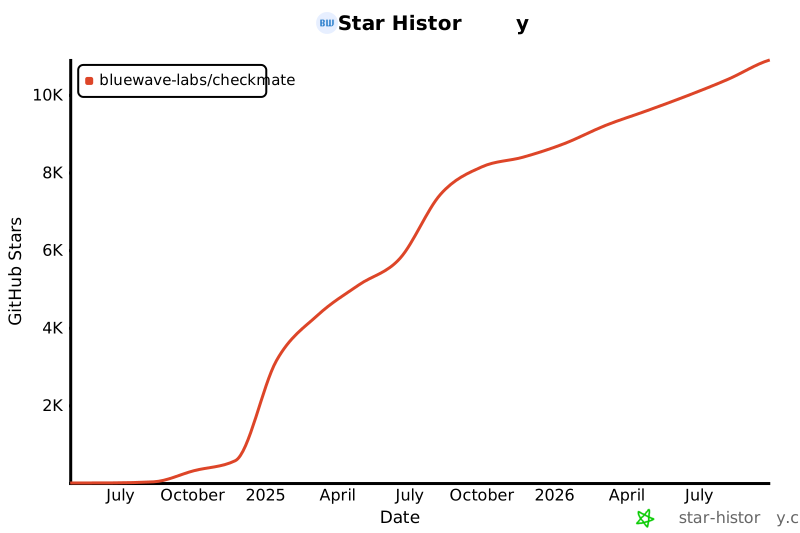](https://star-history.com/#bluewave-labs/Checkmate&Date)
|
||||
|
||||
@@ -9,7 +9,6 @@
|
||||
🇪🇸 <a href="README.es.md">Español</a> |
|
||||
🇫🇮 <a href="README.fi.md">Suomi</a> |
|
||||
🇫🇷 <a href="README.fr.md">Français</a> |
|
||||
🇮🇹 <a href="README.it.md">Italiano</a> |
|
||||
🇯🇵 <a href="README.ja.md">日本語</a> |
|
||||
🇧🇷 <a href="README.pt-BR.md">Português (Brasil)</a> |
|
||||
🇷🇺 <a href="README.ru.md">Русский</a> |
|
||||
|
||||
@@ -9,7 +9,6 @@
|
||||
🇪🇸 <a href="README.es.md">Español</a> |
|
||||
🇫🇮 <a href="README.fi.md">Suomi</a> |
|
||||
🇫🇷 <a href="README.fr.md">Français</a> |
|
||||
🇮🇹 <a href="README.it.md">Italiano</a> |
|
||||
🇯🇵 <a href="README.ja.md">日本語</a> |
|
||||
🇧🇷 <a href="README.pt-BR.md">Português (Brasil)</a> |
|
||||
🇷🇺 <a href="README.ru.md">Русский</a> |
|
||||
|
||||
@@ -9,7 +9,6 @@
|
||||
🇪🇸 <a href="README.es.md">Español</a> |
|
||||
🇫🇮 <a href="README.fi.md">Suomi</a> |
|
||||
🇫🇷 <a href="README.fr.md">Français</a> |
|
||||
🇮🇹 <a href="README.it.md">Italiano</a> |
|
||||
🇯🇵 <a href="README.ja.md">日本語</a> |
|
||||
🇧🇷 <a href="README.pt-BR.md">Português (Brasil)</a> |
|
||||
🇷🇺 <a href="README.ru.md">Русский</a> |
|
||||
|
||||
@@ -9,7 +9,6 @@
|
||||
🇪🇸 <a href="README.es.md">Español</a> |
|
||||
🇫🇮 <a href="README.fi.md">Suomi</a> |
|
||||
🇫🇷 <a href="README.fr.md">Français</a> |
|
||||
🇮🇹 <a href="README.it.md">Italiano</a> |
|
||||
🇯🇵 <a href="README.ja.md">日本語</a> |
|
||||
🇧🇷 <a href="README.pt-BR.md">Português (Brasil)</a> |
|
||||
🇷🇺 <a href="README.ru.md">Русский</a> |
|
||||
|
||||
@@ -9,7 +9,6 @@
|
||||
🇪🇸 <a href="README.es.md">Español</a> |
|
||||
🇫🇮 <a href="README.fi.md">Suomi</a> |
|
||||
🇫🇷 <a href="README.fr.md">Français</a> |
|
||||
🇮🇹 <a href="README.it.md">Italiano</a> |
|
||||
🇯🇵 <a href="README.ja.md">日本語</a> |
|
||||
🇧🇷 <a href="README.pt-BR.md">Português (Brasil)</a> |
|
||||
🇷🇺 <a href="README.ru.md">Русский</a> |
|
||||
|
||||
@@ -9,7 +9,6 @@
|
||||
🇪🇸 <a href="README.es.md">Español</a> |
|
||||
🇫🇮 <a href="README.fi.md">Suomi</a> |
|
||||
🇫🇷 <a href="README.fr.md">Français</a> |
|
||||
🇮🇹 <a href="README.it.md">Italiano</a> |
|
||||
🇯🇵 <a href="README.ja.md">日本語</a> |
|
||||
🇧🇷 <a href="README.pt-BR.md">Português (Brasil)</a> |
|
||||
🇷🇺 <a href="README.ru.md">Русский</a> |
|
||||
|
||||
@@ -9,7 +9,6 @@
|
||||
🇪🇸 <a href="README.es.md">Español</a> |
|
||||
🇫🇮 <a href="README.fi.md">Suomi</a> |
|
||||
🇫🇷 <a href="README.fr.md">Français</a> |
|
||||
🇮🇹 <a href="README.it.md">Italiano</a> |
|
||||
🇯🇵 <a href="README.ja.md">日本語</a> |
|
||||
🇧🇷 <a href="README.pt-BR.md">Português (Brasil)</a> |
|
||||
🇷🇺 <a href="README.ru.md">Русский</a> |
|
||||
|
||||
@@ -9,7 +9,6 @@
|
||||
🇪🇸 <a href="README.es.md">Español</a> |
|
||||
🇫🇮 <a href="README.fi.md">Suomi</a> |
|
||||
🇫🇷 <a href="README.fr.md">Français</a> |
|
||||
🇮🇹 <a href="README.it.md">Italiano</a> |
|
||||
🇯🇵 <a href="README.ja.md">日本語</a> |
|
||||
🇧🇷 <a href="README.pt-BR.md">Português (Brasil)</a> |
|
||||
🇷🇺 <a href="README.ru.md">Русский</a> |
|
||||
|
||||
@@ -9,7 +9,6 @@
|
||||
🇪🇸 <a href="README.es.md">Español</a> |
|
||||
🇫🇮 <a href="README.fi.md">Suomi</a> |
|
||||
🇫🇷 <a href="README.fr.md">Français</a> |
|
||||
🇮🇹 <a href="README.it.md">Italiano</a> |
|
||||
🇯🇵 <a href="README.ja.md">日本語</a> |
|
||||
🇧🇷 <a href="README.pt-BR.md">Português (Brasil)</a> |
|
||||
🇷🇺 <a href="README.ru.md">Русский</a> |
|
||||
|
||||
@@ -54,7 +54,6 @@ export const createApp = ({
|
||||
|
||||
app.use(express.static(frontendPath));
|
||||
|
||||
app.use("/api/v1/monitors/import/json", express.json({ limit: "10mb" }));
|
||||
app.use(express.json());
|
||||
app.use(cookieParser());
|
||||
|
||||
|
||||
Reference in new issue
Block a user