
🇺🇸 English |
🇸🇦 العربية |
🇪🇸 Català |
🇨🇿 Čeština |
🇩🇪 Deutsch |
🇪🇸 Español |
🇫🇮 Suomi |
🇫🇷 Français |
🇮🇹 Italiano |
🇯🇵 日本語 |
🇧🇷 Português (Brasil) |
🇷🇺 Русский |
🇹🇭 ไทย |
🇹🇷 Türkçe |
🇺🇦 Українська |
🇻🇳 Tiếng Việt |
🇨🇳 简体中文 |
🇹🇼 繁體中文







[](https://deepwiki.com/bluewave-labs/checkmate)
An open source uptime and infrastructure monitoring application
[](https://www.pikapods.com/pods?run=checkmate)

This repository contains both the frontend and the backend of Checkmate, an open-source, self-hosted monitoring tool for tracking server hardware, uptime, response times, and incidents in real-time with beautiful visualizations. Checkmate regularly checks whether a server/website is accessible and performs optimally, providing real-time alerts and reports on the monitored services' availability, downtime, and response time.
Checkmate also has an agent, called [Capture](https://github.com/bluewave-labs/capture), to retrieve data from remote servers. While Capture is not required to run Checkmate, it provides additional insights about your servers' CPU, RAM, disk, and temperature status. Capture can run on Linux, Windows, Mac, Raspberry Pi, or any device that can run Go.
Checkmate has been stress-tested with 1000+ active monitors without any particular issues or performance bottlenecks.
## 📚 Table of contents
- [📦 Demo](#demo)
- [🔗 User's guide](#users-guide)
- [🛠️ Installation](#installation)
- [🚀 Performance](#performance)
- [💚 Questions & Ideas](#questions--ideas)
- [🧩 Features](#features)
- [🏗️ Screenshots](#screenshots)
- [🏗️ Tech stack](#tech-stack)
- [🔗 A few links](#a-few-links)
- [🤝 Contributing](#contributing)
## Demo
You can see the latest build of [Checkmate](https://demo.checkmate.so/) in action.
The username is demouser@demo.com and the password is Demouser1! (just a note that we update the demo server from time to time, so if it doesn't work for you, please ping us on the Discussions channel).
## User's guide
Usage instructions can be found [here](https://checkmate.so/docs).
## Prerequisites
- [Docker](https://www.docker.com/) installed
- [Git](https://git-scm.com/) installed
## Installation
The quickest way to run Checkmate is the reference Docker Compose file. It starts two services: the all-in-one Checkmate application image (`ghcr.io/bluewave-labs/checkmate`) and a separate MongoDB service.
> **What “all-in-one” means:** the Checkmate application is packaged in a single image; MongoDB is not embedded in that image and remains required. The reference Compose file starts MongoDB for you. For custom deployments, configure `DB_CONNECTION_STRING` to use an external MongoDB instance.
```bash
curl -O https://raw.githubusercontent.com/bluewave-labs/checkmate/master/docker/docker-compose.yaml
JWT_SECRET="$(openssl rand -hex 32)" docker compose up -d
```
Then open http://localhost:52345. If the app is reached at another origin (domain or LAN IP), set `CLIENT_HOST` accordingly. To build the image yourself, run `docker build -f docker/Dockerfile -t checkmate .` from a checkout. For TLS, put any reverse proxy (Caddy, Traefik, nginx) in front of port 52345.
There are also 1-click installation options like [Repocloud](https://repocloud.io/details/Checkmate),
[Pikapods](https://www.pikapods.com/), [Coolify](https://coolify.io/), [Elestio](https://elest.io/open-source/checkmate), [Easypanel](https://easypanel.io/templates/checkmate), [K8s](./charts/helm/checkmate/INSTALLATION.md), [Sive Host](https://sive.host) or [Cloudzy](https://cloudzy.com/marketplace/checkmate). Note that the Helm chart has not yet been migrated to the all-in-one image: it still deploys the legacy `checkmate-client`, `checkmate-backend` and `checkmate-mongo` images, pinned at v3.8.1.
### Configuration
The image is configured entirely through environment variables on the server container:
| Variable | Required | Description |
|---|---|---|
| `DB_CONNECTION_STRING` | Yes | MongoDB connection string, e.g. `mongodb://mongodb:27017/uptime_db` |
| `JWT_SECRET` | Yes | Secret used to sign auth tokens; generate one with `openssl rand -hex 32` |
| `CLIENT_HOST` | Yes | The URL users reach the app at, e.g. `https://checkmate.example.com`; used for CORS and for links in notifications and emails |
| `ENCRYPTION_KEY` | No | Encrypts stored Docker TLS client keys at rest; generate one with `openssl rand -base64 32`. Comma-separated list: the first key encrypts, every key decrypts. Must be identical on the API and every worker. To rotate without downtime, deploy `OLD_KEY,NEW_KEY` everywhere, then `NEW_KEY,OLD_KEY` everywhere, wait for the worker to re-encrypt every row, then drop `OLD_KEY`. |
| `PORT` | No | Port the API and web client are served on (default `52345`) |
| `HEALTH_PORT` | No | Port for the `/livez`, `/readyz` and `/metrics` endpoints, served by any process that runs the job worker (default `52346`) |
| `NODE_ENV` | No | `development`, `production` or `test` (default `development`). `development` disables the general API rate limiter; set `production` on real deployments |
| `LOG_LEVEL` | No | Server log level: `error`, `warn`, `info`, or `debug` (default `debug`) |
| `TOKEN_TTL` | No | Lifetime of issued auth tokens, e.g. `12h` or `7d` (default `99d`) |
| `QUEUE_MODE` | No | `primary` (default) runs the API, the web client and the job scheduler; `worker` runs a job-processing worker only, with no API |
| `QUEUE_PRIMARY_PROCESSES` | No | `true` (default) or `false`. Whether a `primary` node also processes monitoring jobs itself; set `false` when dedicated `worker` nodes handle all checks. Ignored in `worker` mode |
| `STATUS_PAGE_THEMES_ENABLED` | No | `true` (default) or `false`. When `false`, status pages ignore theme settings and always render the default theme |
The web client needs no configuration by default: it calls the API on the same origin it was served from (`/api/v1`). For setups where the defaults don't apply — for example, the API is reached through a different origin than the page — the server renders overrides into the client at runtime via these optional variables:
| Variable | Description |
|---|---|
| `CLIENT_CONFIG_API_BASE_URL` | Full base URL the client calls the API at, e.g. `https://api.example.com/api/v1`; defaults to same-origin `/api/v1` |
| `CLIENT_CONFIG_CLIENT_HOST` | Origin used when the client builds absolute links (invites, status pages); defaults to the browser's current origin |
| `CLIENT_CONFIG_LOG_LEVEL` | Browser console log level: `error`, `warn`, `info`, or `debug` (default `error`) |
> **Upgrading from an older image?** The `UPTIME_APP_*` variables (`UPTIME_APP_API_BASE_URL`, `UPTIME_APP_CLIENT_HOST`, `UPTIME_APP_LOG_LEVEL`) are no longer read. In most setups no replacement is needed — the same-origin defaults cover them; if you pointed the client at a different origin, use the `CLIENT_CONFIG_*` equivalents above. The `checkmate-client`, `checkmate-backend`, `checkmate-mongo`, and `checkmate-backend-mono-multiarch` images are no longer updated — switch to `ghcr.io/bluewave-labs/checkmate`, keeping your existing MongoDB service and data volume.
See full installation instructions in the [Checkmate documentation portal](https://checkmate.so/docs).
Alternatively, you can also use [Coolify](https://coolify.io/), [Elestio](https://elest.io/open-source/checkmate), [K8s](./charts/helm/checkmate/INSTALLATION.md) (legacy images, pinned at v3.8.1), [Sive Host](https://sive.host) (South Africa), [Cloudzy](https://cloudzy.com/marketplace/checkmate) or [Pikapods](https://www.pikapods.com/) to quickly spin off a Checkmate instance. If you would like to monitor your server infrastructure, you'll need [Capture agent](https://github.com/bluewave-labs/capture). Capture repository also contains the installation instructions.
### Using a Custom CA
If you need to monitor internal HTTPS endpoints with certificates from private Certificate Authorities (like Smallstep), see our [Custom CA Trust Guide](./docs/custom-ca-trust.md) for Docker configuration options.
### Docker monitors
A Docker monitor connects to a Docker daemon and reports on every container it runs. The daemon's ping response decides whether the monitor is up or down and its latency is the response time. Each check also records every container's state, health, CPU and memory usage, restart count, published ports and mounts. Enabling **Collect container logs** additionally stores the latest 200 log lines per container on every check; logs are kept for 7 days.
The **Docker host** field accepts two forms:
| Host | Example | Notes |
|---|---|---|
| Local socket | `unix:///var/run/docker.sock` | Also accepts a bare absolute path such as `/var/run/docker.sock`. Use this for the daemon on the same machine Checkmate runs on. |
| Remote daemon | `tcp://docker.example.com:2376` | Always uses mutual TLS; the port defaults to `2376`. Unencrypted daemons on `2375` are not supported. |
**Monitoring the local socket.** The reference Compose file does not mount the socket, so add it and grant the container the host's `docker` group. The image runs as an unprivileged user and cannot read the socket otherwise. Find the group id with `stat -c %g /var/run/docker.sock`, then:
```yaml
services:
checkmate:
volumes:
- /var/run/docker.sock:/var/run/docker.sock:ro
group_add:
- "989" # the gid printed by stat
```
**Monitoring a remote daemon.** Set the host to `tcp://host:port` and fill in the **TLS credentials** section of the monitor form with the same PEM files you would pass to `docker --tlsverify`:
- **CA certificate**: the CA that signed the daemon's server certificate. Required unless **Ignore TLS/SSL errors** is on, which skips verifying the daemon's identity.
- **Client certificate**: the certificate the daemon uses to authenticate Checkmate.
- **Client key**: the matching private key, unencrypted (no passphrase). Checkmate checks that it matches the certificate, encrypts it with `ENCRYPTION_KEY`, and never shows it again. Leave the field blank when editing to keep the stored key.
TLS Docker monitors require `ENCRYPTION_KEY` to be set on the server (see [Configuration](#configuration)). Saving one without it fails with an error telling you so. If the key is ever removed or rotated incorrectly, affected checks fail with a decryption error until it is restored.
If the daemon's certificate is signed by a private CA that you also want the rest of Checkmate to trust, see the [Custom CA Trust Guide](./docs/custom-ca-trust.md); for Docker monitors alone, the **CA certificate** field is enough.
### Securing the Docker daemon with TLS
The Docker daemon does not enable TLS by default. Follow these steps on the Docker host to generate a CA, a server certificate, and a client certificate for Checkmate. This is the procedure from [Docker's own guide](https://docs.docker.com/engine/security/protect-access/), condensed. Replace `docker.example.com` and `203.0.113.10` with your daemon's DNS name and IP.
**1. Create a CA.** The CA key gets a passphrase; keep it offline once the certificates are issued.
```bash
openssl genrsa -aes256 -out ca-key.pem 4096
openssl req -new -x509 -days 365 -key ca-key.pem -sha256 -subj "/CN=docker-ca" -out ca.pem
```
**2. Create the server certificate.** The subject alternative names must cover every name or address Checkmate will use to reach the daemon.
```bash
openssl genrsa -out server-key.pem 4096
openssl req -subj "/CN=docker.example.com" -sha256 -new -key server-key.pem -out server.csr
cat > server-ext.cnf < client-ext.cnf
openssl x509 -req -days 365 -sha256 -in client.csr -CA ca.pem -CAkey ca-key.pem -CAcreateserial \
-out cert.pem -extfile client-ext.cnf
rm client.csr server.csr server-ext.cnf client-ext.cnf
chmod 0400 ca-key.pem key.pem server-key.pem
chmod 0444 ca.pem server-cert.pem cert.pem
```
**4. Point the daemon at the certificates.** Move `ca.pem`, `server-cert.pem` and `server-key.pem` to `/etc/docker/certs/` and configure `/etc/docker/daemon.json`:
```json
{
"hosts": ["unix:///var/run/docker.sock", "tcp://0.0.0.0:2376"],
"tls": true,
"tlsverify": true,
"tlscacert": "/etc/docker/certs/ca.pem",
"tlscert": "/etc/docker/certs/server-cert.pem",
"tlskey": "/etc/docker/certs/server-key.pem"
}
```
On distributions where the systemd unit already passes `-H fd://` (Debian, Ubuntu and derivatives), the daemon refuses to start with `hosts` set in both places. Remove the flag from the unit with an override, then restart:
```bash
sudo systemctl edit docker.service
```
```ini
[Service]
ExecStart=
ExecStart=/usr/bin/dockerd
```
```bash
sudo systemctl daemon-reload && sudo systemctl restart docker
```
Open port `2376` on the host firewall only to the machine running Checkmate.
**5. Verify from the Checkmate host**, then paste `ca.pem`, `cert.pem` and `key.pem` into the monitor form:
```bash
docker --tlsverify --tlscacert=ca.pem --tlscert=cert.pem --tlskey=key.pem \
-H=docker.example.com:2376 version
```
For more documentation, see the [docs directory](./docs/).
## Performance
Thanks to extensive optimizations, Checkmate operates with an exceptionally small memory footprint, requiring minimal memory and CPU resources. Here’s the memory usage of a Node.js instance running on a server that monitors 323 servers every minute:

You can see the memory footprint of MongoDB on the same server (398Mb) for the same amount of servers:

## Questions & Ideas
If you have any questions, suggestions or comments, you have several options:
- [Discord channel](https://discord.gg/NAb6H3UTjK) (preferred)
- [GitHub Discussions](https://github.com/bluewave-labs/Checkmate/discussions) (we check here from time to time)
Feel free to ask questions or share your ideas - we'd love to hear from you!
## Features
- Completely open source, deployable on your servers or home devices (e.g Raspberry Pi 4 or 5)
- Several monitoring options: HTTP (with SSL certificate expiry), Ping, Port, DNS, Docker, gRPC, WebSocket, Game server
- Page speed monitoring
- Infrastructure monitoring (memory, disk usage, CPU performance, network etc) - requires [Capture](https://github.com/bluewave-labs/capture) agent
- Selective disk monitoring with mountpoint selection
- Incidents at a glance
- Status pages with 5 beautiful themes
- E-mail, Webhooks, Discord, Slack, PagerDuty, Matrix, Rocket.Chat, Microsoft Teams, Telegram, Pushover, ntfy, SignalGrid, Twilio (SMS) notifications
- Scheduled maintenance
- JSON query monitoring
- Multi-language support for Arabic, Catalan, Chinese (Simplified), Chinese (Traditional, Taiwan), Czech, English, Finnish, French, German, Italian, Japanese, Polish, Portuguese (Brazil), Russian, Spanish, Thai, Turkish, Ukrainian, and Vietnamese
## Monitor Lifecycle
1. A monitor executes a check (HTTP / ping / port / hardware via Capture agent)
2. The result is stored (success/failure + response time)
3. Recent check results are evaluated against the monitor's configured status change threshold
4. If the monitor's status change threshold is met and the current status is not equal to the previous status, the monitor's state changes (e.g. `initializing`, `up`, `down`, `breached`)
5. Upon a state change: an incident is either created or resolved, depending on the monitor's current status
6. Notifications are triggered based on configuration
## Screenshots


## Tech stack
- [ReactJs](https://react.dev/)
- [MUI (React framework)](https://mui.com/)
- [Node.js](https://nodejs.org/en)
- [MongoDB](https://mongodb.com)
- [Recharts](https://recharts.org)
- Lots of other open source components!
## A few links
- If you would like to support us, please consider giving it a ⭐ and click on "watch".
- Have a question or suggestion for the roadmap/featureset? Check our [Discord channel](https://discord.gg/NAb6H3UTjK) or [Discussions](https://github.com/bluewave-labs/checkmate/discussions) forum.
- Need a ping when there's a new release? Use [Newreleases](https://newreleases.io/), a free service to track releases.
- Watch a Checkmate [installation and usage video](https://www.youtube.com/watch?v=GfFOc0xHIwY)
## Contributing
We are [Alex](http://github.com/ajhollid) (team lead), [Gorkem](http://github.com/gorkem-bwl/), [Aryaman](https://github.com/Br0wnHammer), [Malena](https://github.com/malenacaroline) and [Mert](https://github.com/mertssmnoglu) helping individuals and businesses monitor their infra and servers.
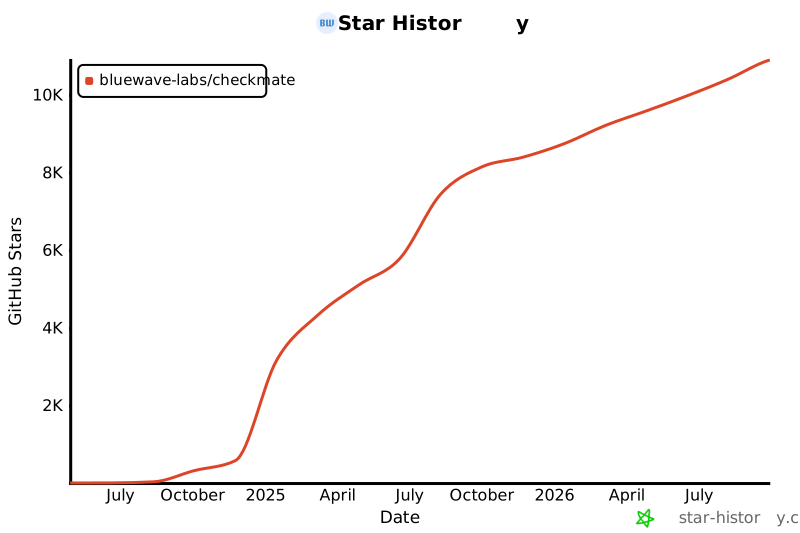
We pride ourselves on building strong connections with contributors at every level. Despite being a young project, Checkmate has already earned almost 11K stars and attracted 150+ contributors from around the globe.
Our repo is starred by employees from **Google, Microsoft, Intel, Cisco, Tencent, Electronic Arts, ByteDance, JP Morgan Chase, Deloitte, Accenture, Foxconn, Broadcom, China Telecom, Barclays, Capgemini, Wipro, Cloudflare, Dassault Systèmes and NEC**, so don’t hold back — jump in, contribute and learn with us!
Here's how you can contribute:
0. Star this repo :)
1. Check [Contributor's guideline](https://github.com/bluewave-labs/Checkmate/blob/develop/CONTRIBUTING.md). First timers are encouraged to check `good-first-issue` tag.
2. Read a detailed structure of [Checkmate](https://deepwiki.com/bluewave-labs/Checkmate) if you would like to deep dive into the architecture.
3. Open an issue if you believe you've encountered a bug.
4. Check for good-first-issue's if you are a newcomer.
5. Make a pull request to add new features/make quality-of-life improvements/fix bugs.
6. Check out this interactive walkthrough of the `Checkmate` codebase on CodeCanvas [here](https://www.code-canvas.com/?session=unauthenticatedGithub&repo=Checkmate&owner=bluewave-labs&branch=develop&OnboardingTutorial=true). To refine existing dataflow simulation or create new ones, follow the quick tutorial [here](https://docs.code-canvas.com/updating-diagram).
 [](https://star-history.com/#bluewave-labs/Checkmate&Date)
[](https://star-history.com/#bluewave-labs/Checkmate&Date)